Introduction to Arrays
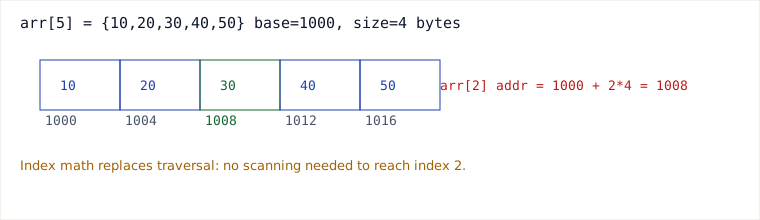
An array works because it commits to two constraints in exchange for speed: every element has the same fixed byte-size, and all elements sit in one contiguous memory block — so the address of element i is computed by arithmetic (base + i * elementSize) rather than found by traversal.
Recognize the pattern
- The problem talks about a fixed collection of same-typed values you need to access "by position" or "the k-th item".
- You need O(1) random access, or you need to iterate a dense sequence with predictable memory locality.
- Size is known upfront or grows rarely — contrast with data that is constantly inserted/removed from the middle (favor a list) or is sparse/keyed (favor a hash map).
Brute force vs optimal: the resizing question
The core design trade-off in arrays is not "how do I read an element" (that's always O(1)) — it's "what happens when the array is full and I need one more slot?"
- Naive resize (grow by 1 each time a new element arrives): allocate a new block of size n+1, copy all n old elements, then insert. Cost of n consecutive appends = 1+2+3+...+n = O(n²) total — i.e. a genuine O(n) amortized cost per append. This is the brute-force dynamic array.
- Optimal — geometric growth (doubling): when full, allocate 2x capacity, copy existing elements, then insert. A single resize costs O(n), but resizes become exponentially rarer, so the amortized cost per append is O(1).
Complexity, derived
Random access: address = base + i·size — one multiply, one add, one dereference → O(1) time, O(1) extra space, regardless of array length.
Doubling amortized cost (accounting argument): consider n appends starting from capacity 1, doubling each time it fills. Resizes happen at sizes 1, 2, 4, 8, ..., up to n. Total copy work = 1+2+4+...+n ≤ 2n (geometric series sums to just under 2n). Spread over n appends, that's O(2n)/n = O(1) amortized per append, even though any single append can spike to O(n).
Insert/delete at index i (non-end): must shift all elements after i by one slot → O(n - i) time, worst case O(n) at index 0, best case O(1) at the end.
Space: a static array of n elements of size s uses exactly n·s bytes. A doubling dynamic array wastes at most ~50% (right after a resize, used = capacity/2+1) — so its space is O(n) with a constant-factor overhead, never asymptotically worse.
Traced example: appends with doubling
| Op | Capacity before | Action | Capacity after | Copy cost |
|---|---|---|---|---|
| push(10) | 0 | alloc 1 | 1 | 0 |
| push(20) | 1 | full → alloc 2, copy 1 | 2 | 1 |
| push(30) | 2 | full → alloc 4, copy 2 | 4 | 2 |
| push(40) | 4 | fits | 4 | 0 |
| push(50) | 4 | full → alloc 8, copy 4 | 8 | 4 |
Total copy work for 5 pushes = 0+1+2+0+4 = 7, vs 5 pushes → average ~1.4 per push, bounded by the O(1) amortized guarantee (not literally constant per call, but constant on average).
Java: minimal dynamic array with doubling
class IntArrayList {
    private int[] data = new int[1];
    private int size = 0;

    void push(int val) {
        if (size == data.length) {
            int[] bigger = new int[data.length * 2];
            System.arraycopy(data, 0, bigger, 0, size);
            data = bigger;
        }
        data[size++] = val;
    }

    int get(int i) {
        if (i < 0 || i >= size) throw new IndexOutOfBoundsException();
        return data[i];
    }
}
Pitfalls
- Off-by-one on bounds — valid indices are 0..n-1; reading arr[n] is undefined behavior in C/C++ and an exception in Java.
- Confusing an array's fixed
lengthwith a dynamic list'ssize— in Java, an array'slengthnever changes; ArrayList'ssize()does. - Assuming insert/delete at an arbitrary index is O(1) — it requires shifting, O(n) worst case.
- Ignoring cache effects: contiguous layout gives real-world speed from CPU cache-line prefetching that a linked structure of the same Big-O cannot match.
When to use / when not — vs. Linked List
| Array (dynamic) | Linked List | |
|---|---|---|
| Random access | O(1) | O(n) |
| Insert/delete at front | O(n) | O(1) |
| Insert/delete at end | O(1) amortized | O(1) (with tail ptr) |
| Memory overhead | low, contiguous, cache-friendly | per-node pointer overhead, scattered |
Use arrays when you need indexed/random access, iteration speed, or a known/bounded size. Prefer a linked list (or deque) when insertions/deletions at arbitrary positions dominate and random access is rare.
Takeaways
- Contiguity + fixed element size is what makes O(1) index access possible — it's arithmetic, not search.
- Dynamic arrays trade occasional O(n) resize spikes for O(1) amortized append via geometric growth.
- Insert/delete away from the end is fundamentally O(n) due to shifting — no implementation trick removes this.
Recall: Why is appending to a doubling dynamic array O(1) amortized even though a single append can cost O(n)?
Synthesized from the source array notes with derivations of amortized doubling cost and array-vs-linked-list trade-offs.
🤖 Don't fully get this? Learn it with Claude
Stuck on Introduction to Arrays? Open Claude, copy a block below, and it'll teach you this exact concept — visually and interactively.
Build the mental picture, not memorization.
I just read a lesson on **Introduction to Arrays** (DSA) and want to truly understand it. Explain Introduction to Arrays from first principles using ONE vivid real-world analogy and a visual mental model — draw it as ASCII art or a clear step-by-step diagram — with a concrete example using real numbers. Then ask me one question to check I got the mental picture, and wait for my reply. If you're unsure or a claim isn't standard, say so and reason from first principles instead of guessing.
Socratic — adapts to where you're stuck.
Teach me **Introduction to Arrays** interactively. Ask me ONE guiding question at a time, wait for my answer, and adapt to my confusion — build the idea with me step by step instead of explaining it all at once. If you're unsure or a claim isn't standard, say so and reason from first principles instead of guessing.
Active recall exposes what you missed.
Quiz me on **Introduction to Arrays** with 5 questions, easy to tricky, ONE at a time. Tell me if each answer is right; at the end, explain clearly what I got wrong and why. If you're unsure or a claim isn't standard, say so and reason from first principles instead of guessing.
Intuition + hook + flashcards for long-term memory.
Help me remember **Introduction to Arrays** for the long term: give the one-sentence intuition, a memorable hook/mnemonic, a tiny worked example, and 3 active-recall flashcards (Q -> A). If you're unsure or a claim isn't standard, say so and reason from first principles instead of guessing.