Introduction to Searching Algorithms
Introduction to Searching Algorithms
Searching means finding whether a value exists in a collection and, if so, where. The two workhorse algorithms are linear search (check every element in order) and binary search (repeatedly halve a sorted range). Binary search looks like a simple speed upgrade over linear search, but its speed rests on a precondition that is easy to miss, and its correctness has edge cases (duplicates, absent targets) that a clean trace on distinct values will never expose. This page makes both explicit, alongside a genuine trade-off comparison against the other natural alternative for lookups: hash tables.
Linear search
Linear search scans elements one at a time until it finds the target or exhausts the collection. It requires no ordering and works on any sequential collection, including a linked list.
function linearSearch(arr, target):
    for i from 0 to arr.length - 1:
        if arr[i] == target:
            return i
    return -1
Time complexity: O(n) worst case (target absent, or the last element checked). Best case O(1) (target is the first element checked).
Binary search — and the precondition its O(log n) claim silently assumes
Binary search repeatedly compares the target to the middle element of a range and discards the half that cannot contain it.
function binarySearch(arr, target):
    lo = 0
    hi = arr.length - 1
    while lo <= hi:
        mid = lo + (hi - lo) // 2
        if arr[mid] == target:
            return mid
        elif arr[mid] < target:
            lo = mid + 1
        else:
            hi = mid - 1
    return -1   # not found
Binary search is usually quoted flatly as O(log n), but that bound depends on two requirements, not one:
- the collection is sorted (the well-known requirement), and
- the collection supports O(1) random access to an arbitrary index — jumping straight to
arr[mid]must cost constant work, regardless of wheremidis.
Requirement 2 is almost never stated, and it is the one that breaks the algorithm's own argument if you apply the same code to the wrong data structure. On a plain array or a dynamic array (e.g. Python list, Java ArrayList, C++ vector), indexing is O(1), so each halving step is O(1) and the total cost really is O(log n). But on a singly or doubly linked list, there is no O(1) indexing — reaching arr[mid] means walking mid pointer hops from one end. Doing that walk at every one of the O(log n) halving steps costs O(n) per step in the worst case, which makes the total cost O(n log n) — worse than just doing a linear scan, and nowhere near the O(log n) the formula promises. This is precisely why structures built for binary search over ordered data but without array-style random access (e.g. balanced binary search trees) implement the halving directly over their own node links instead of reusing array-style binary search: the O(log n) claim is a property of the sorted-array-plus-O(1)-indexing combination, not of the halving idea in isolation.
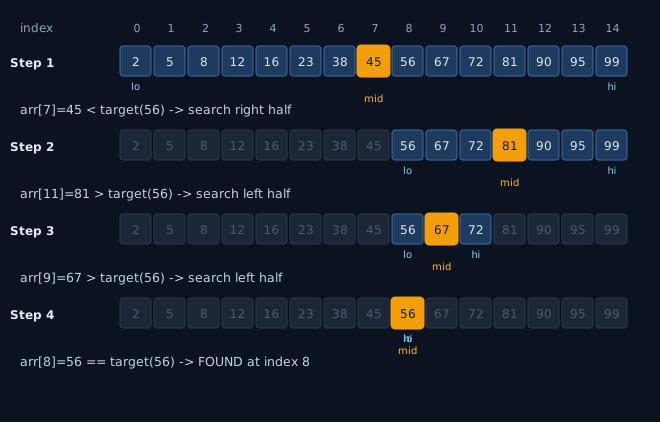
Reading the trace, then testing the edges it doesn't show
The diagram traces binarySearch(arr, 56) over [2, 5, 8, 12, 16, 23, 38, 45, 56, 67, 72, 81, 90, 95, 99] (indices 0–14). Each step shrinks the active range (highlighted cells) by discarding the half on the wrong side of mid: 45 < 56 (go right), 81 > 56 (go left), 67 > 56 (go left), 56 == 56 (found at index 8) — four steps for fifteen elements, consistent with ⌈log₂(15+1)⌉ = 4.
That trace uses fifteen distinct values and a target that exists, so it never exercises the cases that actually trip people up. Three edge cases the code above handles correctly but the trace above never demonstrates:
| Case | Example (same array) | What happens |
|---|---|---|
| Target absent | binarySearch(arr, 100) | Range keeps shrinking (lo eventually exceeds hi) and the loop exits, returning -1. Always sanity-check the not-found path separately — a bug that only breaks the not-found branch (e.g. an off-by-one in the loop condition) will pass any trace that only searches for present values. |
| Target at boundary | binarySearch(arr, 2) (lo) or binarySearch(arr, 99) (hi) | Boundary targets are exactly where off-by-one errors in lo/hi updates (e.g. hi = mid instead of hi = mid - 1) surface as infinite loops or missed matches — a mid-of-range trace like the one above cannot reveal that class of bug. |
| Duplicate keys | [1, 4, 4, 4, 4, 7], search for 4 | The code above returns whichever index mid happens to land on first among the four 4s (which one depends on lo/hi/mid arithmetic) — not necessarily the first or last occurrence. If you need "first index ≥ target" (lower bound) or "first index > target" (upper bound), you must use a variant that never returns early on equality and instead keeps narrowing: e.g. for lower bound, when arr[mid] < target set lo = mid + 1, otherwise set hi = mid, and return lo when the loop ends. Plain binary search and lower/upper-bound binary search are not interchangeable — picking the wrong one silently returns an arbitrary duplicate instead of the boundary you actually wanted. |
Search on Answer & Floating Point Binary Search
Binary search is not limited to searching for values in an array; it can also be used to find a real number or integer value from a continuous function or range where the output is monotonic (i.e., we can evaluate isValid(mid) and know whether to search left or right). This is known as Search on Answer (or binary search on the answer space).
When searching over floating-point spaces (e.g., finding the square root of a double up to 12 decimal places, or finding the optimal throughput under resource constraints), candidates frequently fall into a precision trap:
- The Epsilon Trap: A naive implementation uses a loop condition like
while (hi - lo > epsilon)(whereepsilon = 1e-9). Because of floating-point rounding errors and precision limits (e.g., a 64-bitdoubleonly has ~15–17 decimal digits of precision), ifloandhiare very large numbers, the differencehi - locan never become smaller thanepsilon. This causes the loop to run indefinitely, freezing the CPU. - The Staff Remediation (Fixed Iteration Loop): Instead of looping until the gap is smaller than an epsilon, a staff engineer uses a fixed number of loop iterations (typically 100 loops). Since each iteration halves the search space, 100 iterations shrink the search space by a factor of 2-100 ≈ 7.9 × 10⁻³¹. This safely achieves the maximum machine precision of double-precision floats, guarantees termination, and completely eliminates the risk of infinite loops.
Worked implementation: Finding square root of double
double mySqrt(double x) {
    if (x < 0) return -1; // invalid input
    double lo = 0, hi = Math.max(1.0, x);

    // Exactly 100 iterations guarantee convergence to 1e-15 precision
    // and completely eliminate the infinite loop trap.
    for (int iter = 0; iter < 100; iter++) {
        double mid = lo + (hi - lo) / 2;
        if (mid * mid <= x) {
            lo = mid; // answer is in right half
        } else {
            hi = mid; // answer is in left half
        }
    }
    return lo;
}
Binary search vs. its real alternatives
Linear vs. binary search is a same-family, mechanism-level comparison — both are pure comparison searches over the same array. The comparison that actually matters for choosing a data access strategy in practice is binary search over a sorted array vs. a hash table, because a hash table is the standard alternative whenever the query is a pure existence/lookup check.
| Property | Binary search (sorted array) | Hash table |
|---|---|---|
| Average lookup | O(log n) | O(1) |
| Worst-case lookup | O(log n) (guaranteed) | O(n) (pathological collisions / bad hash function) |
| Insert / delete while keeping the structure searchable | O(n) — must shift elements to keep the array sorted | Average O(1) |
| Ordering / range queries ("all keys between X and Y", "floor/ceiling of X", "k-th smallest") | Yes — the sort order is the whole point | No — hashing destroys order; you'd need a separate sorted index |
| Memory overhead | None beyond the array itself | Extra memory for buckets/table plus hashing cost per operation |
| Determinism | Same performance regardless of key distribution | Depends on hash function quality and load factor |
So the honest framing is not "binary search is the optimal lookup" — for pure existence checks on read-heavy, rarely-mutated data, a hash table's average O(1) beats binary search's O(log n) outright, and that gap widens as n grows. Reach for binary search over a hash table specifically when you need any of: order statistics (k-th smallest/largest), floor/ceiling/predecessor/successor queries, range queries ("all values in [a, b]"), a guaranteed worst-case bound instead of an average one, or you want to avoid the memory and hashing overhead of a hash table on a dataset small enough that O(log n) vs O(1) is not the bottleneck.
When to use binary search — and when not to
Use it when: the data is sorted (or sorting it once and querying many times amortizes the O(n log n) sort cost), the collection supports O(1) random access, and you need order-aware queries (range, floor/ceiling, k-th element) that a hash table cannot answer.
Do not use it when:
- The collection lacks O(1) random access (e.g. a linked list) — as shown above, the O(log n) bound collapses to O(n log n) because each "jump to mid" is itself an O(n) walk.
- The data mutates frequently. Keeping an array sorted costs O(n) per insertion or deletion (shifting elements), so a workload with frequent writes and lookups is usually better served by a hash table (average O(1) insert/lookup/delete) or a balanced BST (guaranteed O(log n) for all three, plus ordering) — both avoid the O(n) shift cost that a sorted array pays on every mutation.
- The array contains duplicate keys and you need a specific occurrence. Plain binary search (the code above) returns an occurrence, not necessarily the first or last — see the duplicate-keys row above. Use a lower-bound/upper-bound variant if you need a specific boundary.
- The collection is unsorted and queried once. Sorting costs O(n log n) up front; if you're only going to query it once, a single O(n) linear scan is cheaper overall.
- The collection is small. For small n, the constant-factor overhead of binary search's branching can lose to a simple linear scan's cache-friendly sequential access; the crossover point is hardware- and language-dependent but is a real, measurable effect, not just a theoretical footnote.
Sources: Cormen, Leiserson, Rivest & Stein, Introduction to Algorithms (CLRS), 3rd ed., Ch. 2 & 12 (searching, binary search trees); Sedgewick & Wayne, Algorithms, 4th ed., §1.4 & §3.1 (binary search analysis, ordered symbol tables); Knuth, The Art of Computer Programming, Vol. 3: Sorting and Searching, §6.2.1 (binary search, including the lower/upper-bound variants for duplicate keys).
Play with it
Step through binary search yourself — press Play and predict each fork:
🤖 Don't fully get this? Learn it with Claude
Stuck on Introduction to Searching Algorithms? Open Claude, copy a block below, and it'll teach you this exact concept — visually and interactively.
Build the mental picture, not memorization.
I just read a lesson on **Introduction to Searching Algorithms** (DSA) and want to truly understand it. Explain Introduction to Searching Algorithms from first principles using ONE vivid real-world analogy and a visual mental model — draw it as ASCII art or a clear step-by-step diagram — with a concrete example using real numbers. Then ask me one question to check I got the mental picture, and wait for my reply. If you're unsure or a claim isn't standard, say so and reason from first principles instead of guessing.
Socratic — adapts to where you're stuck.
Teach me **Introduction to Searching Algorithms** interactively. Ask me ONE guiding question at a time, wait for my answer, and adapt to my confusion — build the idea with me step by step instead of explaining it all at once. If you're unsure or a claim isn't standard, say so and reason from first principles instead of guessing.
Active recall exposes what you missed.
Quiz me on **Introduction to Searching Algorithms** with 5 questions, easy to tricky, ONE at a time. Tell me if each answer is right; at the end, explain clearly what I got wrong and why. If you're unsure or a claim isn't standard, say so and reason from first principles instead of guessing.
Intuition + hook + flashcards for long-term memory.
Help me remember **Introduction to Searching Algorithms** for the long term: give the one-sentence intuition, a memorable hook/mnemonic, a tiny worked example, and 3 active-recall flashcards (Q -> A). If you're unsure or a claim isn't standard, say so and reason from first principles instead of guessing.