Factory Method Pattern
The distinction the original page got wrong
A static method with a switch on a type string — ShapeFactory.getShape("circle") — is a
Simple Factory (a useful idiom), not the GoF Factory Method pattern. The two
are routinely confused, and conflating them hides the very thing the pattern teaches.
The GoF Factory Method defines a method for creating an object but lets subclasses decide
which class to instantiate. There is no central switch; instead a Creator class declares
an abstract factoryMethod(), its own logic calls that method polymorphically, and each
ConcreteCreator subclass overrides it to return a specific product. Adding a new product means adding a new
subclass — you never edit existing code (Open/Closed). The Simple Factory, by contrast, forces you to edit the
switch every time.
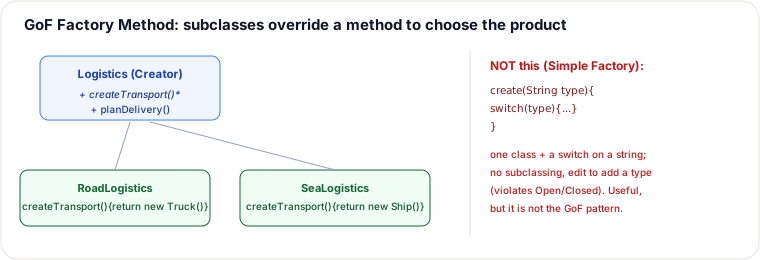
Correct GoF Factory Method (Java)
interface Transport { void deliver(); }
class Truck implements Transport { public void deliver() { System.out.println("Deliver by road"); } }
class Ship  implements Transport { public void deliver() { System.out.println("Deliver by sea");  } }

abstract class Logistics {                    // Creator
    protected abstract Transport createTransport();   // <-- the factory method
    public void planDelivery() {              // business logic depends only on the interface
        Transport t = createTransport();
        t.deliver();
    }
}
class RoadLogistics extends Logistics { protected Transport createTransport() { return new Truck(); } }
class SeaLogistics  extends Logistics { protected Transport createTransport() { return new Ship();  } }

// client: pick the creator, not the product
Logistics logistics = bySea ? new SeaLogistics() : new RoadLogistics();
logistics.planDelivery();
Simple Factory, for contrast — and when each fits
class TransportFactory {                       // Simple Factory: NOT the GoF pattern
    static Transport create(String type) {
        switch (type) {
            case "road": return new Truck();
            case "sea":  return new Ship();
            default: throw new IllegalArgumentException(type);
        }
    }
}| Simple Factory | GoF Factory Method | |
|---|---|---|
| Selection | a switch in one method | subclass overrides factoryMethod() |
| Add a product | edit the switch (breaks Open/Closed) | add a Creator subclass (Open/Closed) |
| Use when | few, stable variants; quick | creation logic varies per subclass / framework hook |
Runtime dispatch trace
Follow one call through the polymorphic Creator. The client only knows it has a Logistics object;
the concrete subclass decides which Transport is born.
| Step | Object | Method invoked | What happens |
|---|---|---|---|
| 1 | Client | new SeaLogistics() | Creates a concrete Creator; no product yet. |
| 2 | Client | logistics.planDelivery() | Calls the inherited business method on the abstract Creator. |
| 3 | Logistics | Transport t = createTransport(); | Virtual dispatch resolves to SeaLogistics.createTransport(). |
| 4 | SeaLogistics | return new Ship(); | The product is instantiated and returned as a Transport. |
| 5 | Logistics | t.deliver() | Runs Ship.deliver(): "Deliver by sea". |
If the client had chosen RoadLogistics, only steps 3–4 would change: virtual dispatch would land
on RoadLogistics.createTransport() and return a Truck. The client code and planDelivery()
need no modification.
The same idea in Go — a function value, not a subclass
Go has no subclassing, so it cannot push the choice down into a ConcreteCreator override. It defers the
choice the Go way: the creation step is a first-class function that the Creator's algorithm calls. This exposes
the pattern's real essence — Factory Method is "parameterize the creation step and let something else fill it in." The
subclass override is merely OO's mechanism for injecting that parameter; a function value is Go's.
type Transport interface{ Deliver() }
type Truck struct{}
func (Truck) Deliver() { fmt.Println("Deliver by road") }
type Ship struct{}
func (Ship) Deliver() { fmt.Println("Deliver by sea") }

// The Creator's business algorithm, parameterized by the creation step.
func planDelivery(createTransport func() Transport) {
    t := createTransport()      // the "factory method", supplied from outside
    t.Deliver()
}

// The "concrete creators" are plain functions, not subclasses.
func newTruck() Transport { return Truck{} }
func newShip()  Transport { return Ship{} }

// client: pick the creator function, not the product
planDelivery(newShip)   // "Deliver by sea"
Same decoupling — planDelivery depends only on Transport and never names Truck
or Ship — with zero inheritance and no parallel Creator hierarchy to maintain. When a language has
first-class functions, the "one Creator subclass per product" tree the GoF version pays for often collapses into a
single function parameter. That is also why in modern Java you frequently see Factory Method replaced by an injected
Supplier<Transport>: identical intent, far fewer types — and it is the honest choice whenever the
subclass carried no behavior beyond the one return new … line.
When NOT to use GoF Factory Method
- Prefer DI / constructor injection when there is no Creator template logic. If the only need is "give me a
PaymentGateway" and there is no sharedplanDelivery()-style algorithm that must callcreateTransport()polymorphically, inject the product. A Creator hierarchy is pure cost. - Prefer Simple Factory when variants are few and stable. Two or three products that rarely change: a static
switchor map at the composition root is clearer than a parallel Creator tree. You accept editing the switch when a type appears; that is fine for a closed set. - Prefer Abstract Factory when product families must stay consistent (e.g. WindowsButton + WindowsScrollbar). Factory Method creates one product axis; Abstract Factory creates coordinated product sets.
- Prefer plain
newwhen N = 1. One concrete type forever (or for the foreseeable sprint) does not earn a factory of any kind.
Inheritance cost of GoF Factory Method: every new product tends to need a new ConcreteCreator subclass. That is a parallel hierarchy (product types ↔ creator types). You buy Open/Closed on the Creator's business method at the price of more types, deeper inheritance, and framework-style extension points. If you do not need subclass hooks (plugin Creators, framework inversion), do not pay that tax.
Pitfalls
- Parallel hierarchy explosion.
RoadLogistics/SeaLogistics/AirLogisticsmirror Truck/Ship/Plane. Adding a product without a Creator (or vice versa) leaves dead code. Prefer Simple Factory or a registry if the hierarchy is only for creation. - Clients that still
newproducts. If callers bypass the factory method and constructTruckdirectly, the pattern taught nothing. Enforce construction through Creator (or DI) at the boundary. - Leaking concrete products. Returning
Truckinstead ofTransportre-couples clients to details. The product type must stay the abstraction. - Parameterized factory when type varies per call. If each invocation needs a different product chosen by a runtime key, a Simple Factory / registry map is often more honest than inventing a Creator subclass per request. Link: creational intro and Abstract Factory deep pages for family selection.
- Mislabeling. A static method with a switch is Simple Factory — useful, but not GoF Factory Method. Naming matters in interviews.
Takeaways
- Simple Factory = a static method + switch; handy, but not a GoF pattern and not Open/Closed.
- GoF Factory Method = an overridable creation method; subclasses choose the concrete product, so new products = new subclasses.
- The Creator's own code depends only on the product interface — that decoupling is the point.
- At runtime the same
planDelivery()code can produce either aTruckor aShip; the decision is pushed out to the Creator subclass, not hard-coded in the client. - Skip GoF Factory Method when DI, Simple Factory, Abstract Factory, or plain
newis the cheaper fit; watch parallel hierarchies and concrete leaks.
Re-authored for correctness for this guide (the prior version labeled a Simple Factory as the GoF Factory Method). Per Gang of Four, "Design Patterns". See also: Abstract Factory, Open/Closed Principle, Dependency Injection. Elevation: added the Go (function-value) formulation to show the pattern's language-independent essence — parameterizing the creation step rather than subclassing.
🤖 Don't fully get this? Learn it with Claude
Stuck on Factory Method Pattern? Open Claude, copy a block below, and it'll teach you this exact concept — visually and interactively.
Build the mental picture, not memorization.
I just read a lesson on **Factory Method Pattern** (OO & Low-Level Design) and want to truly understand it. Explain Factory Method Pattern from first principles using ONE vivid real-world analogy and a visual mental model — draw it as ASCII art or a clear step-by-step diagram — with a concrete example using real numbers. Then ask me one question to check I got the mental picture, and wait for my reply. If you're unsure or a claim isn't standard, say so and reason from first principles instead of guessing.
Socratic — adapts to where you're stuck.
Teach me **Factory Method Pattern** interactively. Ask me ONE guiding question at a time, wait for my answer, and adapt to my confusion — build the idea with me step by step instead of explaining it all at once. If you're unsure or a claim isn't standard, say so and reason from first principles instead of guessing.
Active recall exposes what you missed.
Quiz me on **Factory Method Pattern** with 5 questions, easy to tricky, ONE at a time. Tell me if each answer is right; at the end, explain clearly what I got wrong and why. If you're unsure or a claim isn't standard, say so and reason from first principles instead of guessing.
Intuition + hook + flashcards for long-term memory.
Help me remember **Factory Method Pattern** for the long term: give the one-sentence intuition, a memorable hook/mnemonic, a tiny worked example, and 3 active-recall flashcards (Q -> A). If you're unsure or a claim isn't standard, say so and reason from first principles instead of guessing.