Design LinkedIn
LinkedIn is a social network for professionals. The system's core purpose is to let members connect with people they know and trust professionally, and to discover opportunities to grow their careers. A member's profile surfaces their skills, employment history, and education; a personalized news feed stitches together posts, updates, and recommendations from their network.
Structurally it resembles Facebook — profiles, posts, comments, likes, messages, groups, and notifications — but the entities are specialized for the professional domain: Experience, Education, Skill, Recommendation, Company, and JobPosting.
System requirements
We design to the following functional requirements:
- Each member can add basic profile information, experiences, education, skills, and accomplishments.
- Any user can search for other members or companies by name.
- Members can send and accept connection requests from other members.
- Any member can request a recommendation from other members.
- The system shows basic profile stats: number of profile views, total connections, and total search appearances.
- Members can create posts to share with their connections.
- Members can comment on posts and like or share a post or comment.
- Any member can send messages to other members.
- The system notifies a member on a new message, connection invitation, or comment on their post.
- Members can create a Company page and add job postings.
- Members can create groups and join any group.
- Members can follow other members or companies.
Actors and top use cases
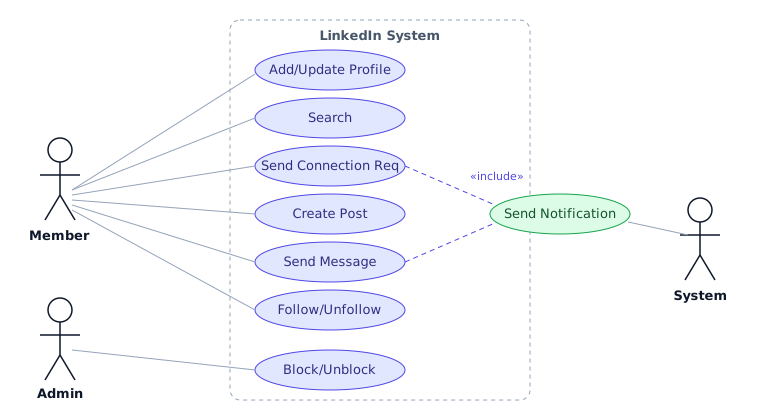
Three actors drive the system:
- Member — searches members, companies, and jobs; sends connection requests; creates posts, comments, likes; sends messages; follows members and companies; joins groups.
- Admin — performs administrative functions such as blocking and unblocking members.
- System — sends notifications for new messages, connection invitations, and comments.
The headline use cases are Add/update profile, Search, Follow/Unfollow, Send message, Create post, and Send notifications.
Class model
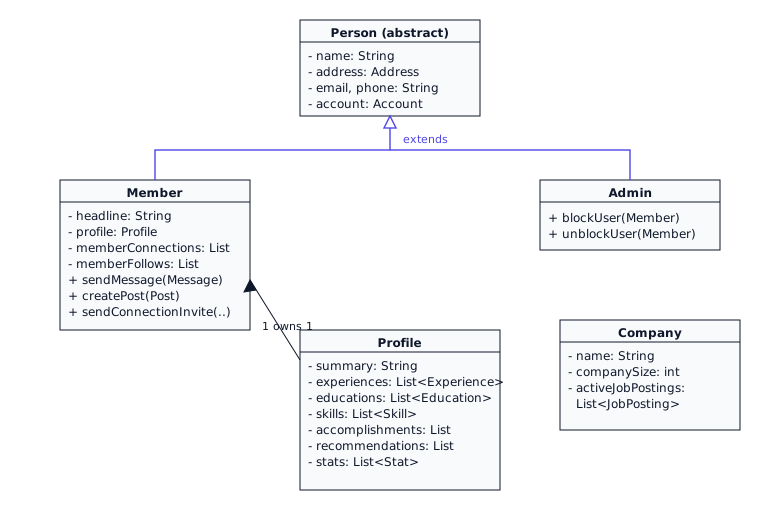
The central classes are:
- Member — the core entity. Owns a
Profileand holds lists of connections, follows (members and companies), and suggestions. - Profile — aggregates
Experience,Education,Skill,Accomplishment,Recommendation, andStat. - Search / SearchIndex — search members and companies by name, and jobs by title.
- Message, Post, Comment, Group, Company, JobPosting, Notification — the supporting entities for messaging, sharing, organizing, and hiring.
Both Member and Admin extend the abstract Person, which holds shared identity fields and an Account.
Enums, data types, and constants
We start with the shared value types.
public enum ConnectionInvitationStatus {
    PENDING, ACCEPTED, CONFIRMED, REJECTED, CANCELED
}

public enum AccountStatus {
    ACTIVE, BLOCKED, BANNED, COMPROMISED, ARCHIVED, UNKNOWN
}

public class Address {
    private String streetAddress;
    private String city;
    private String state;
    private String zipCode;
    private String country;
}
Account, Person, Member, and Admin
These classes model the people who interact with the system. For brevity, getters and setters are omitted; assume all fields are private and accessed via public accessors.
public class Account {
    private String id;
    private String password;
    private AccountStatus status;

    public boolean resetPassword();
}

public abstract class Person {
    private String name;
    private Address address;
    private String email;
    private String phone;
    private Account account;
}

public class Member extends Person {
    private Date dateOfMembership;
    private String headline;
    private byte[] photo;
    private List<Member> memberSuggestions;
    private List<Member> memberFollows;
    private List<Member> memberConnections;
    private List<Company> companyFollows;
    private List<Group> groupFollows;
    private Profile profile;

    public boolean sendMessage(Message message);
    public boolean createPost(Post post);
    /** Creates a PENDING invitation; no edge yet. Idempotent if one is already pending. */
    public boolean sendConnectionInvitation(Member to);
    /** Atomically: PENDING→ACCEPTED and insert undirected edge both ways. */
    public boolean acceptConnectionInvitation(ConnectionInvitation invitation);
}

public class Admin extends Person {
    public boolean blockUser(Member member);
    public boolean unblockUser(Member member);
}
Profile, Company, and content classes
A member's Profile aggregates their professional history; Company owns its open job postings; and Group, Post, and Message carry shared content.
public class Profile {
    private String summary;
    private List<Experience> experiences;
    private List<Education> educations;
    private List<Skill> skills;
    private List<Accomplishment> accomplishments;
    private List<Recommendation> recommendations;
    private List<Stat> stats;

    public boolean addExperience(Experience experience);
    public boolean addEducation(Education education);
    public boolean addSkill(Skill skill);
}

public class Company {
    private String name;
    private String description;
    private int companySize;
    private List<JobPosting> activeJobPostings;
}

public class Post {
    private String text;
    private int totalLikes;
    private int totalShares;
    private Member owner;
}

public class Message {
    private Member[] sentTo;
    private String messageBody;
    private byte[] media;
}
Search interface and SearchIndex
Search is the one place worth fleshing out beyond a stub. Production search would use a tokenized inverted index, but the interview-grade version is an in-memory map from a normalized term to the set of matching members. We key on a normalized name (lower-cased) and keep results sorted, so we back the index with a TreeSet.
The query is split into terms; for each term we look up its posting set and intersect, so a multi-word query returns only members matching all terms. The crucial detail is the default value passed to getOrDefault: because the map's value type is TreeSet<String>, the default must also be a TreeSet<String> — Set.of() returns a Set<String> and will not compile.
public interface Search {
    List<Member> searchMember(String name);
    List<Company> searchCompany(String name);
    List<JobPosting> searchJob(String title);
}

public class SearchIndex implements Search {
    // term (normalized) -> sorted set of member ids that contain that term
    private final Map<String, TreeSet<String>> index = new HashMap<>();
    private final Map<String, Member> membersById = new HashMap<>();

    public void addMember(Member m) {
        membersById.put(m.getId(), m);
        for (String term : m.getName().toLowerCase().split("\\s+")) {
            // default MUST be a TreeSet<String> to match the map's value type
            index.computeIfAbsent(term, k -> new TreeSet<>()).add(m.getId());
        }
    }

    @Override
    public List<Member> searchMember(String query) {
        List<String> qs = Arrays.asList(query.toLowerCase().split("\\s+"));
        if (qs.isEmpty()) return List.of();

        // FIX: default must be TreeSet<String>, not Set.of() (a Set<String>).
        // Map<String,TreeSet<String>>.getOrDefault requires a TreeSet<String> default,
        // so Set.of() would fail to compile: incompatible types.
        TreeSet<String> result = new TreeSet<>(
            index.getOrDefault(qs.get(0), new TreeSet<>()));

        for (int i = 1; i < qs.size(); i++) {
            result.retainAll(index.getOrDefault(qs.get(i), new TreeSet<>()));
        }

        List<Member> out = new ArrayList<>();
        for (String id : result) out.add(membersById.get(id));
        return out;
    }

    @Override
    public List<Company> searchCompany(String query) { /* analogous */ return List.of(); }

    @Override
    public List<JobPosting> searchJob(String query) { /* analogous */ return List.of(); }
}
Worked example: the connection graph
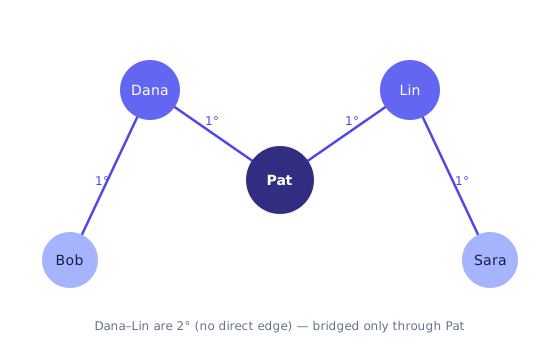
Connections form an undirected graph: an accepted invitation creates a symmetric, first-degree (1°) edge between two members. Two members who are not directly connected but share a common connection are second-degree (2°). Consider this fixed adjacency:
conn[Pat]  = { Dana, Lin }
conn[Dana] = { Pat, Bob }
conn[Lin]  = { Pat, Sara }
conn[Bob]  = { Dana }
conn[Sara] = { Lin }
Reading the edges off the adjacency list: Pat is the hub, directly connected to both Dana and Lin. Dana also connects to Bob; Lin also connects to Sara. Dana and Lin are not directly connected — they are 2° to each other, bridged only through Pat. Likewise Bob and Sara sit two hops out on opposite branches. The diagram draws only the four real 1° edges (Pat–Dana, Pat–Lin, Dana–Bob, Lin–Sara); there is deliberately no edge between Dana and Lin.
Connection invitations: state machine, races, and failure model
A connection is not “append two IDs to two lists.” It is a small protocol with a durable invitation
and an atomic undirected-edge insert. Interview code that only declares
sendConnectionInvitation(...) without a body fails the concurrency and correctness bar.
// Status: PENDING | ACCEPTED | REJECTED | WITHDRAWN | EXPIRED
// Unique open invite key: unordered pair (min(a,b), max(a,b)) while status=PENDING

boolean sendConnectionInvitation(Member from, Member to) {
    if (from.equals(to)) return false;
    if (alreadyConnected(from, to)) return false;          // idempotent no-op
    if (pendingInviteExists(from, to)) return false;       // one open invite
    persist(new ConnectionInvitation(from, to, PENDING));
    notify(to, INVITE_RECEIVED);
    return true;
}

// Critical section: status transition + both adjacency inserts must be one unit.
// In a DB: single transaction. In process: lock both members in id order (deadlock-free).
boolean acceptConnectionInvitation(ConnectionInvitation inv, Member acceptor) {
    if (inv.getTo() != acceptor) return false;             // only invitee accepts
    if (inv.getStatus() != PENDING) return false;          // reject double-accept
    // CAS / conditional update: PENDING -> ACCEPTED
    if (!inv.compareAndSetStatus(PENDING, ACCEPTED)) return false;
    Member a = inv.getFrom(), b = inv.getTo();
    // lock order by id so concurrent accept/withdraw cannot deadlock
    lockBothInIdOrder(a, b);
    try {
        a.memberConnections.add(b);
        b.memberConnections.add(a);                        // undirected edge
    } finally { unlockBoth(a, b); }
    notify(a, INVITE_ACCEPTED);
    return true;
}- Race: two concurrent accepts on the same invite — only the CAS winner inserts; the loser returns false.
- Race: accept vs withdraw — CAS on status decides; never insert an edge for a non-ACCEPTED invite.
- Failure: if the process dies after ACCEPTED but before both inserts, repair with a reconciling job that reads ACCEPTED invites and ensures both sides of the edge exist (idempotent insert).
- When not: embedding only
List<Member>without an edge table makes 2° queries and mutual-delete hard; prefer an edge table(member_a, member_b)with a canonical order for undirected uniqueness.
Activity flow: sending a message
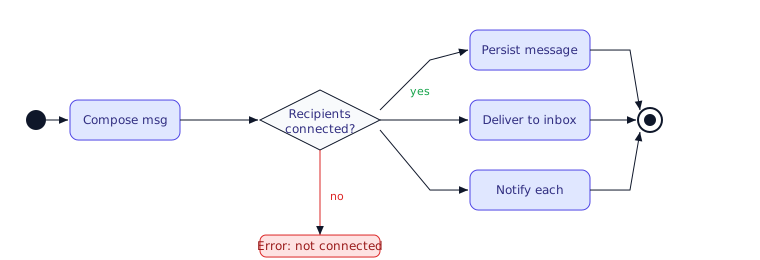
When a member sends a message, the system persists it, fans it out to each recipient's inbox, and emits a notification per recipient. The notification fan-out is what couples Message to the Notification subsystem (the «include» relationship in the use-case diagram).
Key takeaways
- Member is the hub. It composes a
Profileand aggregates connections, follows, and suggestions;MemberandAdminshare state through the abstractPerson. - Connections are an undirected graph with a protocol. 1° = direct edge after ACCEPTED; 2° = shares a common connection. Invite is PENDING first; accept must CAS status and insert both directions atomically.
- Search keys are normalized and sorted. Backing the inverted index with
TreeSet<String>keeps results ordered; multi-term queries intersect posting sets viaretainAll. - Mind the generic default. For a
Map<String, TreeSet<String>>,getOrDefaultandcomputeIfAbsentmust usenew TreeSet<>()—Set.of()is aSet<String>and fails to compile. - Messaging includes notifications. Sending a message fans out a notification per recipient, coupling the two subsystems.
Source
Adapted and expanded from the LinkedIn object-oriented design problem in Grokking the Object-Oriented Design Interview (Design Gurus / educative.io). The connection-graph and search-index walkthroughs, the corrected SearchIndex generics, and the activity flow are original elaborations layered on the reference class model.
Interview drills
Q1. How do you prevent a duplicate connection?
Store the undirected edge with a canonical key — (min(id_a, id_b), max(id_a, id_b)) — under a unique constraint, and do the accept in one transaction (CAS the invite status, then insert the edge). The canonical order means the pair is stored once regardless of who invited whom, so a double-accept or a re-invite cannot create two edges or two open invites.
Q2. Withdraw vs reject — what is the difference?
Both are terminal states for a PENDING invite, but they differ by actor: the sender withdraws (WITHDRAWN), the recipient rejects (REJECTED). The status guard in acceptConnectionInvitation refuses anything not currently PENDING, so a withdraw that lands before an accept simply makes the accept a no-op (and vice-versa) — the CAS decides the winner.
Q3. What do you deliberately leave out of an LLD round?
Scope to the core graph — members, profiles, connections, invitations, search. Feed ranking, notification fan-out at scale, and recommendation ML belong to the high-level/system-design discussion, not the class model. Naming that boundary is itself a senior signal; trying to design a ranking model in an LLD round is a scope error.
🤖 Don't fully get this? Learn it with Claude
Stuck on Design LinkedIn? Open Claude, copy a block below, and it'll teach you this exact concept — visually and interactively.
Build the mental picture, not memorization.
I just read a lesson on **Design LinkedIn** (OO & Low-Level Design) and want to truly understand it. Explain Design LinkedIn from first principles using ONE vivid real-world analogy and a visual mental model — draw it as ASCII art or a clear step-by-step diagram — with a concrete example using real numbers. Then ask me one question to check I got the mental picture, and wait for my reply. If you're unsure or a claim isn't standard, say so and reason from first principles instead of guessing.
Socratic — adapts to where you're stuck.
Teach me **Design LinkedIn** interactively. Ask me ONE guiding question at a time, wait for my answer, and adapt to my confusion — build the idea with me step by step instead of explaining it all at once. If you're unsure or a claim isn't standard, say so and reason from first principles instead of guessing.
Active recall exposes what you missed.
Quiz me on **Design LinkedIn** with 5 questions, easy to tricky, ONE at a time. Tell me if each answer is right; at the end, explain clearly what I got wrong and why. If you're unsure or a claim isn't standard, say so and reason from first principles instead of guessing.
Intuition + hook + flashcards for long-term memory.
Help me remember **Design LinkedIn** for the long term: give the one-sentence intuition, a memorable hook/mnemonic, a tiny worked example, and 3 active-recall flashcards (Q -> A). If you're unsure or a claim isn't standard, say so and reason from first principles instead of guessing.