Facade Pattern
What the Facade Pattern actually is
The Facade pattern is a structural pattern for the common situation where a subsystem exposes many public classes and a typical client needs the same multi-step workflow from them. It introduces a single, higher-level object — the facade — that knows the order and choreography of the subsystem calls and exposes one or a few methods that perform the whole sequence.
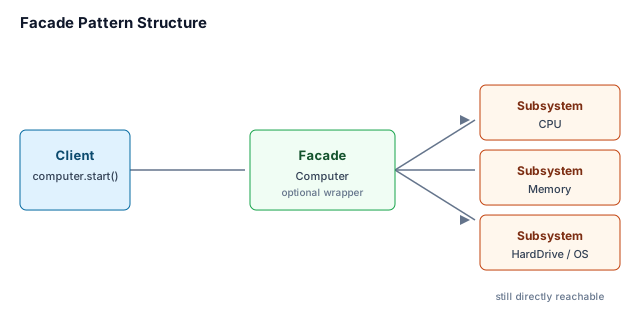
The crucial point is that the facade is optional. It does not wrap or replace the subsystem; the subsystem classes stay public and clients can still call them directly when they need finer control. The facade is simply the "usual path" through the subsystem.
The problem it removes
Imagine booting a computer. To start up, something has to read the boot sector from the hard drive, load the kernel into memory, and initialize the CPU. Without a facade, every piece of client code that wants to boot the machine has to know the classes (HardDrive, OperatingSystem, Memory, CPU) and the order in which to call them. That order is easy to get wrong, and every caller becomes coupled to the subsystem's internal structure.
Facade pushes that choreography into one place. The client now calls computer.startComputer(), and the facade performs the right sequence. If the boot sequence changes later, only the facade changes.
Structure
- Facade — a thin, optional layer that exposes a high-level operation and forwards it to subsystem objects in the right order. In the example below,
Computeris the facade. - Subsystem classes — the existing classes that do the real work (
CPU,Memory,HardDrive,OperatingSystem). They do not know about the facade and remain independently usable. - Client — the code that uses the facade for the common workflow. The client is not required to interact with the subsystem directly, but it still can.
Worked example: starting a computer
The example keeps the original computer-boot scenario but implements it cleanly. The Computer facade owns the subsystem objects and the startComputer() workflow. Each subsystem class is trivial so the wiring is visible; in real code these would be the heavy classes you do not want callers to choreograph.
Java implementation
class CPU {
    void initialize() {
        System.out.println("CPU initialized");
    }
}

class Memory {
    void load(long position, String data) {
        System.out.println("Loading '" + data + "' at position " + position);
    }
}

class HardDrive {
    String readBootSector() {
        return "boot sector";
    }
}

class OperatingSystem {
    String loadKernel() {
        return "kernel";
    }
}

class Computer {
    private final CPU cpu;
    private final Memory memory;
    private final HardDrive hardDrive;
    private final OperatingSystem operatingSystem;

    public Computer() {
        this.cpu = new CPU();
        this.memory = new Memory();
        this.hardDrive = new HardDrive();
        this.operatingSystem = new OperatingSystem();
    }

    public void startComputer() {
        String bootSector = hardDrive.readBootSector();
        String kernel = operatingSystem.loadKernel();
        memory.load(0L, bootSector);
        memory.load(1024L, kernel);
        cpu.initialize();
    }
}

public class Solution {
    public static void main(String[] args) {
        Computer computer = new Computer();
        computer.startComputer();
    }
}
Go implementation
Go has no classes, so the facade is a struct whose constructor wires the subsystem values and whose method performs the same workflow.
package main

import "fmt"

type CPU struct{}

func (c *CPU) Initialize() {
    fmt.Println("CPU initialized")
}

type Memory struct{}

func (m *Memory) Load(position int64, data string) {
    fmt.Printf("Loading '%s' at position %d\n", data, position)
}

type HardDrive struct{}

func (h *HardDrive) ReadBootSector() string {
    return "boot sector"
}

type OperatingSystem struct{}

func (o *OperatingSystem) LoadKernel() string {
    return "kernel"
}

type Computer struct {
    cpu     *CPU
    memory  *Memory
    hd      *HardDrive
    os      *OperatingSystem
}

func NewComputer() *Computer {
    return &Computer{
        cpu:    &CPU{},
        memory: &Memory{},
        hd:     &HardDrive{},
        os:     &OperatingSystem{},
    }
}

func (c *Computer) StartComputer() {
    boot := c.hd.ReadBootSector()
    kernel := c.os.LoadKernel()
    c.memory.Load(0, boot)
    c.memory.Load(1024, kernel)
    c.cpu.Initialize()
}

func main() {
    computer := NewComputer()
    computer.StartComputer()
}
When to use it — and when not
Use a facade when most callers need the same high-level workflow across a group of subsystem classes and you want to decouple those callers from the subsystem's internal wiring. Common cases: boot sequences, build pipelines, checkout flows, and onboarding a third-party library that requires several objects to be initialized in order.
Do not use it to:
- Hide a design you should refactor. If the subsystem is hard to use because its responsibilities are tangled, a facade only papers over the mess. Fix the subsystem first.
- Create a god object. A facade should expose a coherent workflow for one subsystem, not accumulate unrelated methods from all over the system.
- Become the only entry point for callers who need fine-grained control. Subsystem classes must remain directly reachable. If callers constantly bypass the facade, either the facade is too restrictive or the problem needs a different pattern.
Versus alternatives
| Pattern | What it does | How it differs from Facade |
|---|---|---|
| Adapter | Converts the interface of one class into the interface a client expects. | One-to-one interface translation for a single object or class. A facade is one-to-many workflow simplification for a subsystem; it does not adapt one interface to another. |
| Mediator | Centralizes communication between a set of objects so they do not talk to each other directly. | Decouples peers from each other by routing their interactions through a central object. A facade decouples clients from a subsystem but does not prevent subsystem classes from being used directly, and the subsystem classes do not call the facade back. |
| API Gateway | An infrastructure edge that routes, aggregates, and secures calls from external clients to backend services. | Operates at the network or service boundary (authentication, rate limiting, load balancing). A facade is an in-process object that simplifies a local subsystem's API. |
Boot-order trace (what actually prints)
Walking computer.startComputer() with the Java listing above:
| Step | Facade call | Subsystem | Console / result |
|---|---|---|---|
| 1 | hardDrive.readBootSector() | HardDrive | returns "boot sector" |
| 2 | operatingSystem.loadKernel() | OperatingSystem | returns "kernel" |
| 3 | memory.load(0L, bootSector) | Memory | Loading 'boot sector' at position 0 |
| 4 | memory.load(1024L, kernel) | Memory | Loading 'kernel' at position 1024 |
| 5 | cpu.initialize() | CPU | CPU initialized |
Order is load-bearing: memory must hold the boot sector and kernel before the CPU is initialized. Every client that used to choreograph this sequence is now one call; only the facade owns the order.
Takeaways
- A facade is an optional front door. It encapsulates a common subsystem workflow without making the subsystem classes private or inaccessible.
- It reduces coupling to wiring, not functionality. Clients are no longer coupled to the order of subsystem calls, but the subsystem remains directly usable for power users.
- Keep it narrow and coherent. A facade should cover one subsystem or one workflow; do not let it become a dumping ground for unrelated convenience methods.
- Do not use it as a substitute for cleanup. If the subsystem itself is poorly designed, fix the subsystem rather than wrapping it.
Self-check drills
- When does a Facade become a god object? When it accumulates unrelated workflows (boot + billing + auth + reporting) and every change in the system reopens the same class. Detection: the facade's method list no longer maps to one subsystem; tests of "start computer" pull in payment mocks. Fix: split facades by coherent workflow, or push orchestration back into domain services. A facade should be thin choreography, not a second application root.
- Facade vs API Gateway — same idea?
No. Facade is an in-process object that simplifies a local subsystem's API (boot sequence, library init). API Gateway is an infrastructure edge: routing, auth, rate limits, aggregation across network services. A gateway may look like a "front door," but it lives at L7 of a distributed system and fails with network partitions, not with wrong method order. Do not call a Spring
@Servicefacade an API Gateway, and do not design a service mesh hop when an in-process facade would do.
Sources: Gamma, Helm, Johnson & Vlissides, Design Patterns: Elements of Reusable Object-Oriented Software (Gang of Four), "Facade" chapter; Martin Fowler, Patterns of Enterprise Application Architecture, particularly the discussion of gateway and facade-style layering at service boundaries. Re-authored and deepened for the Knowledge Guide; the original bulk-extracted text, generic pros/cons table, and cringey closing paragraph were removed.
🤖 Don't fully get this? Learn it with Claude
Stuck on Facade Pattern? Open Claude, copy a block below, and it'll teach you this exact concept — visually and interactively.
Build the mental picture, not memorization.
I just read a lesson on **Facade Pattern** (OO & Low-Level Design) and want to truly understand it. Explain Facade Pattern from first principles using ONE vivid real-world analogy and a visual mental model — draw it as ASCII art or a clear step-by-step diagram — with a concrete example using real numbers. Then ask me one question to check I got the mental picture, and wait for my reply. If you're unsure or a claim isn't standard, say so and reason from first principles instead of guessing.
Socratic — adapts to where you're stuck.
Teach me **Facade Pattern** interactively. Ask me ONE guiding question at a time, wait for my answer, and adapt to my confusion — build the idea with me step by step instead of explaining it all at once. If you're unsure or a claim isn't standard, say so and reason from first principles instead of guessing.
Active recall exposes what you missed.
Quiz me on **Facade Pattern** with 5 questions, easy to tricky, ONE at a time. Tell me if each answer is right; at the end, explain clearly what I got wrong and why. If you're unsure or a claim isn't standard, say so and reason from first principles instead of guessing.
Intuition + hook + flashcards for long-term memory.
Help me remember **Facade Pattern** for the long term: give the one-sentence intuition, a memorable hook/mnemonic, a tiny worked example, and 3 active-recall flashcards (Q -> A). If you're unsure or a claim isn't standard, say so and reason from first principles instead of guessing.