What is Authentication
What is Authentication
Every request that hits your backend carries an implicit claim: "I am this user." Authentication is the process of verifying that claim before you act on it. It answers exactly one question: who is making this request? It does not decide what they are allowed to do — that is authorization (authz), a separate step that runs after identity is established.
The concept exists because the network is hostile by default. Anyone can craft an HTTP request that says userId=42. Without proof, that field is a wish, not a fact. Authentication forces the caller to present evidence — something only the real principal could produce — so the rest of your system can safely treat the identity as trustworthy. Get this wrong and everything downstream (rate limits, billing, access control, audit logs) is built on sand.
How it works, precisely
Authentication proves identity using one or more factors: something you know (password, PIN), something you have (phone, hardware key, TOTP seed), or something you are (fingerprint, face). Combining categories gives multi-factor authentication (MFA).
The classic flow has two phases. First, primary authentication: the client submits credentials. The server never stores the raw password — it stores a salted hash computed with a slow, memory-hard function like bcrypt, scrypt, or Argon2id. On login it re-hashes the submitted password with the stored salt and compares. Slowness is the point: it caps how fast an attacker who steals the database can brute-force offline.
A concrete stored-password record looks like this: { userId: 42, salt: "a1b2c3...", hash: argon2id(password + salt, m=64MB, t=3, p=4), updatedAt: 1719003600 }. Some systems also add a pepper — a site-wide secret blended into the hash and kept outside the database — so a stolen hash table alone is not enough to brute-force offline.
Second, session establishment. Re-checking a password on every request is expensive and dangerous, so after one successful login the server issues a short-lived credential of continuity. Two dominant styles:
- Server-side sessions — the server stores session state (in Redis/DB) and hands the client an opaque random
session_idin a cookie. Every request, the server looks it up. - Stateless tokens (JWT) — the server issues a signed JSON Web Token containing claims (
sub,exp,roles). It signs with a secret (HMAC) or private key (RS256). The server verifies the signature on each request — no lookup needed, because a valid signature is the proof.
For third-party identity you delegate: OAuth 2.0 handles delegated authorization, and OpenID Connect (OIDC) layers authentication on top, returning an id_token that proves who logged in.
The mechanism, visualized
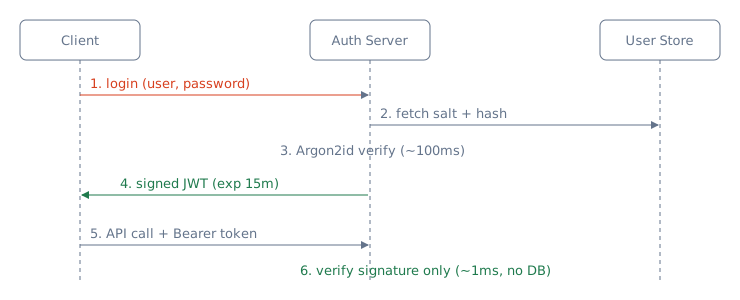
The diagram below traces a token-based login: one expensive verification, then many cheap signature checks.
A concrete worked scenario
Say your API serves 50,000 QPS at peak, with users active for ~8-hour sessions. If you re-verified a password on every request, each check would cost ~100 ms of CPU (that is the deliberate cost of Argon2id) — 50,000 × 0.1s = 5,000 CPU-seconds per wall-clock second, i.e. you would need 5,000 cores just for auth. Absurd.
So you verify the password once per session. With, say, 2 million daily active users each logging in twice, that is ~4M expensive hashes spread across the day — roughly 46 logins/sec, well within a handful of cores. The 50,000 QPS of subsequent traffic carries a token instead.
Now the state trade-off bites. With stateless JWTs, verifying an RS256 signature is ~1 ms of local CPU and zero network hops — 50,000 QPS is trivially cheap and scales horizontally with no shared store. With server-side sessions, each of those 50,000 requests does a Redis GET. At ~0.5 ms round-trip that is fine latency-wise, but it means 50,000 Redis ops/sec and a hard dependency: if the session store hiccups, every authenticated request fails. That is the real design tension you are being asked to reason about.
Trade-offs — when to use what
Server-side sessions. Use when you need instant revocation (logout, ban, password reset must take effect immediately), when session data changes mid-session, or for classic same-domain web apps. The store is the source of truth, so deleting a row kills the session. Cost: a stateful lookup on every request and a store you must scale and keep highly available.
Stateless JWTs. Use for horizontally scaled, multi-service, or cross-domain systems (microservices, mobile clients, APIs) where you want any node to validate independently with no shared session store. Cost: you cannot un-issue a token. A stolen JWT is valid until it expires. You mitigate with short access-token lifetimes (5–15 min) plus a long-lived refresh token that is checked against a revocation list — reintroducing state, but only on the rare refresh path, not every request.
API keys / mTLS. Use for service-to-service auth where there is no human and no browser. mTLS proves identity at the transport layer with certificates; API keys are simpler but are bearer secrets that must be rotated.
OAuth2 / OIDC. Use when you want to delegate identity to Google/Okta/Auth0 rather than store passwords yourself — fewer secrets to protect, but a dependency on the identity provider's availability. Do not hand-roll OAuth flows; the edge cases (PKCE, state param, token exchange) are where breaches live.
Multi-factor and passwordless: a comparison
Not all second factors are equal. The right choice depends on the threat you are trying to stop and the friction you can tolerate.
| Factor | What it proves | Typical UX | Threats it stops | Threats it does not stop |
|---|---|---|---|---|
| Password | Something you know | Type a secret | Casual guessing | Phishing, credential stuffing, database leaks |
| SMS / email OTP | Something you have (SIM/inbox) | Receive a code | Stolen password alone | SIM swap, inbox compromise, phishing proxy |
| TOTP app | Something you have (seed) | Enter 6-digit code | Stolen password alone; credential stuffing; bulk or delayed phishing (codes expire in ~30–90s) | Real-time phishing proxies that relay the code (TOTP is not phishing-resistant) |
| Push notification | Something you have (phone) | Tap “Approve” | Stolen password | MFA fatigue attacks, push spam |
| WebAuthn / passkey | Something you have + something you are | Touch fingerprint / face / security key | Phishing, credential stuffing, replay | Device loss (mitigated by cross-device synced keys) |
The table's boldest claim deserves its one-line why: WebAuthn resists phishing structurally — the browser writes the real origin it is talking to into the signed challenge response, so a signature produced on a look-alike domain fails the server's origin check, and there is no code for the user to retype to an attacker (traced step-by-step in MFA: TOTP, WebAuthn & Step-Up Auth).
Passkeys are the long-term direction. They replace the shared secret (password) with a private key that never leaves the authenticator, eliminating both database leaks and phishing in one move. The operational cost is recovery: plan a device-loss flow before you make passkeys mandatory.
Pitfalls an interviewer probes
- Conflating authN with authZ. If you say "authentication checks permissions," you have already failed. Identity first, then a separate authorization decision.
- "How do you revoke a JWT?" The trap. Honest answer: you fundamentally cannot before expiry — that is the price of statelessness. You use short expiries + a refresh-token denylist, or a token-version claim you bump on logout. Claiming instant JWT revocation without extra state is wrong.
- Storing passwords wrong. Plain text, unsalted hashes, or fast hashes (MD5/SHA-256) are red flags. The right answer is a salted, slow, memory-hard KDF (
Argon2id/bcrypt), and comparisons must be constant-time to avoid timing attacks. - Cookie/token handling. Tokens in
localStorageare exposed to XSS; preferHttpOnly,Secure,SameSitecookies. Missing CSRF protection on cookie-based sessions is a classic follow-up. - JWT signature confusion. Accepting the
alg: noneheader, or verifying an RS256 token with the public key mistakenly treated as an HMAC secret, lets attackers forge tokens. Always pin the expected algorithm. - No account-level defenses. Missing rate limiting / lockout invites credential stuffing; no MFA on high-value accounts is a common weakness they will push on.
- Session fixation. Reusing a pre-login session identifier into the authenticated session lets an attacker who planted a known id inherit the session. The fix is one line: mint a fresh session id at the moment of login (and on any privilege elevation), discarding the pre-auth one.
Credential-stuffing mitigation trace
Suppose an attacker buys 1 million username/password pairs from a breach and aims them at your login API. Without defenses, they can test all 1M pairs in a few minutes. Layered defenses change the economics:
- Per-account rate limiting. Allow only 10 failed attempts per account per hour. Now each account can be tested 10 times; the attacker needs 100k distinct accounts to exhaust the list, and repeated attempts against high-value accounts are blocked.
- Per-IP + per-device rate limiting. Even if the attacker rotates IPs, device-fingerprint clustering groups the traffic. A ceiling of 100 failed logins per hour per fingerprint raises the cost of proxies and automation.
- Breach detection at login. Check the submitted password against a k-anonymity service like Have I Been Pwned. If the password is known-leaked, force a password reset. The 1M-list attack now succeeds only on the subset not yet in breach databases.
- CAPTCHA after failures. Trigger after 3–5 failures. This adds cents per attempt and breaks cheap automation without annoying normal users.
- MFA on high-risk logins. New device, new location, or breach-flagged password → require a second factor. Even a correct password is not enough.
The residual risk is small and expensive for the attacker: they must avoid account lockouts, bypass fingerprinting, solve CAPTCHAs, and defeat MFA. That is the point — you do not make theft impossible, you make it unprofitable.
Key takeaways
- Authentication proves who you are; authorization decides what you can do — never merge the two.
- Verify the expensive credential (password) once per session, then ride a cheap, short-lived token or session for the flood of subsequent requests.
- The core design axis is stateful sessions (instant revocation, but a lookup + HA store per request) vs stateless JWTs (free horizontal scale, but no revocation before expiry) — pick per your revocation and scaling needs.
- Store passwords only as salted, slow, memory-hard hashes (Argon2id/bcrypt), pin your JWT algorithm, and add MFA + rate limiting on the human login path.
Staff drill: defend your auth design
Three questions an interviewer will use to test whether the sections above actually landed. Each has a tempting wrong answer — give the bar answer instead.
“Your JWT carries
role: adminin the payload — why can't the client just edit it and promote themselves?”
Trap answer: “because the payload is encrypted.” It is not — a JWT payload is only base64url-encoded, and anyone can decode, read, and rewrite it in seconds. Bar answer: editing is free but useless, because the signature is computed overheader.payload; change one byte of either and the signature no longer verifies, so the server rejects the token. The real risk is not client cleverness but server misconfiguration: acceptingalg: none, or leaving the algorithm unpinned so an RS256 token can be replayed as HS256 with the public key abused as an HMAC secret. Pin the algorithm server-side; the math does the rest.“Password login vs OIDC SSO — when is each the right call?”
Trap answer: “SSO is always better; passwords are legacy.” Bar answer: it depends on who the users are. For a workforce / enterprise product, delegate to the customer's IdP via OIDC: central offboarding kills all of a departing employee's app access the day they leave, MFA is enrolled once at the IdP, and you never hold a password database that can be breached. For a consumer product, password + MFA (or passkeys) is usually right, because forcing a third-party IdP couples your signup conversion and your account-recovery story to that provider — a user who loses their Google account loses your product with it.“One specific session token is stolen and you must kill it in under a second, across 40 services — sessions or JWTs?”
Trap answer: “JWTs — we'll just revoke that token.” Pure stateless JWTs cannot do this: there is no server-side record to delete, and the token stays valid untilexp. Bar answer: server-side sessions win here by construction — delete the row in the session store and the very next lookup fails on every service. If you are committed to JWTs, say so honestly and then pay for the state you removed: short TTLs (minutes, not hours) plus a per-request deny-list scoped to the sensitive routes that genuinely need sub-second revocation, so the common path stays stateless.
🤖 Don't fully get this? Learn it with Claude
Stuck on What is Authentication? Open Claude, copy a block below, and it'll teach you this exact concept — visually and interactively.
Build the mental picture, not memorization.
I just read a lesson on **What is Authentication** (System Design) and want to truly understand it. Explain What is Authentication from first principles using ONE vivid real-world analogy and a visual mental model — draw it as ASCII art or a clear step-by-step diagram — with a concrete example using real numbers. Then ask me one question to check I got the mental picture, and wait for my reply. If you're unsure or a claim isn't standard, say so and reason from first principles instead of guessing.
Socratic — adapts to where you're stuck.
Teach me **What is Authentication** interactively. Ask me ONE guiding question at a time, wait for my answer, and adapt to my confusion — build the idea with me step by step instead of explaining it all at once. If you're unsure or a claim isn't standard, say so and reason from first principles instead of guessing.
Active recall exposes what you missed.
Quiz me on **What is Authentication** with 5 questions, easy to tricky, ONE at a time. Tell me if each answer is right; at the end, explain clearly what I got wrong and why. If you're unsure or a claim isn't standard, say so and reason from first principles instead of guessing.
Intuition + hook + flashcards for long-term memory.
Help me remember **What is Authentication** for the long term: give the one-sentence intuition, a memorable hook/mnemonic, a tiny worked example, and 3 active-recall flashcards (Q -> A). If you're unsure or a claim isn't standard, say so and reason from first principles instead of guessing.