SLIs, SLOs, SLAs & Error Budgets
Reliability is not a feeling — it is a measured ratio that a monitoring system computes from real request events, compared every window against a number you committed to, so that a machine (not an argument in a meeting) can decide whether you are allowed to ship the next release. That single mechanism — turn reliability into a countable quantity, then let the arithmetic govern behavior — is what SLIs, SLOs, and error budgets exist to provide.
The three terms, from the inside out
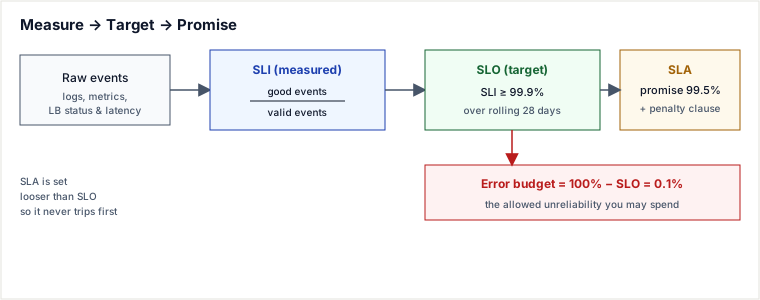
They form a chain: you measure an SLI, you target it with an SLO, and you sometimes promise a weaker version of it in an SLA.
- SLI — Service Level Indicator: a number your telemetry actually computes, almost always a ratio of good events / valid events over a window. Example:
(requests with status < 500 and latency < 300 ms) / (all valid requests)= 99.94% over the last 5 minutes. It is a measurement, nothing more. - SLO — Service Level Objective: the internal target the SLI must hold, e.g. "the availability SLI ≥ 99.9% over a rolling 28-day window." It is a decision, owned by the engineering org, and it is the number the error budget is derived from.
- SLA — Service Level Agreement: a contract with a customer that pays out (credits, penalties) if a stated level is breached. Because breaching it costs money, the SLA is deliberately looser than the internal SLO — you promise 99.5% externally while targeting 99.9% internally, so the SLO trips your alerts and freezes long before the SLA trips your lawyers.
Why the SLA is weaker than the SLO — on purpose
If your SLA and SLO were both 99.9%, then the instant you broke your internal target you would simultaneously owe customers money and have zero warning margin. Setting SLA < SLO builds a buffer: the SLO breach is an internal signal that fires while there is still contractual headroom left. Google's rule of thumb is to make the internal SLO stricter than the external SLA by a meaningful margin for exactly this reason.
The error budget: reliability as a spendable quantity
Here is the pivotal move. If the SLO is 99.9%, then 0.1% of events are allowed to fail. That leftover is not a defect to be driven to zero — it is a budget. Over a fixed window it is a finite, countable amount of failure you are permitted to spend, and spending it is not shameful: it is the resource that pays for shipping features.
This converts an unwinnable philosophical fight — "devs want to ship, SREs want stability" — into a shared account balance. When budget remains, you ship aggressively: risky launches, config changes, experiments are all funded by the budget. When the budget is exhausted, an agreed policy kicks in automatically: freeze feature releases, and spend all engineering effort on reliability until the rolling window refills the budget. Nobody has to win an argument; the number decides.
Burn rate — how fast you are spending
The instantaneous measure is the burn rate: how fast you are consuming budget relative to the rate that would exhaust it exactly at the end of the window. Burn rate 1× means you will use the whole budget precisely on schedule (i.e. you are running right at your SLO). Burn rate 10× means you will be broke in a tenth of the window.
Google's SRE Workbook uses multi-window, multi-burn-rate alerts built on this: a fast-burn alert (14.4× sustained over both a 1-hour window and a paired 5-minute window — 2% of the budget in an hour) pages a human immediately; a medium-burn alert (6× over 6 hours plus a 30-minute short window — 5% of the budget in six hours, a pace that empties the whole budget in 720 h / 6 = 120 h = 5 days, which can vanish over a long weekend while a ticket sits unread) also pages; only the slow-burn tier (1× over 3 days plus a 6-hour short window — 10% of the budget in three days) files a ticket, because at 1× there are still weeks of runway. The 14.4 is derived, not chosen: the tier is defined as "2% of the 30-day budget burned within one hour", and since a 30-day period is 720 hours, the burn rate that does that is 0.02 × 720/1 = 14.4 — in general, burn = budget_fraction × period / window. Likewise 6× over 6 hours is exactly 5% of the budget (6 × 6/720), and 1× over 3 days is 10% (1 × 72/720): every threshold is a budget-fraction commitment re-expressed as a rate. The next section demonstrates exactly why this beats a raw error-count or single-window threshold, with numbers you can check by hand.
The nines: turning a percentage into minutes
An SLO percentage is abstract until you convert it to allowed downtime per window. The arithmetic is just (1 − SLO) × window duration. A 30-day month is 30 × 24 × 60 = 43,200 minutes; a 365-day year is 525,600 minutes.
So for 99.9% ("three nines"), the budget is 0.1% of the month: 0.001 × 43,200 = 43.2 minutes/month. Each extra nine divides the allowed downtime by 10.
| SLO (availability) | Unavailable fraction | Downtime / month (30d) | Downtime / year |
|---|---|---|---|
| 99% ("two nines") | 1% | 7.2 hours | 3.65 days |
| 99.9% ("three nines") | 0.1% | 43.2 minutes | 8.76 hours |
| 99.95% | 0.05% | 21.6 minutes | 4.38 hours |
| 99.99% ("four nines") | 0.01% | 4.32 minutes | 52.6 minutes |
| 99.999% ("five nines") | 0.001% | 25.9 seconds | 5.26 minutes |
The table is a design tool, not trivia. "Five nines" allows ~26 seconds of downtime a month — less than a single pod reschedule or a JVM stop-the-world GC pause on a bad day. It forces the honest question: can our deploy process, our dependencies, and our incident response even fit inside that budget? Usually the answer is that each extra nine multiplies engineering cost, so you buy the fewest nines your users actually notice.
A traced example: one month of budget, computed exactly
Payments API, SLO = 99.9% availability over a rolling 28-day window. Traffic is a steady 500 requests/second, so valid events in 28 days = 500 × 86,400 × 28 = 1,209,600,000 requests. The error budget is 0.1% of that = 1,209,600 allowed failures. At exactly 1× burn rate — the rate that exhausts the whole budget precisely at day 28 — that is 1,209,600 / 28 = 43,200 failures/day, the number every other burn rate below is a multiple of.
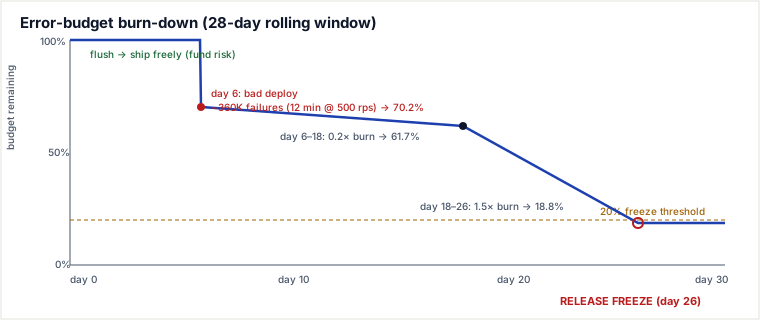
- Day 0. Budget full: 1,209,600 failures available (100%). Release train runs freely; two feature deploys ship.
- Day 6, 02:00. A bad deploy returns 5xx for 12 minutes at 500 rps → 500 × 720 s = 360,000 failures burned in one incident. Remaining = 1,209,600 − 360,000 = 849,600 (70.2%). Fast-burn alert (14.4× sustained over both the 1h and 5m windows) had already paged at minute ~2.
- Day 6–18 (12 days). Steady-state error rate settles at 0.02% of traffic — exactly 0.2× nominal burn, since 0.02% / 0.1% = 0.2, i.e. 0.2 × 43,200 = 8,640 failures/day. Over 12 days that burns 8,640 × 12 = 103,680 failures. Remaining = 849,600 − 103,680 = 745,920 (61.7%) — a number you can reproduce from just the rate and the duration, not eyeballed off a chart.
- Day 18. A dependency degrades; latency SLI (p99 < 300 ms) starts failing, pushing the total bad-event rate to 0.15% — exactly 1.5× nominal burn (0.15% / 0.1% = 1.5), i.e. 1.5 × 43,200 = 64,800 failures/day. At 1.5× only the slow-burn tier trips (1.5 ≥ 1×, but far below the 6× paging tier), so the 1×/3d alert files a ticket, not a page.
- Day 18–26 (8 days) at 1.5×. Burns 64,800 × 8 = 518,400 failures. Remaining = 745,920 − 518,400 = 227,520 (18.8%).
- Day 26. Remaining budget (18.8%) crosses the team's pre-agreed 20%-remaining freeze threshold. Release freeze triggers automatically. No new features ship; the team's whole focus is the dependency and the latency regression until the rolling window ages out the day-6 incident and/or the dependency is fixed and the budget climbs back above 20%.
Notice the budget did its job twice: it funded risk early (deploy freely while flush) and halted risk late (freeze once thin) — and every number along the way is the stated rate multiplied by the stated duration, nothing asserted.
Choosing good SLIs
A bad SLI makes the whole edifice lie. The discipline: measure what a user experiences at the point of interaction, as a ratio, and pick the threshold where users start to care.
Availability
Define "good" precisely. good = HTTP responses that are not 5xx is the common request-based SLI, but decide the denominator carefully: exclude requests the client aborted, and be explicit about whether 429 (rate-limited) or 400 (client's own bad input) count as "bad" — usually they should not, since they are not your service failing. For long-lived systems, a time-based availability SLI (fraction of good minutes) can fit worse than a request-based one; prefer request-based when traffic is uneven.
Latency — always a percentile, never a mean
The average latency is the single most misleading number in a distributed system: one slow tail hides behind millions of fast requests. If p50 = 40 ms but p99 = 900 ms, one in a hundred users waits nearly a second — and on a page that fans out to 100 backends, the chance all of them beat p99 is only 0.99¹⁰⁰ ≈ 37%, so tail latency becomes the typical page latency (Dean & Barroso, "The Tail at Scale"). So the latency SLI is a threshold on a percentile: good = requests served in < 300 ms; SLI = good / valid; SLO: p99 < 300 ms holds 99.9% of the time. Set the threshold at the value where user behavior changes, not at a round number.
The other three of the golden signals
Availability and latency are the two you almost always turn into SLOs. Google's four golden signals add traffic and saturation (usually watched, rarely SLO'd) and fold errors into availability. Correctness/quality/freshness SLIs matter for data pipelines and reads-of-stale-data systems.
The four golden signals
Google's four golden signals are the minimum telemetry set that lets you reason about a service from the outside: latency, traffic, errors, and saturation. Latency and errors are the ones most often turned into SLOs because they directly describe user experience. Traffic measures demand and is essential for capacity and anomaly detection. Saturation measures how close to full a resource is — CPU, memory, disk, connection pools — and is the leading indicator that latency or errors are about to rise.
| Signal | What it tells you | Typical SLI? |
|---|---|---|
| Latency | How long requests take; use percentiles, not means | Yes (p99 < threshold) |
| Traffic | How much demand is hitting the service | No (watched, rarely SLO'd) |
| Errors | What fraction of requests fail | Yes (success rate > threshold) |
| Saturation | How close a constrained resource is to its limit | Sometimes (queue depth, utilization) |
A good SLI almost always combines latency and errors into a single "good event" ratio: a request counts as good only if it is both successful and fast enough. Traffic and saturation then provide the context that explains why the ratio moved.
Pitfalls a working engineer hits
- Averaging percentiles. You cannot average p99s across shards or time buckets to get an overall p99 — percentiles are not linear. Aggregate from histograms (e.g. Prometheus
histogram_quantileover summed buckets), never by averaging pre-computed quantiles. Averaging p99s silently understates your tail. - The denominator lies. If "valid events" includes health-check pings or bot traffic, a real user-facing outage gets diluted into insignificance. Scope the SLI to the traffic that represents real user journeys.
- SLA = SLO. Setting the external contract equal to the internal target removes all buffer; the moment you miss internally you also owe money and have zero warning runway. Keep SLA strictly looser.
- Chasing 100%. An SLO of 100% is a bug: it means zero error budget, so every deploy is forbidden and every blip is an incident. It also over-invests — users on flaky mobile networks cannot perceive the difference between 99.99% and 100%. Pick a target below what users can distinguish.
- A budget with no policy. An error budget that does not actually stop releases when exhausted is theater. The freeze must be a pre-agreed, automatic consequence — otherwise the number is ignored the first time it is inconvenient.
- Too-long a window hiding a bad week. A 90-day window can absorb a terrible week without ever tripping; too-short a window is noisy. 28–30 days rolling is the common compromise.
Trade-offs & when to use error budgets
Use SLO/error-budget governance when you have a service with enough traffic for ratios to be statistically meaningful, a real tension between shipping speed and stability, and the organizational will to honor the freeze. It shines for user-facing request/response systems where "good" is cleanly definable per request.
Versus raw threshold alerting (the named alternative) — demonstrated, not asserted
The traditional approach is a static, single-window threshold: "page if 5xx rate > 1% over a 5-minute window." Reuse the Payments API numbers above (500 rps, 1× burn = 43,200 failures/day) to see exactly where this breaks in both directions.
- False page (the threshold overreacts to noise). A connection-pool warm-up spikes the error rate to 1.2% for a single 5-minute window, then self-heals. Failures = 500 rps × 300 s × 0.012 = 1,800 failures — just 1,800 / 1,209,600 = 0.15% of the entire month's budget. The static rule crosses 1% and pages a human at 2 a.m. for an event that could not meaningfully threaten the month even if repeated a dozen times. A multi-window rule requiring 14.4× to hold across both a 1-hour and a paired 5-minute window would not page here: the blip doesn't sustain across the longer window, so it correctly downgrades to a non-paging signal proportional to its true 0.15% cost.
- Missed detection (the threshold underreacts to a slow leak). A dependency degrades to a steady 0.6% error rate — still under the 1% static line, so the static alert never fires. But 0.6% / 0.1% = 6× nominal burn, meaning the entire 28-day budget is gone in 28 / 6 ≈ 4.7 days. Left running for 10 days, this single silent leak burns through more than two full months of budget while the static alert stays green throughout. A burn-rate alert at 6× sustained over just 6 hours fires while only 6 / (4.7 × 24) ≈ 5% of the budget has actually been spent — catching the leak with over 95% of the month still intact, instead of finding out only after it's gone.
That is the actual mechanism, not a slogan: a single-window count threshold conflates a large-but-brief blip with a genuine trend (false pages), and it is blind to any leak that stays under its fixed line no matter how long it runs (missed detections). Burn-rate alerting fixes both because it multiplies rate × remaining window — the same quantity the freeze policy itself is denominated in — so the alert threshold and the governance threshold are the same currency.
- Threshold alerting gains simplicity — no window math, trivial to configure, fires on the instantaneous symptom.
- It costs the two failure modes above: pager fatigue on self-healing blips, and silent budget exhaustion from sub-threshold leaks. It answers "is something wrong right now?" but never "can we afford to keep taking risks this month?"
- Error budgets gain a single currency that both aligns dev/SRE incentives and drives multi-burn-rate alerts that page proportionally to real damage. They cost setup complexity, honest SLI definition, and cultural buy-in to actually freeze.
They are not exclusive: mature teams keep a couple of hard threshold/heartbeat alerts ("service totally down") for instant catastrophe detection, and layer burn-rate SLO alerts on top for everything nuanced. Small internal tools with trivial traffic often need neither — a heartbeat check is enough, and formal SLOs are over-engineering.
Takeaways
- SLI = measured ratio, SLO = internal target, SLA = looser external contract with penalties; keep SLA < SLO so the SLO trips first.
- Error budget =
100% − SLO— a finite, spendable amount of failure that funds release velocity when flush and freezes it when exhausted, replacing arguments with arithmetic. - Convert nines to time with
(1 − SLO) × window: 99.9% = 43.2 min/month = 8.76 hours/year; each nine divides downtime by 10; don't buy nines users can't perceive. - Burn-rate alerting beats a static threshold because it is denominated in the same rate×window currency as the freeze policy: it ignores brief blips that don't sustain across a paired longer window, and it catches slow leaks that stay under a fixed line forever.
- Latency SLIs are percentiles (p99), never means — the tail is the real user experience, especially under fan-out.
Recall question
Your service has a 99.95% monthly availability SLO and serves 200 rps. A single incident causes total outage. How long can that outage last before it burns the entire month's error budget, and how many failed requests is that? (Answer: 0.05% of 43,200 min = 21.6 minutes; at 200 rps that is 200 × 21.6 × 60 ≈ 259,200 failed requests.)
Sources: Google, Site Reliability Engineering (Beyer et al.) ch. 3 & 4 and The SRE Workbook ch. 2 & 5 (SLIs/SLOs, error budgets, multi-window multi-burn-rate alerting, the four golden signals); Dean & Barroso, "The Tail at Scale" (CACM, 2013) for tail-latency and fan-out amplification; Nygard, Release It! for stability-vs-velocity framing. Re-authored/Deepened for this guide.
Design an SLO: a worksheet
Use this checklist when someone asks, "What should our SLO be?" The goal is to force the conversation from "a number" to "a measured user experience with an explicit policy."
- Pick the user journey. Which request path or interaction actually matters? (Example:
POST /v1/payments.) - Define "good event." A request counts as good only if it is both successful and fast enough. (Example: status < 500 and latency < 300 ms.)
- Choose the SLI window. Short enough to detect problems, long enough to be statistically stable. (Common: 28-day rolling window.)
- Set the SLO target. Stricter than the external SLA, realistic against dependencies, and justified by user behavior. (Example: 99.9%.)
- Compute the budget.
(1 − SLO) × valid events in window. Know the number of allowed failures. - Name the release policy. At what budget-remaining threshold do you freeze releases? (Example: 20% remaining.)
- Write the alert. Use burn-rate alerting, not a static threshold, and pair a short window with a long one.
- Assign ownership. Who owns the SLI definition, who gets paged, and who decides when the freeze lifts?
If you cannot answer steps 1, 6 and 8, you do not have an SLO yet — you have a dashboard target.
Error-budget policy: when to freeze releases
The budget is only useful if the organization agrees ahead of time what happens when it runs low. Here is a concrete policy template:
| Budget remaining | Action | Rationale |
|---|---|---|
| > 50% | Ship normally; risky launches and experiments are allowed. | Healthy buffer absorbs normal deploy risk. |
| 20–50% | Ship, but every launch needs an explicit risk review and a rollback plan. | Budget is shrinking; spend deliberately, not automatically. |
| < 20% | Freeze feature releases. Only fixes, reliability work, and SRE-approved exceptions. | Protect the remaining budget for incident recovery and avoid breaching the SLO/SLA. |
| 0% or SLO already breached | All-hands reliability sprint; no launches until the rolling window refills the budget. | The team has spent faster than it can earn; earning it back is the only priority. |
The 20% threshold is arbitrary in the abstract but concrete in practice: it is large enough to absorb one more moderate incident and small enough to force a real conversation before a team ships itself into an SLA breach.
Counter vs histogram SLI: a decision table
Prometheus offers two fundamental metric shapes for SLIs. Picking the wrong one produces subtly wrong dashboards.
| Use a counter when… | Use a histogram when… |
|---|---|
| You care about counts or rates of events: errors, requests, cache hits. | You care about distributions of a continuous value: latency, response size. |
The SLI is a fraction: errors / total, cache_hits / lookups. | The SLI is a percentile: "p99 < 300 ms" or "95% under threshold." |
| Aggregation is simple sum or rate. | You need fleet-wide percentiles from summed buckets with histogram_quantile. |
Example: http_requests_total{status} for availability. | Example: http_request_duration_seconds_bucket{le} for latency. |
The common mistake is trying to compute a latency percentile from a counter: you can count how many requests were slow, but you cannot reconstruct the distribution of the slow ones without histogram buckets.
🪜 Drill ladder: SLIs, SLOs, SLAs & Error Budgets
- Q: What is the difference between an SLI and an SLO?
A: The SLI is the measured ratio; the SLO is the target the SLI must hold over a window. - Q: Why is the external SLA usually looser than the internal SLO?
A: You want the SLO to trip alerts and freeze releases before you owe customers money or credits. - Q: A 99.9% SLO over 30 days allows how much downtime?
A: 0.001 × 30 × 24 × 60 = 43.2 minutes. - Q: Your error budget is down to 15%. Can you ship a new feature?
A: Under a typical policy, no — the budget is below the freeze threshold; only fixes and reliability work ship. - Q: You need a latency SLO. Should you use a counter or a histogram?
A: A histogram, because percentiles require bucketed distribution data; counters only give you counts. - Q: Why is averaging pod-level p99s wrong?
A: Percentiles are not linear; aggregate from summed histogram buckets withhistogram_quantile. - Q: Burn rate is 14.4×. How long until a 28-day budget is gone if it stays there?
A: 28 days / 14.4 ≈ 47 hours, or just under two days.
🤖 Don't fully get this? Learn it with Claude
Stuck on SLIs, SLOs, SLAs & Error Budgets? Open Claude, copy a block below, and it'll teach you this exact concept — visually and interactively.
Build the mental picture, not memorization.
I just read a lesson on **SLIs, SLOs, SLAs & Error Budgets** (System Design) and want to truly understand it. Explain SLIs, SLOs, SLAs & Error Budgets from first principles using ONE vivid real-world analogy and a visual mental model — draw it as ASCII art or a clear step-by-step diagram — with a concrete example using real numbers. Then ask me one question to check I got the mental picture, and wait for my reply. If you're unsure or a claim isn't standard, say so and reason from first principles instead of guessing.
Socratic — adapts to where you're stuck.
Teach me **SLIs, SLOs, SLAs & Error Budgets** interactively. Ask me ONE guiding question at a time, wait for my answer, and adapt to my confusion — build the idea with me step by step instead of explaining it all at once. If you're unsure or a claim isn't standard, say so and reason from first principles instead of guessing.
Active recall exposes what you missed.
Quiz me on **SLIs, SLOs, SLAs & Error Budgets** with 5 questions, easy to tricky, ONE at a time. Tell me if each answer is right; at the end, explain clearly what I got wrong and why. If you're unsure or a claim isn't standard, say so and reason from first principles instead of guessing.
Intuition + hook + flashcards for long-term memory.
Help me remember **SLIs, SLOs, SLAs & Error Budgets** for the long term: give the one-sentence intuition, a memorable hook/mnemonic, a tiny worked example, and 3 active-recall flashcards (Q -> A). If you're unsure or a claim isn't standard, say so and reason from first principles instead of guessing.