Containers: cgroups & Namespaces
A container is a normal Linux process wearing a costume
A container is not a lightweight VM and there is no "container" object in the kernel — it is an ordinary process that the kernel has been asked to lie to. When you launch one, the kernel does three cheap things on top of a normal fork()/execve(): it puts the process in a fresh set of namespaces (so its view of PIDs, mounts, network, hostname, IPC and users is a private sandbox), it attaches it to a cgroup (so the scheduler and memory allocator cap and account its CPU, memory and I/O), and it pivots its root filesystem onto an overlay mount (so it sees a private image without copying it). Everything else — the process runs on the host kernel, is visible in the host's ps, is scheduled by the same CFS/EEVDF scheduler — is completely normal. That is the whole trick.
This matters because the alternative, a virtual machine, boots an entire guest kernel and emulates virtual hardware, costing hundreds of MB of RAM and seconds of boot per instance. A container adds a few syscalls to a process that already exists, so it starts in milliseconds and shares the host kernel's page cache and scheduler. That density — thousands of isolated workloads per host — is what makes Kubernetes, Lambda, and CI runners economically possible. The cost is the flip side of the same coin: one shared kernel, so the isolation is only as strong as the kernel's namespace and cgroup boundaries, not a hardware-enforced VM boundary.
Namespaces isolate the view; cgroups limit the resources
Keep these two axes strictly separate in your head — they are orthogonal and answer different questions. Namespaces answer "what can this process see and name?" Cgroups answer "how much can this process consume?" A process could be in a private PID namespace but with no memory limit (sees only itself, can OOM the host), or in a tight memory cgroup but the host network namespace (throttled, but sees every interface). A real container uses both.
The eight namespaces (created via clone() / unshare() flags)
| Namespace | Flag | What it virtualizes | Concrete effect inside the container |
|---|---|---|---|
| PID | CLONE_NEWPID | Process-ID number space | Your entrypoint is PID 1; it cannot see or signal host processes |
| NET | CLONE_NEWNET | Interfaces, routes, ports, netfilter | Own lo + a veth pair; two containers can both bind :8080 |
| MNT | CLONE_NEWNS | The mount table | A private filesystem tree; /proc, / differ from host |
| UTS | CLONE_NEWUTS | Hostname & domainname | hostname returns the container ID, not the node |
| IPC | CLONE_NEWIPC | System-V IPC, POSIX msg queues | Shared-memory segments are invisible across containers |
| USER | CLONE_NEWUSER | UID/GID mapping | root (uid 0) inside can map to an unprivileged uid (e.g. 100000) outside — if the runtime opts in |
| CGROUP | CLONE_NEWCGROUP | The cgroup filesystem's root view | The container sees its own cgroup as /, hiding sibling and ancestor cgroup paths |
| TIME | CLONE_NEWTIME (unshare only, applied at the next fork) | CLOCK_MONOTONIC / CLOCK_BOOTTIME offsets | A restored/migrated container (CRIU) keeps its own uptime and monotonic clock instead of inheriting the host's |
The time namespace is the newest (Linux 5.6, 2020) and the odd one out: it exists mainly so checkpoint/restore and migration don't make monotonic time jump backwards inside the container — a restored process's timers and timeouts keep making sense.
The user namespace is the one that can turn "root in the container" from a host-level danger into a safe illusion: when UID mapping is enabled, uid 0 inside is a mapped, unprivileged uid outside, so even a container escape lands as nobody. In practice this mapping is opt-in, not the default: Docker's default runtime and most production Kubernetes clusters still run container processes as UID 0 in the host's own user namespace — Docker's userns-remap and Kubernetes' hostUsers/user-namespace support (beta since 1.30, on by default from 1.33, GA in 1.36) exist precisely because rootless-by-default isn't yet the common case. Treat user-namespace remapping as a hardening option you should turn on, not a guarantee you already have.
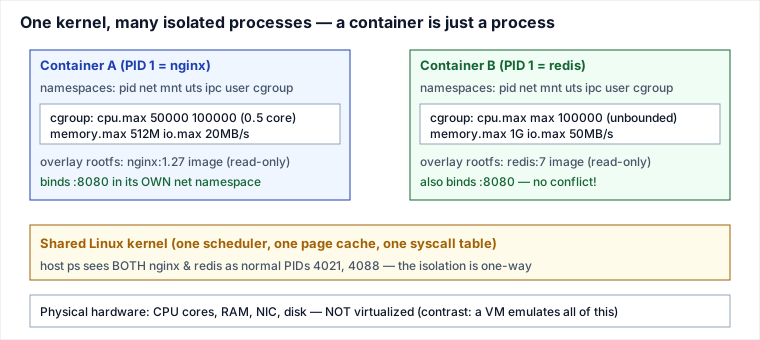
Traced example: building a container by hand
Docker/containerd/runc do exactly this sequence — you can reproduce the core of it with a few commands and watch each layer engage. Assume a host running cgroup v2 (unified hierarchy under /sys/fs/cgroup).
Step-by-step trace
- t=0 — create the namespaces.
unshare --pid --net --mount --uts --ipc --user --fork --map-root-user /bin/sh. The kernel does aclone()with the requestedCLONE_NEW*flags set. The child is now PID 1 in its own PID namespace. - t=1 — verify the PID illusion. Inside,
echo $$prints1;ps(after mounting a private/proc) shows only your shell. On the host,ps aux | grep shshows the same process as PID 5177. Same task_struct, two different numbers — the PID namespace is just a translation table onstruct pid. - t=2 — pivot the root. In the mount namespace,
pivot_rootonto an extracted image dir so/is the image, not the host. The host's/is now unreachable from inside — not hidden, unmounted from this namespace's view. - t=3 — attach the cgroup.
mkdir /sys/fs/cgroup/demo;echo "50000 100000" > cpu.max(50 ms of CPU per 100 ms period = half a core);echo 512M > memory.max; thenecho <pid> > cgroup.procsto move the process in. - t=4 — hit the CPU limit. Run a busy loop. On the host,
topshows the process pinned close to 50% of one core. The CFS bandwidth controller enforces this: in the simple case, the process (or its threads) spend the 50 ms of quota within the 100 ms period and are then throttled until the period resets. The real accounting is a bit richer — quota is drawn from a per-cgroup pool that multiple runnable threads can spend concurrently, andcpu.max's optional burst allowance lets a cgroup borrow a little unused quota from a previous period — but the observable effect is the same:cpu.stat'sthrottled_usecclimbs once quota is exhausted. - t=5 — hit the memory limit. Allocate past 512 MB. The kernel first reclaims page cache, then triggers the cgroup OOM killer, which kills a task inside this cgroup only — the host and other containers are untouched.
memory.eventsshowsoom_kill 1.
Notice what you never did: boot a kernel, allocate virtual RAM, or emulate a device. You added flags to one process. That is the entire mechanism runc implements — plus seccomp/capabilities/AppArmor for hardening.
cgroups v1 vs v2: resource-limit config comparison
Most modern distros have moved to cgroup v2, but production hosts and managed Kubernetes clusters still run v1 or a hybrid (cgroups v1 controllers on a v2 unified root). The concepts are the same — cap, account, throttle — but the file paths and knobs differ.
| Resource | cgroups v1 path / knob | cgroups v2 path / knob | Meaning |
|---|---|---|---|
| CPU hard cap | cpu.cfs_quota_us / cpu.cfs_period_us | cpu.max | "50000 100000" = 0.5 cores |
| CPU weight | cpu.shares (1024 = default) | cpu.weight (100 = default) | Relative share when the CPU is contended |
| Memory hard limit | memory.limit_in_bytes | memory.max | OOM kill if exceeded |
| Memory soft limit | memory.soft_limit_in_bytes | memory.high | Throttle before hard OOM |
| Block I/O throttle | blkio.throttle.read_bps_device | io.max with rbps= | Max bytes/sec per device |
| PIDs | pids.max | pids.max | Max processes/threads in the cgroup |
| Hierarchy | One controller per subsystem hierarchy (/sys/fs/cgroup/cpu, /memory...) | Single unified hierarchy (/sys/fs/cgroup) | v2 simplifies delegation and avoids controller conflicts |
v2 also introduces cpu.max burst (cpu.max.burst) and a more accurate memory accounting model. When you set resources.limits in Kubernetes, the kubelet translates them into the active cgroup version for you, but the values you see in /sys/fs/cgroup on the node depend on whether the node is v1 or v2.
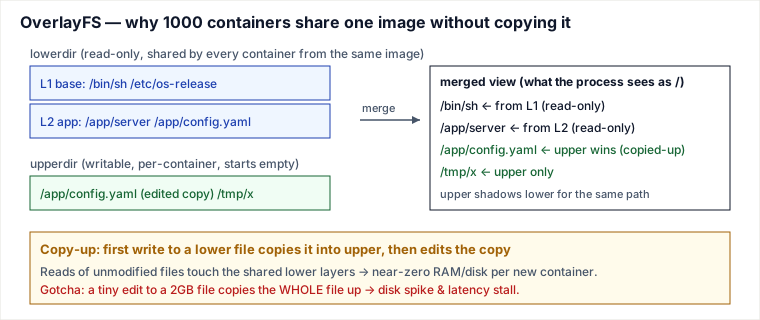
Overlay copy-up worked example: the 1-byte-edit surprise
OverlayFS shares the immutable image layers across every container that uses the same image, but the first time a process writes to a file the whole file is copied from the lower (read-only) layer to the upper (writable) layer. The size of the copied file, not the size of the edit, is what matters.
Imagine a base image with one large CSV:
lower/app/orders.csv  128 MB  (read-only image layer)
upper/                  (empty per-container writable layer)

# Inside the container, append one 512-byte row
open("/app/orders.csv", O_WRONLY | O_APPEND)
  -> overlayfs copies the entire 128 MB from lower to upper/app/orders.csv
  -> the 512-byte append is written to the upper copy

# du inside the container (merged view)
/app/orders.csv  128 MB + 512 B

# du of this container's writable layer on the host
upper/app/orders.csv  128 MB
The container just grew by 128 MB to change 512 bytes. This is the copy-up tax: cheap for small config files, punishing for large databases or log files inside the container. The senior move is to keep mutable, large data on a volume (a bind mount or named volume that is not overlayfs) so writes happen in place, not through copy-up. A volume mount of /app/data bypasses the overlay entirely and avoids the 128 MB copy.
Pitfalls a working engineer actually hits
- PID 1 reaps nothing → zombie storm. In a PID namespace your entrypoint is PID 1, which inherits orphaned children. A shell or app that does not reap exited children leaves zombies that accumulate until the PID table fills. Fix: run a tiny init (
tini,--init, ordumb-init) as PID 1, or handleSIGCHLD. - The JVM/Go runtime reads the host, not the cgroup. Older JREs (pre-8u191) and many tools call
sysconf//proc/cpuinfoand see all 64 host cores, then size thread pools and heap for a machine they can't use — the cgroup then throttles them into latency cliffs. SetGOMAXPROCS/heap explicitly or use cgroup-aware runtimes. - CFS quota throttling looks like a mystery latency spike. A service under
cpu.maxthat bursts (GC, request spike) exhausts its 100 ms quota early and is throttled until the next period — p99 jumps by tens of ms while average CPU looks low. Diagnose viacpu.stat'snr_throttled/throttled_usec; often the fix is raising the quota, enablingcpu.max's burst allowance, or using CPU shares/weight instead of a hard cap.
Do the arithmetic: a limit of 0.5 CPU = 50 ms of quota per 100 ms period. Four busy threads drain the shared pool in 50/4 = 12.5 ms of wall time, then the whole cgroup freezes for the remaining 87.5 ms of the period. A request landing 1 ms into the freeze waits ~86 ms — a clean p99 cliff — while average CPU reads only 50% (50 ms used / 100 ms). Rule: worst-case added latency ≈ period × (1 − quota/(threads × period)); more threads under the same limit drain the pool sooner, so the freeze starts earlier and lasts longer. That is why the fix is often removing the limit (or making the runtime honest about its thread count viaGOMAXPROCS), not adding CPU. - OOM kill is silent and local. Exceeding
memory.maxkills a process inside the cgroup with SIGKILL — no stack trace, exit code 137. Checkmemory.eventsanddmesg; page cache counts toward the limit, so heavy file I/O can trigger it even with modest heap. - "It works in Docker, not in prod" = missing capabilities/seccomp. Containers drop most Linux capabilities and apply a seccomp filter by default. Code that needs
CAP_NET_ADMIN,mount, or raw sockets fails with EPERM that has nothing to do with your app logic. - Overlay copy-up on huge files. As the diagram shows, editing one byte of a large lower-layer file copies the entire file into the upper layer — surprise disk usage and a write stall. Put mutable large data on a real volume, not the overlay.
- Assuming rootless-by-default protects you. A service that assumes uid 0 inside the container is already unprivileged outside (because "that's how containers work now") is wrong on a default Docker or Kubernetes install: without
userns-remap/hostUsers: falseexplicitly configured, container root is host uid 0. Verify your runtime's actual user-namespace configuration before relying on it as a security boundary.
Trade-offs: containers vs virtual machines vs sandboxed runtimes
The decision is fundamentally about where the isolation boundary sits and what you are willing to pay for it.
| Property | Container (runc) | VM (KVM/Firecracker) | Sandboxed (gVisor / Kata) |
|---|---|---|---|
| Isolation boundary | Shared kernel + namespaces | Hardware (VT-x), separate kernel | User-space kernel (gVisor) or micro-VM (Kata) |
| Start time | ~10–50 ms | ~100 ms–seconds (Firecracker ~125 ms) | ~100–200 ms |
| Memory overhead | ~MB (just the process) | tens–hundreds of MB (guest kernel) | tens of MB |
| Blast radius of a kernel 0-day | Host compromise possible | Contained to the guest | Contained (syscalls intercepted) |
| Syscall performance | Native (zero overhead) | Near-native | gVisor: measurable syscall tax |
Use containers when you own the workloads and trust the code: microservices, CI, internal batch jobs. Density and speed dominate and a shared kernel is acceptable. Use VMs (or Firecracker micro-VMs) when you run untrusted, multi-tenant code — this is exactly why AWS Lambda and Fargate wrap each customer's container in a Firecracker micro-VM: they want container ergonomics with VM-grade isolation. Use gVisor/Kata when you need stronger-than-namespace isolation but can't afford a full VM per workload (GKE Sandbox). The named alternative to internalize: a container trades the VM's hardware boundary for ~10× faster start and ~10× higher density — a great trade for trusted code, a dangerous one for hostile tenants on a shared kernel.
Capabilities and seccomp: shrinking the attack surface
Namespaces and cgroups isolate a container, but they do not limit which syscalls it can issue. Docker and runC add two more layers by default. Linux capabilities split root privileges into fine-grained rights; a container can run as root yet have CAP_SYS_ADMIN, CAP_NET_ADMIN, and many others dropped. seccomp-bpf installs a BPF filter that inspects every syscall and blocks dangerous ones (for example, mount, pivot_root, and raw ptrace) before they reach the kernel.
A typical hardened invocation drops everything and adds back only what is needed:
docker run --cap-drop=ALL --cap-add=NET_BIND_SERVICE --security-opt seccomp=default.json myappIf your application fails in production with EPERM but works in a development container, the first thing to check is whether a capability or seccomp rule was silently removed by the runtime or by the cluster's PodSecurityContext. Capabilities and seccomp are not the same as namespaces — namespaces hide objects, while capabilities and seccomp restrict what the container is allowed to do with the objects it can still see.
Container escape mitigation checklist
Namespaces and cgroups are not a security boundary by themselves — they are isolation primitives. A hostile or compromised container can escape if the runtime, the image, or the host configuration leaves a hole. Treat this as a checklist, not a menu.
| Layer | Hardening | What it blocks |
|---|---|---|
| Identity | Run as non-root; use a distroless/minimal image | Most trivial host-root exploits assume uid 0 inside |
| User namespace | Map container root to an unprivileged host uid (e.g., 100000) | Even if the container breaks out, it is an unprivileged user on the host |
| Capabilities | --cap-drop=ALL, add back only what is needed | Blocks raw syscalls such as CAP_SYS_ADMIN (mount), CAP_NET_ADMIN, CAP_SYS_PTRACE |
| seccomp | Use the default filter or a custom profile | Prevents dangerous syscalls (e.g., mount, pivot_root, open_by_handle_at) from reaching the kernel |
| LSM | Enable AppArmor/SELinux profiles | Restricts what files and operations the container can touch even after a breakout |
| Rootfs | Read-only root filesystem (--read-only) | Stops attackers from overwriting binaries or dropping payloads |
| Namespaces | Never share the host PID, network, or IPC namespace | Host PID namespace exposes /proc; host network bypasses network policy |
| Mounts | Never mount the Docker socket, /proc, /sys, or host root into a container | Docker socket is root-on-host; /proc//sys expose kernel interfaces |
| Resources | Set memory and CPU limits, pids.max | Prevents a noisy neighbor from exhausting the node |
| Supply chain | Scan images, pin digests, sign SBOMs | Reduces the chance that the escape starts with a malicious binary |
One concrete escape to remember: a container with --privileged (or just CAP_SYS_ADMIN) can mount the host root filesystem and chroot into it. That is not a clever hack — it is a documented capability of the flag. If you see privileged: true in a production manifest, you should be able to justify exactly why every other hardening above is insufficient.
🪜 Drill ladder: Containers — cgroups & Namespaces
- Why can two containers bind port 8080? Each has its own network namespace; the socket tuple is scoped to that namespace.
- Why is PID 1 inside a container special? It inherits orphaned children in that PID namespace; if it does not reap them, zombies fill the PID table.
- What is the practical cost of editing a 1 GB base-layer file? OverlayFS copies the whole 1 GB to the writable layer on first write, even for a 1-byte change.
- What does
--privilegedactually grant? It gives nearly all capabilities, includingCAP_SYS_ADMIN, allowing mounts and host root access. - How does cgroup v2 express a 0.5-core CPU cap?
cpu.max = "50000 100000"means 50 ms of quota per 100 ms period.
Takeaways
- A container is a process the kernel lies to: namespaces virtualize its view, cgroups cap its resources, and overlayfs gives it a private image — no guest kernel, no emulated hardware.
- Namespaces and cgroups are orthogonal — "what it sees" vs "what it consumes." Both are needed for real isolation; either alone leaves a hole.
- The isolation is one-way and only kernel-strong: the host sees every container process, and a kernel exploit escapes the sandbox. That single shared kernel is the whole security trade-off vs a VM.
- User-namespace UID remapping is what makes root-in-container safe, but it is opt-in on Docker and most Kubernetes clusters today — do not assume it is on without checking.
- Most production pain is cgroup-adjacent: CFS-quota throttling masquerading as latency bugs, local OOM kills (exit 137), and runtimes that size themselves to the host instead of the cgroup.
Recall question
Two containers on the same host both bind port 8080 successfully with no conflict, yet ps on the host shows both their main processes. Which mechanism makes the ports non-conflicting, and which fact reveals that a container is "just a process"?
Answer: separate network namespaces give each container its own port space, so :8080 is a different socket in each. The host's ps listing both proves there is no VM boundary — they are ordinary host processes sharing one kernel, merely placed in different namespaces.
Sources: The Linux Programming Interface (Kerrisk, ch. 28 & namespaces/cgroups); Linux kernel documentation (cgroup-v2.rst, namespaces(7), overlayfs.rst); Brendan Gregg, Systems Performance (2nd ed., cgroup CPU throttling & the USE method); AWS Firecracker paper (NSDI 2020); Docker userns-remap and Kubernetes user-namespaces (KEP-127) documentation; the gVisor design docs. Authored for this guide.
🤖 Don't fully get this? Learn it with Claude
Stuck on Containers: cgroups & Namespaces? Open Claude, copy a block below, and it'll teach you this exact concept — visually and interactively.
Build the mental picture, not memorization.
I just read a lesson on **Containers: cgroups & Namespaces** (System Design) and want to truly understand it. Explain Containers: cgroups & Namespaces from first principles using ONE vivid real-world analogy and a visual mental model — draw it as ASCII art or a clear step-by-step diagram — with a concrete example using real numbers. Then ask me one question to check I got the mental picture, and wait for my reply. If you're unsure or a claim isn't standard, say so and reason from first principles instead of guessing.
Socratic — adapts to where you're stuck.
Teach me **Containers: cgroups & Namespaces** interactively. Ask me ONE guiding question at a time, wait for my answer, and adapt to my confusion — build the idea with me step by step instead of explaining it all at once. If you're unsure or a claim isn't standard, say so and reason from first principles instead of guessing.
Active recall exposes what you missed.
Quiz me on **Containers: cgroups & Namespaces** with 5 questions, easy to tricky, ONE at a time. Tell me if each answer is right; at the end, explain clearly what I got wrong and why. If you're unsure or a claim isn't standard, say so and reason from first principles instead of guessing.
Intuition + hook + flashcards for long-term memory.
Help me remember **Containers: cgroups & Namespaces** for the long term: give the one-sentence intuition, a memorable hook/mnemonic, a tiny worked example, and 3 active-recall flashcards (Q -> A). If you're unsure or a claim isn't standard, say so and reason from first principles instead of guessing.