VPN vs Proxy Server
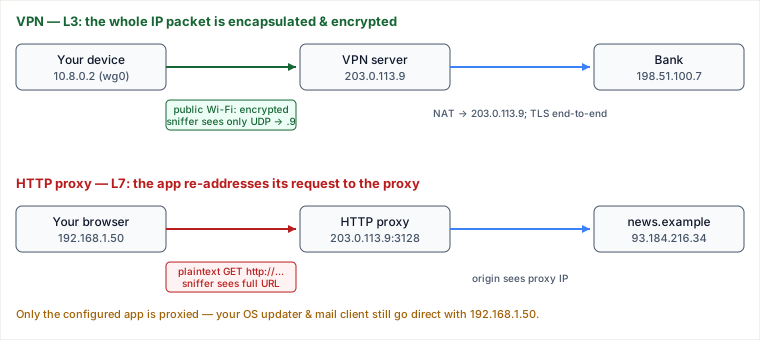
Both hide your origin IP, but they intercept traffic at different layers of the stack, and that single fact drives every other difference: a VPN installs a virtual network interface and encapsulates your entire IP packet (L3) inside an encrypted tunnel, so the operating system routes all traffic through it; a proxy is a server your application explicitly addresses at L7 (HTTP) or L4 (SOCKS), so only the apps you configure use it and no encryption is added unless the app already speaks TLS.
The mechanism: where the interception happens
A VPN client (WireGuard, OpenVPN, IPsec) creates a virtual interface — say wg0 with address 10.8.0.2 — and rewrites the routing table so the default route 0.0.0.0/0 points at it. When any process sends a packet, the kernel hands it to wg0, which encrypts the whole inner IP packet (its headers and payload) and wraps the ciphertext in a fresh outer UDP datagram addressed to the VPN server. The application never knows a tunnel exists; it just uses the network normally.
An HTTP proxy does none of that. There is no interface and no routing change. Instead the application is configured to send its request to the proxy's socket and to name the real destination inside the request (an absolute-URI GET, or a CONNECT host:443 for HTTPS). The kernel routes that packet to the proxy using your real IP over the local link, exactly like any other connection. The proxy parses the request at L7, opens its own connection to the origin, and relays bytes back. Nothing else on the machine is affected.
Traced: the same coffee-shop, two tools
You are on public Wi-Fi, local address 192.168.1.50. An attacker on the same Wi-Fi is running tcpdump. Watch what they can see in each case. To keep the comparison honest, both tools exit through the same host, 203.0.113.9 — once as a VPN server, once as an HTTP proxy — so every difference you see below comes from the mechanism, not the endpoint.
Case A — WireGuard VPN to bank.com (198.51.100.7)
| # | Where | Packet on the wire | Wi-Fi sniffer sees |
|---|---|---|---|
| 1 | Your app → kernel | Inner IP: src 10.8.0.2 → dst 198.51.100.7, TCP 443, TLS record | — (never on Wi-Fi) |
| 2 | wg0 | Encrypts the entire inner packet with ChaCha20-Poly1305; wraps it in UDP | — |
| 3 | Physical Wi-Fi | Outer IP: src 192.168.1.50 → dst 203.0.113.9, UDP/51820, opaque blob | Only "you talk to 203.0.113.9 over UDP." Not the bank's IP, not the hostname, not TLS. |
| 4 | VPN server | Decrypts, recovers inner packet, NATs src → 203.0.113.9, forwards | — |
| 5 | Bank | Sees a request from 203.0.113.9 | — |
Case B — HTTP proxy at proxy.example:3128 browsing http://news.example (192.0.2.80)
| # | Where | Packet on the wire | Wi-Fi sniffer sees |
|---|---|---|---|
| 1 | Browser → proxy | src 192.168.1.50 → dst 203.0.113.9:3128; body GET http://news.example/ HTTP/1.1, Host: news.example | Everything: your real IP, the proxy IP, the full URL and headers — plaintext. |
| 2 | Proxy | Opens its own TCP to 192.0.2.80:80, forwards the request | — |
| 3 | News site | Sees a request from the proxy's IP | — |
| 4 | Your mail client, OS updater | Go direct with src 192.168.1.50 | Full plaintext / real IP — the proxy never touched them. |
The decisive line is row 3 of Case A versus row 1 of Case B. The VPN's local link is opaque even about where you are going; the HTTP proxy's local link is fully readable. (For an HTTPS site over the proxy via CONNECT news.example:443, the sniffer sees the target hostname but not the content — because TLS, not the proxy, protects it. The proxy adds no confidentiality of its own.)
Split tunneling: the L3 analog of "per-app"
A VPN is not forced to be all-or-nothing. WireGuard's AllowedIPs and OpenVPN's routes decide which destination prefixes go through the tunnel. Set AllowedIPs = 10.0.0.0/8 and only corporate traffic is tunneled; Netflix and your video calls go straight out your real link at full speed. This is split tunneling, and it is exactly why a per-app proxy and a split-tunnel VPN can look similar in effect while differing in mechanism: the proxy selects by application, the VPN selects by destination IP range. Full-tunnel (0.0.0.0/0) is the default when the goal is privacy or public-Wi-Fi safety; split-tunnel is the default for corporate access where you only need the private network reachable.
Pitfalls
- "The proxy makes me anonymous." A plain HTTP proxy adds zero encryption. On hostile Wi-Fi, an unencrypted (
http://) request through a proxy is fully readable on your local link — the proxy only masks your IP from the origin server, not from anyone between you and the proxy. - DNS leaks. Even with a full-tunnel VPN, if the client doesn't also push DNS through the tunnel, your OS resolver queries the coffee-shop's DNS in the clear — leaking every hostname you visit despite the encrypted tunnel. Check that the VPN sets the tunnel's resolver.
- WebRTC / non-proxied protocols. Browser WebRTC can discover and reveal your real local IP via STUN, bypassing an HTTP proxy entirely. Proxies only catch the protocols you route to them.
- Trusting the exit node. Both tools shift trust to their operator. A free proxy or shady VPN can log, inject ads, or MITM your traffic at the exit — you've moved the observation point, not eliminated it.
- TLS interception at a "transparent" corporate proxy. Enterprise proxies that decrypt HTTPS install a root CA on your device and re-sign certificates. Confidentiality from the origin is intact, but the proxy sees plaintext. That's a feature for DLP and a surprise if you assumed end-to-end.
- Kill-switch gap. If a full-tunnel VPN drops and there's no kill switch, the OS silently falls back to the default route — traffic resumes over the naked link with your real IP, often unnoticed.
When to use which — and the trade-offs
These are not competitors so much as tools at different layers; a senior engineer picks by what must be protected and how broadly.
Reach for a VPN when…
- You need device-wide protection: every app, including ones you can't configure (OS services, native apps that ignore proxy settings).
- The local link is untrusted (public Wi-Fi, hostile networks) and you need the path itself encrypted, not just the payload.
- You need to reach a private network (corporate
10.0.0.0/8, a database in a VPC) as if you were inside it — this is L3 network membership, which a proxy cannot give.
Reach for a proxy when…
- You want to affect one application and leave the rest of the machine untouched — a browser profile, a scraping job, a CI runner.
- The value is L7 behavior the proxy uniquely provides: caching, content filtering, request logging, header rewriting, or geo-selection per request.
- You want high throughput with low overhead and rely on the app's own TLS for confidentiality (no per-packet encapsulation cost).
Cost of each choice
| Dimension | VPN (full tunnel) | HTTP/SOCKS proxy |
|---|---|---|
| Scope | Whole device | Only configured apps |
| Encryption added | Yes — device ↔ VPN server | None (rely on app TLS) |
| Local-link privacy | Destination hidden too | Destination/URL visible unless app uses TLS |
| Overhead | Per-packet encrypt + encapsulate; higher latency, MTU costs | Minimal; near line-rate |
| Granularity | By destination prefix (split tunnel) | By application |
| L7 features (cache/filter/rewrite) | No | Yes |
Choose a VPN when the threat is the network path or you need to be on a remote network; prefer a proxy when you need per-app control or L7 features and the confidentiality is already handled by TLS. In practice they compose: a corporate laptop often runs a split-tunnel VPN for private-subnet access and routes browser traffic through a filtering proxy for policy.
Takeaways
- The whole difference falls out of which layer intercepts: VPN encapsulates IP packets at L3 (device-wide, transparent to apps); a proxy is a server the app explicitly talks to at L7/L4 (per-app, no OS routing change).
- A VPN's local link is opaque even about the destination; a plain HTTP proxy adds no encryption — confidentiality still comes from the app's own TLS.
- Split tunneling (VPN, by destination prefix) and per-app proxying achieve similar selectivity by different mechanisms — know which knob you're turning.
- Both only relocate trust to the exit operator and can leak via DNS, WebRTC, or a dropped kill switch — the tunnel is not the whole story.
Re-authored/Deepened for this guide. Mechanism and packet trace drawn from the WireGuard whitepaper (Donenfeld, 2017) for L3 encapsulation and ChaCha20-Poly1305; RFC 7230 §5.3 (request-target forms: absolute-form for proxied requests, authority-form for CONNECT) and §5.7 (message forwarding), plus RFC 7231 §4.3.6 (the CONNECT method) for proxy behavior; RFC 8446 for where TLS provides end-to-end confidentiality independent of any proxy; and Cloudflare Learning Center and Mozilla MDN articles on VPNs, proxies, and DNS/WebRTC leaks.
🤖 Don't fully get this? Learn it with Claude
Stuck on VPN vs Proxy Server? Open Claude, copy a block below, and it'll teach you this exact concept — visually and interactively.
Build the mental picture, not memorization.
I just read a lesson on **VPN vs Proxy Server** (System Design) and want to truly understand it. Explain VPN vs Proxy Server from first principles using ONE vivid real-world analogy and a visual mental model — draw it as ASCII art or a clear step-by-step diagram — with a concrete example using real numbers. Then ask me one question to check I got the mental picture, and wait for my reply. If you're unsure or a claim isn't standard, say so and reason from first principles instead of guessing.
Socratic — adapts to where you're stuck.
Teach me **VPN vs Proxy Server** interactively. Ask me ONE guiding question at a time, wait for my answer, and adapt to my confusion — build the idea with me step by step instead of explaining it all at once. If you're unsure or a claim isn't standard, say so and reason from first principles instead of guessing.
Active recall exposes what you missed.
Quiz me on **VPN vs Proxy Server** with 5 questions, easy to tricky, ONE at a time. Tell me if each answer is right; at the end, explain clearly what I got wrong and why. If you're unsure or a claim isn't standard, say so and reason from first principles instead of guessing.
Intuition + hook + flashcards for long-term memory.
Help me remember **VPN vs Proxy Server** for the long term: give the one-sentence intuition, a memorable hook/mnemonic, a tiny worked example, and 3 active-recall flashcards (Q -> A). If you're unsure or a claim isn't standard, say so and reason from first principles instead of guessing.