Bloom Filters — How They Work (Examples & Sizing)
The problem: “have I seen this before?” at huge scale
A web crawler has visited 10 billion URLs; before crawling a new one it must ask “seen it?” — but storing every URL is terabytes. A Bloom filter answers in a few bits per item, with an occasional false “yes” and never a false “no”. Same question behind: is this username taken? has this user seen this ad? is this URL malicious (Chrome)? is this key even in this DB file?
How it works: a bit array + k hash functions
- ADD(x): hash x with k functions → k positions → set those bits to 1.
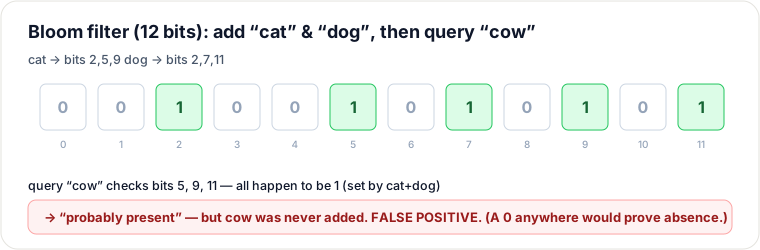
- CHECK(x): hash the same way → any bit 0 = definitely absent; all 1 = probably present.
We only ever set bits, never clear them — so a 0 is proof of absence, while all-1s can be a coincidence (a false positive). Watch it on 12 bits:
Why never a false negative
Once x is added, its k bits are 1 forever — a later CHECK(x) always finds them. Errors only go the other way.
Sizing (the dial)
More bits per item → fewer collisions. Rules: bits m = −n·ln p / 0.48; optimal hashes k = 0.693·(m/n).
Memorise: ~10 bits/item ≈ 1% false positives (independent of item size). 1M items at 1% → ~1.2 MB, k≈7.
| Target FP | bits/item | k |
|---|---|---|
| 10% | ~4.8 | ~3 |
| 1% | ~9.6 | ~7 |
| 0.1% | ~14.4 | ~10 |
Real uses
- LSM-tree DBs (Cassandra/RocksDB): one Bloom filter per SSTable → skip disk reads for absent keys.
- Chrome Safe Browsing; web-crawler dedup; CDN one-hit-wonder filtering.
Can’t delete (clearing a bit could break another key) — use a counting Bloom filter if you must.
Takeaways
- ADD sets k hashed bits; CHECK passes only if all k are 1; a single 0 = certain absence.
- ~10 bits/item ≈ 1% error, size-independent.
- The “should I even look?” gate in front of expensive lookups.
Re-authored from-scratch; diagram hand-authored (SVG) for this guide.
🤖 Don't fully get this? Learn it with Claude
Stuck on Bloom Filters — How They Work (Examples & Sizing)? Open Claude, copy a block below, and it'll teach you this exact concept — visually and interactively.
Build the mental picture, not memorization.
I just read a lesson on **Bloom Filters — How They Work (Examples & Sizing)** (System Design) and want to truly understand it. Explain Bloom Filters — How They Work (Examples & Sizing) from first principles using ONE vivid real-world analogy and a visual mental model — draw it as ASCII art or a clear step-by-step diagram — with a concrete example using real numbers. Then ask me one question to check I got the mental picture, and wait for my reply. If you're unsure or a claim isn't standard, say so and reason from first principles instead of guessing.
Socratic — adapts to where you're stuck.
Teach me **Bloom Filters — How They Work (Examples & Sizing)** interactively. Ask me ONE guiding question at a time, wait for my answer, and adapt to my confusion — build the idea with me step by step instead of explaining it all at once. If you're unsure or a claim isn't standard, say so and reason from first principles instead of guessing.
Active recall exposes what you missed.
Quiz me on **Bloom Filters — How They Work (Examples & Sizing)** with 5 questions, easy to tricky, ONE at a time. Tell me if each answer is right; at the end, explain clearly what I got wrong and why. If you're unsure or a claim isn't standard, say so and reason from first principles instead of guessing.
Intuition + hook + flashcards for long-term memory.
Help me remember **Bloom Filters — How They Work (Examples & Sizing)** for the long term: give the one-sentence intuition, a memorable hook/mnemonic, a tiny worked example, and 3 active-recall flashcards (Q -> A). If you're unsure or a claim isn't standard, say so and reason from first principles instead of guessing.