hard Bandwidth-Delay Product & Why a Fast Link Feels Slow
A single TCP connection never gets "the bandwidth" — it gets window ÷ RTT
Bandwidth is a property of the link. Throughput of one TCP connection is a property of the
connection, and it is capped by a completely different formula: throughput = window / RTT.
A sender may only have as much data unacknowledged and in flight as its send/receive window allows — once
that much data is out, it must stop and wait for an ACK before sending more, no matter how much spare bandwidth the
link has. If the window is smaller than what the link-plus-latency can actually hold, most of the link's capacity
sits idle every round trip.
The bandwidth-delay product (BDP)
The bandwidth-delay product is exactly that "how much can the link hold" number:
BDP = bandwidth × RTT
Picture the link as a pipe. Bandwidth is the pipe's cross-section (bits per second it can carry); RTT is how long a bit takes to travel to the far end and an acknowledgment to travel back. BDP is the volume of that pipe — the amount of data that must be "in flight" at any instant to keep the pipe completely full. If your window is smaller than BDP, the sender empties its allowance, then sits idle waiting for the round trip to complete before it can send more — the pipe runs less than full even though nothing is congested.
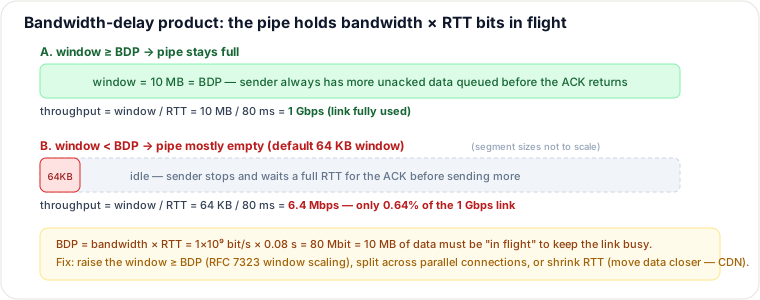
Traced example: a 1 Gbps link, 80 ms RTT
This is the classic "long fat network" case — high bandwidth, high latency, e.g. a transcontinental or satellite path.
| Step | Calculation | Result |
|---|---|---|
| BDP | 1×10⁹ bit/s × 0.08 s | 8×10⁷ bit = 80 Mbit |
| BDP in bytes | 80×10⁶ bit ÷ 8 | 10 MB must be in flight to fill the link |
| Default OS window | 64 KB = 64,000 bytes = 512,000 bit | window << BDP |
| Achievable throughput | window / RTT = 512,000 bit / 0.08 s | 6,400,000 bit/s = 6.4 Mbps |
| Link utilization | 6.4 Mbps / 1000 Mbps | 0.64% of the 1 Gbps link |
The link is not the bottleneck — the 64 KB window is. The connection physically cannot have more than 64 KB
outstanding at once, so it can never fill a pipe that holds 10 MB. This is why a "1 Gbps server" can feel no faster
than a cable modem for a single long-haul transfer: the number that matters is window / RTT, not the
NIC's rated speed.
Fixing it
- Window scaling (RFC 7323): TCP's original window field is only 16 bits (max 65,535 bytes). The window-scale option multiplies it by up to 2¹⁴, letting the effective window grow past 1 GB — enough to reach any realistic BDP. Both endpoints (and every middlebox in between) must support the option, or the window silently collapses back to 64 KB.
- Parallel connections: open N connections instead of one; N independent 64 KB windows behave like one N×64 KB window. Works even when window scaling is blocked, but multiplies connection-setup cost and lets N flows compete unfairly for a shared link versus one well-tuned connection.
- BBR-style pacing: instead of reacting to loss (classic loss-based congestion control), BBR continuously estimates the path's real bandwidth and RTT and paces sends to match — filling the BDP without needing to build a queue or drop a packet to find the limit.
Selection & trade-offs
Raise the window (scaling) when you control both endpoints' TCP stacks (your own services, your own clients) — it is the "fix the root cause" option: one connection, one congestion-control state machine, and it scales to any BDP once the option is negotiated. The catch: some old NAT boxes and firewalls strip the window-scale option in the handshake, silently capping real users back to ~64 KB with no visible error — verify with a packet capture, don't assume.
Parallel connections when you don't control the far end's window (e.g., an S3-style HTTP download) — many clients/CDNs use multi-range or multi-connection downloads for exactly this reason. Trade-off: more server-side sockets, more slow-start ramps to pay for, and it is a workaround, not a fix — you're multiplying small pipes instead of filling the big one.
Shrink RTT instead (move data closer — a CDN/edge cache) attacks the other factor in the product directly: if RTT drops from 80 ms to 4 ms, the BDP for the same link drops 20× too, so even a modest window now fills it. This is the best fix when the content is cacheable; it does nothing for dynamic, per-request, non-cacheable data, where you're back to tuning the window or using BBR.
Pitfalls
- Blaming the link. "We pay for 10 Gbps but this one transfer only gets 6 Mbps" is almost always a window/RTT problem, not a bandwidth problem — check the RTT and window size before opening a ticket with the ISP.
- Invisible on a LAN. At 1 ms RTT, BDP for the same 1 Gbps link is only ~125 KB — close enough to default windows that the problem doesn't show up until you go cross-region, transcontinental, or satellite (a "long fat network," RFC 1323's own term).
- Scaling negotiated but still capped. A middlebox that drops the window-scale option makes the connection silently behave as if scaling were never requested — no error, just a hard 64 KB ceiling.
Takeaways
- A single connection's throughput is
window / RTT, not the link's rated bandwidth. - BDP = bandwidth × RTT is the data that must be in flight to keep the pipe full; window < BDP ⇒ idle pipe.
- Fix by raising the window (RFC 7323 scaling), running parallel connections, or cutting RTT (CDN) — pick based on who controls which end of the connection.
- High-BDP "long fat networks" (cross-region, satellite) need this tuning; LANs rarely do.
Re-authored for this guide; bandwidth-delay-product diagram hand-authored as SVG. Follows RFC 1323 / RFC 7323 (TCP window scaling) and the "long fat network" literature; BBR per Cardwell et al., "BBR: Congestion-Based Congestion Control" (ACM Queue, 2016). See also: TCP Deep — Congestion Control & Head-of-Line Blocking, Capacity Estimation.
🤖 Don't fully get this? Learn it with Claude
Stuck on Bandwidth-Delay Product & Why a Fast Link Feels Slow? Open Claude, copy a block below, and it'll teach you this exact concept — visually and interactively.
Build the mental picture, not memorization.
I just read a lesson on **Bandwidth-Delay Product & Why a Fast Link Feels Slow** (System Design) and want to truly understand it. Explain Bandwidth-Delay Product & Why a Fast Link Feels Slow from first principles using ONE vivid real-world analogy and a visual mental model — draw it as ASCII art or a clear step-by-step diagram — with a concrete example using real numbers. Then ask me one question to check I got the mental picture, and wait for my reply. If you're unsure or a claim isn't standard, say so and reason from first principles instead of guessing.
Socratic — adapts to where you're stuck.
Teach me **Bandwidth-Delay Product & Why a Fast Link Feels Slow** interactively. Ask me ONE guiding question at a time, wait for my answer, and adapt to my confusion — build the idea with me step by step instead of explaining it all at once. If you're unsure or a claim isn't standard, say so and reason from first principles instead of guessing.
Active recall exposes what you missed.
Quiz me on **Bandwidth-Delay Product & Why a Fast Link Feels Slow** with 5 questions, easy to tricky, ONE at a time. Tell me if each answer is right; at the end, explain clearly what I got wrong and why. If you're unsure or a claim isn't standard, say so and reason from first principles instead of guessing.
Intuition + hook + flashcards for long-term memory.
Help me remember **Bandwidth-Delay Product & Why a Fast Link Feels Slow** for the long term: give the one-sentence intuition, a memorable hook/mnemonic, a tiny worked example, and 3 active-recall flashcards (Q -> A). If you're unsure or a claim isn't standard, say so and reason from first principles instead of guessing.