AI-Assisted Resume Creation
AI-Assisted Resume Creation
AI-assisted resume creation means using a large language model (LLM) as a drafting and editing partner for your resume, not as a ghostwriter that invents your career. You feed it structured raw material about your work; it returns tightened, quantified, keyword-aligned bullet points that you then verify and own. For a senior backend engineer, the resume is a lossy compression of years of work into one page that must survive two very different readers in under 20 seconds each: an automated parser and a skimming human. AI is a tool for winning both passes cheaply.
1. Intuition — the problem it solves
Most engineers write bad resumes for predictable reasons. They are too close to their own work to see what a stranger finds impressive, they default to duty language ("responsible for the payments service") instead of impact, and they under-quantify because the numbers feel obvious to them. Meanwhile the pipeline they must clear has two gates:
- The ATS (Applicant Tracking System) parse. Software extracts text and matches it against the job description's keywords. Weak keyword overlap can drop you before a human ever looks.
- The human recruiter skim. A non-engineer scans for scope signals: scale, ownership, technologies, and measurable outcomes.
AI attacks exactly these weaknesses. It is tireless at rephrasing, ruthless about cutting filler, and good at surfacing the impact you buried. It closes the gap between what you did and how a stranger reads it. The judgment about what is true and what matters stays with you.
2. Precise definition / how it works
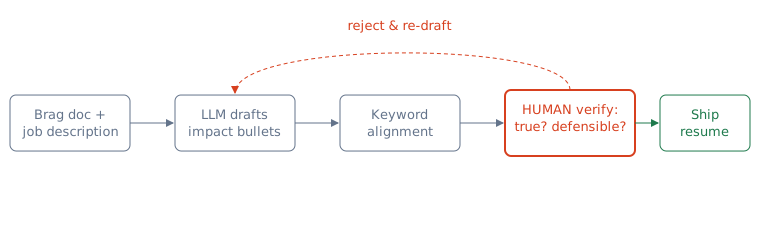
The workflow is a loop, not a one-shot prompt. Think of it as a pipeline:
- Input assembly. You provide the model your raw achievements (a "brag doc"), the target job description, and constraints (one page, backend-focused, seniority level).
- Transformation. The model rewrites each raw note into an impact bullet, typically in the form
Action verb + what you built + technology + quantified outcome. This is often called the XYZ / STAR-compressed pattern: "Accomplished X, measured by Y, by doing Z." - Alignment. You paste the job description and ask the model to identify missing keywords you legitimately have experience with, then weave them in truthfully.
- Verification (yours). Every number, claim, and technology must be something you can defend in the interview. The model hallucinates plausibly; you are the fact-checker of your own life.
The diagram below shows the loop and the mandatory human checkpoint before anything reaches an employer.
3. Concrete example — a prompt and a before/after
Give the model raw context and a strict template rather than asking "write my resume." A reusable prompt:
You are a technical resume editor for senior backend roles.
Rewrite each raw note below as ONE bullet using the pattern:
  <strong verb> + <what I built> + <tech> + <quantified result>
Rules: max 2 lines, no adjectives like "passionate",
keep every number I give, never invent numbers,
prefer active voice, lead with impact.

RAW NOTE: "Worked on the checkout service. It was slow.
I added Redis caching and fixed some N+1 queries.
p99 went from 800ms to 180ms. Handles Black Friday now."

TARGET JD KEYWORDS: distributed systems, latency, caching, Java
A weak self-written bullet versus the AI-assisted output:
- Before:
Responsible for improving the checkout service performance using caching. - After:
Cut checkout p99 latency 78% (800ms → 180ms) by adding Redis caching and eliminating N+1 queries in a Java service that now sustains Black Friday peak traffic.
Notice what changed: a duty became an outcome, the number is front-loaded, the JD keywords (caching, latency, Java) appear naturally, and every claim traces back to something you actually did and can explain.
4. When to use / when NOT — the judgment layer
Use AI for: rephrasing duty-language into impact, tightening bullets to two lines, generating variants tailored per job description, catching missing keywords, and fixing tone/consistency. These are high-volume mechanical edits where the model's fluency is a genuine multiplier.
Prefer alternatives when:
- Named alternative — a resume template / builder (Overleaf, Novoresume). These solve layout and ATS-safe formatting, which the LLM does not. Use a clean template for structure and the LLM for content; they are complementary, not competitors.
- Named alternative — a human reviewer (mentor, peer, recruiter). Superior for calibration: is this scope actually senior for this company? Is a claim believable? AI has no ground truth about your industry's bar. Use humans for the final sanity pass.
- Named alternative — writing it yourself unaided. Better when the content is highly specific or sensitive (e.g., describing a nuanced architecture you led) and phrasing accuracy matters more than speed. Here AI's smoothing can flatten the very detail that signals seniority.
The trade-off in one line: AI maximizes fluency and throughput but has zero ground truth. Templates own format; humans own calibration; you own the facts. Do not let the tool that knows least about your career make the final claims.
5. Pitfalls / what interviewers probe
- Fabricated metrics. The biggest risk. If a bullet says "reduced costs 40%," a senior interviewer will ask how you measured it. If the number came from the model, not from you, you are cornered. Never ship a number you cannot derive on a whiteboard.
- Keyword stuffing. Overlapping the JD too aggressively reads as generic and can trip modern ATS that weight context. If your resume claims Kafka, expect Kafka questions.
- Homogenized voice. Recruiters now recognize the flat "leveraged synergies to drive impactful solutions" LLM register. Sameness signals low effort. Inject specific systems, real constraints, and concrete nouns.
- The defend-every-line test. The interview is where the resume is audited. Every verb ("architected," "led," "scaled") implies a story. Interviewers reverse-engineer bullets into behavioral questions. If you cannot narrate the STAR behind a line, cut it.
- Privacy. Do not paste confidential employer data (unreleased metrics, internal architecture) into third-party models.
Key takeaways
- AI is a drafting and editing partner, not a ghostwriter — it converts duty-language into quantified impact fast, but owns none of the facts.
- Work as a loop: raw brag doc + job description → LLM draft → keyword alignment → your verification → ship.
- Use the pattern
strong verb + what you built + tech + quantified outcome; front-load the number. - Complement, don't replace: templates own format, humans own calibration, AI owns throughput, you own truth.
- Never ship a metric or verb you cannot defend — the interview reverse-engineers every bullet into a behavioral question.
- Avoid fabricated numbers, keyword stuffing, homogenized AI voice, and pasting confidential data into third-party tools.
🤖 Don't fully get this? Learn it with Claude
Stuck on AI-Assisted Resume Creation? Open Claude, copy a block below, and it'll teach you this exact concept — visually and interactively.
Build the mental picture, not memorization.
I just read a lesson on **AI-Assisted Resume Creation** (Career & Job Search) and want to truly understand it. Explain AI-Assisted Resume Creation from first principles using ONE vivid real-world analogy and a visual mental model — draw it as ASCII art or a clear step-by-step diagram — with a concrete example using real numbers. Then ask me one question to check I got the mental picture, and wait for my reply. If you're unsure or a claim isn't standard, say so and reason from first principles instead of guessing.
Socratic — adapts to where you're stuck.
Teach me **AI-Assisted Resume Creation** interactively. Ask me ONE guiding question at a time, wait for my answer, and adapt to my confusion — build the idea with me step by step instead of explaining it all at once. If you're unsure or a claim isn't standard, say so and reason from first principles instead of guessing.
Active recall exposes what you missed.
Quiz me on **AI-Assisted Resume Creation** with 5 questions, easy to tricky, ONE at a time. Tell me if each answer is right; at the end, explain clearly what I got wrong and why. If you're unsure or a claim isn't standard, say so and reason from first principles instead of guessing.
Intuition + hook + flashcards for long-term memory.
Help me remember **AI-Assisted Resume Creation** for the long term: give the one-sentence intuition, a memorable hook/mnemonic, a tiny worked example, and 3 active-recall flashcards (Q -> A). If you're unsure or a claim isn't standard, say so and reason from first principles instead of guessing.