Converting ER Diagrams to Relational Model
Converting an ER (Entity-Relationship) diagram to a relational model means translating its entities, attributes, and relationships into relational database tables. The goal is to preserve every fact the ER diagram captures while reshaping it into something a relational engine can store, index, and query consistently. In this lesson we convert an Employee Management System ER diagram into a relational schema by following a small set of repeatable steps.
The ER diagram below is our starting point. It has two entities, Employee and Payroll, joined by a one-to-one relationship. Notice the attribute shapes: a plain oval is a simple attribute, a double oval (Contact_Number) is multivalued, an oval hanging off other ovals (Full_Name) is composite, and a dashed oval (Age, Net_Pay) is derived. Those shapes drive every decision that follows.
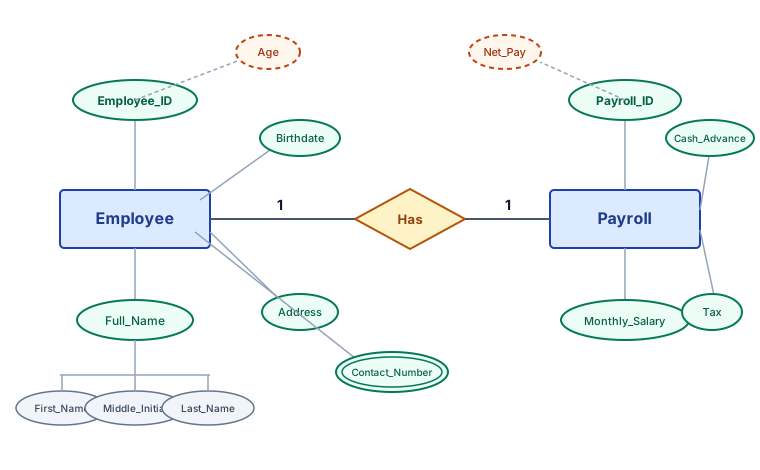
Working from the diagram above, here is the step-by-step conversion.
Step 1: Convert entities into tables
Each entity becomes a table. The Employee Management System has two main entities:
- Employee becomes an Employee table.
- Payroll becomes a Payroll table.
Each table gets columns for the entity's attributes, with one or more columns designated as the primary key that uniquely identifies a row.
Step 2: Define attributes for each table
Employee table
The Employee entity's attributes become columns in the Employee table:
| Column Name | Data Type | Description |
|---|---|---|
| Employee_ID | INT (PK) | Primary key for each employee |
| First_Name | VARCHAR | First name of the employee |
| Middle_Initial | CHAR | Middle initial of the employee |
| Last_Name | VARCHAR | Last name of the employee |
| Birthdate | DATE | Date of birth of the employee |
| Gender | CHAR | Gender of the employee |
| Address | VARCHAR | Address of the employee |
| Position | VARCHAR | Job position or title of the employee |
Special handling:
- Full_Name is a composite attribute, so it is not stored as a single column. Its subcomponents First_Name, Middle_Initial, and Last_Name are stored as separate columns instead.
- Contact_Number is a multivalued attribute (one employee may have several numbers). A column cannot hold many values atomically, so this moves into a separate Employee_Contact table in Step 3.
- Age is a derived attribute that can always be recomputed from Birthdate. We drop it to avoid storing redundant, drift-prone data.
Payroll table
The Payroll entity becomes the Payroll table:
| Column Name | Data Type | Description |
|---|---|---|
| Payroll_ID | INT (PK) | Primary key for each payroll record |
| Employee_ID | INT (FK) | Foreign key linking to the Employee table |
| Monthly_Salary | DECIMAL | Monthly salary of the employee |
| Cash_Advance | DECIMAL | Cash advance taken by the employee |
| Tax | DECIMAL | Taxes owed by the employee |
Special handling:
- Net_Pay is a derived attribute (computed from salary, advances, and tax), so we remove it.
Step 3: Handle multivalued attributes
A multivalued attribute cannot live in a single column without breaking first normal form. We give it its own table, one row per value, so that every cell holds a single atomic value.
Employee_Contact table
To store multiple contact numbers per employee, we create an Employee_Contact table where each row is one contact number tied to one employee:
| Column Name | Data Type | Description |
|---|---|---|
| Employee_ID | INT (PK, FK) | Foreign key to Employee; part of the composite primary key |
| Contact_Number | VARCHAR | One contact number for the employee; part of the composite primary key |
The primary key here is the pair (Employee_ID, Contact_Number) together, which keeps any single number from being recorded twice for the same employee.
Step 4: Define relationships between tables
- The diagram shows a one-to-one (1:1) relationship between Employee and Payroll. We represent it with a foreign key: Employee_ID in Payroll references Employee_ID in Employee. Because the relationship is 1:1, that Employee_ID column is also marked as a key in Payroll (often the table's primary key, or a unique key alongside Payroll_ID), which enforces at most one payroll row per employee.
- There is a one-to-many (1:M) relationship between Employee and Employee_Contact: one employee owns many contact numbers, and each contact row belongs to exactly one employee via its Employee_ID foreign key.
A clarifying note on keys: a column can be both a primary key and a foreign key at the same time, and that is exactly what happens to Employee_ID in both Employee_Contact and Payroll — it uniquely identifies the row (PK role) and points back to Employee (FK role). The only thing that never happens is a column being a foreign key to its own table's primary key: Employee_ID inside Employee is purely a primary key, not a foreign key referencing itself. "PK" and "FK" describe two independent jobs, and the same column can hold both unless the reference would point at the row's own table.
Step 5: Final relational model structure
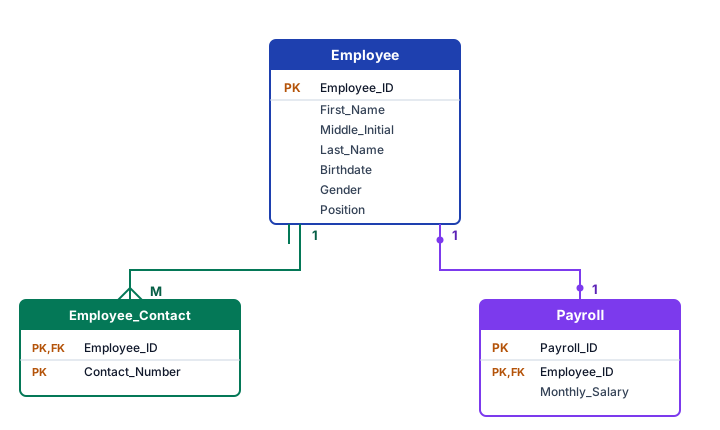
After conversion, the Employee Management System has three tables:
- Employee — core employee data: Employee_ID (PK), First_Name, Middle_Initial, Last_Name, Birthdate, Gender, Address, and Position. (Age is derived and omitted.)
- Payroll — payroll data per employee: Payroll_ID (PK), Employee_ID (PK/FK, enforcing the 1:1 link), Monthly_Salary, Cash_Advance, and Tax. (Net_Pay is derived and omitted.)
- Employee_Contact — one row per contact number, keyed on (Employee_ID, Contact_Number), where Employee_ID is also the FK that implements the 1:M relationship.
The final relational schema for the Employee Management System looks like this.
Source
Adapted from the Knowledge Guide lesson "Converting ER Diagrams to Relational Model" (Databases › Relational Model), site/databases/relational-model/005-converting-er-diagrams-to-relational-model.html. The worked Employee Management System example, the five-step conversion procedure, and the handling rules for composite, multivalued, and derived attributes follow standard relational-design treatment as presented in that lesson.
🎯 STRICT STANDOUT: Why / mental model / when-not / worked / failure / hostile panel — Converting ER Diagrams to Relational Model
Why this concept exists (judgment layer)
ER shapes (composite, multivalued, derived, 1:1/1:N/M:N) are not optional art — each shape forces a concrete table/column decision. Staff interviews probe whether you map mechanically or invent tables by vibes.
Mental model (install this intuition)
Entity → table. Composite → flatten components. Multivalued → new table with composite PK (owner_id, value). Derived → drop or materialize with policy. 1:1 → FK UNIQUE on one side (participation decides which). 1:N → FK on many. M:N → junction with two FKs as PK.
Worked example with numbers or traced steps
Employee.Contact_Number (multivalued) ↛ one column
→ Employee_Contact(Employee_ID, Contact_Number) PK both
Employee 1:1 Payroll → Payroll.Employee_ID UNIQUE FK
Age derived from Birthdate → omit Age column (recompute)
Full_Name composite → First_Name, Middle_Initial, Last_Name columns
Check: no cell holds a list; no derived drift column without refresh plan
When NOT to use / named alternative
Do not store multivalued attributes as CSV-in-a-column 'to avoid a join' — that is 1NF violation and unqueryable. Do not auto-materialize every derived attribute without stating refresh/invalidation. Prefer view/compute for Age/Net_Pay unless read path is hot and you document consistency.
Failure mode & ops fingerprint
Fingerprint: Contact_Number column with '555,666' strings; Age wrong after birthday; two Payroll rows per employee because Employee_ID was not UNIQUE; junction table without composite PK allowing double enrollments.
Hostile-panel drills (defend the decision)
Q1. Where does a multivalued attribute live after conversion?
Model answer: Own table: one row per value, PK (entity_key, value) or (entity_key, sequence), FK to owner.
Q2. How do you enforce 1:1 Employee–Payroll in SQL?
Model answer: FK from Payroll to Employee and UNIQUE (or PK) on Payroll.Employee_ID so at most one payroll row per employee.
Q3. Why drop Age rather than store it?
Model answer: It is determined by Birthdate; storing it creates update anomaly when time passes and the column is not recomputed.
🤖 Don't fully get this? Learn it with Claude
Stuck on Converting ER Diagrams to Relational Model? Open Claude, copy a block below, and it'll teach you this exact concept — visually and interactively.
Build the mental picture, not memorization.
I just read a lesson on **Converting ER Diagrams to Relational Model** (Databases) and want to truly understand it. Explain Converting ER Diagrams to Relational Model from first principles using ONE vivid real-world analogy and a visual mental model — draw it as ASCII art or a clear step-by-step diagram — with a concrete example using real numbers. Then ask me one question to check I got the mental picture, and wait for my reply. If you're unsure or a claim isn't standard, say so and reason from first principles instead of guessing.
Socratic — adapts to where you're stuck.
Teach me **Converting ER Diagrams to Relational Model** interactively. Ask me ONE guiding question at a time, wait for my answer, and adapt to my confusion — build the idea with me step by step instead of explaining it all at once. If you're unsure or a claim isn't standard, say so and reason from first principles instead of guessing.
Active recall exposes what you missed.
Quiz me on **Converting ER Diagrams to Relational Model** with 5 questions, easy to tricky, ONE at a time. Tell me if each answer is right; at the end, explain clearly what I got wrong and why. If you're unsure or a claim isn't standard, say so and reason from first principles instead of guessing.
Intuition + hook + flashcards for long-term memory.
Help me remember **Converting ER Diagrams to Relational Model** for the long term: give the one-sentence intuition, a memorable hook/mnemonic, a tiny worked example, and 3 active-recall flashcards (Q -> A). If you're unsure or a claim isn't standard, say so and reason from first principles instead of guessing.