Use Case Diagrams
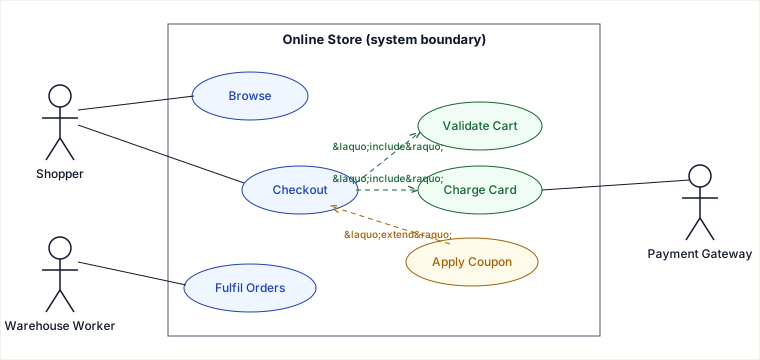
A use case diagram works by drawing a closed box (the system boundary) and forcing every behaviour you commit to build to sit inside it while every actor who triggers that behaviour sits outside it — so the diagram becomes a contract: whatever is in the box is in scope, whatever crosses the boundary is an interface you must support, and everything else is explicitly not the system's job. The two relationship arrows, <<include>> and <<extend>>, exist only to factor that box: include pulls shared steps out so they are written once; extend bolts optional steps on without touching the base flow.
Building one, traced step by step
Don't start by drawing ovals. A use case diagram is derived from a requirements sentence, actor by actor. Take a real brief: "An online store lets shoppers browse and check out; checkout always validates the cart and always charges a card; a shopper can optionally apply a coupon at checkout; a warehouse worker fulfils paid orders; a payment gateway authorises charges." Walk it left to right:
| # | Phrase in the brief | What it becomes | Why |
|---|---|---|---|
| 1 | "shoppers", "warehouse worker" | Primary actors (left) | They initiate goals; each wants a result from the system. |
| 2 | "payment gateway authorises" | Secondary/supporting actor (right) | The system calls it; it serves a use case rather than starting one. |
| 3 | "browse", "check out", "fulfil orders" | Use cases (ovals in the box) | Each is a goal-level chunk of observable value — not a button click. |
| 4 | "checkout always validates the cart" | Checkout <<include>> Validate Cart | Always + shared → factor the mandatory step out so it is defined once and reused by any flow that needs it. |
| 5 | "optionally apply a coupon" | Apply Coupon <<extend>> Checkout | Optionally → the base Checkout is complete on its own; the coupon is conditional, added behaviour. |
| 6 | "always charges a card" | Checkout <<include>> Charge Card; Charge Card talks to the Payment Gateway actor | Mandatory sub-step, and the step that crosses the boundary to the supporting actor. |
Notice the test you applied at each arrow: "always vs. optionally" decided include vs. extend, and "who starts it" decided primary vs. supporting actor. That is the whole method.
Include vs. extend — and why "function call" is the wrong picture
The arrows point in opposite directions, which is the single fact most people get wrong:
<<include>>points from the base use case to the included one: Checkout → Validate Cart. The base knows about and always runs the included behaviour. Reading direction: "Checkout includes Validate Cart."<<extend>>points from the extending use case to the base: Apply Coupon → Checkout. The base is oblivious; the extension hooks in conditionally at a defined point. Reading direction: "Apply Coupon extends Checkout."
Why "include = a function call" is loose (the fix)
It is tempting to say include is "like calling a function." That analogy quietly imports two things that are not in the model and leads to bad diagrams:
- It implies a runtime ordering / call stack. A use case diagram has no execution semantics — no sequence, no return value, no "who runs first." It only asserts that the included behaviour is part of every instance of the base. Sequencing belongs in an activity or sequence diagram, not here.
- It implies the base depends on a concrete callee. The point of
includeis the reverse motivation: factor out behaviour that is shared by several use cases (e.g. Validate Cart is also used by Save Cart for Later) so it is specified once. It is reuse-of-requirement, not invocation.
A tighter mental model: include is mandatory, base-driven factoring ("always, and shared"); extend is optional, condition-driven augmentation ("sometimes, and the base doesn't know"). If you can describe a successful run of the base use case without ever mentioning the other behaviour, it is an extend; if you can't, it is an include.
Pitfalls
- Functional decomposition disguised as use cases. Ovals like Click Add Button, Open Cart Page, Validate Email Field are UI steps, not goals. A use case must deliver standalone, observable value to an actor ("Place an order"), not name a screen or a method. The give-away: a swarm of tiny ovals all chained with include arrows — you've drawn a flowchart.
- Drawing the include arrow backwards. Engineers habitually point the included use case at the base (because "it gets called"). UML is the other way: base → included. Getting it wrong inverts the meaning of the whole diagram for any reader.
- Using extend for mandatory behaviour. If the step always happens, it is an
include.extendis for genuinely conditional behaviour with an explicit extension point; over-using it produces diagrams that hide required steps. - Treating systems and tools as primary actors. A database, a cache, or a cron timer is usually not an actor. Actors are the entities with a goal at the boundary. Supporting systems your use case calls out to (the Payment Gateway) go on the right as secondary actors; pure infrastructure isn't drawn at all.
- Putting numbers, conditions, and data on the diagram. No "if total > $50", no field lists. Use case diagrams are a scope map; detail lives in the written use case spec, activity diagrams, and class diagrams.
When to use it / when NOT to
A use case diagram is one tool for capturing requirements, and a senior engineer picks it against named alternatives by what the reader needs.
Decision signals (reach for it when)
- You are at the scope-negotiation stage with non-technical stakeholders and need a single picture of "who uses this and what for" that fits on a whiteboard.
- The system has several distinct actor roles and you need to show who can do what — it doubles as a coarse authorization map.
- You want a checklist that also states the negative space (what is out of scope) so the boundary can be argued and signed off.
Trade-offs vs. alternatives
| Alternative | You gain | It costs |
|---|---|---|
| User stories / backlog ("As a shopper, I want…") | Estimable, prioritizable, testable units; fits agile flow; carries acceptance criteria. | No single picture of the whole boundary or actor relationships; easy to lose the forest for hundreds of cards. |
| Activity diagram | Real control flow — branches, loops, ordering — inside one use case. | Says nothing about who the actors are or overall scope; too detailed for a kickoff conversation. |
| Sequence diagram | Exact message ordering between objects/services at runtime. | Object-level, not goal-level; useless for scoping with a product owner. |
Choose a use case diagram when the question is "what is in and out of scope, and which actor wants each capability" at the start of a project; prefer user stories when you need to plan and estimate iterative delivery, and prefer an activity or sequence diagram once a single use case is agreed and you need its internal flow. In practice they compose: the use case diagram frames scope, then each oval expands into stories plus an activity/sequence diagram.
Concrete choice: for the online-store brief above, kicking off with the client you'd draw the use case diagram (5 ovals, 3 actors, agree the box). Once "Checkout" is locked, you'd throw it away for that use case and draw an activity diagram of validate → coupon? → charge → confirm, because the order and the coupon condition now matter.
Takeaways
- The mechanism is the boundary box: inside = committed scope, crossing it = an actor interface, unstated = explicitly not the system's job.
- Build it by reading the brief: "who starts it" sorts primary vs. supporting actors; "always vs. optionally" sorts
includevs.extend. includepoints base→sub and means mandatory, shared;extendpoints sub→base and means optional, base-oblivious. It is requirement factoring, not a runtime function call — there is no ordering or call stack here.- It's a scope map, not a design: when ordering, branching, or data appear, switch to activity/sequence diagrams or user stories.
Sources: the UML 2.5.1 specification (OMG) for the normative meaning and arrow direction of <<include>> and <<extend>>; Martin Fowler, UML Distilled (3rd ed.) for the "use cases are goals, not functional decomposition" caution; Alistair Cockburn, Writing Effective Use Cases for goal-level granularity and actor classification. Online-shopping example and trade-off framing re-authored and deepened for this guide to add a traced build-from-brief walkthrough and to replace the loose "include = function call" analogy with the correct "mandatory shared factoring, no runtime semantics" model.
Interview drills
Q1. Which way does the <<include>> arrow point?
From the base use case to the included one (Checkout → Validate Cart). The base always runs the included behaviour; pointing it the other way inverts the diagram's meaning.
Q2. Why is <<include>> not a function call?
A use case diagram has no execution semantics — no ordering, no return value, no call stack. Include asserts the sub-behaviour is part of every run of the base and is factored out because it is shared; it is requirement reuse, not invocation. Sequencing belongs in an activity or sequence diagram.
Q3. Primary vs secondary actor?
A primary actor initiates a goal (the shopper wants to check out); a secondary/supporting actor is one the system calls out to (the payment gateway authorises a charge). "Who starts it?" is the test.
🤖 Don't fully get this? Learn it with Claude
Stuck on Use Case Diagrams? Open Claude, copy a block below, and it'll teach you this exact concept — visually and interactively.
Build the mental picture, not memorization.
I just read a lesson on **Use Case Diagrams** (OO & Low-Level Design) and want to truly understand it. Explain Use Case Diagrams from first principles using ONE vivid real-world analogy and a visual mental model — draw it as ASCII art or a clear step-by-step diagram — with a concrete example using real numbers. Then ask me one question to check I got the mental picture, and wait for my reply. If you're unsure or a claim isn't standard, say so and reason from first principles instead of guessing.
Socratic — adapts to where you're stuck.
Teach me **Use Case Diagrams** interactively. Ask me ONE guiding question at a time, wait for my answer, and adapt to my confusion — build the idea with me step by step instead of explaining it all at once. If you're unsure or a claim isn't standard, say so and reason from first principles instead of guessing.
Active recall exposes what you missed.
Quiz me on **Use Case Diagrams** with 5 questions, easy to tricky, ONE at a time. Tell me if each answer is right; at the end, explain clearly what I got wrong and why. If you're unsure or a claim isn't standard, say so and reason from first principles instead of guessing.
Intuition + hook + flashcards for long-term memory.
Help me remember **Use Case Diagrams** for the long term: give the one-sentence intuition, a memorable hook/mnemonic, a tiny worked example, and 3 active-recall flashcards (Q -> A). If you're unsure or a claim isn't standard, say so and reason from first principles instead of guessing.