Introduction to Data Partitioning
Partitioning works by pushing each row's partition key through a deterministic routing function — typically hash(key) mod N or a range lookup — so every key maps to exactly one of N partitions; a request then goes straight to the single node that owns that key instead of scanning all of them. That single property is what lets a dataset outgrow one machine: instead of one server holding everything and answering everything, each node holds a disjoint slice and answers only for its slice.
Three words get used constantly and are worth pinning down. A partition is one disjoint slice of the dataset. The partition key is the column (or derived value) the routing function reads to decide which slice a row belongs to. A shard is a partition that lives on its own node — in practice people say "shard" for horizontal partitioning across separate machines, and "partition" for slices that may still share a machine, but the routing mechanism is identical.
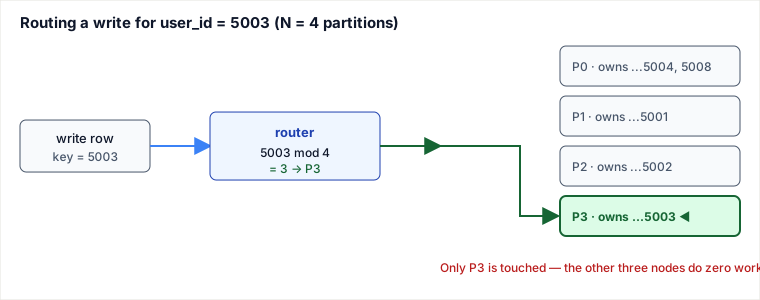
Worked example: hash-routing five users across 4 nodes
Take a users table with user_id as the partition key and N = 4 partitions. The router computes partition_id = user_id mod 4. (Real systems hash the key first — e.g. murmur3(key) mod N — so that sequential or clustered IDs get shuffled; the arithmetic is the same, the inputs are just scrambled. We route on the raw value here so every step is verifiable.)
| Insert / lookup | user_id mod 4 | Lands on |
|---|---|---|
| 5001 | 1 | P1 |
| 5002 | 2 | P2 |
| 5003 | 3 | P3 |
| 5004 | 0 | P0 |
| 5008 | 0 | P0 |
Now the payoff. A read for user_id = 5003 recomputes 5003 mod 4 = 3 and hits only P3. It never asks P0, P1, or P2. That is the whole point: a point lookup on the partition key becomes a single-node request, so aggregate read/write throughput scales roughly linearly as you add nodes — four nodes serve ~4× the traffic one node could, and each node stores only ~1/4 of the rows so the working set fits in RAM.
Pitfalls
- Hot partitions from a skewed key. Even distribution of keys is not even distribution of load. Partition a social graph by
celebrity_idand the node owning one 50-million-follower account melts while the rest idle. The key must spread traffic, not just row count. - The
mod Nresharding storm. Routing withhash(key) mod Nis cheap untilNchanges. Go from 4 to 5 nodes and13 mod 4 = 1becomes13 mod 5 = 3— the key must physically move. Roughly1 − 1/(N+1)of all keys relocate at once — for 4→5 nodes that is ~80% (only keys withk mod 4 = k mod 5stay, 4 of every 20): a cluster-wide data shuffle and cache wipe just to add one machine. This is exactly why consistent hashing exists (see below). - Cross-partition queries fall off a cliff. Any query that does not include the partition key must fan out to every node and merge results (scatter-gather). A join, a
GROUP BYon a non-key column, or "list all orders in March" now costs N round-trips and tail latency dominated by the slowest node. - Cross-partition transactions lose atomicity. A single-node
BEGIN/COMMITbecomes a two-phase commit across shards — slower, and a coordinator crash can leave locks held. Many teams redesign the schema to keep a transaction's rows co-located on one partition rather than pay this. - Rebalancing is not free at runtime. Moving a partition to a new node consumes network and disk on machines that are already the bottleneck, and reads/writes for keys in flight can see errors or stale data mid-move if the cutover is sloppy.
- Shipping the design doc without the two numbers. Before any production cutover, force two numbers into the design doc: the estimated remap fraction when
Nchanges (1 − 1/(N+1)for mod-N; ~1/Nfor consistent hashing) and a named hot-key story (which key melts first, and what the plan is — salt, dedicated shard, or cache).
When to partition — and when not to
Partitioning is a scaling tool with a real tax attached (routing logic, painful cross-partition queries, distributed transactions, operational rebalancing). Reach for it only when a single node genuinely cannot cope. Concrete signals that point here: write throughput or dataset size exceeds what one machine can hold or ingest; the working set no longer fits in one node's RAM so the buffer cache thrashes; or a single primary's write path is saturated and you cannot buy a bigger box.
vs. vertical scaling (a bigger machine). The cheapest fix is a larger instance — no code changes, joins and transactions stay trivial. Choose vertical scaling until you hit the ceiling (cost curve goes vertical, or you physically cannot get more RAM/IOPS); partition only once that ceiling is real.
vs. replication. Replication makes full copies of the dataset on every node; partitioning makes disjoint splits. Replication scales reads and gives high availability, but every replica still holds 100% of the data and every write hits the primary — so it does nothing for write throughput or storage size. Partitioning scales writes and storage but by itself gives you no redundancy: lose a shard and you lose that slice. Choose replication when your problem is read volume or availability; choose partitioning when it is write volume or total data size. Production systems almost always do both — partition first, then replicate each partition.
Choosing the partition key: hash vs. range. A hash key (hash(user_id) mod N) gives near-uniform spread and kills hotspots, but destroys ordering — range scans like "orders between two dates" must scatter to every node. A range key (e.g. partition by date) keeps scans local and cheap, but concentrates today's writes on one "latest" partition, recreating a hot node. Choose hashing when access is point-lookup by key; choose range when range scans dominate and you can tolerate/manage write hotspots.
vs. plain mod N — prefer consistent hashing at scale. If you expect to add or remove nodes, mod N's full-reshuffle on resize is a dealbreaker. Consistent hashing (a hash ring) moves only ~1/N of keys when a node joins or leaves. Choose mod N for a fixed cluster size where simplicity wins; choose consistent hashing whenever elastic scaling or node failures are routine.
Drill — say the answer out loud before reading it
- Your reads are slow but the data still fits on one node — partition or replicate? Why? Expected: replicate. Replication makes full copies, so it scales read volume and gives availability; partitioning solves write throughput and storage ceilings, which is not the problem here. Partitioning would add routing logic and cross-partition query pain for zero benefit.
- You run
hash(key) mod 4and add a 5th node — what fraction of keys move, and why? Expected: ~80%. A key stays only whenk mod 4 = k mod 5, which holds for exactly 4 residues of every 20 consecutive values — so 4/20 stay and 16/20 (=1 − 1/(N+1)) relocate. - Your partition key spreads rows evenly but one node still melts — what did the key fail to spread? Expected: load (traffic), not row count. A celebrity account's partition gets a uniform share of rows but a wildly outsized share of requests — the key must spread traffic, not just data.
Takeaways
- Partitioning = a deterministic function from partition key to exactly one node, so key-based requests hit one node instead of all N — that is what makes writes and storage scale horizontally.
- The partition key is the single most consequential decision: it must spread load (not just rows), and it dictates which queries stay cheap (contain the key) versus which fan out to every node.
- Partitioning scales writes/storage; replication scales reads/availability. They solve different problems and are normally combined.
hash(key) mod Nis simple but reshuffles ~80% of keys (1 − 1/(N+1)) on resize; use consistent hashing when the cluster grows, shrinks, or loses nodes.
Re-authored and deepened for this guide. Draws on Martin Kleppmann, Designing Data-Intensive Applications (ch. 6, "Partitioning") for hashing vs. range partitioning and hot-spot/rebalancing analysis; Karger et al., "Consistent Hashing and Random Trees" (1997) for the resize-cost argument; and the DynamoDB and Apache Cassandra documentation for partition-key / hash-ring practice.
🤖 Don't fully get this? Learn it with Claude
Stuck on Introduction to Data Partitioning? Open Claude, copy a block below, and it'll teach you this exact concept — visually and interactively.
Build the mental picture, not memorization.
I just read a lesson on **Introduction to Data Partitioning** (System Design) and want to truly understand it. Explain Introduction to Data Partitioning from first principles using ONE vivid real-world analogy and a visual mental model — draw it as ASCII art or a clear step-by-step diagram — with a concrete example using real numbers. Then ask me one question to check I got the mental picture, and wait for my reply. If you're unsure or a claim isn't standard, say so and reason from first principles instead of guessing.
Socratic — adapts to where you're stuck.
Teach me **Introduction to Data Partitioning** interactively. Ask me ONE guiding question at a time, wait for my answer, and adapt to my confusion — build the idea with me step by step instead of explaining it all at once. If you're unsure or a claim isn't standard, say so and reason from first principles instead of guessing.
Active recall exposes what you missed.
Quiz me on **Introduction to Data Partitioning** with 5 questions, easy to tricky, ONE at a time. Tell me if each answer is right; at the end, explain clearly what I got wrong and why. If you're unsure or a claim isn't standard, say so and reason from first principles instead of guessing.
Intuition + hook + flashcards for long-term memory.
Help me remember **Introduction to Data Partitioning** for the long term: give the one-sentence intuition, a memorable hook/mnemonic, a tiny worked example, and 3 active-recall flashcards (Q -> A). If you're unsure or a claim isn't standard, say so and reason from first principles instead of guessing.