Benefits of Data Partitioning
Every benefit of partitioning traces back to one mechanism: splitting a large dataset into disjoint subsets by a partition key so that any given request touches only the subset(s) it needs — the rest are never read, locked, or shipped over the network. The ten-item benefit lists you see elsewhere are really four consequences of that single idea: partition pruning (skip irrelevant data), horizontal scale-out (spread data and load over machines), parallelism (work the subsets at once), and operational locality (back up, drop, or move one subset without touching the others). This page shows each one with real numbers, then where partitioning is the wrong tool.
Mechanism 1 — Partition pruning (the query-performance win)
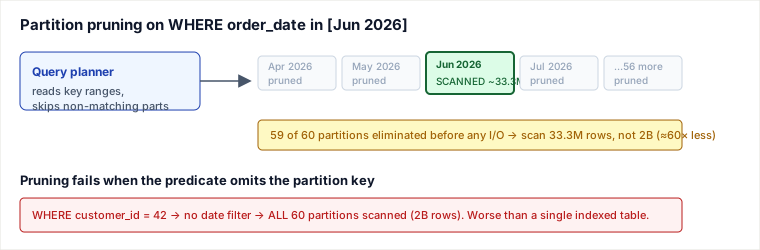
When the partition key appears in a query's predicate, the planner compares the predicate to each partition's key range and eliminates the partitions that cannot contain matching rows before touching any data. This is the source of the "only query the mystery-novels partition" story — but the value is quantitative, not anecdotal.
Consider an orders table with 2,000,000,000 rows spanning 5 years, range-partitioned by month into 60 partitions of ~33.3M rows each. A dashboard runs:
SELECT status, COUNT(*)
FROM orders
WHERE order_date >= '2026-06-01' AND order_date < '2026-07-01'
GROUP BY status;
Trace of what the planner does:
| Step | Without partitioning | With monthly partitions |
|---|---|---|
| Partitions considered | 1 giant heap | 60 |
| Partitions pruned by date predicate | — | 59 |
| Rows scanned | 2,000,000,000 | ~33,300,000 |
| I/O relative to full scan | 1.0× | ~0.017× (≈60× less) |
The 60× reduction is not a heuristic — it is exactly the ratio of the matching key-range to the whole domain. A B-tree index on order_date also helps a single range query, but pruning stacks on top of indexing and, unlike a secondary index, keeps every partition's own indexes small (a 33M-row index is far shallower than a 2B-row one), so index maintenance on writes stays cheap too.
Mechanism 2 — Horizontal scale-out (scalability, load balancing, throughput)
Pruning helps one machine. Scale-out is what lets you outgrow one machine at all. Sharding by a hash of the partition key spreads both bytes and QPS across N nodes: each node owns ~1/N of the keyspace and, if the key distributes evenly, serves ~1/N of the traffic. Adding capacity is then a matter of adding shards rather than buying an ever-bigger single server — which is the real content behind the "enhanced scalability" and "load balancing" bullets.
Worked numbers: 8,000 write QPS against user data, hash-sharded by user_id.
| Shards | Data per shard | Write QPS per shard |
|---|---|---|
| 4 | 25% | 2,000 |
| 8 | 12.5% | 1,000 |
| 16 | 6.25% | 500 |
Doubling shards halves per-shard load — provided the key is high-cardinality and evenly requested. That proviso is where partitioning most often goes wrong in practice (see Pitfalls).
Mechanism 3 — Parallelism and operational locality
Because partitions are disjoint, independent workers can process them at once — a MapReduce/Spark job assigns one task per partition, and a 12-region dataset finishes an aggregation in roughly the time of its slowest region rather than the sum of all twelve. The same disjointness gives cheap operations: dropping last year's data becomes DROP PARTITION orders_2025_01 (an O(1) metadata operation) instead of a DELETE that scans and logs tens of millions of rows and then needs a vacuum. Backups, archival, and index rebuilds all narrow to one partition. This is the substance behind "simplified data management" and "faster recovery": at ~1 KB/row the 2B-row table is ~2 TB, so restoring the three hot monthly partitions (~33.3M rows ≈ ~33 GB each) touches ~100 GB, not the whole 2 TB.
Two claims the original page got wrong
Hot/cold storage tiering is NOT vertical partitioning. The old #6 said a streaming service "uses vertical partitioning to store high-resolution files separately from low-resolution versions." Vertical partitioning splits the columns of one table into separate tables (e.g. user_profile vs user_login_blob). Placing hot data on SSD/NVMe and cold data on cheap object storage by access temperature is data / storage tiering (a form of horizontal partitioning over rows or objects, keyed by recency or access frequency). It is a real benefit — a table range-partitioned by month can put the last 3 months on fast storage and archive the rest to S3 — but call it by its right name, or you will reach for column-splitting when you meant tiering.
"Isolation limits a breach to one partition" is an overclaim. Partitioning is a performance and availability boundary, not a security boundary. If an attacker compromises a database credential or the node itself, partitions on that node are equally exposed — the query engine can read them all. Segregating sensitive columns into a separate store with its own encryption keys and access policy does help, but the protection comes from the separate credentials/keys/network isolation, not from partitioning per se. Treat security as an argument for a distinct trust domain, not a free side effect of splitting a table.
Pitfalls
- Cross-partition queries erase the win. Any query without the partition key in its predicate must fan out to all partitions and merge results — often slower than a single indexed table (see the red band in the diagram). A schema partitioned by
order_datemakesWHERE customer_id = ?a full fan-out. - Hot partitions / skew. Partitioning by
countrywhen 70% of users are in one country means one shard carries 70% of load — the average-case math above lies. A celebrity user or a monotonic key (auto-increment, timestamp) funnels all recent writes to the newest shard. - Cross-partition transactions and joins. A transaction spanning two shards needs distributed commit (2PC or sagas); a join across shards needs a scatter-gather. Both add latency and failure modes that a single node never had.
- Rebalancing is expensive. Going from 8 to 9 hash shards with naive
hash % Nremaps almost every key. This is exactly why consistent hashing / virtual nodes exist — but that machinery is now your problem. - Too many partitions. Thousands of tiny partitions bloat the planner's catalog and per-query planning time; pruning 10,000 partitions on every query has its own cost.
When to use partitioning — and when not to
Reach for it when the working set no longer fits comfortably on one node (data > ~single-server capacity, or write QPS beyond one node's ceiling), and your dominant access pattern carries a natural key you can partition on (time-series scanned by time; multi-tenant data queried per tenant; user data keyed by user_id). Those two conditions together are the signal.
Concrete decision vs named alternatives:
- vs. Replication (read replicas): Replication copies the whole dataset to more nodes — it scales reads and boosts availability but does nothing for write throughput or single-dataset size, and every replica still holds everything. Choose replication when you are read-heavy and the data fits one node; choose partitioning when the data or the write load exceeds one node. Serious systems use both: shard for size/writes, replicate each shard for read scale and HA.
- vs. Vertical scaling (a bigger box): Buying more CPU/RAM/NVMe is by far the simplest fix — no cross-partition joins, no distributed transactions, no rebalancing. Choose the bigger box until you hit its ceiling or its price curve turns vertical; the cost of partitioning is permanent application and operational complexity, so defer it as long as one machine (plus replicas) suffices.
- vs. Better indexing / caching on one node: If your pain is a few slow queries rather than raw capacity, an index or a cache is cheaper and keeps transactions local. Partition only when pruning/scale-out addresses a problem indexing cannot.
What partitioning costs you: fan-out on non-key queries, distributed transactions, rebalancing machinery, hot-spot risk, and operational surface area. You pay all of that up front; you get scale-out and locality in return. Make the trade only when a single node (with replicas) genuinely can't keep up.
Takeaways
- One mechanism — disjoint subsets by a partition key — produces all the listed benefits: pruning, scale-out, parallelism, and operational locality. Reason from the mechanism, not the catalog.
- The gains are quantitative and predictable: pruning cuts I/O by the ratio of matched-range to domain (60× in the traced example); scale-out divides load by N only if the key is high-cardinality and evenly requested.
- Partitioning is a performance/availability boundary, not a security boundary; hot/cold placement is data tiering, not vertical partitioning.
- Prefer a bigger box or replication until one node truly can't hold the data or absorb the writes — partitioning's complexity is the price of the ticket.
Re-authored/Deepened for this guide. Sources: Kleppmann, Designing Data-Intensive Applications (Ch. 6, Partitioning) for partition-key/skew/rebalancing and the shard-plus-replicate pattern; PostgreSQL documentation on declarative partitioning and partition pruning for the pruning mechanism and DROP PARTITION semantics; Amazon DynamoDB / Cassandra partition-key and hot-partition guidance; AWS S3 storage-class / lifecycle-tiering docs for the corrected data-tiering terminology. Worked numbers are illustrative but arithmetically exact.
🤖 Don't fully get this? Learn it with Claude
Stuck on Benefits of Data Partitioning? Open Claude, copy a block below, and it'll teach you this exact concept — visually and interactively.
Build the mental picture, not memorization.
I just read a lesson on **Benefits of Data Partitioning** (System Design) and want to truly understand it. Explain Benefits of Data Partitioning from first principles using ONE vivid real-world analogy and a visual mental model — draw it as ASCII art or a clear step-by-step diagram — with a concrete example using real numbers. Then ask me one question to check I got the mental picture, and wait for my reply. If you're unsure or a claim isn't standard, say so and reason from first principles instead of guessing.
Socratic — adapts to where you're stuck.
Teach me **Benefits of Data Partitioning** interactively. Ask me ONE guiding question at a time, wait for my answer, and adapt to my confusion — build the idea with me step by step instead of explaining it all at once. If you're unsure or a claim isn't standard, say so and reason from first principles instead of guessing.
Active recall exposes what you missed.
Quiz me on **Benefits of Data Partitioning** with 5 questions, easy to tricky, ONE at a time. Tell me if each answer is right; at the end, explain clearly what I got wrong and why. If you're unsure or a claim isn't standard, say so and reason from first principles instead of guessing.
Intuition + hook + flashcards for long-term memory.
Help me remember **Benefits of Data Partitioning** for the long term: give the one-sentence intuition, a memorable hook/mnemonic, a tiny worked example, and 3 active-recall flashcards (Q -> A). If you're unsure or a claim isn't standard, say so and reason from first principles instead of guessing.