What is a Database
Why a database instead of just files?
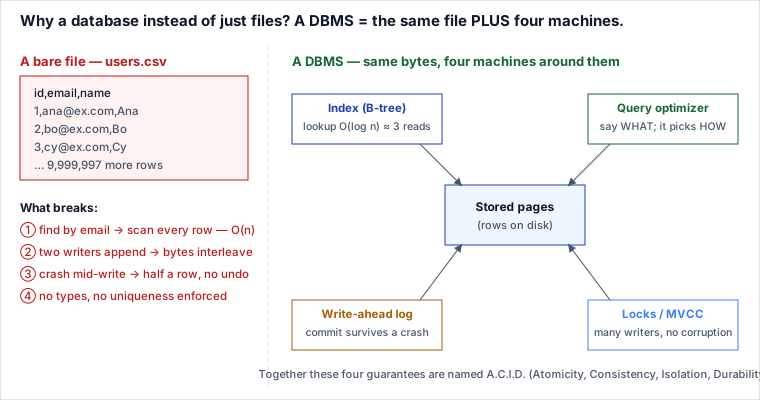
A database is a file plus four machines a bare file lacks: an index that finds a row without reading the whole file, concurrency control that lets many writers touch the data at once without corrupting it, a write-ahead log that makes a committed change survive a crash, and a declarative query engine that decides how to fetch what you asked for. You can store the same bytes in a CSV; what you cannot get from the CSV is those four guarantees, and every "characteristic" people list for databases (fast retrieval, integrity, safe concurrent access, reliability) is just a downstream effect of one of them.
Keep the four machines in view — the rest of this unit takes each one apart:
- Indexing. A B-tree (or B+tree) on a key turns "scan the whole file to find one record" into a few page reads. On a 1-million-row table stored at roughly 80 rows per 8 KB page, a full scan reads about 12,500 pages — O(n). A B-tree with a fan-out of a few hundred is only 3–4 levels deep, so the same lookup touches about 3–4 pages — O(log n). That gap, multiplied by every request, is the whole economic case for a database.
- Concurrency control. Row-level locks and MVCC (multi-version concurrency control) let one team update row 5 while another reads row 900, serializing only the writes that actually conflict on the same row. Two OS processes appending to a raw file have no such referee: their bytes interleave and the file is corrupt, or one overwrites the other's change (the lost update).
- Durability & crash recovery. Before
COMMITreturns, the DBMS writes the intended change to a write-ahead log and flushes (fsyncs) that log to disk. If the power cuts the instant after, restart replays the log: committed work is redone, half-finished work is undone. Rewriting a file by hand has no such log — a crash mid-write leaves a truncated, undefined file. - Declarative querying. You write what you want (
SELECT * FROM users WHERE email = ?) and a cost-based optimizer uses live statistics to pick how — index scan vs. full scan, which join order. With a file you hand-code the "how" yourself, and re-code it every time the data shape changes.
The Central Hub: The Buffer Pool Manager
Connecting all these machines is the Buffer Pool Manager, a shared RAM cache that holds copies of database pages. The buffer pool acts as the coordinator that makes indexing and logging work together efficiently in memory:
- Connecting the Index: When descending a B-tree, the engine does not read disk pages directly. It queries the buffer pool. If the target page is resident in RAM (a buffer hit), it is accessed in nanoseconds. If it is a buffer miss, the manager loads the page from disk into a buffer frame.
- Connecting the WAL: When a row is modified, the change is written directly to the page in the buffer pool, marking it as "dirty". Writing the full 8 KB page to disk for every single write would stall execution. Instead, the engine writes a compact transaction record to the sequential WAL on disk and commits. The dirty pages in the buffer pool are then written back to disk lazily in the background, safe in the knowledge that any crash can be reconstructed by replaying the WAL.
A fifth machine is often bundled in: integrity constraints — column types, NOT NULL, uniqueness, foreign keys — enforced centrally by the engine so bad data cannot be written at all, rather than hoped for in every application that opens the file. Taken together, these guarantees are what the acronym ACID (Atomicity, Consistency, Isolation, Durability) names.
Traced example: 10 million users, CSV vs. table
Store the same 10M users in a flat users.csv and in a users table with a primary key on id and a unique index on email. Run three ordinary operations and watch what each choice does:
| Operation | Plain CSV file | DBMS (indexed table) |
|---|---|---|
Find the user with email = 'ana@ex.com' |
No index → read rows top to bottom until found; on average scans ~5M rows (all 10M if absent). O(n), and it grows linearly with the file. | Descend the B-tree on email: ~3–4 page reads regardless of table size. O(log n), sub-millisecond. |
| Two people sign up with the same new email at the same instant | Each process checks "is this email present?", both scan and see "no", both append. Result: a duplicate account — or, if the two appends interleave at the byte level, a corrupt line. The last writer can also silently clobber the other. | The unique index + row locks serialize them: the first INSERT commits, the second hits the uniqueness constraint and fails cleanly. Exactly one account exists; nothing is corrupted. |
| Update one user's name; power cut mid-write | A safe update rewrites the file; a crash partway leaves it truncated — some rows gone, one row half-written, and no record of what was actually saved. | The change is in the WAL and fsynced before COMMIT returned. On restart the log is replayed: the update is either fully applied or not at all (atomic + durable). The data file is never left half-written. |
The complexity numbers you will be asked about
There is no single Big-O for "a database," but these recur:
- Point lookup by key: O(log n) with a B-tree, ~O(1) average with a hash index — vs. O(n) for a file scan.
- Range query ("all rows between X and Y"): O(log n + k) with a B-tree, where k is the result size. A hash index cannot serve ranges at all — which is exactly why B-trees are the default for general-purpose stores.
- Write: O(log n) to update the index structure, plus a near-sequential append to the WAL. The sequential WAL append is what buys durability without paying for a random disk write on the critical path.
- Space: O(n) for the data plus O(n) for every index. Each index is a space-and-write-cost trade for read speed — which is why "just index every column" is a design smell, not a best practice.
Pitfalls & misconceptions
- "A database is just a spreadsheet / a big file." The tables are the least interesting part. The value is the four machines around the bytes; a spreadsheet has none of them (no crash recovery, no concurrency control, no optimizer).
- "Add indexes to make everything fast." Reads speed up; every write now has to maintain each index, and each index costs O(n) space. Indexes are a targeted trade, not free.
- "The DBMS makes concurrency automatically correct." It gives you the tools (locks, MVCC, isolation levels), but weak isolation still permits real anomalies (lost updates, write skew). You must choose the isolation level your invariant needs — a later page in this unit.
- "Durable means the data file is written on commit." Usually not — only the WAL is guaranteed flushed at commit; the data pages are written lazily. Durability comes from the log, not from the data file being up to date.
When a plain file is the right call (selection & trade-offs)
"Use a database" is not always the answer. Reach for a full DBMS when you need concurrent, safe, queryable access to data that must survive a crash. Reach for something simpler when one of those needs is genuinely absent:
- Append-only log files (application logs, an event stream batch-processed later): fine when you only ever append and read sequentially. The moment you need "find record X" or "update X safely while others read it," you would be reinventing indexing and locking — badly.
- An in-memory map in your process: fastest possible, zero durability and single-process. Correct for a cache or regenerable data; wrong the instant a restart must not lose data or a second process needs the same state.
- An embedded database (SQLite): a real B-tree, transactions, and SQL in a single file with no server — the right pick for single-writer local apps (a phone app, a desktop tool, a browser). You get the four machines without operating a server; you give up high-concurrency multi-writer throughput.
- Key-value store (Redis, DynamoDB) vs. a full RDBMS: choose KV when access is purely by key with no joins or ad-hoc queries — you trade query flexibility for very low, predictable latency and easy horizontal scaling. Choose an RDBMS when access patterns are not known upfront, or you need multi-row transactions (moving money between two accounts atomically).
Takeaways
- A database is not "a place to put data" — it is indexing + concurrency control + durability + a declarative query engine bundled behind one interface.
- Each machine closes one specific failure of a bare file: slow scans (index), lost updates and byte corruption (locks/MVCC), crash corruption (WAL), and hand-coded access paths (optimizer).
- ACID is just the name for the guarantees those machines jointly provide; every "database characteristic" is a downstream effect of them.
- Files, in-memory maps, embedded stores, and key-value stores are the right tool when you provably do not need all four guarantees — know which one your workload actually requires before choosing.
Sources: Database Internals (Petrov); Designing Data-Intensive Applications (Kleppmann, ch. 3 & 7); PostgreSQL and SQLite documentation on WAL and MVCC. Re-authored/Deepened for this guide.
🤖 Don't fully get this? Learn it with Claude
Stuck on What is a Database? Open Claude, copy a block below, and it'll teach you this exact concept — visually and interactively.
Build the mental picture, not memorization.
I just read a lesson on **What is a Database** (Databases) and want to truly understand it. Explain What is a Database from first principles using ONE vivid real-world analogy and a visual mental model — draw it as ASCII art or a clear step-by-step diagram — with a concrete example using real numbers. Then ask me one question to check I got the mental picture, and wait for my reply. If you're unsure or a claim isn't standard, say so and reason from first principles instead of guessing.
Socratic — adapts to where you're stuck.
Teach me **What is a Database** interactively. Ask me ONE guiding question at a time, wait for my answer, and adapt to my confusion — build the idea with me step by step instead of explaining it all at once. If you're unsure or a claim isn't standard, say so and reason from first principles instead of guessing.
Active recall exposes what you missed.
Quiz me on **What is a Database** with 5 questions, easy to tricky, ONE at a time. Tell me if each answer is right; at the end, explain clearly what I got wrong and why. If you're unsure or a claim isn't standard, say so and reason from first principles instead of guessing.
Intuition + hook + flashcards for long-term memory.
Help me remember **What is a Database** for the long term: give the one-sentence intuition, a memorable hook/mnemonic, a tiny worked example, and 3 active-recall flashcards (Q -> A). If you're unsure or a claim isn't standard, say so and reason from first principles instead of guessing.