Creating an ER Diagram for Employee Management System
Creating an ER Diagram for an Employee Management System
An ER diagram is not decoration — it is a contract about "how many" that you translate, almost mechanically, into tables, keys, and foreign-key constraints. Read two things off every line: cardinality (can one Employee have many Departments, or exactly one?) and participation (must every Employee have one, or is it optional?). Those two answers decide whether a fact becomes a column, a NOT NULL FK, a UNIQUE FK, or a whole junction table. This page builds the canonical Employee–Department–Project–Dependent model and shows the translation for each construct.
Step 1 — classify the attributes (stored vs derived)
Before entities relate, get their attributes right. The distinction that trips people up is stored (base) vs derived. A derived attribute is computed from other data and therefore not stored; a stored attribute is an independent value you actually enter and keep.
| Kind | ER notation | Employee example |
|---|---|---|
| Simple / stored | solid ellipse | EmpID, Monthly_Salary, DOB |
| Key | underlined | EmpID |
| Composite | ellipse with sub-ellipses | Name → (First, Last) |
| Multivalued | double ellipse | Phone_Numbers |
| Derived | dashed ellipse | Age (from DOB), Net_Pay (= salary − deductions) |
The test is one question: can I compute it from other attributes? Age = today − DOB → derived (and time-dependent — a second reason not to store it). Net_Pay = Monthly_Salary − deductions → derived. Monthly_Salary is not computable from anything else — it is entered and kept → stored. (An earlier version of this page wrongly called Monthly_Salary derived; it is base data.)
Step 2 — the entities and their keys
- Employee(EmpID; Name[composite]; DOB; Monthly_Salary; Age, Net_Pay[derived])
- Department(DeptID; DeptName; NumEmployees[derived — COUNT of its employees])
- Project(ProjID; ProjName; Location)
- Dependent(DependentName — partial key only; Relationship) — a weak entity, owned by Employee
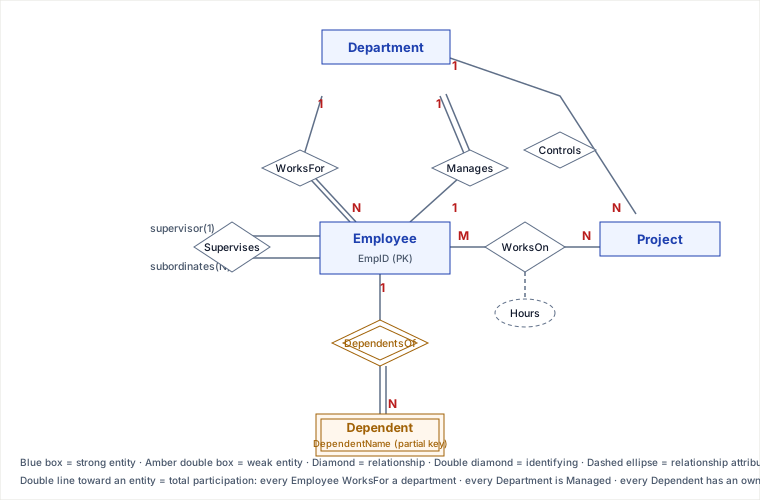
Now the six relationships. Read the diagram, then the translation table below it.
Step 3 — translate each relationship to a schema decision
| Relationship | Cardinality & participation | Becomes |
|---|---|---|
| WorksFor (Emp–Dept) | Employee(N)→Department(1); total on Employee | FK Employee.dept_id NOT NULL |
| Manages (Emp–Dept) | 1:1; total on Department, partial on Employee | FK Department.mgr_id UNIQUE NOT NULL |
| Controls (Dept–Proj) | Department(1)→Project(N) | FK Project.dept_id |
| WorksOn (Emp–Proj) | M:N, attribute Hours | junction WorksOn(emp_id, proj_id, hours), PK(emp_id, proj_id) |
| Supervises (Emp–Emp) | unary 1:N | self-FK Employee.supervisor_id (nullable) |
| DependentsOf (Emp–Dep) | 1:N, identifying | Dependent PK = (emp_id, DependentName); emp_id FK NOT NULL ON DELETE CASCADE |
The three constructs that carry the exam weight
Many-to-many ⇒ a junction table. An M:N cannot be a foreign key on either side (a column holds one value, not a set). It becomes its own table whose PK is the pair of parent keys. Crucially, relationship attributes live on the junction: Hours describes the Employee-on-Project pairing, so it belongs on WorksOn, not on Employee or Project.
Unary (self-referencing) ⇒ a nullable self-FK. Supervises relates Employee to Employee — the classic org chart. It becomes supervisor_id pointing back at Employee.EmpID. It must be nullable: the person at the top has no supervisor, and a NOT NULL here makes the first insert impossible (a chicken-and-egg cycle).
Weak entity ⇒ composite PK + identifying relationship. Dependent has no key of its own — two employees can each have a "Dependent named Alex". Its identity is borrowed from its owner: the full PK is (owner's EmpID + partial key DependentName). The owning link (DependentsOf) is an identifying relationship (double diamond), and because the dependent cannot exist without the employee, the FK is NOT NULL … ON DELETE CASCADE.
Pitfalls
- Putting the 1:1 FK on the wrong side. For Manages, place the FK on Department (total participation — every department has exactly one manager) so it can be
NOT NULL. Put it on Employee and it is NULL for all but a handful of rows, and you cannot enforce "exactly one". - Faking M:N with a column. A comma-separated
projectscolumn (or repeatedproj1, proj2, …) can't be indexed, joined, or constrained. The junction table is not optional. - A
NOT NULLunary FK. Makes the root of the hierarchy un-insertable and forbids the natural "CEO reports to no one". - Surrogate key on a weak entity. Slapping
DependentID SERIALon Dependent throws away the existence-dependence: you lose the automatic composite identity and must re-implement the cascade rule by hand. - Storing derived values. Persisting
AgeorNumEmployeesis a denormalization — sometimes worth it for read performance, but then you own keeping it consistent when inputs change. Default to computing on read; store only with a deliberate recompute/invalidation strategy.
Selection & trade-offs — weak entity vs strong entity + FK
The real design decision is whether Dependent should be a weak entity with an identifying relationship or a strong entity with a surrogate PK and an ordinary FK.
- Weak + identifying models existence-dependence directly: you get the composite PK, the "one Alex per employee" uniqueness, and
ON DELETE CASCADEsemantics for free. Cost: composite keys are clumsy as FK targets and many ORMs handle them poorly. - Strong + surrogate FK gives a single stable ID that is easy to reference and ORM-friendly. Cost: you must add a
UNIQUE(emp_id, DependentName)yourself to keep the no-duplicate rule, and enforce delete-with-owner behaviour explicitly.
Rule of thumb: choose the weak entity when the child genuinely cannot exist without the parent and is identified within it (dependents, order-line-items, invoice rows). Choose strong + surrogate when the child has independent identity or is referenced from elsewhere in the schema.
Takeaways
- An ER diagram translates mechanically: cardinality + participation → column vs NOT NULL FK vs UNIQUE FK vs junction table.
- M:N always needs a junction; relationship attributes (Hours) live there.
- Weak entity = borrowed identity: composite PK (owner key + partial key) + identifying relationship + cascade delete.
- Unary self-FK must be nullable; 1:1 FK goes on the totally-participating side so it can be NOT NULL.
Re-authored and deepened for this guide, based on the canonical COMPANY schema from Elmasri & Navathe, Fundamentals of Database Systems, and standard ER-to-relational mapping rules.
🎯 STRICT STANDOUT: Why / worked / when-not / failure / drills — ER Diagram — Employee Management System
Why this concept exists (judgment chain)
EMS is the canonical mapping stress-test: 1:N WorksFor, 1:1 Manages (FK on total side), M:N WorksOn with Hours, unary Supervises (nullable self-FK), and weak Dependent (composite PK + CASCADE). Each construct teaches a different schema decision — not six random diamonds.
Worked example with numbers or traced steps
WorksFor total: Employee.dept_id NOT NULL.
Manages 1:1 total on Dept: Department.mgr_id UNIQUE NOT NULL (not on Employee).
WorksOn M:N: WorksOn(emp_id, proj_id, hours) PK(emp_id, proj_id).
Supervises unary: Employee.supervisor_id NULL — CEO has no boss.
Dependent weak: PK(emp_id, DependentName), ON DELETE CASCADE.
Derived: Age, NumEmployees — compute by default; store only with recompute strategy.
When NOT to use / named alternative
Prefer strong entity + surrogate DependentID when ORMs hate composite keys and dependents are referenced elsewhere — then add UNIQUE(emp_id, DependentName) yourself. Do not use NOT NULL on supervisor_id. Do not put Hours on Employee or Project.
Failure / ops fingerprint
Chicken-and-egg insert failure with NOT NULL supervisor_id. Orphan dependents after employee delete without CASCADE. Double-count payroll if Hours were wrongly stored on Employee and Project. Ops: check FK ON DELETE policies and UNIQUE on 1:1 manager column.
Hostile-panel Q&As (model answers)
Q1. Why place Manages FK on Department not Employee?
Model answer: Total participation on Department lets NOT NULL + UNIQUE enforce exactly one manager; on Employee most rows would be NULL and "exactly one" is unenforceable.
Q2. Weak vs strong Dependent?
Model answer: Weak encodes existence-dependence and identity-within-owner; strong+surrogate is ORM-friendly but reimplements uniqueness and cascade.
Q3. Is Monthly_Salary derived?
Model answer: No — base entered value. Net_Pay and Age are derived.
🤖 Don't fully get this? Learn it with Claude
Stuck on Creating an ER Diagram for Employee Management System? Open Claude, copy a block below, and it'll teach you this exact concept — visually and interactively.
Build the mental picture, not memorization.
I just read a lesson on **Creating an ER Diagram for Employee Management System** (Databases) and want to truly understand it. Explain Creating an ER Diagram for Employee Management System from first principles using ONE vivid real-world analogy and a visual mental model — draw it as ASCII art or a clear step-by-step diagram — with a concrete example using real numbers. Then ask me one question to check I got the mental picture, and wait for my reply. If you're unsure or a claim isn't standard, say so and reason from first principles instead of guessing.
Socratic — adapts to where you're stuck.
Teach me **Creating an ER Diagram for Employee Management System** interactively. Ask me ONE guiding question at a time, wait for my answer, and adapt to my confusion — build the idea with me step by step instead of explaining it all at once. If you're unsure or a claim isn't standard, say so and reason from first principles instead of guessing.
Active recall exposes what you missed.
Quiz me on **Creating an ER Diagram for Employee Management System** with 5 questions, easy to tricky, ONE at a time. Tell me if each answer is right; at the end, explain clearly what I got wrong and why. If you're unsure or a claim isn't standard, say so and reason from first principles instead of guessing.
Intuition + hook + flashcards for long-term memory.
Help me remember **Creating an ER Diagram for Employee Management System** for the long term: give the one-sentence intuition, a memorable hook/mnemonic, a tiny worked example, and 3 active-recall flashcards (Q -> A). If you're unsure or a claim isn't standard, say so and reason from first principles instead of guessing.