What is a Distributed File System
What Is a Distributed File System
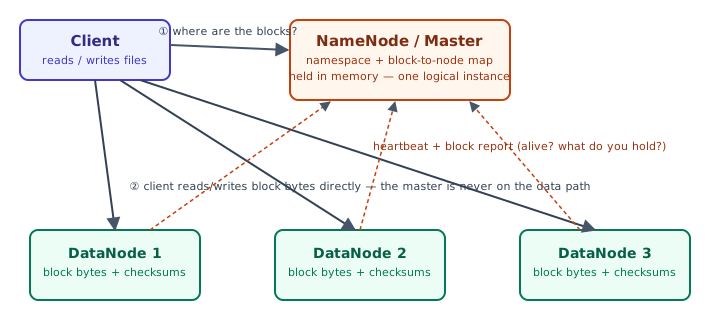
A distributed file system (DFS) manages files and directories whose data is spread across many physical machines, while presenting a single, unified namespace to clients — so opening /data/logs/2026-07-02.log feels exactly like opening a local file, even though the bytes might live on a rack of machines the client never talks to directly. This is the storage layer underneath systems like Hadoop, large-scale analytics warehouses, and high-throughput data pipelines.
Key characteristics
- Data distribution — files are split into fixed-size blocks (64–256 MB is typical) and spread across many machines, so no single disk or server is a capacity bottleneck.
- Transparency — clients see one logical filesystem; the mapping from file → blocks → physical machines is hidden behind a client library and a metadata service.
- Scalability — capacity and throughput grow roughly linearly by adding more storage nodes, since block placement is handled by the metadata layer rather than baked into any one machine.
- Fault tolerance — each block is replicated (commonly 3x) onto independent machines and racks, so a disk, node, or even a whole-rack failure doesn't lose data.
- Consistency — the guarantee a client gets about seeing its own and others' writes. This is the part most overviews wave their hands over; it gets a dedicated, deeper treatment further down this page.
Where This Shows Up
Common use cases
- Cloud storage services — Google Drive, Dropbox, and similar products use a DFS internally to store user files across many machines.
- Big data platforms — Hadoop-style analytics pipelines read and write petabyte-scale datasets from HDFS or similar systems.
- Content delivery — replicating content close to where it's consumed to cut latency and spread load.
- High-performance computing — many compute nodes need concurrent access to the same large datasets.
Representative systems
| System | Metadata role | Storage role | Notable trait |
|---|---|---|---|
| HDFS | NameNode | DataNode | write-once-read-many; built for Hadoop/MapReduce-style batch analytics |
| Google File System (GFS) | Master | Chunkserver | 64 MB chunks; relaxed, at-least-once record-append semantics |
| Ceph (CephFS) | Metadata Server (MDS) | Object Storage Daemon (OSD) | POSIX-compliant; clients compute placement via CRUSH instead of a lookup table |
| GlusterFS | Elastic hashing / distributed hash table | Brick (per-server storage volume) | Scale-out, POSIX-like, no single metadata master; replicates whole files across bricks |
| Amazon EFS | AWS-managed control plane | AWS-managed storage | Fully managed, POSIX-compatible, mounted over NFS |
| Microsoft DFS | Namespace server | File server shares | Presents shares from multiple Windows file servers under one namespace path |
Worked Example: Placing Replicas (Illustrative)
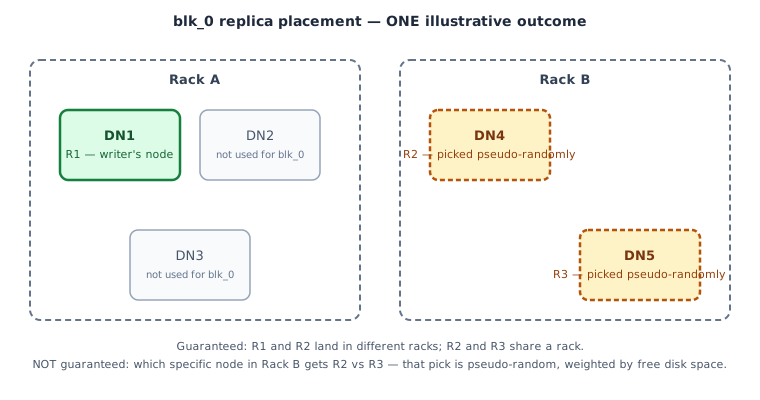
Say a client writes a 300 MB file to an HDFS cluster with a 128 MB block size and replication factor 3. The file splits into three blocks — blk_0, blk_1, blk_2 — onto a cluster of five DataNodes across two racks: Rack A (DN1, DN2, DN3) and Rack B (DN4, DN5).
HDFS's default rack-aware placement policy for each block is:
- Replica 1 goes on the node doing the write (or a random in-cluster node if the writer is outside the cluster).
- Replica 2 goes on a node in a different rack, so a whole-rack failure can't take out both copies.
- Replica 3 goes on a different node in the same rack as replica 2, keeping cross-rack traffic low while still tolerating a single node failure.
Within a target rack, the specific node is not chosen deterministically — the NameNode picks pseudo-randomly among the eligible candidates, weighted by available disk space, to spread load evenly. One possible, illustrative outcome for blk_0 is shown in the diagram above: replica 1 on DN1 (the writer's node), replica 2 on DN4, replica 3 on DN5. Re-run the same write, or run it against a cluster with a different free-space distribution, and replicas 2 and 3 could just as easily land as DN5-then-DN4, or shift entirely if DN4's disks happen to be fuller than DN5's. The rack constraint is guaranteed; the exact node within the rack is not — treat any specific node assignment you see in a diagram or log as one example, not a rule.
Consistency Semantics
"Consistency" in a DFS answers one narrow question: after a write happens somewhere in the cluster, what is a reader — possibly hitting a different replica, possibly racing the writer — guaranteed to see? Different systems answer this very differently, and the answer has real consequences for which workloads a DFS is safe to use for.
HDFS: single-writer, write-once-read-many
- A file has exactly one writer at a time — HDFS does not support concurrent writers to the same file, which sidesteps the whole class of "who wins a concurrent write" conflicts.
- Files are effectively write-once, append-only: once a block is finalized (closed, or rolled over because it hit the block-size limit), its bytes are immutable, and the NameNode ensures every replica holds that exact, checksummed content. Two replicas of a finalized block are guaranteed byte-identical.
- The block currently being written is a gray zone: readers are not guaranteed to see bytes the writer has buffered but not flushed. A client that needs "readers see what I just wrote" must explicitly call
hflush()(visible to new readers, not yet fsynced to disk) orhsync()(also durable) — without this, a concurrent reader may see a stale or truncated tail. - Net effect: strong, easy-to-reason-about consistency, purchased by giving up in-place random writes and concurrent writers. Exactly right for write-once-read-many analytics data (log files, dataset dumps); wrong for anything that looks like a shared, mutable database file.
GFS: relaxed, "at-least-once" record append
- GFS defines two weaker notions instead of one strong one: a region is consistent if all clients see the same data no matter which replica they read from; it is defined if it's consistent and clients see the mutation that was written, in full, with nothing mixed in from a concurrent writer.
- Plain (offset) writes from multiple concurrent clients leave a region consistent but not defined — the bytes are the same everywhere, but they may be an interleaved patchwork of fragments from different writers.
- GFS's signature operation, record append, is optimized for many producers appending to one shared file (hundreds of MapReduce workers writing to a shared results log, for instance). GFS guarantees the record is appended atomically at least once — but if a replica write fails partway, GFS retries, which can leave duplicate records or padding/gaps in the file. It does not guarantee exactly-once or gap-free.
- This is a deliberate trade: enforcing exactly-once, gap-free appends across replicas would require cross-replica coordination on every single append, which kills throughput for the many-writer, append-heavy workload GFS was built for. Instead GFS pushes the cost onto the application: consumers are expected to tolerate duplicates and padding, typically by embedding a unique ID or checksum per record and de-duplicating at read time.
The pattern to notice: neither system chose full POSIX-style consistency — both traded it away deliberately, in different directions, for the specific write pattern they were built to serve (single-writer batch files for HDFS, many-writer shared logs for GFS). The useful question when picking or designing a DFS isn't "is it consistent?" but "consistent for which access pattern, and what does the application have to do to compensate for the rest?"
CAP trade-offs in DFS terms
Under the CAP lens, both HDFS and GFS choose partition tolerance as non-negotiable: a rack switch or network partition must not lose data. The remaining dimension is the consistency/availability trade-off. HDFS pays with availability of concurrent writers (only one writer per file, metadata operations block if the NameNode is down) to buy strong consistency for finalized blocks. GFS pays with record-level consistency (duplicates, gaps, padded records) to keep availability high for hundreds of concurrent appenders. Dropbox-style sync moves the trade-off again: metadata is strongly consistent (small, transactional), while the block store and cross-device propagation are eventually consistent so sync stays available even when one device is offline.
Pitfalls
- Data synchronization — keeping replicas in sync is harder under heavy write load or during network partitions; a partitioned DataNode can fall behind and needs re-sync (or re-replication) once it rejoins.
- Security — authentication, authorization, and encryption all get harder once "the filesystem" is actually dozens of machines talking over a network rather than one kernel enforcing permissions locally.
- Performance — network latency and cross-rack bandwidth are real costs a local filesystem never pays; small-file-heavy or random-read workloads suffer the most.
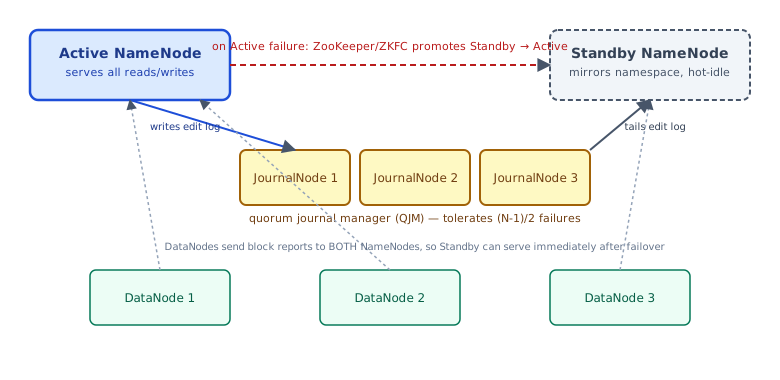
- The NameNode is a single point of failure. In the classic GFS/HDFS design, exactly one active master process holds the entire namespace and block-location map in memory. If it crashes, the cluster is unavailable for both reads and writes — even though every data block is still sitting, intact and replicated, on the DataNodes — because no other process knows what file those blocks belong to. This is arguably the single most important operational caveat of the classic architecture: replicating data solves durability, but does nothing for metadata availability unless the metadata service is itself made redundant. The same in-memory design also caps how many files and blocks a cluster can hold, since the whole namespace must fit in one process's heap.
The standard mitigation is to stop treating the master as a single process. HDFS's answer is HDFS High Availability (HA): an Active NameNode and a hot-standby Standby NameNode share the filesystem edit log through a quorum of JournalNodes (the Quorum Journal Manager, QJM) — the Active writes every edit to a majority of JournalNodes before considering it committed, and the Standby continuously tails that same log so its in-memory namespace stays current. DataNodes send block reports to both NameNodes, so the Standby can serve traffic immediately after taking over. On failure, a ZooKeeper-based failover controller (ZKFC) detects the Active is gone and promotes the Standby automatically, typically within seconds. Classic GFS took a lighter-weight version of the same idea: the primary master periodically checkpoints its state and streams operation logs to shadow masters, which lag slightly behind and can serve read-only metadata during an outage — though the original GFS design still needed a slower, more manual recovery to restore full read/write service, a gap Google's GFS successor, Colossus, closed by moving metadata into a fully distributed layer instead of a single (even if replicated) master.
DFS or object store? The first fork
Before reaching for a NameNode-and-DataNodes DFS, decide whether you need a filesystem at all. The named alternative is an object store (S3, GCS, Azure Blob): a flat key → blob map behind an HTTP API, no POSIX semantics, no in-place edits, no hierarchical rename. The crossover is concrete:
- Reach for a DFS (HDFS/GFS) when you run your own cluster and want compute pinned to data (Spark/MapReduce reading local blocks), do high-throughput sequential scans over GB-scale files, and can live with the operational weight of a metadata service. Data locality is the thing an object store cannot give you.
- Reach for an object store when you want storage as a zero-ops utility with eleven-nines durability and elastic capacity, your access is whole-object
GET/PUTover HTTP, and you are decoupling compute from storage (the modern "lakehouse" default). It is the wrong tool for POSIX random reads/writes or a shared mutable file — exactly HDFS's own weak spot, so "DFS vs object store" is rarely the real question; "do I need file semantics and locality at all" is.
Conclusion
A distributed file system's real design surface isn't "can it store a lot of data" — replication handles that. It's the three things that actually bite developers in practice: how deterministic the metadata service's placement decisions are (often deliberately not, for load-balancing); what a reader is actually guaranteed to see after a concurrent write (weaker than most people assume, and different by design between systems like HDFS and GFS); and what happens to the whole cluster when the one process that knows where everything lives goes down (nothing works, until that process itself is made redundant via a standby and a replicated log).
Sources
- Ghemawat, Gobioff, Leung, "The Google File System," SOSP 2003 — record append semantics, consistent vs. defined regions, shadow masters.
- Apache Hadoop documentation, "HDFS Architecture Guide" — NameNode/DataNode roles, block replication, write pipeline,
hflush/hsync. - Apache Hadoop documentation, "HDFS High Availability Using the Quorum Journal Manager" — Active/Standby NameNode, JournalNodes, ZKFC failover.
- Apache Hadoop source/documentation, BlockPlacementPolicyDefault — rack-aware replica placement algorithm and pseudo-random node selection among rack candidates.
🤖 Don't fully get this? Learn it with Claude
Stuck on What is a Distributed File System? Open Claude, copy a block below, and it'll teach you this exact concept — visually and interactively.
Build the mental picture, not memorization.
I just read a lesson on **What is a Distributed File System** (System Design) and want to truly understand it. Explain What is a Distributed File System from first principles using ONE vivid real-world analogy and a visual mental model — draw it as ASCII art or a clear step-by-step diagram — with a concrete example using real numbers. Then ask me one question to check I got the mental picture, and wait for my reply. If you're unsure or a claim isn't standard, say so and reason from first principles instead of guessing.
Socratic — adapts to where you're stuck.
Teach me **What is a Distributed File System** interactively. Ask me ONE guiding question at a time, wait for my answer, and adapt to my confusion — build the idea with me step by step instead of explaining it all at once. If you're unsure or a claim isn't standard, say so and reason from first principles instead of guessing.
Active recall exposes what you missed.
Quiz me on **What is a Distributed File System** with 5 questions, easy to tricky, ONE at a time. Tell me if each answer is right; at the end, explain clearly what I got wrong and why. If you're unsure or a claim isn't standard, say so and reason from first principles instead of guessing.
Intuition + hook + flashcards for long-term memory.
Help me remember **What is a Distributed File System** for the long term: give the one-sentence intuition, a memorable hook/mnemonic, a tiny worked example, and 3 active-recall flashcards (Q -> A). If you're unsure or a claim isn't standard, say so and reason from first principles instead of guessing.