Batch Processing vs Stream Processing
Two Answers to "When Does the Data Get Processed?"
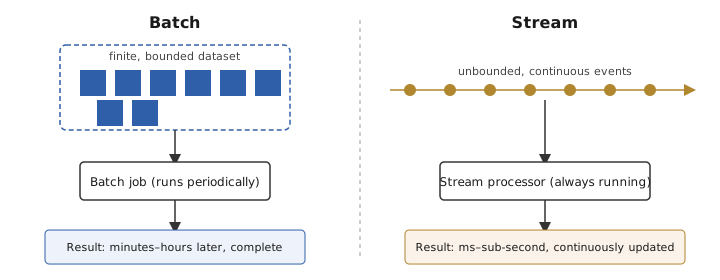
Batch processing and stream processing are two different answers to the same question: when should a system act on data it receives? Batch processing waits, collects a bounded amount of data, and processes it as one unit. Stream processing acts on each event (or a very small buffer of events) as it arrives, treating the data as an unbounded, never-ending sequence. The rest of this page works through the mechanics of each approach, a worked example of a subtle correctness bug in naive stream processing, and — because knowing the mechanics is not the same as knowing when to reach for which — an explicit decision guide for batch vs. stream and for the two most common architectures that try to get both at once: Lambda and Kappa.
Batch Processing
Definition
Batch processing operates on a bounded dataset: a finite collection of records gathered over some window of time (an hour, a day, a month) and processed as a single, complete unit. The system knows the full extent of the data before it starts — there is a first record and a last record.
Mechanics
Frameworks like Hadoop MapReduce and Apache Spark split the bounded dataset into partitions, run computation (map) independently per partition, then shuffle records by key across the cluster so that all records sharing a key land on the same reducer, and finally aggregate (reduce) per key. This shuffle-and-sort step is the main cost: it is I/O- and network-heavy, and it is why batch jobs measure completion time in minutes to hours rather than milliseconds. A job aggregating, say, 2 TB of clickstream data across roughly 200 executors might, for example, take on the order of 20 minutes end to end — the real number swings a lot with partition count, executor memory, and shuffle I/O, so treat it as a sense of scale, not a benchmark.
Characteristics
- High throughput, higher latency: batch systems are tuned to move large volumes of data efficiently, at the cost of the result only being available after the whole job finishes.
- Complete-information computations: because the whole dataset is present before processing starts, batch jobs can do things a stream cannot easily do — global joins, exact deduplication across the entire dataset, multi-pass algorithms — without worrying about data that hasn't arrived yet.
- Simpler exactly-once semantics: a batch job that fails can simply be re-run over the same bounded input and produce the same output, so idempotent re-runs are the natural correctness model.
Use cases
- End-of-day and end-of-month reports (billing runs, financial reconciliation).
- ETL pipelines feeding a data warehouse.
- Training machine learning models over historical data.
Stream Processing
Definition
Stream processing operates on an unbounded dataset: events keep arriving indefinitely, and the system has no concept of "the last record." Instead of waiting for a complete dataset, a stream processor reacts to each event (or a very short micro-batch of events) as it arrives.
Event time vs. processing time
The moment an event is generated (event time) and the moment the processing system receives it (processing time, or arrival time) are not the same thing, and the gap between them is not fixed. A mobile app can buffer events while offline and flush them minutes later; a network hop can retry and add latency; a partition rebalance can delay delivery. Any windowing logic that buckets events by processing time rather than event time is implicitly assuming that gap is always small enough not to matter — an assumption that network reality does not guarantee.
Characteristics
- Low latency: results are available continuously, often within milliseconds to low seconds of an event occurring.
- Never "done": there is no fixed endpoint, so every windowing decision (when is this minute's data complete enough to emit?) is a trade-off between waiting longer for stragglers and emitting sooner with a risk of being wrong.
- Harder exactly-once: because the pipeline never stops to let you safely re-run from scratch, exactly-once processing requires checkpointing progress and coordinating that checkpoint with idempotent (or transactional) writes to the output (delivery on the wire may still redeliver).
Use cases
- Fraud detection that has to block a transaction before it clears.
- Real-time dashboards and monitoring/alerting.
- Live feeds — IoT telemetry, social media firehoses, ride-location updates.
Worked Example: Why Naive Windowing Gets This Wrong
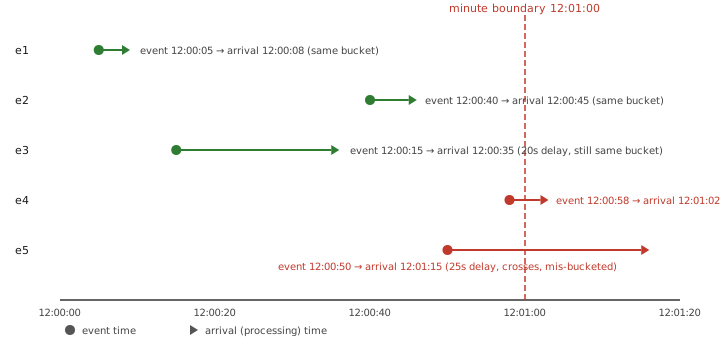
Suppose a stream processor wants to compute a count of events per minute, and — naively — buckets each event by the minute in which it arrives (processing time) rather than the minute in which it occurred (event time). Here is a trace of five events crossing the 12:00–12:01 boundary:
| Event | Event time | Arrival time | Correct bucket (by event time) | Naive bucket (by arrival time) | Mis-bucketed? |
|---|---|---|---|---|---|
| e1 | 12:00:05 | 12:00:08 | 12:00–12:01 | 12:00–12:01 | No |
| e2 | 12:00:40 | 12:00:45 | 12:00–12:01 | 12:00–12:01 | No |
| e3 | 12:00:15 | 12:00:35 | 12:00–12:01 | 12:00–12:01 | No |
| e4 | 12:00:58 | 12:01:02 | 12:00–12:01 | 12:01–12:02 | Yes |
| e5 | 12:00:50 | 12:01:15 | 12:00–12:01 | 12:01–12:02 | Yes |
Only e4 and e5 actually land in the wrong bucket here: both occurred before 12:01:00 but arrived after it, so naive processing-time windowing counts them in the 12:01–12:02 bucket instead of 12:00–12:01. e1 and e2 arrive quickly enough that they never leave their event-time minute. e3 has a 20-second delay — larger than e1's or e2's — but it still arrives at 12:00:35, comfortably inside the same 12:00–12:01 minute as its event time, so it is not mis-bucketed despite the delay.
That last point is the trap: e3 being correct in this trace is a coincidence of how large the delay happened to be relative to where the event fell inside its minute, not evidence that naive processing-time windowing is safe in general. A 20-second delay is harmless for an event at 12:00:15; the same 20-second delay would be fatal for an event at 12:00:50 — which is exactly what happened to e5, with an even larger 25-second delay. Network delay is not a constant, and nothing in a naive processing-time window bounds it, so the naive version is wrong as a design even in a trace where only two of five events happen to be affected by it.
Watermarks: The Fix
A watermark is the stream engine's heuristic assertion that "no more events with event time earlier than T will arrive." It lets a window close and emit a result based on event time while still tolerating some out-of-order arrival — the engine waits until the watermark passes the end of a window before finalizing it, buying time for stragglers like e4 and e5 without waiting forever. Events that still arrive after the watermark has passed their window (very late data) are handled explicitly: dropped and counted as late, routed to a side output for separate handling, or merged into the window via an "allowed lateness" grace period, depending on the engine and the correctness the use case needs.
Engines differ in how they physically achieve this. Apache Flink is a native streaming engine: each record flows through the operator graph individually, and Flink achieves exactly-once state consistency by injecting checkpoint barriers into the stream — an asynchronous, Chandy-Lamport-style snapshot — so the pipeline never has to pause to take a consistent checkpoint. For a lean pipeline with small per-key state, a short checkpoint interval, and no expensive fan-out joins, that design can push end-to-end p99 latency down to, say, the tens of milliseconds. That figure moves a great deal with state size, checkpoint interval, network conditions, and hardware, so treat it as an illustration of what's achievable, not a number to write an SLA against — benchmark your own pipeline before committing to one. Spark Structured Streaming instead runs micro-batches: it buffers events for a short trigger interval (commonly around one second) and then executes a small batch job over the buffer using Spark's ordinary batch engine, which reuses batch's fault-tolerance and is simpler to reason about, at the cost of at least one trigger interval of added latency.
Windowing strategies
- Tumbling windows: fixed-size, non-overlapping (e.g., "every minute").
- Sliding windows: fixed-size, overlapping, re-evaluated on a shorter step (e.g., "last 5 minutes, updated every 30 seconds").
- Session windows: size determined by a gap of inactivity, useful for grouping a user's activity into a "session" that ends when they go quiet.
Lambda Architecture
Lambda architecture runs two pipelines over the same raw data: a batch layer that periodically recomputes a complete, accurate view over all historical data, and a speed layer (a stream processor) that computes a fast, approximate view over only the most recent data not yet covered by the last batch run. A serving layer merges the two at query time — approximate-but-current, corrected a few hours later by the accurate-but-delayed batch result.
Trade-off
You get both a low-latency approximate answer and an eventually-correct exact answer, but you pay for it with two codebases implementing conceptually the same transformation logic in two different frameworks. Every change to the business logic has to be made twice and kept in sync, and any drift between the batch and speed implementations shows up as a real discrepancy in the merged result — a whole category of bug that a single-pipeline design doesn't have.
Kappa Architecture
Kappa architecture drops the batch layer and treats everything as a stream. The log itself — a Kafka topic with retention long enough to hold the history you care about — is the single source of truth. There is one pipeline, written once in the stream-processing framework. Reprocessing historical data (a schema change, a bug fix in the transformation logic) is done by replaying the log from an earlier offset through that same pipeline, rather than maintaining a second batch pipeline to do it.
Trade-off
One codebase means no logic drift between "the fast path" and "the correct path" — there's only one path. The cost shows up when you need to reprocess a large amount of history: replaying weeks or months of a high-volume topic through a stream engine to backfill a fix can be slow and resource-intensive compared to a batch engine that is purpose-built for bulk, one-shot transforms over data already at rest. Kappa also leans on your log's retention and compaction capabilities being sufficient to hold the history you might need to replay — that's a storage and cost commitment, not just a processing one.
Choosing: The Decision Layer
Batch vs. stream
- Use batch when the workload tolerates latency measured in minutes to hours, needs computations that benefit from seeing the complete dataset (large joins, exact global deduplication, multi-pass aggregation), or when off-peak, resource-efficient execution matters more than immediacy — end-of-day billing, data warehouse ETL, model training.
- Use stream when a decision or user-facing result has to happen within seconds of the triggering event — fraud blocking, live dashboards, alerting — and you're willing to take on event-time/watermark handling and harder exactly-once guarantees to get that latency.
- Don't reach for stream processing just because it sounds more modern: if nothing downstream consumes a result faster than a batch job could produce it, the operational cost of running an always-on stateful stream processor (checkpointing, state backends, backpressure handling) buys you nothing.
- Don't force a genuinely latency-sensitive workload into batch just because it's operationally simpler — "we'll just run it every 5 minutes" is a stream-processing use case wearing a batch costume, and it will eventually need the event-time correctness batch scheduling doesn't give you.
Lambda vs. Kappa — and when to use neither
- Use Lambda when you genuinely need both a fast approximate view and a separately-computed authoritative historical view, or when your stream engine's correctness guarantees aren't yet trustworthy enough to be the sole source of truth and you want batch recomputation as a safety net.
- Use Kappa when your organization already has a mature stream engine with reliable exactly-once semantics and a log that can retain and replay enough history, and you want one pipeline instead of two to build, test, and keep in sync.
- Avoid Lambda when you can't staff or afford maintaining two codebases for the same logic — the dual-maintenance cost and drift-bug risk is the whole downside of the architecture, and it is a real, ongoing cost, not a one-time setup cost.
- Avoid Kappa when large-scale historical reprocessing is a routine, expected part of your workload (e.g., re-deriving ML features over years of data) — that is precisely the job batch engines are optimized for, and replaying it all through a stream engine every time will typically be slower and more expensive.
- Use neither if a single batch pipeline already meets your latency requirement — Lambda and Kappa both exist to solve a problem (needing both speed and correctness) that doesn't arise until you actually have a low-latency requirement pulling against a correctness requirement.
How watermarks are generated in practice
A watermark is not magic; an engine must compute it from observable event timestamps. The common heuristic is bounded out-of-orderness: track the largest event timestamp seen so far, then publish watermark = max_event_time_seen - allowed_lateness. If the largest timestamp observed is 12:01:20 and you configured allowed_lateness = 30s, the watermark is 12:00:50; windows ending at or before 12:00:50 may close, while newer windows stay open for stragglers.
The other model is a punctuated watermark: the source embeds explicit progress markers in the stream, such as "partition 7 is complete through offset X / event time 12:01:00." This is stronger when the producer can know completeness (for example, sorted input, CDC boundaries, or file ingestion), but it requires source cooperation and fails if producers omit or delay the punctuation.
Watermark delay trade-off
- Short delay closes windows quickly, reducing user-visible latency and keeping less keyed window state in memory, but more late events arrive after closure and must be dropped, side-output, or used to issue corrections.
- Long delay improves completeness and reduces correction traffic, but every open window retains state longer; p99 output latency rises by roughly the delay, and large key cardinality can turn that waiting period into a state-backend and checkpoint-size problem.
- Correct setting comes from measured lateness distribution: pick a delay that covers the lateness percentile the product requires, then explicitly define what happens to events later than that.
Sources
- Martin Kleppmann, Designing Data-Intensive Applications (O'Reilly, 2017) — chapters on batch processing (MapReduce) and stream processing (event time, watermarks, windowing).
- Tyler Akidau, Robert Bradshaw, et al., "The Dataflow Model" (VLDB 2015) — the paper that formalized event-time windowing and watermarks.
- Nathan Marz and James Warren, Big Data: Principles and Best Practices of Scalable Real-time Data Systems (Manning, 2015) — origin of the Lambda architecture.
- Jay Kreps, "Questioning the Lambda Architecture" (O'Reilly Radar, 2014) — the post that introduced the Kappa architecture as an alternative.
- Apache Flink and Apache Spark project documentation — checkpointing/barrier mechanics and Structured Streaming's micro-batch execution model, respectively.
🤖 Don't fully get this? Learn it with Claude
Stuck on Batch Processing vs Stream Processing? Open Claude, copy a block below, and it'll teach you this exact concept — visually and interactively.
Build the mental picture, not memorization.
I just read a lesson on **Batch Processing vs Stream Processing** (System Design) and want to truly understand it. Explain Batch Processing vs Stream Processing from first principles using ONE vivid real-world analogy and a visual mental model — draw it as ASCII art or a clear step-by-step diagram — with a concrete example using real numbers. Then ask me one question to check I got the mental picture, and wait for my reply. If you're unsure or a claim isn't standard, say so and reason from first principles instead of guessing.
Socratic — adapts to where you're stuck.
Teach me **Batch Processing vs Stream Processing** interactively. Ask me ONE guiding question at a time, wait for my answer, and adapt to my confusion — build the idea with me step by step instead of explaining it all at once. If you're unsure or a claim isn't standard, say so and reason from first principles instead of guessing.
Active recall exposes what you missed.
Quiz me on **Batch Processing vs Stream Processing** with 5 questions, easy to tricky, ONE at a time. Tell me if each answer is right; at the end, explain clearly what I got wrong and why. If you're unsure or a claim isn't standard, say so and reason from first principles instead of guessing.
Intuition + hook + flashcards for long-term memory.
Help me remember **Batch Processing vs Stream Processing** for the long term: give the one-sentence intuition, a memorable hook/mnemonic, a tiny worked example, and 3 active-recall flashcards (Q -> A). If you're unsure or a claim isn't standard, say so and reason from first principles instead of guessing.