Architecture of a Distributed File System
A distributed file system chops every file into fixed-size blocks, stores each block as an ordinary file on many commodity machines, and keeps a separate, tiny service that remembers only which blocks make up which file and which machines hold each replica — so the metadata service handles lookups while the bulk bytes stream directly between the client and the storage machines. That split of a small control plane from a fat data plane is the whole architecture; everything else (replication, rebalancing, recovery) hangs off it.
The names differ by system but the roles are identical: HDFS calls them NameNode (metadata) and DataNodes (block storage); Google File System calls them master and chunkservers. HDFS blocks default to 128 MB, GFS chunks to 64 MB — orders of magnitude larger than a local filesystem's 4 KB block, precisely so one small master can index petabytes.
Why the two planes are physically separate
The reason bytes must not flow through the metadata server is arithmetic. A NameNode holds the entire namespace in RAM: roughly 150 bytes per file, block, and directory object. A machine with 64 GB of heap can index on the order of 400 million objects — but only if it is doing lookups, not shovelling data. If every read and write went through it, its network card, not its memory, would cap the cluster at one machine's bandwidth. By handing the client a list of DataNode addresses and then stepping out of the path, the master's load scales with the number of operations, while throughput scales with the number of DataNodes. Add 500 DataNodes and aggregate bandwidth grows 500×; the NameNode barely notices.
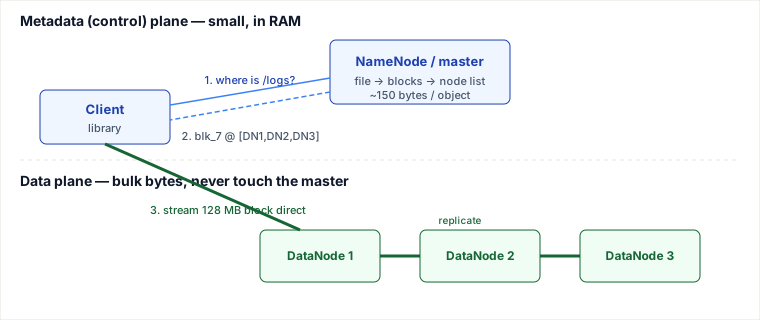
Tracing one write, end to end
Say a client writes a 300 MB file /logs/2026-07-03.parquet to HDFS with the default 128 MB block size and replication factor 3. The file becomes three blocks (128 + 128 + 44 MB), and each block is written independently. Here is the trace for the first block. Note that the master is contacted once per block, not once per byte.
| Step | Who → who | What happens (real values) |
|---|---|---|
| 1 | Client → NameNode | create("/logs/2026-07-03.parquet"). NameNode checks permissions, that the path is free, records the file in the namespace, and takes a lease so no one else writes it. |
| 2 | Client → NameNode | addBlock(). NameNode mints blk_1073, gen-stamp 42 and, using rack awareness, returns a placement pipeline: [DN-A (rack1), DN-B (rack2), DN-C (rack2)] — one local-ish replica, two on a second rack. |
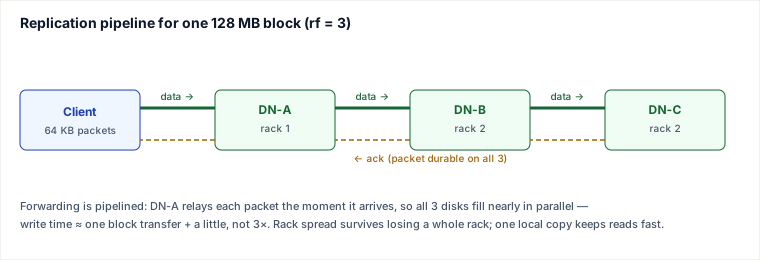
| 3 | Client → DN-A → DN-B → DN-C | Client opens a TCP pipeline to DN-A only; DN-A connects to DN-B; DN-B to DN-C. Data now flows client→A→B→C. |
| 4 | along the pipeline | The 128 MB block is split into 64 KB packets; each packet is a chain of 512-byte chunks each carrying a CRC-32C checksum. DN-A forwards a packet to DN-B the instant it arrives — it does not wait for the whole block. |
| 5 | DN-C → DN-B → DN-A → Client | Acks flow back up the pipeline. A packet is "done" only when all three nodes have it on disk. The client keeps a sliding window of unacked packets in flight. |
| 6 | DataNodes → NameNode | As each replica finishes, the DataNode sends a blockReceived report. The NameNode now knows blk_1073 lives on A, B, C. |
| 7 | Client → NameNode | Block full → back to step 2 for block 2, then block 3. After the last block, complete() closes the file and releases the lease. The write is durable once min-replication (default 1, often set to 2) acks land. |
A read is the mirror image and even cheaper: the client asks the NameNode for the block list once, gets {blk_1073: [DN-A, DN-B, DN-C]}, then reads each block from the closest replica (same node > same rack > remote), verifying every 512-byte chunk against its checksum and failing over to the next replica if a checksum is wrong.
File operations beyond write: open, close, rename
The write pipeline dominates the interview trace, but a DFS also has to make everyday filesystem operations behave sensibly across replicas.
- Open: the client asks the NameNode for the file's block list and lease state. If another client holds a write lease, the open may fail or block until the lease expires/recovers.
- Close: the client flushes the last packet, waits for pipeline acks, tells the NameNode
complete(), and releases the lease. Until close, readers may see a truncated or invisible file. - Rename: in HDFS this is a single metadata operation on the NameNode — it atomically moves the inode from one directory to another. Because file data never moves (only the block list pointer is rewired), rename is fast and independent of file size. One nuance: rename never moves data, even when it changes what policy should apply. In HDFS, moving a file under a directory with a different storage policy (e.g. ARCHIVE) changes only the file's effective policy; the block replicas stay where they are until the separate Mover tool is run to migrate them. Rename itself is always a metadata-only pointer change.
Why this matters in design rounds: "rename a 1 TB file" is a classic trap. In a local filesystem it may copy bytes; in a centralized-metadata DFS it is an O(1) namespace update. Conversely, "concurrent writers rename the same file" is undefined or last-writer-wins, which is why leases and single-writer rules exist.
Pitfalls
- The small-files disaster. Because the NameNode holds every file, block, and directory in RAM at ~150 bytes each, 10 million 4 KB files cost the same metadata RAM as 10 million 128 MB files but store 30,000× less data. Clusters die of NameNode heap exhaustion, not disk. Fix: pack small files (HAR, SequenceFile, Parquet) before landing them.
- The NameNode is the availability ceiling. Lose it and the whole filesystem is unreadable even though every byte is safe on DataNodes — the map from file to blocks is gone. This is why production runs an Active/Standby NameNode pair with a shared edit log (Quorum Journal Manager) and ZooKeeper failover; the classic single-master GFS design simply accepted minutes of downtime on master failure.
- Write pipeline stalls on one slow node. The pipeline is only as fast as its slowest DataNode; a dying disk on DN-B throttles the client. HDFS detects the bad node, removes it from the pipeline, and continues with the survivors, re-replicating later — but a flapping node can repeatedly stall writes.
- Rack-awareness misconfiguration silently kills durability. If the topology script is wrong and all three replicas land on one rack, a single top-of-rack switch failure takes out all copies. This looks fine until the outage.
- Replication storms after a node dies. When a DataNode is declared dead (missed heartbeats, default ~10 min), the NameNode re-replicates all its under-replicated blocks at once. On a full node that is terabytes of cross-network copying that can saturate the cluster and cascade.
- Append/consistency surprises. These systems optimize for write-once-read-many. Concurrent random writes are not supported the way a POSIX filesystem implies; GFS's relaxed consistency famously allowed duplicate/padded records on concurrent appends. Do not treat a DFS like a local disk.
When to use this architecture — and when not to
The centralized-metadata, block-replicated design (HDFS, GFS) is the right call when you have a modest number of enormous, append-mostly files read by high-throughput batch jobs — log/event lakes, ML training corpora, MapReduce/Spark inputs — and you value sequential throughput over latency. The decision signals: files measured in GB not KB, write-once-read-many access, and co-located compute that wants data locality.
Weigh it against the named alternatives:
- vs. decentralized placement (Ceph / CRUSH): Ceph removes the central metadata bottleneck by computing a block's location from a hash of its ID plus the cluster map — no master lookup, no single point of failure, smoother scaling to exabytes. What it costs: rebalancing is harder to reason about, operational complexity is higher, and you lose the dead-simple mental model of "ask the NameNode." Choose CRUSH-style when metadata ops themselves are your bottleneck or you need a filesystem and object and block interface from one cluster.
- vs. object stores (Amazon S3, GCS): Object stores drop the hierarchical namespace and POSIX-ish semantics entirely for a flat key→blob map with an HTTP API, giving eleven-nines durability, infinite elastic capacity, and zero servers to run. What it costs: higher per-op latency, no in-place appends/edits, no true directories, and no data locality for compute. Choose S3 when you want storage as a utility and are decoupling compute from storage (the modern "lakehouse" default); choose HDFS when you run your own cluster and need compute pinned to data.
- vs. a single NAS / networked disk: A NAS is simpler and gives real POSIX semantics, but it caps at one box's capacity and bandwidth and offers no automatic replication. Choose a DFS the moment your data or throughput outgrows a single machine's disks.
Rule of thumb: choose centralized-metadata DFS for petabyte-scale, batch-throughput workloads on your own hardware; prefer an object store when you can offload operations to a cloud and can live with object (not file) semantics; prefer Ceph-style hashing when central metadata is itself the scaling wall.
Takeaways
- The one idea to keep: separate a small in-RAM metadata plane from a fat data plane so the master handles lookups while throughput scales with the number of DataNodes.
- A write is a per-block pipeline (client→A→B→C) of 64 KB packets with acks flowing back; large blocks (64–128 MB) exist so one master can index petabytes.
- The NameNode's RAM, not disk, is the real limit — which is why small files and NameNode HA dominate real-world operations.
- Pick by workload: HDFS/GFS for batch throughput on owned hardware, object stores for cloud-scale utility storage, Ceph/CRUSH when the metadata master itself becomes the bottleneck.
Sources: Ghemawat, Gobioff & Leung, "The Google File System" (SOSP 2003); Shvachko et al., "The Hadoop Distributed File System" (MSST 2010); the Apache Hadoop HDFS Architecture & HA documentation; Weil et al., "Ceph: A Scalable, High-Performance Distributed File System" (OSDI 2006). Re-authored/Deepened for this guide.
Distributed file system read-path trace
| Step | Component | Action |
|---|---|---|
| 1 | Client | Requests /data/foo.txt |
| 2 | NameNode | Returns block IDs and closest DataNode locations |
| 3 | DataNode | Streams the nearest replica to the client |
| 4 | Client | Verifies block checksums; asks another replica on mismatch |
| 5 | Client | Marks the bad DataNode dead locally and re-requests the block from the next replica in the location list |
When NOT to build a custom DFS
- Object blobs with HTTP access — use S3/GCS; DFS metadata complexity is wasted.
- Single-datacenter POSIX apps that fit one NAS — simpler operationally.
Interviewer follow-ups & drills
- Why separate metadata and data planes? Metadata is latency-sensitive and consistent; data is throughput/bandwidth.
- Ops: namenode/master CPU, under-replicated blocks, rebalance bandwidth, client tail latency.
- Drill: 3-way block replication, one disk dies — what must the master do? Mark under-replicated, schedule re-replication without blocking all reads.
🤖 Don't fully get this? Learn it with Claude
Stuck on Architecture of a Distributed File System? Open Claude, copy a block below, and it'll teach you this exact concept — visually and interactively.
Build the mental picture, not memorization.
I just read a lesson on **Architecture of a Distributed File System** (System Design) and want to truly understand it. Explain Architecture of a Distributed File System from first principles using ONE vivid real-world analogy and a visual mental model — draw it as ASCII art or a clear step-by-step diagram — with a concrete example using real numbers. Then ask me one question to check I got the mental picture, and wait for my reply. If you're unsure or a claim isn't standard, say so and reason from first principles instead of guessing.
Socratic — adapts to where you're stuck.
Teach me **Architecture of a Distributed File System** interactively. Ask me ONE guiding question at a time, wait for my answer, and adapt to my confusion — build the idea with me step by step instead of explaining it all at once. If you're unsure or a claim isn't standard, say so and reason from first principles instead of guessing.
Active recall exposes what you missed.
Quiz me on **Architecture of a Distributed File System** with 5 questions, easy to tricky, ONE at a time. Tell me if each answer is right; at the end, explain clearly what I got wrong and why. If you're unsure or a claim isn't standard, say so and reason from first principles instead of guessing.
Intuition + hook + flashcards for long-term memory.
Help me remember **Architecture of a Distributed File System** for the long term: give the one-sentence intuition, a memorable hook/mnemonic, a tiny worked example, and 3 active-recall flashcards (Q -> A). If you're unsure or a claim isn't standard, say so and reason from first principles instead of guessing.