Problem 17 Traffic-Light-Controlled Intersection Synchronization
Overview
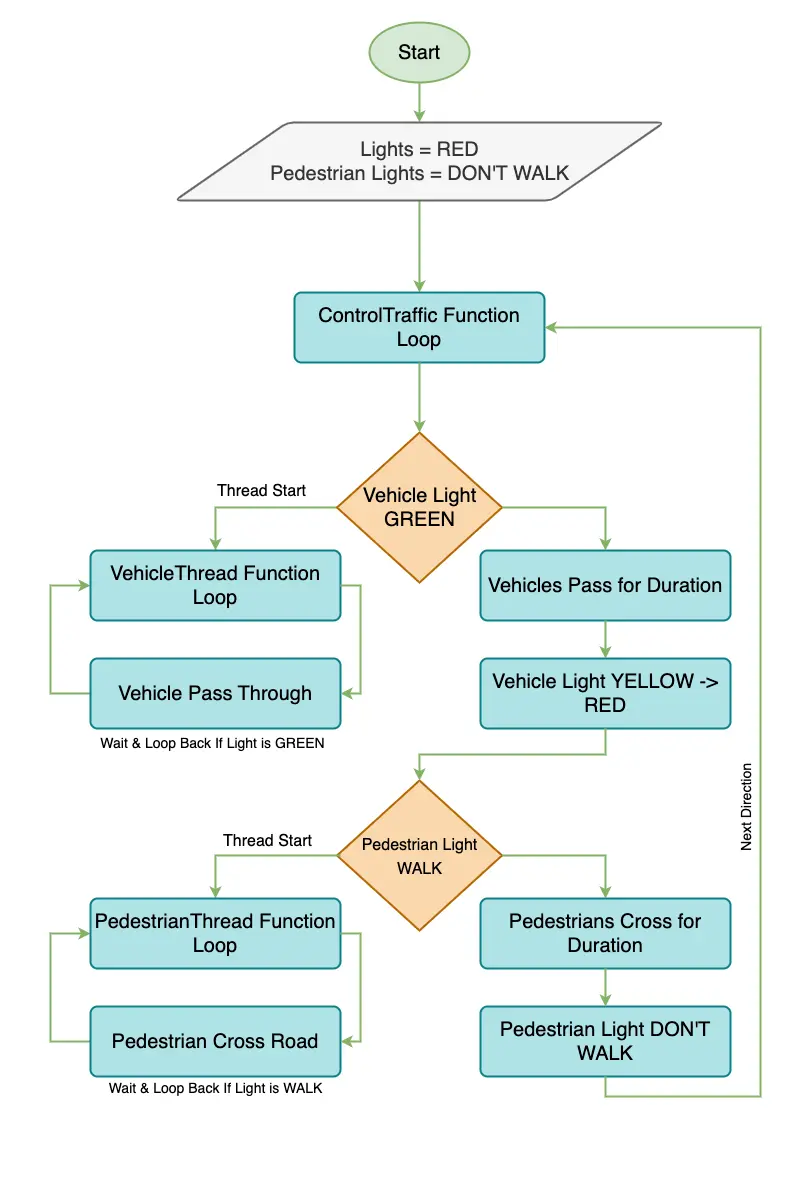
The problem at hand is to ensure the smooth and safe movement of vehicles and pedestrians through a four-way intersection using traffic lights. Each direction of vehicle traffic and each direction of pedestrian traffic is represented as an individual thread, resulting in a total of eight threads. The challenge lies in synchronizing these threads such that there's no collision, and the flow is efficient.
Concurrency & Synchronization Insights
- Concurrency: With multiple vehicle and pedestrian threads running in parallel, there's a risk of a "collision" if two or more threads attempt to pass through the intersection at the same time.
- Synchronization Requirement: The traffic lights should ensure that only one direction of vehicle traffic (or possibly more, depending on the type of intersection) can proceed through the intersection at once. Similarly, pedestrian lights should ensure safe crossing, keeping in mind they may have separate signals. Pedestrians must wait if vehicles are moving, and vice versa.
initialize traffic lights for each direction as RED
initialize pedestrian lights for each direction as DON'T WALK

FUNCTION ControlTraffic():
    WHILE true:
        FOR each direction:
            Turn vehicle light to GREEN for that direction
            Allow vehicles to pass for a set duration
            Turn vehicle light to YELLOW, then RED for that direction
            Turn pedestrian light to WALK for that direction
            Allow pedestrians to cross for a set duration
            Turn pedestrian light to DON'T WALK for that direction

FUNCTION VehicleThread(direction):
    WHILE true:
        IF traffic light for that direction is GREEN:
            Let vehicle pass through the intersection
            Wait for a short duration before the next vehicle

FUNCTION PedestrianThread(direction):
    WHILE true:
        IF pedestrian light for that direction is WALK:
            Let pedestrian cross the road
            Wait for a short duration before the next pedestrian

START ControlTraffic() as a separate thread
FOR each direction:
    START VehicleThread(direction) as a separate thread
    START PedestrianThread(direction) as a separate thread
Algorithm Walkthrough
Let's walk through the traffic simulation code you provided, focusing on the synchronization aspects.
Initialization
- trafficLights: An array representing the state of traffic lights in all directions. Initially set to RED.
- pedestrianLights: An array representing the state of pedestrian lights in all directions. Initially set to RED.
- trafficLocks: An array of mutexes for synchronizing access to each direction's traffic light.
- pedestrianLocks: An array of mutexes for synchronizing access to each direction's pedestrian light.
- controlThread: A thread to control the overall traffic light system.
- vehicleThreads: Threads representing the vehicle flow in each direction.
- pedestrianThreads: Threads representing the pedestrian flow in each direction.
Execution
The program runs an infinite loop with three main parts: traffic control, vehicle simulation, and pedestrian simulation.
1. Traffic Control (ControlTraffic thread)
- Iterates through each direction.
- Locks the traffic light mutex for the current direction.
- Sets the traffic light to GREEN, waits for 5 seconds, then sets to YELLOW, waits for 2 seconds, and finally sets to RED.
- Unlocks the traffic light mutex.
- Does a similar process for the pedestrian light, but without the YELLOW state.
2. Vehicle Simulation (VehicleThread)
- Runs in an infinite loop for each direction.
- Checks if the traffic light for its direction is GREEN.
- If GREEN, it prints a message indicating a vehicle is passing and waits for 1 second.
- If not, it does nothing (busy waiting).
3. Pedestrian Simulation (PedestrianThread)
- Runs in an infinite loop for each direction.
- Checks if the pedestrian light for its direction is GREEN.
- If GREEN, it prints a message indicating a pedestrian is crossing and waits for 1 second.
- If not, it does nothing (busy waiting).
Synchronization Aspects
-
trafficLocks:
- Ensures exclusive access to the traffic light state for each direction.
- Prevents vehicles from checking/changing the state of the light while it's being controlled.
-
pedestrianLocks:
- Ensures exclusive access to the pedestrian light state for each direction.
- Prevents pedestrians from checking/changing the state of the light while it's being controlled.
Final Result
The program simulates a traffic light system, managing traffic and pedestrian lights for multiple directions. It uses mutex locks to synchronize access to shared resources (the state of the lights), ensuring that the state is changed in a controlled and thread-safe manner. Vehicle and pedestrian threads check the state of the lights in a loop, and react accordingly when the lights are GREEN. However, it's worth noting that the program currently uses busy waiting for the vehicle and pedestrian threads, which could be improved with condition variables or other synchronization mechanisms to reduce CPU usage.
import java.util.concurrent.atomic.AtomicBoolean;
import java.util.concurrent.locks.*;

public class Solution {

  private static final int NUM_DIRECTIONS = 4;

  public enum LightState {
    RED,
    GREEN,
    YELLOW,
  }

  private LightState[] trafficLights = new LightState[NUM_DIRECTIONS];
  private LightState[] pedestrianLights = new LightState[NUM_DIRECTIONS];

  private Lock[] trafficLocks = new ReentrantLock[NUM_DIRECTIONS];
  private Lock[] pedestrianLocks = new ReentrantLock[NUM_DIRECTIONS];

  private AtomicBoolean stopSimulation = new AtomicBoolean(false);

  public Solution() {
    for (int i = 0; i < NUM_DIRECTIONS; i++) {
      trafficLights[i] = LightState.RED;
      pedestrianLights[i] = LightState.RED;
      trafficLocks[i] = new ReentrantLock();
      pedestrianLocks[i] = new ReentrantLock();
    }
  }

  public void controlTraffic() throws InterruptedException {
    int iterations = 3; // Run simulation for 3 iterations
    while (iterations-- > 0) {
      for (int direction = 0; direction < NUM_DIRECTIONS; direction++) {
        trafficLocks[direction].lock(); // Lock the current direction's traffic mutex
        try {
          trafficLights[direction] = LightState.GREEN;
          System.out.println(
            "Traffic light for direction " + direction + " is GREEN."
          );
          Thread.sleep(5); // Simulate light timing

          // Transition to YELLOW, then RED
          trafficLights[direction] = LightState.YELLOW;
          System.out.println(
            "Traffic light for direction " + direction + " is YELLOW."
          );
          Thread.sleep(2); // Simulate light timing
          trafficLights[direction] = LightState.RED;
          System.out.println(
            "Traffic light for direction " + direction + " is RED."
          );
        } finally {
          trafficLocks[direction].unlock();
        }

        pedestrianLocks[direction].lock();
        try {
          pedestrianLights[direction] = LightState.GREEN;
          System.out.println(
            "Pedestrian light for direction " + direction + " is WALK."
          );
          Thread.sleep(5); // Simulate pedestrian crossing time
          pedestrianLights[direction] = LightState.RED;
          System.out.println(
            "Pedestrian light for direction " + direction + " is DON'T WALK."
          );
        } finally {
          pedestrianLocks[direction].unlock();
        }
      }
    }
    stopSimulation.set(true);
  }

  public void vehicleFlow(int direction) throws InterruptedException {
    while (!stopSimulation.get()) {
      if (trafficLights[direction] == LightState.GREEN) {
        System.out.println("Vehicle passing through direction " + direction);
        Thread.sleep(2);
      }
    }
  }

  public void pedestrianFlow(int direction) throws InterruptedException {
    while (!stopSimulation.get()) {
      if (pedestrianLights[direction] == LightState.GREEN) {
        System.out.println("Pedestrian crossing from direction " + direction);
        Thread.sleep(2); // Simulate pedestrian crossing
      }
    }
  }

  public static void main(String[] args) {
    Solution intersection = new Solution();

    new Thread(() -> {
      try {
        intersection.controlTraffic();
      } catch (InterruptedException e) {
        e.printStackTrace();
      }
    }).start();

    for (int i = 0; i < NUM_DIRECTIONS; i++) {
      final int direction = i;

      new Thread(() -> {
        try {
          intersection.vehicleFlow(direction);
        } catch (InterruptedException e) {
          e.printStackTrace();
        }
      }).start();

      new Thread(() -> {
        try {
          intersection.pedestrianFlow(direction);
        } catch (InterruptedException e) {
          e.printStackTrace();
        }
      }).start();
    }
  }
}
🤖 Don't fully get this? Learn it with Claude
Stuck on Problem 17 Traffic-Light-Controlled Intersection Synchronization? Open Claude, copy a block below, and it'll teach you this exact concept — visually and interactively.
Progressively stronger hints — you still solve it.
I'm working on the problem **Problem 17 Traffic-Light-Controlled Intersection Synchronization** (Concurrency). Give me a HINT LADDER: start with the tiniest nudge, then wait. Only reveal the next, stronger hint when I ask. Do NOT show the full solution unless I type 'show solution'. Keep me doing the thinking. If you're unsure or a claim isn't standard, say so and reason from first principles instead of guessing.
See the technique, not just code.
Explain the optimal approach to **Problem 17 Traffic-Light-Controlled Intersection Synchronization** with a VISUAL walkthrough: trace it on a small concrete example using ASCII art / a step-by-step diagram, narrate what changes each step, then give time & space complexity with a one-line derivation. If you're unsure or a claim isn't standard, say so and reason from first principles instead of guessing.
Catch bugs, edge cases, sub-optimality.
I'll paste my solution to **Problem 17 Traffic-Light-Controlled Intersection Synchronization**. Review it for correctness, missed edge cases, and time/space complexity, then coach me toward the optimal — don't just rewrite it. Ask me to paste my code now. If you're unsure or a claim isn't standard, say so and reason from first principles instead of guessing.
Lock in recognition with look-alikes.
Give me 2 problems that use the SAME underlying pattern as **Problem 17 Traffic-Light-Controlled Intersection Synchronization**. For each, let me attempt first, then review my answer and name the trigger signal that reveals the pattern. If you're unsure or a claim isn't standard, say so and reason from first principles instead of guessing.