Designing a Hospital Management System
The design problem in one breath
A hospital needs to track patients, the doctors who see them, what happened at each visit, the medicines prescribed, the rooms patients occupy, and the bills they owe. The job is to turn that messy real-world tangle into a set of relational tables where every fact lives in exactly one place. This walkthrough does that end to end — but the part worth slowing down for is the prescriptions, because it is where a careless decomposition quietly corrupts the data.
We will build the entities, wire up the relationships, and then run one fat, denormalized prescription table through 1NF, 2NF, and 3NF so you can watch the determinants move. The whole lesson of normalization is: follow the functional dependencies, and let them tell you where each column belongs.
The entities and their keys
Ten entities fall straight out of the requirements. Each gets a primary key that uniquely identifies one of its rows.
| Entity | Primary key | Notable attributes |
|---|---|---|
| Patient | Patient_ID | First_Name, Last_Name, Date_of_Birth, Gender, Address, Email (Phone_Number is multi-valued → its own table) |
| Doctor | Doctor_ID | First_Name, Last_Name, Specialty, Email (Phone_Number multi-valued) |
| Appointment | Appointment_ID | Appointment_Date, Appointment_Time, Reason_For_Visit, Patient_ID (FK), Doctor_ID (FK) |
| Medical_Record | Record_ID | Diagnosis, Treatment_Details, Record_Date, Patient_ID (FK), Doctor_ID (FK) |
| Prescription | Prescription_ID | Dosage, Frequency, Duration, Record_ID (FK) |
| Medicine | Medicine_ID | Medicine_Name, Manufacturer, Price |
| Bill | Bill_ID | Bill_Date, Amount, Payment_Method, Patient_ID (FK) |
| Room | Room_Number | Room_Type, Availability_Status, Assigned_Patient_ID (FK) |
| Department | Department_ID | Department_Name, Location |
| Insurance | Insurance_ID | Provider_Name, Policy_Number, Coverage_Details |
Two attributes need special handling before anything else. Name is composite, so we drop it and keep First_Name and Last_Name directly. Phone_Number is multi-valued, so it becomes its own table keyed on (Patient_ID, Phone_Number) — one row per phone, never a comma-separated list jammed into a column.
The grain chain that everything hinges on
Before touching normalization, fix this chain in your head, because it is the single fact the rest of the page depends on:
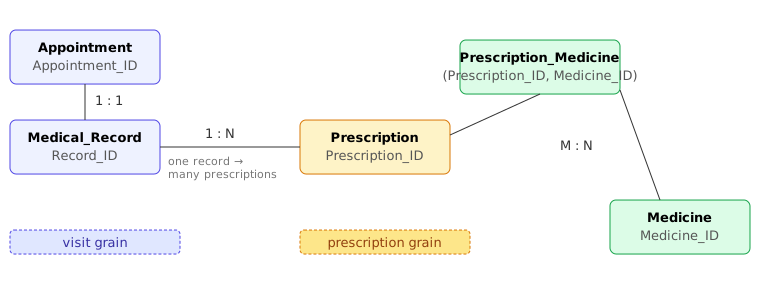
A visit (Appointment) produces one Medical_Record. That medical record can list many Prescriptions. Each prescription can name many Medicines, and each medicine appears across many prescriptions.
The word that trips people up is “per-encounter grain.” A visit is not the same grain as a prescription: one visit can leave behind several prescriptions (an antibiotic, a painkiller, and a steroid written at the same appointment are three rows in Prescription, not one). So the identifier that sits at the prescription grain is Prescription_ID — not Visit_ID, not Appointment_ID, not Record_ID. When we normalize below, the key we land on is the prescription key, and we will be explicit every time we cross from the visit grain down to the prescription grain.
Relationships, resolved to keys
Each relationship resolves to either a foreign key or a junction table.
- Patient → Appointment (1:N):
Patient_IDFK on Appointment. - Doctor → Appointment (1:N):
Doctor_IDFK on Appointment. - Patient → Medical_Record (1:N) and Doctor → Medical_Record (1:N): both FKs on Medical_Record.
- Medical_Record → Prescription (1:N):
Record_IDFK on Prescription. This is the edge that makes a record hold many prescriptions. - Prescription ↔ Medicine (M:N): resolved with the junction table
Prescription_Medicine(Prescription_ID, Medicine_ID, Dosage, Frequency, Duration), where the clinical instructions (dosage, frequency, duration) live on the link because they depend on both the prescription and the specific drug. - Patient ↔ Room (1:1 at a time):
Assigned_Patient_IDFK on Room. - Department → Doctor (1:N) and Department → Patient (1:N):
Department_IDFK on each side. - Patient → Bill (1:N) and Patient → Insurance (1:N): FKs on Bill and Insurance.
Normalizing the prescription data — the part that bites
Imagine someone hands you a single wide spreadsheet that captures everything about medicines prescribed during care. To make the failure mode visible we deliberately denormalize it down to the medicine grain, so its natural key is the pair (Prescription_ID, Medicine_ID) — one row per medicine within one prescription:
Rx_Wide(
  Prescription_ID,   -- which prescription
  Medicine_ID,       -- which medicine on it
  Record_ID,         -- the medical record the prescription belongs to
  Medicine_Name,     -- name of the medicine
  Manufacturer,      -- who makes it
  Dosage,            -- e.g. 500 (mg)
  Frequency,         -- e.g. 3 (times/day)
  Duration           -- e.g. 7 (days)
)
Key: (Prescription_ID, Medicine_ID)
Now apply the forms one at a time. The discipline is always the same: ask which columns depend on the whole key, which depend on part of it, and which depend on a non-key column.
1NF — atomic values
1NF just demands atomic cells and a defined key. As written, every column holds a single value, so Rx_Wide is already in 1NF. (Had we stored medicines as “Amoxicillin, Ibuprofen” in one cell, this is the step that would have forced one row per medicine.)
2NF — kill partial dependencies on the composite key
The key is the pair (Prescription_ID, Medicine_ID). Walk each non-key column and ask what it actually depends on:
| Column | Determined by | Partial? |
|---|---|---|
| Medicine_Name, Manufacturer | Medicine_ID alone | Yes — depends on part of the key |
| Record_ID | Prescription_ID alone | Yes — depends on part of the key |
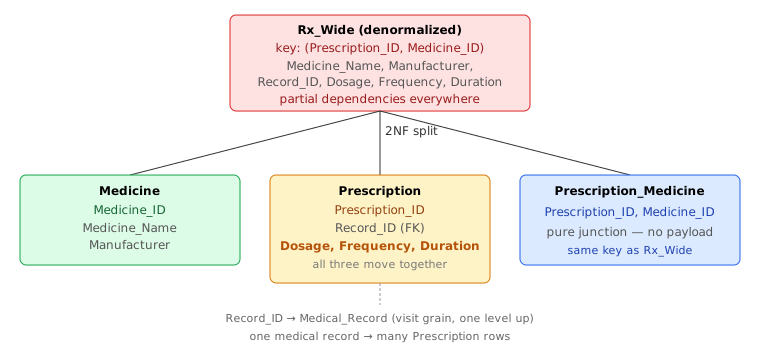
Here is the correction the careful reader is owed. Dosage, Frequency, and Duration depend on the combination of both the prescription and the specific medicine. A doctor prescribes a specific drug with specific instructions (e.g., 'Amoxicillin: 500mg, 3x/day' and 'Ibuprofen: 400mg, as needed'). Therefore, they do not depend on Prescription_ID alone, nor on Medicine_ID alone—they require the composite key (Prescription_ID, Medicine_ID). Thus, they remain on the junction table and do not represent a partial dependency.
Splitting out every partial dependency leaves three relations:
Medicine(Medicine_ID, Medicine_Name, Manufacturer)— facts about a drug.Prescription(Prescription_ID, Record_ID)— facts about one prescription header, keyed byPrescription_IDalone.Prescription_Medicine(Prescription_ID, Medicine_ID, Dosage, Frequency, Duration)— the junction carrying the clinical instructions.
Read the keys carefully, because this is exactly where a sloppy trace lies to you. The fat table was keyed on (Prescription_ID, Medicine_ID), and the residue after removing every partial dependency is the same pair, (Prescription_ID, Medicine_ID) — but it now carries the payload of Dosage, Frequency, Duration. It is a (Prescription_ID, Medicine_ID, Dosage, Frequency, Duration) table. And it is decidedly not keyed on any Visit_ID: the visit grain belongs to Appointment/Medical_Record one level up, and a single visit's medical record can spawn several of these prescriptions. We never silently swap Visit_ID for Prescription_ID mid-trace — they are different grains, and the FK chain Prescription.Record_ID → Medical_Record.Record_ID is precisely what bridges them.
3NF — kill transitive dependencies
Check each table for a non-key column that depends on another non-key column. In Prescription, Dosage, Frequency, and Duration each depend only on Prescription_ID; none depends on another. In Medicine, Manufacturer and Medicine_Name depend only on Medicine_ID. The junction has no non-key columns at all. So all three tables are already in 3NF — no transitive dependency to remove.
The final relational schema
Putting every table together, with primary keys underlined and foreign keys marked, the normalized Hospital Management System is:
Patient(Patient_ID, First_Name, Last_Name, Gender, Address,
        Email, Date_of_Birth, Department_ID→Department)
Patient_Phone_Number(Patient_ID→Patient, Phone_Number)
Doctor(Doctor_ID, First_Name, Last_Name, Specialty, Email,
       Department_ID→Department)
Doctor_Phone_Number(Doctor_ID→Doctor, Phone_Number)
Appointment(Appointment_ID, Appointment_Date, Appointment_Time,
            Reason_For_Visit, Patient_ID→Patient, Doctor_ID→Doctor)
Medical_Record(Record_ID, Diagnosis, Treatment_Details,
               Record_Date, Patient_ID→Patient, Doctor_ID→Doctor)
Prescription(Prescription_ID, Record_ID→Medical_Record)
Prescription_Medicine(Prescription_ID→Prescription,
                       Medicine_ID→Medicine, Dosage, Frequency, Duration)
Medicine(Medicine_ID, Medicine_Name, Manufacturer, Price)
Bill(Bill_ID, Bill_Date, Amount, Payment_Method,
     Insurance_Coverage, Patient_ID→Patient)
Room(Room_Number, Room_Type, Availability_Status,
     Assigned_Patient_ID→Patient)
Department(Department_ID, Department_Name, Location)
Insurance(Insurance_ID, Provider_Name, Policy_Number,
          Coverage_Details, Patient_ID→Patient)
Every fact now has exactly one home. A medicine's manufacturer is stated once in Medicine; a prescription's header facts are stated in Prescription; and the many-to-many link between them carries the clinical instructions (dosage, frequency, duration) that depend on both.
Pitfalls to avoid
The mistakes that wreck a schema like this are nearly always failures to respect grain and dependency.
- Swapping grains mid-decomposition. A “visit” (Appointment/Medical_Record) and a “prescription” are different grains: one visit's medical record can yield several prescriptions. Never let a residue keyed on
(Prescription_ID, Medicine_ID)get relabeled as if it were visit-keyed — trace the FK chainPrescription.Record_ID → Medical_Record.Record_IDexplicitly instead of assuming one visit equals one prescription. - Stranding a column on the prescription header.
Dosage,Frequency, andDurationdepend on both the prescription and the specific drug, so they belong on the junction table. Keeping them on the header table when multiple drugs are linked creates a clinical contradiction (forcing all drugs to share the same instructions). - Loading the junction with attributes that don't depend on both keys. A junction table earns extra columns only when those columns depend on the full pair. General prescription properties (like
Record_ID) do not, so they remain onPrescription. - Treating multi-valued attributes as single columns.
Phone_Numbermust become its own table keyed on(Owner_ID, Phone_Number); cramming numbers into one cell violates 1NF and breaks search and uniqueness. - Over-normalizing 1:1 relationships. Patient↔Room is one-to-one at any moment, so a single FK on
Roomsuffices — a separate junction table would add joins for no integrity benefit. - Forgetting NULL semantics. Optional links (a patient with no insurance, a vacant room with no assigned patient) leave nullable FKs; design queries and constraints so a NULL reads as “no relationship yet” rather than as an error or a phantom match.
Source
Adapted and corrected from the Knowledge Guide lesson “Designing a Hospital Management System” (Databases → Normalization), site/databases/normalization/009-designing-a-hospital-management-system.html. The entity set, attributes, primary/foreign keys, and the Prescription / Prescription_Medicine / Medicine split follow that source's relational schema; the normalization trace and grain analysis are this revision's, reconciled against the source's actual visit→record→prescription→medicine grain chain.
🤖 Don't fully get this? Learn it with Claude
Stuck on Designing a Hospital Management System? Open Claude, copy a block below, and it'll teach you this exact concept — visually and interactively.
Build the mental picture, not memorization.
I just read a lesson on **Designing a Hospital Management System** (Databases) and want to truly understand it. Explain Designing a Hospital Management System from first principles using ONE vivid real-world analogy and a visual mental model — draw it as ASCII art or a clear step-by-step diagram — with a concrete example using real numbers. Then ask me one question to check I got the mental picture, and wait for my reply. If you're unsure or a claim isn't standard, say so and reason from first principles instead of guessing.
Socratic — adapts to where you're stuck.
Teach me **Designing a Hospital Management System** interactively. Ask me ONE guiding question at a time, wait for my answer, and adapt to my confusion — build the idea with me step by step instead of explaining it all at once. If you're unsure or a claim isn't standard, say so and reason from first principles instead of guessing.
Active recall exposes what you missed.
Quiz me on **Designing a Hospital Management System** with 5 questions, easy to tricky, ONE at a time. Tell me if each answer is right; at the end, explain clearly what I got wrong and why. If you're unsure or a claim isn't standard, say so and reason from first principles instead of guessing.
Intuition + hook + flashcards for long-term memory.
Help me remember **Designing a Hospital Management System** for the long term: give the one-sentence intuition, a memorable hook/mnemonic, a tiny worked example, and 3 active-recall flashcards (Q -> A). If you're unsure or a claim isn't standard, say so and reason from first principles instead of guessing.