Designing an Online Food Delivery System
An online food delivery system connects customers with restaurants: they browse menus, place orders, pay, and have food delivered. The data model has to keep all of that consistent while many orders move through their lifecycle at once. This lesson works the design from requirements to an Entity-Relationship (ER) diagram to a normalized relational schema, and traces one concrete order through the tables so the schema's invariants are visible rather than asserted.
The single thesis that drives every decision below is: store every fact exactly once, and treat any value you can recompute from other stored facts as derived rather than authoritative. Where we deliberately break that rule we will say so out loud and justify it as a denormalization trade-off — because an unflagged redundant column is exactly how a schema starts to lie.
Requirements
The system must support:
- Customer management — customer profiles and their multiple delivery addresses.
- Restaurant management — restaurant details, a menu per restaurant, menu items grouped into categories, and ratings.
- Order processing — orders made of line items, with payment and an optional coupon discount.
- Delivery tracking — delivery status and assignment to delivery personnel.
- Reviews — customers leaving reviews on restaurants.
- Promotions — percentage-discount coupons with expiry and usage caps.
Step 1 — Identify entities
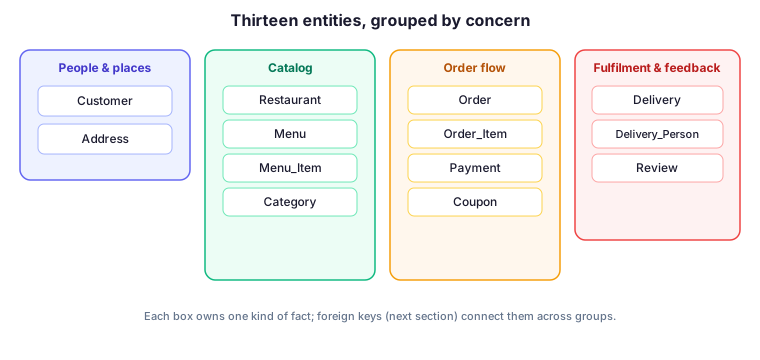
An entity is a thing the system stores facts about. Decomposing the requirements gives thirteen entities, each owning exactly one kind of fact:
- Customer — a person who orders.
- Address — a delivery location owned by a customer.
- Restaurant — a vendor.
- Menu — the menu belonging to a restaurant.
- Menu_Item — a dish on a menu.
- Category — a grouping of dishes (e.g. Starters, Desserts).
- Order — one purchase by a customer.
- Order_Item — one menu item on an order, with quantity.
- Payment — settlement of an order.
- Delivery_Person — a courier.
- Delivery — the delivery of one order.
- Review — a customer's review of a restaurant.
- Coupon — a percentage-discount promotion.
The decomposition diagram below groups these entities by the concern they serve, which is also how the foreign-key edges will later cluster.
Step 2 — Attributes
Each attribute is listed against the table that owns it. Two points to note up front, because they bite later:
- Customer.Password_Hash, not Password — we never store a plaintext password. The column holds a salted hash (e.g. bcrypt/argon2 output).
- Address.State is a real column. A street + city + postal code is ambiguous without it, so it belongs in the attribute list and in the DDL — the two must agree.
Customer
- Customer_ID (PK)
- Full_Name, Email, Phone_Number
- Password_Hash
- Date_Joined
Address
- Address_ID (PK)
- Customer_ID (FK)
- Street, City, State, Postal_Code
- Address_Type (Home, Work, …)
Restaurant
- Restaurant_ID (PK)
- Name, Location, Contact_Number, Rating
Menu
- Menu_ID (PK)
- Restaurant_ID (FK)
Menu_Item
- Item_ID (PK)
- Menu_ID (FK), Category_ID (FK)
- Name, Description, Price
Category
- Category_ID (PK)
- Name, Description
Order
- Order_ID (PK)
- Customer_ID (FK), Address_ID (FK), Coupon_ID (FK, nullable)
- Order_Date
- Items_Subtotal — sum of the line subtotals (the gross before any discount)
- Discount_Amount — currency taken off by the coupon, 0 if no coupon
- Total_Amount — derived: Items_Subtotal − Discount_Amount
- Status (Pending, Confirmed, Delivered, Cancelled)
Order_Item
- Order_Item_ID (PK)
- Order_ID (FK), Item_ID (FK)
- Quantity
- Unit_Price — a price snapshot, copied from Menu_Item.Price at the moment of ordering
Payment
- Payment_ID (PK)
- Order_ID (FK)
- Payment_Date, Payment_Method, Payment_Status
Delivery_Person
- Delivery_Person_ID (PK)
- Full_Name, Phone_Number, Vehicle_Details
Delivery
- Delivery_ID (PK)
- Order_ID (FK), Delivery_Person_ID (FK)
- Delivery_Status, Delivery_Date
Review
- Review_ID (PK)
- Customer_ID (FK), Restaurant_ID (FK)
- Rating, Review_Text, Review_Date
Coupon
- Coupon_ID (PK)
- Code, Discount_Percentage, Expiry_Date, Maximum_Usage
Step 3 — Relationships
| # | Between | Cardinality | How it is realized |
|---|---|---|---|
| 1 | Customer → Address | One-to-many | Address.Customer_ID (FK) |
| 2 | Restaurant → Menu | One-to-one | Menu.Restaurant_ID (FK, unique) |
| 3 | Menu → Menu_Item | One-to-many | Menu_Item.Menu_ID (FK) |
| 4 | Category → Menu_Item | One-to-many | Menu_Item.Category_ID (FK) |
| 5 | Customer → Order | One-to-many | Order.Customer_ID (FK) |
| 6 | Address → Order | One-to-many | Order.Address_ID (FK) |
| 7 | Coupon → Order | One-to-many (optional) | Order.Coupon_ID (FK, nullable) |
| 8 | Order → Order_Item | One-to-many | Order_Item.Order_ID (FK) |
| 9 | Menu_Item → Order_Item | One-to-many | Order_Item.Item_ID (FK) |
| 10 | Order → Payment | One-to-one | Payment.Order_ID (FK, unique) |
| 11 | Order → Delivery | One-to-one | Delivery.Order_ID (FK, unique) |
| 12 | Delivery_Person → Delivery | One-to-many | Delivery.Delivery_Person_ID (FK) |
| 13 | Restaurant → Review | One-to-many | Review.Restaurant_ID (FK) |
| 14 | Customer → Review | One-to-many | Review.Customer_ID (FK) |
Order_Item is the classic associative table: it resolves the many-to-many between Order and Menu_Item (an order has many items; a dish appears on many orders) into two one-to-many relationships, and it carries the per-line facts those relationships cannot — Quantity and the Unit_Price snapshot.
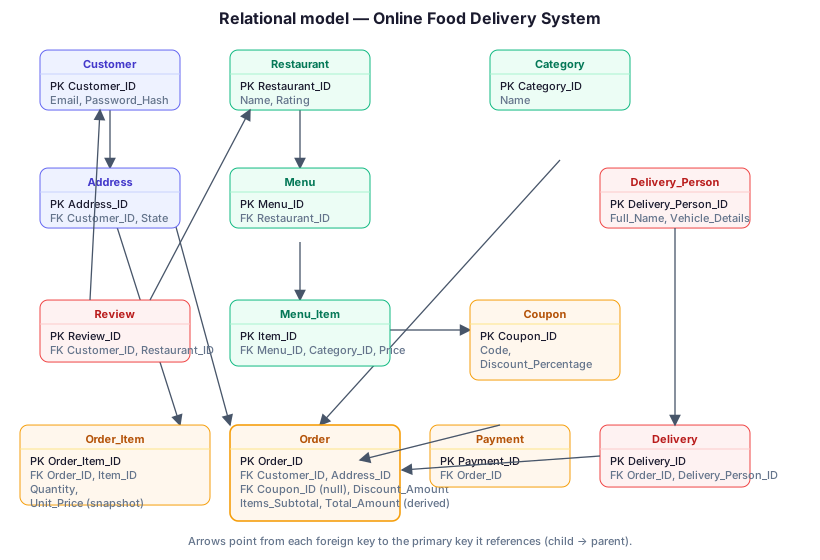
The relational model below makes every foreign key in the table above explicit. Read each arrow as “child references parent,” pointing from the table holding the FK to the table holding the PK it references. This figure is specific to the food-delivery schema — its tables, columns, and arrows describe Customer/Address/Order/… and nothing carried over from any other case study.
Two deliberate redundancies, named as such
The thesis says store every fact once and never treat a recomputable value as authoritative. Two columns above appear to break that. Both are intentional, and the distinction between them matters:
Order_Item.Unit_Price is a snapshot, not a duplicate
It looks like a copy of Menu_Item.Price, but it is not the same fact. Menu_Item.Price is the price now; Order_Item.Unit_Price is the price at the instant the order was placed. The restaurant will raise prices later, and a historical order must not silently change value when they do. So Unit_Price is its own fact — “what this customer agreed to pay” — and storing it is correct normalization, not redundancy. This is why the earlier design's stored Subtotal per line was the real mistake: Subtotal = Unit_Price × Quantity is fully derivable from two columns already in the row, so we drop it and compute it on read.
Order.Total_Amount is a flagged denormalization
By the thesis, Total_Amount should not be stored at all — it is derivable. We store it anyway, and we are flagging it: it is a read-performance denormalization / financial snapshot. Order history and receipts read the total constantly and must show the exact figure the customer was charged even if coupon rules or tax logic change later. The cost is that the stored total can drift from its inputs, so it must be protected by an invariant and recomputed inside the same transaction that writes the lines, never edited independently.
The invariant, stated correctly
The earlier rewrite asserted “Total_Amount = sum of the line subtotals,” which is simply false whenever a coupon applies. The correct, two-part invariant is:
Items_Subtotal = Σ over the order's lines of (Unit_Price × Quantity)
Total_Amount = Items_Subtotal − Discount_Amountwhere Discount_Amount = round(Items_Subtotal × Coupon.Discount_Percentage / 100) when a coupon is attached, and 0 otherwise.
The sum of the lines equals the gross (Items_Subtotal), never the charged total. Conflating the two is what produced the contradiction in the earlier draft.
Traced example — Order #5012
This is the same order the earlier draft used, now reconciled with the invariant above. The customer orders one Margherita pizza and two Cold Brews, with coupon WELCOME20 (20% off).
Order_Item rows (the lines)
| Order_Item_ID | Order_ID | Item_ID | Quantity | Unit_Price | line = Unit_Price × Qty (computed) |
|---|---|---|---|---|---|
| 9001 | 5012 | 301 (Margherita) | 1 | 240.00 | 240.00 |
| 9002 | 5012 | 302 (Cold Brew) | 2 | 60.00 | 120.00 |
Note there is no stored Subtotal column — each line total is computed from Unit_Price × Quantity.
Order row
| Order_ID | Coupon_ID | Items_Subtotal | Discount_Amount | Total_Amount (derived) | Status |
|---|---|---|---|---|---|
| 5012 | (WELCOME20) | 360.00 | 72.00 | 288.00 | Confirmed |
Checking the invariant
- Items_Subtotal = 240.00 + 120.00 = 360.00 ✓ (this is the sum of the lines — the gross).
- Discount_Amount = 360.00 × 20 / 100 = 72.00 ✓.
- Total_Amount = 360.00 − 72.00 = 288.00 ✓ (this is what Payment settles, and what the receipt shows).
Everything is consistent: the lines sum to the gross 360, and the charged total 288 is the gross minus the discount. The earlier draft's “360 vs 288” contradiction was an artifact of comparing the line sum against the post-discount total as though they should be equal — they should not, and the two-column model makes that explicit. Payment.Order_ID = 5012 records the 288.00 settlement; Delivery.Order_ID = 5012 tracks fulfilment.
Step 4 — DDL
The DDL matches the revised attribute lists exactly: Password_Hash (not Password), State present on Address, Order_Item carrying Unit_Price with no stored Subtotal, and Order carrying Items_Subtotal, Discount_Amount, and a derivable Total_Amount. "Order" is quoted because ORDER is a reserved word.
CREATE TABLE Customer (
    Customer_ID   INT PRIMARY KEY,
    Full_Name     VARCHAR(100) NOT NULL,
    Email         VARCHAR(100) NOT NULL UNIQUE,
    Phone_Number  VARCHAR(15),
    Password_Hash VARCHAR(255) NOT NULL,   -- salted hash, never plaintext
    Date_Joined   DATE NOT NULL
);

CREATE TABLE Address (
    Address_ID   INT PRIMARY KEY,
    Customer_ID  INT NOT NULL,
    Street       VARCHAR(255),
    City         VARCHAR(50),
    State        VARCHAR(50),
    Postal_Code  VARCHAR(10),
    Address_Type VARCHAR(20),
    FOREIGN KEY (Customer_ID) REFERENCES Customer(Customer_ID)
);

CREATE TABLE Restaurant (
    Restaurant_ID  INT PRIMARY KEY,
    Name           VARCHAR(100) NOT NULL,
    Location       VARCHAR(255),
    Contact_Number VARCHAR(15),
    Rating         DECIMAL(3,2)
);

CREATE TABLE Category (
    Category_ID INT PRIMARY KEY,
    Name        VARCHAR(50) NOT NULL,
    Description  TEXT
);

CREATE TABLE Menu (
    Menu_ID       INT PRIMARY KEY,
    Restaurant_ID INT NOT NULL UNIQUE,     -- one menu per restaurant
    FOREIGN KEY (Restaurant_ID) REFERENCES Restaurant(Restaurant_ID)
);

CREATE TABLE Menu_Item (
    Item_ID     INT PRIMARY KEY,
    Menu_ID     INT NOT NULL,
    Category_ID INT,
    Name        VARCHAR(100) NOT NULL,
    Description TEXT,
    Price       DECIMAL(10,2) NOT NULL,    -- current price
    FOREIGN KEY (Menu_ID)     REFERENCES Menu(Menu_ID),
    FOREIGN KEY (Category_ID) REFERENCES Category(Category_ID)
);

CREATE TABLE Coupon (
    Coupon_ID           INT PRIMARY KEY,
    Code                VARCHAR(50) NOT NULL UNIQUE,
    Discount_Percentage DECIMAL(5,2) NOT NULL,
    Expiry_Date         DATE,
    Maximum_Usage       INT
);

CREATE TABLE "Order" (
    Order_ID        INT PRIMARY KEY,
    Customer_ID     INT NOT NULL,
    Address_ID      INT NOT NULL,
    Coupon_ID       INT,                   -- nullable: no coupon used
    Order_Date      DATE NOT NULL,
    Items_Subtotal  DECIMAL(10,2) NOT NULL, -- = SUM(line Unit_Price * Quantity)
    Discount_Amount DECIMAL(10,2) NOT NULL DEFAULT 0,
    Total_Amount    DECIMAL(10,2) NOT NULL, -- DERIVED snapshot: Items_Subtotal - Discount_Amount
    Status          VARCHAR(20) NOT NULL,
    FOREIGN KEY (Customer_ID) REFERENCES Customer(Customer_ID),
    FOREIGN KEY (Address_ID)  REFERENCES Address(Address_ID),
    FOREIGN KEY (Coupon_ID)   REFERENCES Coupon(Coupon_ID),
    CONSTRAINT chk_total CHECK (Total_Amount = Items_Subtotal - Discount_Amount)
);

CREATE TABLE Order_Item (
    Order_Item_ID INT PRIMARY KEY,
    Order_ID      INT NOT NULL,
    Item_ID       INT NOT NULL,
    Quantity      INT NOT NULL CHECK (Quantity > 0),
    Unit_Price    DECIMAL(10,2) NOT NULL,  -- price snapshot at order time; NO stored Subtotal
    FOREIGN KEY (Order_ID) REFERENCES "Order"(Order_ID),
    FOREIGN KEY (Item_ID)  REFERENCES Menu_Item(Item_ID)
);

CREATE TABLE Payment (
    Payment_ID     INT PRIMARY KEY,
    Order_ID       INT NOT NULL UNIQUE,    -- one payment per order
    Payment_Date   DATE,
    Payment_Method VARCHAR(50),
    Payment_Status VARCHAR(20),
    FOREIGN KEY (Order_ID) REFERENCES "Order"(Order_ID)
);

CREATE TABLE Delivery_Person (
    Delivery_Person_ID INT PRIMARY KEY,
    Full_Name          VARCHAR(100) NOT NULL,
    Phone_Number       VARCHAR(15),
    Vehicle_Details    VARCHAR(100)
);

CREATE TABLE Delivery (
    Delivery_ID        INT PRIMARY KEY,
    Order_ID           INT NOT NULL UNIQUE, -- one delivery per order
    Delivery_Person_ID INT,
    Delivery_Status    VARCHAR(20),
    Delivery_Date      DATE,
    FOREIGN KEY (Order_ID)           REFERENCES "Order"(Order_ID),
    FOREIGN KEY (Delivery_Person_ID) REFERENCES Delivery_Person(Delivery_Person_ID)
);

CREATE TABLE Review (
    Review_ID     INT PRIMARY KEY,
    Customer_ID   INT NOT NULL,
    Restaurant_ID INT NOT NULL,
    Rating        INT CHECK (Rating BETWEEN 1 AND 5),
    Review_Text   TEXT,
    Review_Date   DATE,
    FOREIGN KEY (Customer_ID)   REFERENCES Customer(Customer_ID),
    FOREIGN KEY (Restaurant_ID) REFERENCES Restaurant(Restaurant_ID)
);
The chk_total CHECK constraint is what keeps the denormalized Total_Amount honest: the database itself refuses any row where the stored total does not equal Items_Subtotal − Discount_Amount, so the snapshot can never silently drift from its inputs.
Source
Adapted and corrected from the GeeksforGeeks case study “Designing an Online Food Delivery System,” geeksforgeeks.org (Databases · Normalization). The relational-model figure, the snapshot-versus-derived treatment of Unit_Price/Total_Amount, and the coupon-reconciled worked example for Order #5012 are this revision's corrections to that source.
🤖 Don't fully get this? Learn it with Claude
Stuck on Designing an Online Food Delivery System? Open Claude, copy a block below, and it'll teach you this exact concept — visually and interactively.
Build the mental picture, not memorization.
I just read a lesson on **Designing an Online Food Delivery System** (Databases) and want to truly understand it. Explain Designing an Online Food Delivery System from first principles using ONE vivid real-world analogy and a visual mental model — draw it as ASCII art or a clear step-by-step diagram — with a concrete example using real numbers. Then ask me one question to check I got the mental picture, and wait for my reply. If you're unsure or a claim isn't standard, say so and reason from first principles instead of guessing.
Socratic — adapts to where you're stuck.
Teach me **Designing an Online Food Delivery System** interactively. Ask me ONE guiding question at a time, wait for my answer, and adapt to my confusion — build the idea with me step by step instead of explaining it all at once. If you're unsure or a claim isn't standard, say so and reason from first principles instead of guessing.
Active recall exposes what you missed.
Quiz me on **Designing an Online Food Delivery System** with 5 questions, easy to tricky, ONE at a time. Tell me if each answer is right; at the end, explain clearly what I got wrong and why. If you're unsure or a claim isn't standard, say so and reason from first principles instead of guessing.
Intuition + hook + flashcards for long-term memory.
Help me remember **Designing an Online Food Delivery System** for the long term: give the one-sentence intuition, a memorable hook/mnemonic, a tiny worked example, and 3 active-recall flashcards (Q -> A). If you're unsure or a claim isn't standard, say so and reason from first principles instead of guessing.