Designing an Instagram
Instagram is a platform where users post content, interact through likes, comments, follows, and direct messages, and curate a profile. In this case study we model its core domain with an Entity-Relationship (ER) diagram and then map that diagram to a normalized relational schema in SQL.
By the end you will be able to identify the entities, attach attributes, reason about each relationship's cardinality, and translate the result into CREATE TABLE statements with sane keys and constraints. We will not stop at the textbook-clean answer: this walkthrough also confronts the denormalized counters head-on, because the interesting database lessons live exactly where the clean model meets a feed that has to be fast.
Requirements analysis
Before drawing anything, pin down what the system must actually support. For Instagram the core functional areas are:
- User management — store account details and manage profiles.
- Content management — posts, captions, and the engagement attached to them.
- Engagement — likes, comments, and group discussions.
- Messaging — private direct messages between users.
- Profile insights — dashboards that surface per-user analytics.
- Group management — letting users create, join, and interact within groups.
These requirements drive every entity and relationship below — if a column does not serve one of them, it does not belong in the model.
Step 1 — Identify the entities
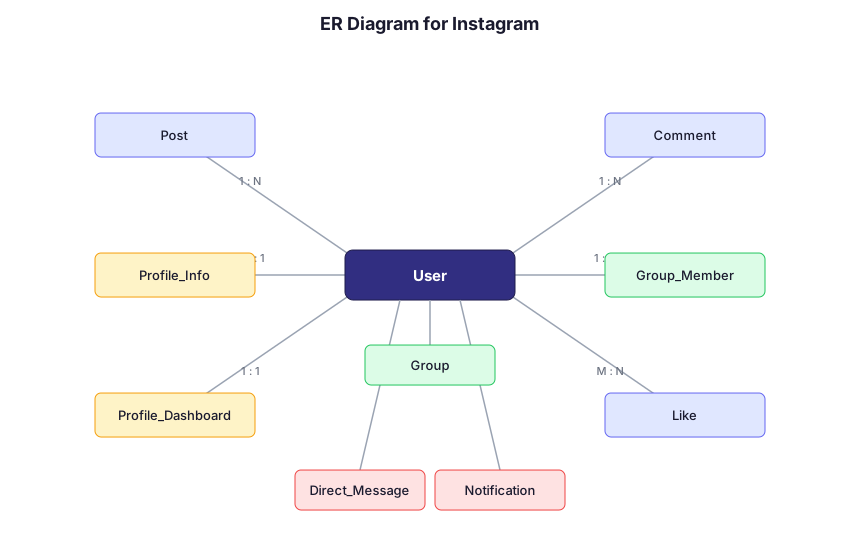
Entities are the things the system stores data about. From the requirements we get nine:
- User
- Post
- Comment
- Like
- Direct_Message
- Notification
- Group
- Profile_Info
- Profile_Dashboard
User is the hub: almost everything else points back at it.
Step 2 — Detail the attributes
Each entity gets a primary key (PK) and the attributes the requirements demand. Foreign keys (FK) carry the relationships.
User
- User_ID (PK)
- Username
- Full_Name
- Phone_Number
- Date_Joined
- Profile_Picture
Post
- Post_ID (PK)
- Caption
- Post_Date
- User_ID (FK)
Comment
- Comment_ID (PK)
- Text
- Comment_Date
- User_ID (FK)
- Post_ID (FK)
Like
- Like_ID (PK)
- Like_Date
- User_ID (FK)
- Post_ID (FK)
Direct_Message
- Message_ID (PK)
- Message_Text
- Sent_Date
- Sender_ID (FK)
- Recipient_ID (FK)
Notification
- Notification_ID (PK)
- Notification_Text
- Notification_Date
- User_ID (FK)
Group
- Group_ID (PK)
- Group_Name
- Description
- Created_By (FK to User_ID)
Profile_Info
- User_ID (PK, FK)
- Bio
- Website
- Number_of_Posts
- Number_of_Followers
- Number_of_Following
Profile_Dashboard
- User_ID (PK, FK)
- Total_Likes
- Total_Comments
- Total_Groups_Joined
- Total_Posts_Shared
Notice the suspicious columns: Number_of_Followers, Number_of_Posts, Total_Likes, and friends. None of these is a fact the user typed in — each is a count of rows in another table. Storing them is a deliberate trade-off, not free real estate, and we dissect it below.
Step 3 — Define the relationships
For each pair of related entities, ask "how many of A relate to how many of B?" That cardinality decides whether the link is a foreign key, a junction table, or a shared key.
- User → Post — a user creates many posts; each post has one author. One-to-Many.
- Post → Comment — a post has many comments; each comment belongs to one post (and one author). One-to-Many.
- Post → Like — a post has many likes; each like is one user reacting once. One-to-Many.
- User → User (follows) — a user follows many users and is followed by many. This is genuinely Many-to-Many, resolved by a
Followjunction table of (Follower_ID, Followed_ID). (The original notes call this "one-to-many"; that only describes one direction — the relation as a whole is many-to-many, which is why it needs its own table.) - User → Comment — a user writes many comments. One-to-Many.
- User → Like — a user gives many likes. One-to-Many.
- User → Direct_Message — a user sends many messages; each message has one sender and one recipient (two FKs back to User). One-to-Many on each role.
- User → Notification — a user receives many notifications; each belongs to one user. One-to-Many.
- User ↔ Group — a user joins many groups; a group has many members. Many-to-Many, resolved by the
Group_Memberjunction table. - User → Profile_Info — exactly one profile-info row per user. One-to-One.
- User → Profile_Dashboard — exactly one dashboard row per user. One-to-One.
A caveat on the one-to-one tables
The mechanical move for a 1:1 relationship is to give Profile_Info and Profile_Dashboard a primary key that is also a foreign key to User — a shared User_ID PK. That is what the schema below does, and it is correct.
But be honest about what it is: splitting a 1:1 relationship into a separate table is itself a design choice, not a forced consequence of the cardinality. In real Instagram-style designs the bio, website, and avatar usually just live as columns on User. You only split them out when you have a concrete reason — vertical partitioning to keep the hot User row narrow, isolating rarely-read analytics, or attaching different access controls or storage to the satellite table. A shared-PK 1:1 split with no such reason is closer to an anti-pattern than a default: it buys you an extra join for every profile read in exchange for nothing.
The denormalized counters: store vs. recompute
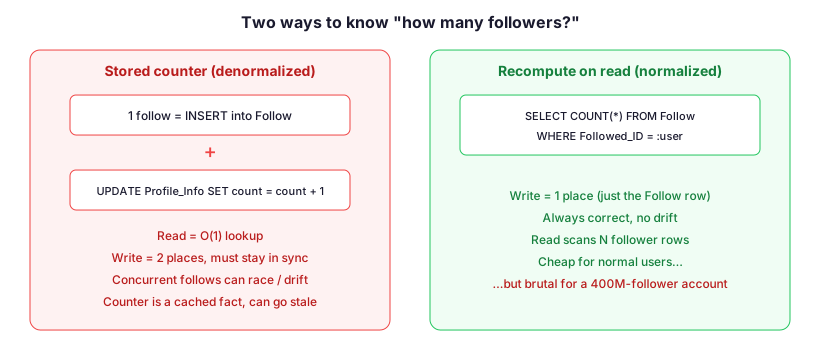
Here is the teaching moment the schema sets up. Profile_Info.Number_of_Followers and Profile_Dashboard.Total_Likes are not source data — they are aggregates over rows that already exist elsewhere. The true follower count is SELECT COUNT(*) FROM Follow WHERE Followed_ID = :user; the true like total is a COUNT(*) over the Like table. Storing a separate integer column is a deliberate denormalization, and it comes with a bill.
What recompute-on-read costs
If we keep the model fully normalized and never store the count, reads pay for it. For a typical user with a few hundred followers, COUNT(*) over an indexed Followed_ID is cheap. For a celebrity with hundreds of millions of followers, that same query scans an enormous index range on every profile view — and profile views are constant. The aggregate is correct, but its cost scales with the size of the relationship, exactly on your hottest accounts.
What storing the count costs
The stored column makes reads O(1), but it turns one logical action into two writes — and that is write amplification. Every INSERT into Follow must also fire UPDATE Profile_Info SET Number_of_Followers = Number_of_Followers + 1; every unfollow must decrement it. Three concrete hazards follow:
- Update anomaly / drift. The instant the
Followinsert succeeds but the counterUPDATEfails (crash, deploy, bug, or a code path that forgets), the stored number disagrees with the row count. The denormalized value is now wrong, and nothing in the schema notices. - Concurrency. Two follows landing at once can both read the old value and write back the same +1, losing an increment — unless every counter write goes through an atomic
SET count = count + 1or a lock, which serializes writes on that one hot row and becomes a contention point for popular accounts. - Who owns the write? The counter has no natural owner. If it is application code, every service that touches
Followmust remember to update it. If it is a database trigger, the logic is hidden from the app. If it is an async worker or change-data-capture stream, the count is now eventually consistent — correct soon, but observably stale right after a follow.
How this is actually resolved
At Instagram scale the answer is rarely "pick one." The Follow rows remain the single source of truth (so the count is always recoverable and reconcilable), while the displayed number is a cached, asynchronously-maintained counter — and a small amount of staleness on a follower count is an accepted, deliberate trade-off because nobody is harmed if the number lags by a second. The lesson generalizes: a denormalized aggregate is a cache, and like every cache it trades read speed for the obligation to keep it fresh and the risk that it drifts.
Step 4 — Map the ER diagram to a relational schema
Translating the diagram into tables follows three rules:
- One table per entity. Give each a primary key. Multi-valued or member-style attributes (a group's members) become their own table rather than a column.
- Foreign keys carry relationships. A 1:N link puts the FK on the "many" side; enforce referential integrity with FK constraints so you can never reference a user or post that does not exist.
- Many-to-many becomes a junction table.
User ↔ Groupresolves toGroup_Member, andUser ↔ User(follows) resolves toFollow— each with a composite key built from the two related keys, splitting one M:N into two clean 1:N links.
The one-to-one satellites (Profile_Info, Profile_Dashboard) reuse User_ID as both PK and FK — the shared-key pattern discussed earlier.
The SQL schema
1. User
CREATE TABLE User (
    User_ID INT PRIMARY KEY,
    Username VARCHAR(50) UNIQUE,
    Full_Name VARCHAR(100),
    Email VARCHAR(100),
    Phone_Number VARCHAR(15),
    Date_Joined DATE,
    Profile_Picture VARCHAR(255)
);
2. Post
CREATE TABLE Post (
    Post_ID INT PRIMARY KEY,
    Caption TEXT,
    Post_Date DATE,
    User_ID INT,
    FOREIGN KEY (User_ID) REFERENCES User(User_ID)
);
3. Comment
CREATE TABLE Comment (
    Comment_ID INT PRIMARY KEY,
    Text TEXT,
    Comment_Date DATE,
    User_ID INT,
    Post_ID INT,
    FOREIGN KEY (User_ID) REFERENCES User(User_ID),
    FOREIGN KEY (Post_ID) REFERENCES Post(Post_ID)
);
4. Like (Quoted to avoid SQL Reserved Word conflict)
CREATE TABLE "Like" (
    Like_ID INT PRIMARY KEY,
    User_ID INT,
    Post_ID INT,
    UNIQUE (User_ID, Post_ID), -- Prevents a user from liking the same post multiple times
    FOREIGN KEY (User_ID) REFERENCES User(User_ID),
    FOREIGN KEY (Post_ID) REFERENCES Post(Post_ID)
);
5. Follow
CREATE TABLE Follow (
    Follow_ID INT PRIMARY KEY,
    Follower_ID INT,
    Followed_ID INT,
    UNIQUE (Follower_ID, Followed_ID), -- Prevents duplicate follow relationships
    FOREIGN KEY (Follower_ID) REFERENCES User(User_ID),
    FOREIGN KEY (Followed_ID) REFERENCES User(User_ID)
);
6. Direct_Message
CREATE TABLE Direct_Message (
    Message_ID INT PRIMARY KEY,
    Message_Text TEXT,
    Sent_Date DATE,
    Sender_ID INT,
    Recipient_ID INT,
    FOREIGN KEY (Sender_ID) REFERENCES User(User_ID),
    FOREIGN KEY (Recipient_ID) REFERENCES User(User_ID)
);
7. Notification
CREATE TABLE Notification (
    Notification_ID INT PRIMARY KEY,
    Notification_Text TEXT,
    Notification_Date DATE,
    User_ID INT,
    FOREIGN KEY (User_ID) REFERENCES User(User_ID)
);
8. Group
CREATE TABLE "Group" (
    Group_ID INT PRIMARY KEY,
    Group_Name VARCHAR(100),
    Description TEXT,
    Created_By INT,
    FOREIGN KEY (Created_By) REFERENCES User(User_ID)
);
9. Group_Member (junction)
CREATE TABLE Group_Member (
    Group_ID INT,
    User_ID INT,
    Join_Date DATE,
    PRIMARY KEY (Group_ID, User_ID),
    FOREIGN KEY (Group_ID) REFERENCES "Group"(Group_ID),
    FOREIGN KEY (User_ID) REFERENCES User(User_ID)
);
10. Profile_Info (1:1 satellite)
CREATE TABLE Profile_Info (
    User_ID INT PRIMARY KEY,
    Bio TEXT,
    Website VARCHAR(100),
    Number_of_Posts INT,       -- denormalized counter
    Number_of_Followers INT,   -- = COUNT(*) over Follow
    Number_of_Following INT,
    FOREIGN KEY (User_ID) REFERENCES User(User_ID)
);
11. Profile_Dashboard (1:1 satellite)
CREATE TABLE Profile_Dashboard (
    User_ID INT PRIMARY KEY,
    Total_Likes INT,          -- denormalized counter
    Total_Comments INT,
    Total_Groups_Joined INT,
    Total_Posts_Shared INT,
    FOREIGN KEY (User_ID) REFERENCES User(User_ID)
);
Group is a SQL reserved word, so it is quoted here. The counter columns in the last two tables are exactly the denormalized aggregates analyzed above — keep them only with a plan for who maintains them and how stale they are allowed to get.
Source
This walkthrough adapts and extends the case study "Designing Instagram" / "How to Design a Database for Instagram" from GeeksforGeeks' DBMS / database-design series (geeksforgeeks.org). The entity list, attributes, relationships, and base SQL schema follow that source; the requirements framing has been corrected to Instagram (the original notes copy stray "Hospital Management System" phrasing), the follows relationship is reclassified as many-to-many, and the denormalized-counter trade-off, one-to-one-split caveat, and accompanying diagrams are added analysis.
🤖 Don't fully get this? Learn it with Claude
Stuck on Designing an Instagram? Open Claude, copy a block below, and it'll teach you this exact concept — visually and interactively.
Build the mental picture, not memorization.
I just read a lesson on **Designing an Instagram** (Databases) and want to truly understand it. Explain Designing an Instagram from first principles using ONE vivid real-world analogy and a visual mental model — draw it as ASCII art or a clear step-by-step diagram — with a concrete example using real numbers. Then ask me one question to check I got the mental picture, and wait for my reply. If you're unsure or a claim isn't standard, say so and reason from first principles instead of guessing.
Socratic — adapts to where you're stuck.
Teach me **Designing an Instagram** interactively. Ask me ONE guiding question at a time, wait for my answer, and adapt to my confusion — build the idea with me step by step instead of explaining it all at once. If you're unsure or a claim isn't standard, say so and reason from first principles instead of guessing.
Active recall exposes what you missed.
Quiz me on **Designing an Instagram** with 5 questions, easy to tricky, ONE at a time. Tell me if each answer is right; at the end, explain clearly what I got wrong and why. If you're unsure or a claim isn't standard, say so and reason from first principles instead of guessing.
Intuition + hook + flashcards for long-term memory.
Help me remember **Designing an Instagram** for the long term: give the one-sentence intuition, a memorable hook/mnemonic, a tiny worked example, and 3 active-recall flashcards (Q -> A). If you're unsure or a claim isn't standard, say so and reason from first principles instead of guessing.