INSERT
INSERT takes the row image you supply, fills any columns you omitted with their column DEFAULT (or NULL), validates the candidate row against every constraint on the table (type, NOT NULL, CHECK, UNIQUE/primary-key, foreign-key), and only then appends it to a data page and updates every index that covers the table — all inside the current transaction, so the row is invisible to other sessions until you COMMIT.
The shape of the statement
An INSERT has three movable parts: the target table, an optional column list, and one or more value rows. The column list is what binds your values to columns by position; leave it off and you are implicitly promising to supply every column in the table's defined order.
INSERT INTO employees (first_name, last_name, age)
VALUES ('Monica', 'Geller', 28);
INSERT INTO employees— the table that will receive the row.(first_name, last_name, age)— the columns you are providing, in the order you list them. Any column not named here gets itsDEFAULTorNULL.VALUES ('Monica', 'Geller', 28)— one row, matched left-to-right against the column list. String literals use single quotes;28is a numeric literal and takes no quotes.
Why the naive version is wrong
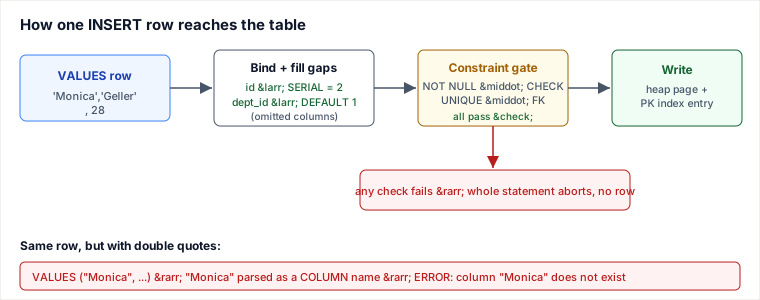
The textbook example often reads VALUES ("Monica", "Geller", 28). In ANSI SQL — and in PostgreSQL, Oracle, and SQL Server — double quotes delimit identifiers (table and column names), not string values. So the engine reads "Monica" as “the column named Monica,” finds no such column in the row being built, and raises ERROR: column "Monica" does not exist. MySQL happens to tolerate double-quoted strings by default (unless ANSI_QUOTES is set), which is exactly why the habit spreads — it works on one engine and breaks the moment you move. The portable, correct form is single quotes for text: 'Monica'. To put a literal apostrophe inside a string, double it: 'O''Brien'.
Trace one row through the engine
Start with this table and one existing row:
CREATE TABLE employees (
  id         SERIAL PRIMARY KEY,        -- auto-assigned
  first_name TEXT    NOT NULL,
  last_name  TEXT    NOT NULL,
  age        INT     CHECK (age >= 18),
  dept_id    INT     DEFAULT 1
);
Existing state:
| id | first_name | last_name | age | dept_id |
|---|---|---|---|---|
| 1 | Ross | Geller | 30 | 2 |
Now run:
INSERT INTO employees (first_name, last_name, age)
VALUES ('Monica', 'Geller', 28);
Step by step, the engine:
- Binds by the column list.
first_name ← 'Monica',last_name ← 'Geller',age ← 28. - Fills the omitted columns.
idwas not supplied → theSERIALsequence hands out2.dept_idwas not supplied → itsDEFAULT 1. - Checks constraints. Both
NOT NULLcolumns are present;CHECK (age >= 18)holds for 28;id = 2is unique. All pass. - Writes & indexes. The row is placed on a heap page and the primary-key index gets a new entry pointing at it.
Resulting state after COMMIT:
| id | first_name | last_name | age | dept_id |
|---|---|---|---|---|
| 1 | Ross | Geller | 30 | 2 |
| 2 | Monica | Geller | 28 | 1 |
Beyond one row
You rarely insert a single literal row in production. The forms that matter:
Multi-row insert — one statement, one round trip, one transaction. Far cheaper than N separate statements because constraint checks and index maintenance batch, and the whole set commits or rolls back together:
INSERT INTO employees (first_name, last_name, age) VALUES
  ('Rachel', 'Green',   29),
  ('Chandler','Bing',   30),
  ('Joey',   'Tribbiani', 31);
INSERT ... SELECT — copy or transform rows from another query. The column count and types of the SELECT must line up with the target's column list:
INSERT INTO employees_archive (first_name, last_name, age)
SELECT first_name, last_name, age
FROM employees
WHERE age >= 60;
RETURNING (PostgreSQL, Oracle 23ai, modern SQLite/MariaDB) — get the generated values back without a second query. Indispensable for grabbing an auto-generated key:
INSERT INTO employees (first_name, last_name, age)
VALUES ('Monica', 'Geller', 28)
RETURNING id;          -- yields 2
SQL Server's equivalent is the OUTPUT clause; MySQL exposes the last id via LAST_INSERT_ID().
Pitfalls
- Double-quoted strings. Covered above — the single most common portability bug. Strings are single-quoted; double quotes mean identifiers everywhere except MySQL's default mode.
- Omitting the column list.
INSERT INTO employees VALUES (...)binds positionally to every column in table order, includingid. Add a column later and every such statement silently shifts or breaks. Always name your columns in application code. - Forgetting auto-generated columns. If you do supply the column list, do not list a
SERIAL/IDENTITYcolumn you want auto-assigned — let the sequence fill it, or you risk a duplicate-key clash with the sequence's next value. - Constraint violations abort the whole statement. One bad row in a multi-row insert rolls back all the rows in that statement — it is not partial. Use
ON CONFLICT DO NOTHING/UPDATE(Postgres) orINSERT IGNORE/ON DUPLICATE KEY UPDATE(MySQL) when you want upsert semantics instead. - String concatenation = SQL injection. Never build
VALUES ('" + name + "'). A name of'); DROP TABLE employees;--becomes runnable SQL. Use parameterized/prepared statements so the value is sent separately from the query text. - Not committing. Outside autocommit, an inserted row is invisible to other sessions and is lost on disconnect until you
COMMIT.
Takeaways
- Single quotes for string literals; double quotes are identifiers (MySQL's leniency is the trap, not the rule).
- Always write an explicit column list — it makes inserts order-independent and lets
DEFAULT/auto-increment columns do their job. - An insert is validated against all constraints and committed atomically; a multi-row insert is all-or-nothing.
- Reach for multi-row
VALUES,INSERT ... SELECT, andRETURNING— they are where INSERT earns its keep in real systems.
Sources: ISO/IEC 9075 (SQL standard) on quoting rules for character-string literals vs. delimited identifiers; PostgreSQL documentation — INSERT (multi-row VALUES, RETURNING, ON CONFLICT) and the lexical-structure page on quoting; MySQL Reference Manual — INSERT and the ANSI_QUOTES SQL mode. Re-authored and deepened for this guide: fixed the double-quoted string-literal bug (would error on ANSI/Postgres), replaced the garbled column description and the raster “Image” placeholders with inline before/after tables and a traced mechanism, and added constraints, defaults, multi-row, INSERT ... SELECT, and RETURNING.
🎯 STRICT STANDOUT: Why / worked / when-not / failure / drills — INSERT
Why this concept exists (judgment chain)
INSERT materializes a candidate row (defaults for omitted cols), runs every constraint gate, then writes heap+indexes inside the transaction. Portable string literals use single quotes; double quotes are identifiers (MySQL's leniency teaches a bad habit). Multi-row VALUES and RETURNING are the production forms.
Worked example with numbers or traced steps
INSERT INTO employees (first_name,last_name,age) VALUES ('Monica','Geller',28)
→ id SERIAL=2, dept_id DEFAULT 1; CHECK age>=18 passes; PK unique.
VALUES ("Monica",...) on Postgres → column "Monica" does not exist.
Multi-row 3-tuple insert: one round-trip, all-or-nothing on constraint fail.
RETURNING id → 2 without second SELECT.
Injection: never VALUES ('"'+name+'"'); use parameters.
When NOT to use / named alternative
Single-row inserts are fine for low QPS interactive creates. Prefer COPY/bulk load for millions of rows. Use ON CONFLICT/upsert when duplicates are expected. Do not omit column lists in application SQL.
Failure / ops fingerprint
Duplicate key storms from concurrent inserts without conflict handling. Sequence gaps after rolled-back SERIAL inserts (normal). Partial multi-row belief is wrong — one bad row aborts all. Ops: monitor insert error rates; use prepared statements; batch size tuning.
Hostile-panel Q&As (model answers)
Q1. Single vs double quotes?
Model answer: Single = string literal (standard); double = delimited identifier. MySQL without ANSI_QUOTES tolerates double-quoted strings — not portable.
Q2. Why name columns explicitly?
Model answer: Survives column reordering/ADD COLUMN; documents intent; lets DEFAULT/SERIAL fill omitted fields.
Q3. Multi-row insert partial success?
Model answer: No — statement atomic; one constraint failure rolls back all rows of that statement (unless engine-specific ignore modes).
🤖 Don't fully get this? Learn it with Claude
Stuck on INSERT? Open Claude, copy a block below, and it'll teach you this exact concept — visually and interactively.
Build the mental picture, not memorization.
I just read a lesson on **INSERT** (Databases) and want to truly understand it. Explain INSERT from first principles using ONE vivid real-world analogy and a visual mental model — draw it as ASCII art or a clear step-by-step diagram — with a concrete example using real numbers. Then ask me one question to check I got the mental picture, and wait for my reply. If you're unsure or a claim isn't standard, say so and reason from first principles instead of guessing.
Socratic — adapts to where you're stuck.
Teach me **INSERT** interactively. Ask me ONE guiding question at a time, wait for my answer, and adapt to my confusion — build the idea with me step by step instead of explaining it all at once. If you're unsure or a claim isn't standard, say so and reason from first principles instead of guessing.
Active recall exposes what you missed.
Quiz me on **INSERT** with 5 questions, easy to tricky, ONE at a time. Tell me if each answer is right; at the end, explain clearly what I got wrong and why. If you're unsure or a claim isn't standard, say so and reason from first principles instead of guessing.
Intuition + hook + flashcards for long-term memory.
Help me remember **INSERT** for the long term: give the one-sentence intuition, a memorable hook/mnemonic, a tiny worked example, and 3 active-recall flashcards (Q -> A). If you're unsure or a claim isn't standard, say so and reason from first principles instead of guessing.