Read data from table
SELECT: projecting columns out of stored rows
A table is stored as a set of rows, each row a fixed sequence of column values; SELECT tells the engine which of those columns to keep (the projection) and FROM tells it which table to scan. The engine walks the rows of that table and, for each one, emits a new row containing only the requested columns in the order you named them. SELECT * is shorthand that expands, at parse time, to every column in the table's defined order.
Worked example: scanning the Employee table
Suppose Employee is stored with four columns in this defined order: id, firstName, lastName, salary.
| id | firstName | lastName | salary |
|---|---|---|---|
| 1 | Asha | Rao | 92000 |
| 2 | Liam | Chen | 78000 |
| 3 | Maya | Iyer | 105000 |
Trace what the engine does for the projection query below, row by row:
SELECT firstName, lastName FROM Employee;- Resolve
FROM Employee→ the source is the three stored rows above. - Resolve the select list → keep columns
firstNameandlastNameonly, in that order. - Row 1
(1, Asha, Rao, 92000)→ emit(Asha, Rao). - Row 2
(2, Liam, Chen, 78000)→ emit(Liam, Chen). - Row 3
(3, Maya, Iyer, 105000)→ emit(Maya, Iyer).
Result set (note: no WHERE, so every row survives; only the columns are narrowed):
| firstName | lastName |
|---|---|
| Asha | Rao |
| Liam | Chen |
| Maya | Iyer |
The equivalent SELECT * would instead emit all four columns of every row — same three rows, wider shape.
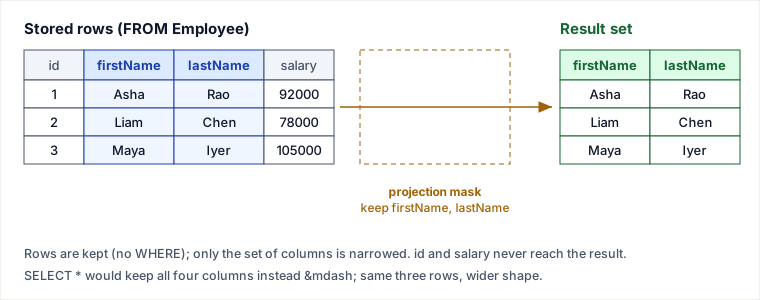
Selecting all columns
To return every column of every row, project with the * wildcard:
SELECT * FROM Employee;This returns all four columns (id, firstName, lastName, salary) for the three rows. * is expanded against the table's column list at parse time, so the output column order follows the table definition, not your intent.
Pitfalls
SELECT *in application code is an anti-pattern. It ships every column over the wire even when you need two, defeats covering-index optimizations (the engine must visit the table heap instead of answering from the index alone), and silently changes its result shape when someone runsALTER TABLE ... ADD COLUMN. Code that doesrow[3]by position, or anINSERT INTO target SELECT * FROM source, breaks the day a column is added or reordered. Name the columns you actually use.- Output column order is the select-list order, not the table order.
SELECT lastName, firstName FROM EmployeereturnslastNamefirst. If a caller reads results positionally, swapping two columns in the query corrupts the data without any error. SELECTalone has no inherent ordering. The engine may return rows in storage or scan order, which can change after updates, vacuum, or a parallel scan. Never assume the order you saw in testing — addORDER BYwhen order matters.- A bare
SELECT *on a large table is a full scan. With millions of rows and noWHERE/LIMIT, you pull the entire table into the client — a common cause of accidental memory blowups and slow dashboards.
Takeaways
SELECTis projection (which columns);FROMis the source (which table). Without aWHERE, all rows survive — only the columns are narrowed.SELECT *means “all columns in table-defined order” and is fine for ad-hoc exploration, but name explicit columns in any code that ships, persists, or indexes.- Result column order follows your select list; result row order is undefined until you add
ORDER BY.
Sources: ISO/IEC 9075 (SQL standard) on the SELECT specification and projection; PostgreSQL documentation, “Queries / Table Expressions” and “The SELECT List”; MySQL Reference Manual, “SELECT Statement”. The SELECT * anti-pattern and covering-index point follow Markus Winand, Use The Index, Luke!. Re-authored and deepened for this guide — the two code blocks were previously mislabeled with a ‘java’ header above plain SQL (a build-import artifact) and the figures carried placeholder alt text; both are corrected here, with a traced projection example and diagram added.
🎯 STRICT STANDOUT: Why / worked / when-not / failure / drills — Read data from table (SELECT projection)
Why this concept exists (judgment chain)
SELECT is projection: choose columns; FROM chooses the relation; without WHERE all rows survive. Explicit column lists are an API contract for apps, covering indexes, and schema evolution. SELECT * is fine for ad-hoc exploration and a production footgun.
Worked example with numbers or traced steps
Employee rows: (1,Asha,Rao,92000),(2,Liam,Chen,78000),(3,Maya,Iyer,105000).
SELECT firstName, lastName → three rows, two columns; salary never leaves the engine.
Covering index on (firstName, lastName) can answer without heap if query only needs those cols.
SELECT * + later ALTER ADD ssn → app row[3] or INSERT…SELECT * silently breaks.
No ORDER BY → order undefined even if it "looked sorted" in dev.
When NOT to use / named alternative
SELECT * is OK in psql/mysql REPL, admin dumps, and throwaway notebooks. Prefer * when the contract is "entire row image for migration tooling" that introspects catalog. Never use * behind a stable public API or ORM mapping by ordinal.
Failure / ops fingerprint
Incident: production OOM after SELECT * FROM big_table without LIMIT. Silent field shift after column add. Covering-index regressions when someone reintroduces SELECT *. Ops: slow-query log full-table scans; schema lint bans SELECT * in app SQL.
Hostile-panel Q&As (model answers)
Q1. Projection vs selection?
Model answer: Projection narrows columns (SELECT list); selection narrows rows (WHERE). This page is pure projection.
Q2. Why does SELECT * defeat covering indexes?
Model answer: Planner must fetch non-indexed columns from the heap/table; index-only scan requires all needed columns in the index.
Q3. Is result order guaranteed without ORDER BY?
Model answer: No — any plan/storage change can reorder. ORDER BY is the only contract.
🤖 Don't fully get this? Learn it with Claude
Stuck on Read data from table? Open Claude, copy a block below, and it'll teach you this exact concept — visually and interactively.
Build the mental picture, not memorization.
I just read a lesson on **Read data from table** (Databases) and want to truly understand it. Explain Read data from table from first principles using ONE vivid real-world analogy and a visual mental model — draw it as ASCII art or a clear step-by-step diagram — with a concrete example using real numbers. Then ask me one question to check I got the mental picture, and wait for my reply. If you're unsure or a claim isn't standard, say so and reason from first principles instead of guessing.
Socratic — adapts to where you're stuck.
Teach me **Read data from table** interactively. Ask me ONE guiding question at a time, wait for my answer, and adapt to my confusion — build the idea with me step by step instead of explaining it all at once. If you're unsure or a claim isn't standard, say so and reason from first principles instead of guessing.
Active recall exposes what you missed.
Quiz me on **Read data from table** with 5 questions, easy to tricky, ONE at a time. Tell me if each answer is right; at the end, explain clearly what I got wrong and why. If you're unsure or a claim isn't standard, say so and reason from first principles instead of guessing.
Intuition + hook + flashcards for long-term memory.
Help me remember **Read data from table** for the long term: give the one-sentence intuition, a memorable hook/mnemonic, a tiny worked example, and 3 active-recall flashcards (Q -> A). If you're unsure or a claim isn't standard, say so and reason from first principles instead of guessing.