SQL Fundamentals — The Semantic Gotchas: Precedence, NULL/Empty-Set, Timezone, Rounding & Collation (Deep Dive)
The syntax of a SELECT is only the entry gate. Underneath it SQL applies a set of semantic rules silently — whether or not you intended them — and it is exactly these rules an interviewer probes to tell “knows the syntax” from “knows how the engine actually resolves ambiguity.” The six gotchas below are not exotic edge cases; they are the six checks a senior engineer's head runs before trusting any non-trivial query: which operator binds first, what an aggregate returns over zero rows, what a stored timestamp actually means, which way a tie rounds, whether two equal-looking strings are actually equal, and what a set operator quietly does to your result. Each is explained by mechanism, then shown breaking a real query.
1. Operator precedence: AND binds tighter than OR
SQL's boolean operators have a fixed precedence — NOT binds tighter than AND, which binds tighter than OR — the exact same shape as arithmetic, where * binds tighter than +. 2 + 3 * 4 is 2 + (3 * 4) = 14, not (2 + 3) * 4 = 20, and nobody writes extra parens to get that. a OR b AND c works the same way: the parser groups it as a OR (b AND c), never (a OR b) AND c — but because English reads left-to-right and "or/and" sound like peers, this one silently surprises people who would never make the arithmetic mistake.
Traced example: the bug
Say the intent is “orders from customer 1 or customer 2, but only if they're in the EU region”:
-- INTENDED: (customer_id = 1 OR customer_id = 2) AND region = 'EU'
SELECT * FROM orders
WHERE customer_id = 1 OR customer_id = 2 AND region = 'EU';
Because AND binds first, this actually parses as customer_id = 1 OR (customer_id = 2 AND region = 'EU'). Trace it row by row:
| Row | customer_id | region | Intended result | Actual result |
|---|---|---|---|---|
| 1 | 1 | US | excluded (not EU) | included — matches the bare customer_id = 1 branch, region never checked |
| 2 | 2 | US | excluded (not EU) | excluded — correctly requires the AND branch |
| 3 | 2 | EU | included | included |
Row 1 leaks through unconditionally — every order from customer 1 ships regardless of region, because the region = 'EU' check was only ever attached to the customer_id = 2 branch. No error, no warning: the query runs, returns rows, and looks plausible. The fix is to make the intended grouping explicit with parentheses:
SELECT * FROM orders
WHERE (customer_id = 1 OR customer_id = 2) AND region = 'EU';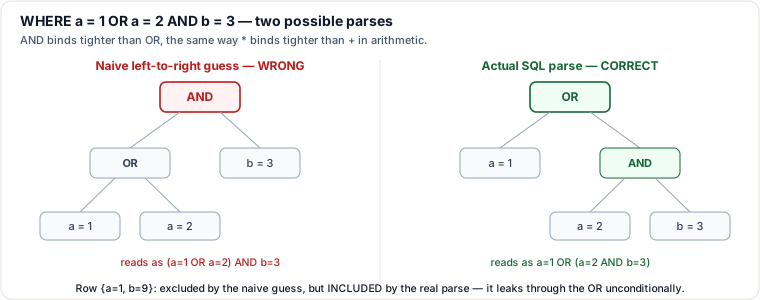
Rule of thumb: any time AND and OR appear in the same WHERE clause without parentheses, stop and parenthesize explicitly — don't rely on the reader (or yourself, six months later) to recompute precedence correctly.
A related non-sargable trap: leading-wildcard LIKE
A B-tree index is sorted by the column's value, so it can jump straight to a prefix — LIKE 'smith%' can seek to the smith range directly. LIKE '%smith' cannot: the unknown character(s) come first, so no prefix of the sort order narrows the search — the engine must inspect every row's value to test the suffix, degrading to a full scan even with an index present. This is a non-sargable predicate (Search ARGument ABLE — one the engine cannot translate into an index seek); the full selectivity/cost mechanics of what makes a predicate sargable are covered in this guide's Indexing & Storage deep dive on fanout, statistics and sargability — the point here is simply that precedence and sargability are both cases where the query runs but silently does something much more expensive, or different, than the shape of the SQL suggests.
2. Aggregate empty-set semantics: SUM/AVG/MIN/MAX return NULL, COUNT returns 0
An aggregate function folds many input rows down to one output value. COUNT(*) is answering “how many rows did I see?” — and the correct answer for zero rows is the number 0, not “unknown.” SUM, AVG, MIN, and MAX are answering a different question — “what is the total / average / smallest / largest value?” — and over zero rows there is no value to report, so the engine returns NULL (unknown/no-answer), not 0. A second, related rule: every aggregate except COUNT(*) ignores NULL inputs before folding — so AVG(col) divides the sum by the count of non-null rows, not by the total row count.
Traced example: SUM over an empty set breaks downstream arithmetic
-- No orders at all matched this promo code this month
SELECT SUM(amount) AS promo_revenue
FROM orders
WHERE promo_code = 'ZZZ_NONE' AND order_date >= '2026-07-01';
-- result: NULL   (not 0 — zero rows means no value to sum)

-- Now fold that into a report total
SELECT (SELECT SUM(amount) FROM orders
        WHERE promo_code = 'ZZZ_NONE' AND order_date >= '2026-07-01') + 1000 AS total_with_promo;
-- result: NULL   — NULL + 1000 = NULL. The +1000 doesn't survive; the whole expression is destroyed.
NULL propagates through arithmetic: any expression that touches a NULL becomes NULL, so one empty aggregate silently poisons an entire downstream calculation — a total that should have been $1,000 becomes NULL, with no error thrown. The fix is to state explicitly what “no orders” should mean numerically:
SELECT COALESCE(SUM(amount), 0) AS promo_revenue
FROM orders
WHERE promo_code = 'ZZZ_NONE' AND order_date >= '2026-07-01';
-- result: 0

SELECT COALESCE((SELECT SUM(amount) FROM orders
                  WHERE promo_code = 'ZZZ_NONE' AND order_date >= '2026-07-01'), 0) + 1000 AS total_with_promo;
-- result: 1000
The same NULL-skipping rule explains a second surprise: AVG(amount) over rows where some amount values are NULL divides by the count of rows that actually have a value, not by COUNT(*) — three rows with values 10, 20, NULL average to (10+20)/2 = 15, not 30/3 = 10. If you need the NULLs treated as zero for the average, wrap the column: AVG(COALESCE(amount, 0)).
3. Timezone / UTC / DST: wall-clock time vs. an instant
A TIMESTAMP (or DATETIME) column with no time zone stores six plain numbers — year, month, day, hour, minute, second — the reading you'd see on a wall clock. On its own that reading is ambiguous: “2026-11-01 01:30:00” could be any of several real moments depending on which time zone (and, in some zones, which side of a DST transition) it was read in. A TIMESTAMPTZ (or TIMESTAMP WITH TIME ZONE) column instead anchors to a single point on the UTC timeline — an instant. Internally it is normalized to and stored as UTC; whatever local offset you insert with, or ask to display it in, is just a view onto that one instant, applied at input/render time.
Daylight Saving Time transitions are exactly where the difference stops being academic. When clocks spring forward (e.g. 01:59:59 → 03:00:00), the local wall-clock values 02:00–02:59 never happen at all that day — a gap. When clocks fall back (e.g. 01:59:59 → 01:00:00), the local wall-clock values 01:00–01:59 happen twice, an hour apart in real time — an overlap. A bare timestamp value that names a wall-clock reading inside a DST gap describes a moment that literally never occurred; one inside a DST overlap is genuinely ambiguous between two different real instants, one hour apart.
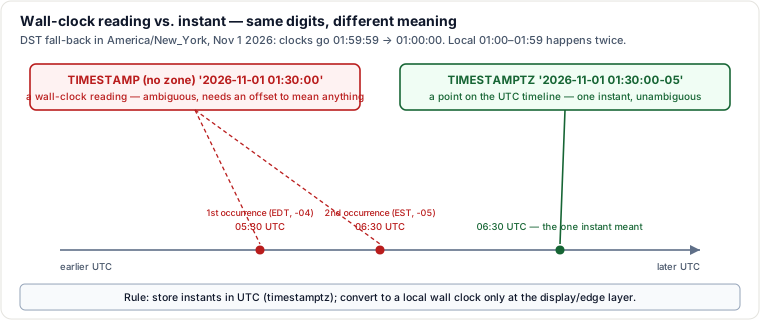
The operating rule: store instants in UTC — use timestamptz/TIMESTAMP WITH TIME ZONE for anything that records when something actually happened (an order placed, a log line, an event) — and convert to a local wall-clock representation only at the display/edge layer (the API response, the UI), using the viewer's time zone at render time, not the writer's time zone at write time. Reserve bare timestamp/DATETIME for genuine wall-clock concepts that are deliberately timezone-agnostic, such as “this alarm should ring at 7:00 AM in whatever zone the device is physically in.”
4. Rounding mode & numeric precision
A rounding tie — a value exactly halfway between two representable results, like 2.5 — can be resolved two different ways, and they disagree exactly at the tie: round-half-away-from-zero (the rule taught in school: 2.5 → 3, always round the .5 up in magnitude) and round-half-to-even, a.k.a. “banker's rounding” (2.5 → 2, because 2 is the nearest even neighbor; but 3.5 → 4, because 4 is the nearest even neighbor). IEEE 754 binary floating point defines round-to-nearest-even as its default rounding mode, and it is what Python's built-in round() and Java's RoundingMode.HALF_EVEN implement explicitly — the motivation is statistical, not aesthetic: rounding a large batch of exact .5 ties consistently upward introduces a systematic upward bias in a sum or average, while alternating between round-up and round-down at each tie cancels that bias out over many values. Round-half-away-from-zero has no such self-correcting property, but it's simpler to reason about and is what many decimal/NUMERIC implementations use by default. Engines differ on which one their ROUND() function applies to a fixed-point/decimal column — never assume; test a literal X.5 value against your engine before trusting a rounding-sensitive report, especially one that rounds and then sums many rows.
The FLOAT-for-money surprise
Separately from rounding mode, binary floating point (FLOAT/DOUBLE PRECISION) cannot exactly represent most base-10 fractions, because they aren't exact sums of powers of two — 0.1 in binary is a repeating fraction, so it is stored as the nearest representable double, off by a sliver you'd never notice from one value alone:
SELECT 0.1::float8 + 0.2::float8;   -- 0.30000000000000004, not 0.3
SELECT 0.1::numeric + 0.2::numeric; -- 0.3, exactlyNUMERIC/DECIMAL types store an exact base-10 representation (digits + scale), so 0.1 really is 0.1 with zero representation error. The float error above looks harmless for a single addition, but summing or multiplying thousands of monetary rows lets that same tiny error accumulate into real, visible cents — a report total that's off by $0.03 with no single row obviously wrong. The rule: never store money in FLOAT/DOUBLE; always use DECIMAL/NUMERIC. Reserve FLOAT for genuinely continuous, measurement-style data (sensor readings, scientific quantities) where a relative error is acceptable and the extra range/speed of binary float is worth it.
5. String encoding & collation: byte length, character length, and “equal” strings
Under a multibyte encoding like UTF-8, a single character can occupy more than one byte — ASCII characters are 1 byte, but an accented Latin letter is typically 2 bytes, and CJK characters are typically 3. That's the entire mechanism behind the byte-length-vs-character-length split: 'café' is 4 characters but 5 bytes in UTF-8 (the é alone is 2 bytes); '日本語' (3 Japanese characters) is 3 characters but 9 bytes. Which built-in function reports which number differs by engine — e.g. in MySQL, LENGTH() returns bytes and CHAR_LENGTH() returns characters; in PostgreSQL, length() on text already returns characters, and octet_length() gives you the byte count instead. The names flip, but the underlying distinction — and the fact that it's invisible until multibyte input actually shows up — is universal, and it matters directly for anything measured against a byte-based column limit (e.g. a VARCHAR(255) byte cap in some engines truncating a shorter-looking multibyte string sooner than expected).
Collation is the separate, and more dangerous, half of this: it's the rule set the engine uses to compare, sort, and equate strings — case sensitivity, accent sensitivity, and locale-specific ordering all live here, not in the raw bytes. Two strings can have completely different bytes and still be considered equal under a case-insensitive or accent-insensitive collation. That equality check isn't cosmetic — it's the exact same comparison operator a UNIQUE or PRIMARY KEY constraint uses to decide whether an insert collides with an existing row. A column email UNIQUE defined under a case-insensitive collation will reject inserting 'Bob@x.com' if 'bob@x.com' already exists — the bytes differ, but the collation says they're the same value — while the identical column under a case-sensitive (binary) collation happily accepts both as distinct rows. The same mechanism can break a join in either direction: a.name = b.name can match rows whose raw bytes differ (case/accent folded away by the collation), or fail to match rows that look identical to a human if the two sides carry different, incompatible collations — a common, confusing cause of a join that returns fewer rows than a byte-for-byte reading of the data would predict, or an outright “collation conflict” error.
6. CASE typing, and what UNION quietly costs you
A CASE expression must resolve every branch (including ELSE) to one common, comparable type, but what happens when the branches mix types — say one branch returns a number and another returns text — differs by engine. In MySQL's permissive type system, mixing a numeric and a text CASE branch silently coerces to a common (usually string) type. That can silently turn a column that looks numeric into text, which then sorts lexicographically ('10' < '9') instead of numerically the moment it's used in ORDER BY. In PostgreSQL and other strictly-typed engines, mismatched CASE branch types are a hard error at parse time (“CASE types text and integer cannot be matched”), not a silent cast — so the sorting hazard described here is MySQL-specific, not universal.
UNION, INTERSECT, and EXCEPT have the same default behavior as each other and it costs more than it looks: per the SQL standard, all three imply DISTINCT unless told otherwise. UNION alone must dedup the combined output of both branches — in most engines that means a sort or a hash pass over the entire combined result, on top of whatever it cost to produce each branch. UNION ALL skips that pass entirely: it just concatenates the two branches' rows, keeping duplicates, with no sort/hash overhead. INTERSECT (rows in both) and EXCEPT/MINUS (rows in the first, not the second) are DISTINCT by default the same way; where an engine offers INTERSECT ALL/EXCEPT ALL (PostgreSQL does), those skip the dedup and instead reconcile duplicate counts (multiset semantics — min of the two counts, or a subtracted count) rather than collapsing to a single row.
Pitfalls a working engineer actually hits
- Trusting AND/OR to read like English. Any
WHEREclause mixingANDandORwithout parentheses is a latent bug — parenthesize the intended grouping explicitly, every time. - A leading-wildcard
LIKE '%x'silently downgrading to a full scan. No error, no warning — just a query that gets slower as the table grows, with an index sitting right there unused. - Skipping
COALESCEon an aggregate because “there will always be rows.” A filter, a new promo code, a quiet region — the first empty result set turns a numeric total into NULL and poisons everything downstream of it. - Assuming
AVG(col)divides byCOUNT(*). It divides by the count of non-null values incol— a column with NULLs gives a different average than you'd compute by hand from all the rows. - Storing timestamps without a time zone for anything a DST boundary or a second region can touch. The ambiguity is invisible in a single-timezone dev environment and shows up only once real users or a DST transition hit it.
- Constructing a literal local time that falls inside a DST gap (e.g. “2026-03-08 02:30 America/New_York”) — that wall-clock reading never happened; the engine has to guess or error.
- Summing money in FLOAT/DOUBLE and being surprised the total is off by a few cents after a few thousand rows — the representation error was always there, just too small to notice on one row.
- Assuming your engine's
ROUND()ties the way another engine's does (or the way you learned in school). Test a literal.5value before trusting a rounding-sensitive financial report. - Defining a
UNIQUE/PRIMARY KEYcolumn without checking its collation. A case- or accent-insensitive collation rejects inserts that look distinct byte-for-byte. - Joining columns with mismatched collations and getting a different match count than a byte-for-byte comparison predicts — or a hard “collation conflict” error.
- Reaching for
UNIONout of habit on a query that never produces or cares about duplicates — paying for a full sort/dedup pass that changes nothing about the result.
Judgment layer: how a senior engineer decides
- UNION vs. UNION ALL. Default to
UNION ALL. Reach for plainUNIONonly when you've confirmed the two branches can actually produce overlapping rows and you specifically want them collapsed — otherwise you're paying for a sort/hash dedup pass that never removes anything. - DECIMAL/NUMERIC vs. FLOAT/DOUBLE. Money, counts of money, anything compared for exact equality, or anything that feeds a financial total →
DECIMAL/NUMERIC, no exceptions. Continuous measurements (sensor data, scientific quantities) where a small relative error is acceptable and range/speed matter more than exactness →FLOAT/DOUBLEis the right trade-off. - When to override the query optimizer. SQL is declarative — you state what you want, and a cost-based planner decides how (join order, join algorithm, index choice) using selectivity estimates built from table statistics. That adapts automatically as the data's size and shape change; a hand-forced plan does not. Reach for a hint, a forced index, or a query rewrite that defeats the planner's default choice only as a last resort, after: (1)
EXPLAIN ANALYZEconfirms the planner's chosen plan is genuinely, measurably worse than the alternative you have in mind; (2) stale statistics have been ruled out as the real root cause (a freshANALYZEoften fixes what looked like a planner mistake); and (3) you accept the ongoing cost of a hint frozen against today's data shape — it must be revisited as the table grows, or it can quietly become the thing making a future query slow.
Takeaways
- Precedence, empty-set aggregates, timezone storage, rounding mode, and collation aren't obscure corner cases — they're exactly where “the query runs” silently diverges from “the query is correct.”
- Make the implicit explicit: parenthesize mixed AND/OR,
COALESCEaggregates that might see zero rows, store instants astimestamptzin UTC, useDECIMALfor money, and pick your collation on purpose rather than inheriting a default. - Default to
UNION ALL; reach forUNION/INTERSECT/EXCEPT's implicit dedup only when you've confirmed you actually need it. - Trust the query planner by default — it's re-deriving the plan from current statistics every time. Override it only after
EXPLAIN ANALYZEproves it's wrong and stale statistics have been ruled out.
Related pages
- Indexing & Storage — Fanout Arithmetic, Optimizer Stats, Composite/Skip Scans & NULL/OR Pitfalls (Deep Dive) — the full sargability/statistics mechanics behind the leading-wildcard
LIKEtrap in §1. - Query Execution — Selectivity, the Cost Model, Join Algorithms, Spills & Sargability (Deep Dive) — how the cost-based planner referenced in the Judgment layer actually picks a plan from table statistics.
- SQL Fundamentals II — Join Types & Cost, DDL Locking, Recursive CTEs & Dump Consistency (Deep Dive) — the companion set of SQL gotchas: join cost, DDL locking, recursive CTEs and dump consistency.
- SQL Practice Patterns I — NULL Traps, COUNT Semantics, Sargability & the Missing-Group Pattern (Deep Dive) — NULL/COUNT semantics from §2, applied to real query patterns.
Re-authored/Deepened for this guide.
🤖 Don't fully get this? Learn it with Claude
Stuck on SQL Fundamentals — The Semantic Gotchas: Precedence, NULL/Empty-Set, Timezone, Rounding & Collation (Deep Dive)? Open Claude, copy a block below, and it'll teach you this exact concept — visually and interactively.
Build the mental picture, not memorization.
I just read a lesson on **SQL Fundamentals — The Semantic Gotchas: Precedence, NULL/Empty-Set, Timezone, Rounding & Collation (Deep Dive)** (Databases) and want to truly understand it. Explain SQL Fundamentals — The Semantic Gotchas: Precedence, NULL/Empty-Set, Timezone, Rounding & Collation (Deep Dive) from first principles using ONE vivid real-world analogy and a visual mental model — draw it as ASCII art or a clear step-by-step diagram — with a concrete example using real numbers. Then ask me one question to check I got the mental picture, and wait for my reply. If you're unsure or a claim isn't standard, say so and reason from first principles instead of guessing.
Socratic — adapts to where you're stuck.
Teach me **SQL Fundamentals — The Semantic Gotchas: Precedence, NULL/Empty-Set, Timezone, Rounding & Collation (Deep Dive)** interactively. Ask me ONE guiding question at a time, wait for my answer, and adapt to my confusion — build the idea with me step by step instead of explaining it all at once. If you're unsure or a claim isn't standard, say so and reason from first principles instead of guessing.
Active recall exposes what you missed.
Quiz me on **SQL Fundamentals — The Semantic Gotchas: Precedence, NULL/Empty-Set, Timezone, Rounding & Collation (Deep Dive)** with 5 questions, easy to tricky, ONE at a time. Tell me if each answer is right; at the end, explain clearly what I got wrong and why. If you're unsure or a claim isn't standard, say so and reason from first principles instead of guessing.
Intuition + hook + flashcards for long-term memory.
Help me remember **SQL Fundamentals — The Semantic Gotchas: Precedence, NULL/Empty-Set, Timezone, Rounding & Collation (Deep Dive)** for the long term: give the one-sentence intuition, a memorable hook/mnemonic, a tiny worked example, and 3 active-recall flashcards (Q -> A). If you're unsure or a claim isn't standard, say so and reason from first principles instead of guessing.