Types of Subqueries
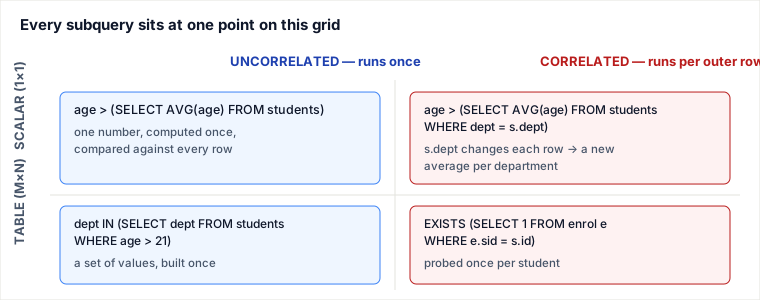
A subquery is just a SELECT wrapped in parentheses inside another statement, and what you can legally do with it is fixed entirely by two independent properties: the shape of the rows it returns (one value, one row, or a whole table) and whether it can run once on its own or must be re-evaluated per outer row because it borrows a column from the outer query. Get those two axes straight and every "type" of subquery you will ever meet is just a point on this grid.
The two axes that actually matter
Older tutorials hand you a flat list — "scalar subquery, single-row subquery, multi-row subquery, single-column subquery, correlated subquery" — but those names live on different axes and overlap, so they mislead. WHERE id = (SELECT MAX(id) ...) is simultaneously a scalar subquery, a single-row subquery, and a single-column subquery; calling it three different "types" teaches nothing. The honest taxonomy is a 2-axis grid:
| Axis | Values | What it controls |
|---|---|---|
| Result shape | Scalar (1×1) · Row (1×N) · Table (M×N) | which operator is legal: =, > vs (a,b)= vs IN, EXISTS, FROM |
| Dependency | Uncorrelated · Correlated | how often it runs: once, or once per outer row |
Result shape is structural — it decides whether the query even parses. Dependency is operational — it decides the cost. They are orthogonal: a correlated subquery can be scalar (= (...)) or a table (EXISTS (...)); an uncorrelated one likewise. The grid, not the list, is the mental model.
Sample data
One small students table drives every example below, so you can hand-trace the results instead of trusting a placeholder image.
| student_id | student_name | age | department |
|---|---|---|---|
| 1 | Asha | 20 | CS |
| 2 | Ben | 23 | CS |
| 3 | Chen | 19 | Math |
| 4 | Diya | 25 | Math |
| 5 | Evan | 22 | Physics |
Scalar subquery (1×1, uncorrelated)
The subquery must return exactly one row and one column, so the engine can substitute it where a single value is expected and compare with =, <, >. Find the oldest student:
SELECT student_name, age
FROM students
WHERE age = (SELECT MAX(age) FROM students);
The inner query collapses the whole table to one number — 25 — first; the outer query then runs as if you had typed WHERE age = 25, returning Diya, 25. This is the case the old page listed three times under three names. It is one thing: a scalar subquery.
Row subquery (1×N, uncorrelated)
Less common but worth knowing: the subquery returns one row of several columns, compared as a tuple. "Who shares the department and exact age profile of student 4?" is contrived, but the legal mechanism is a row constructor:
SELECT student_name
FROM students
WHERE (department, age) = (SELECT department, age
                          FROM students WHERE student_id = 4);
The inner query yields the single row ('Math', 25); the comparison matches it column-by-column. PostgreSQL and MySQL support this; some engines do not, which is exactly why it deserves its own box rather than being lumped in with scalar.
Table subquery (M×N): IN, ANY, EXISTS
Now the subquery returns a set, so a scalar = is illegal — you need a set operator. "Names of students in any department that contains someone older than 21":
SELECT student_name
FROM students
WHERE department IN (SELECT department
                     FROM students WHERE age > 21);
The inner query returns the set {CS, Math, Physics} (Ben 23, Diya 25, Evan 22 all qualify, and Math/CS/Physics are their depts). The outer query keeps every row whose department is in that set — here, all five students, because every department has at least one 21+ member.
Correlated subquery — the one that costs you
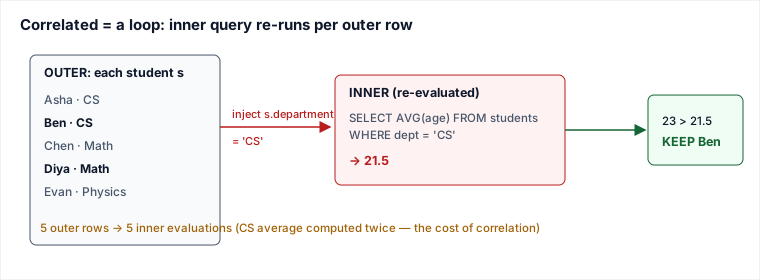
A correlated subquery names an outer-query column inside it, so it cannot be evaluated once. The optimizer must conceptually re-run it for each candidate outer row, plugging in that row's value. "Students older than the average age of their own department":
SELECT s.student_name, s.age, s.department
FROM students s
WHERE s.age > (SELECT AVG(t.age)
              FROM students t
              WHERE t.department = s.department);
Note s.department inside the subquery — that reference to the outer row is what makes it correlated. Trace it row by row:
| Outer row | Dept avg recomputed | Test | Kept? |
|---|---|---|---|
| Asha, 20, CS | avg(20,23)=21.5 | 20 > 21.5 | no |
| Ben, 23, CS | avg(20,23)=21.5 | 23 > 21.5 | yes |
| Chen, 19, Math | avg(19,25)=22.0 | 19 > 22.0 | no |
| Diya, 25, Math | avg(19,25)=22.0 | 25 > 22.0 | yes |
| Evan, 22, Physics | avg(22)=22.0 | 22 > 22.0 | no |
Result: Ben and Diya. The same average (21.5) was computed twice for the two CS rows — that repetition is the signature cost of correlation. (A real optimizer may rewrite this as a window function or a grouped join, but the semantics are this per-row loop.)
Why the naive taxonomy is wrong
The list "Nested Scalar / Single-Row / Multiple-Row / Single-Column / Correlated" fails because the first four are points on the result-shape axis while "Correlated" is the other axis entirely — they are not mutually exclusive. Concretely, the old page used the identical statement WHERE student_id = (SELECT MAX(student_id) ...) for both "Nested Scalar" and "Single-Row," and its "Single-Column" example WHERE student_id < (SELECT MAX(...)) returns a 1×1 value — that is a scalar subquery, not a column of values. A genuine single-column (table) subquery is the operand of IN/ANY, as in the department IN (...) example above. Naming the same thing three ways hides the one distinction that changes how you write and reason: shape decides the operator, correlation decides the cost.
Pitfalls
- Scalar subquery returns >1 row.
WHERE age = (SELECT age FROM students WHERE department='CS')throws "subquery returns more than one row" (MySQL error 1242) the moment CS has two students. If you mean "any of them," use= ANY (...)orIN (...); if you mean one, add an aggregate orLIMIT 1. NOT INwith a NULL in the set silently returns nothing. If the inner result contains a NULL,x NOT IN (1, 2, NULL)evaluates toUNKNOWNfor every row, so the whole query returns zero rows even when matches exist. PreferNOT EXISTS, which is NULL-safe, or filterWHERE col IS NOT NULLinside the subquery.- Accidental correlation from a typo. Reference a column name that only exists in the outer table and the subquery doesn't error — SQL's scoping silently binds it to the outer query, turning an intended one-shot subquery into a per-row loop. Always qualify with aliases (
t.departmentvss.department) so an unintended outer reference is visible. - Assuming correlated means slow. A correlated
EXISTSagainst an indexed column often beats a giant materializedINlist, because it can short-circuit on the first match. Read theEXPLAINplan rather than rewriting on instinct.
Takeaways
- Classify on two axes, not one list: result shape (scalar / row / table) decides which operator is legal; dependency (uncorrelated / correlated) decides how many times it runs.
- Scalar = use
=,<,>; table = useIN,ANY,EXISTS. Mixing them up is the most common parse/runtime error. - A correlated subquery borrows an outer column and is re-evaluated per outer row — that per-row loop, not the syntax, is the thing to recognize and to check in
EXPLAIN. - For "does a related row exist," reach for
EXISTS/NOT EXISTSbeforeIN/NOT IN— it short-circuits and is NULL-safe.
Sources: ISO/IEC 9075 SQL standard (subquery and row-value-constructor semantics); PostgreSQL 16 documentation, §9.23 "Subquery Expressions" (EXISTS, IN, ANY); MySQL 8.0 Reference Manual, §13.2.15 "Subqueries" (error 1242, correlated subqueries); Joe Celko, SQL for Smarties (NULL behavior of NOT IN). Re-authored and deepened for this guide — the original five-item list conflated the result-shape and correlation axes (two examples were byte-for-byte identical and the "single-column" example was actually scalar); replaced with the orthogonal 2-axis model, a hand-traced correlated example on real data, an execution diagram, and the failure modes those mislabels hide.
🎯 STANDOUT elevation: Why / example / when-not / failure / panel / drills — Types of Subqueries
Why this exists / the decision it encodes
Subquery "types" collapse to two orthogonal axes: result shape (scalar / row / table) which picks the legal operator, and dependency (uncorrelated vs correlated) which picks cost semantics. Lists like scalar/single-row/multi-row conflate the same shape under three names and hide correlation.
Worked example with numbers or traced SQL/FD
students: Asha20 CS, Ben23 CS, Chen19 Math, Diya25 Math, Evan22 Physics
Scalar uncorrelated: age = (SELECT MAX(age)) → Diya 25 once
Table: dept IN (SELECT dept WHERE age>21) → {CS,Math,Physics} → all five rows
Correlated: age > (SELECT AVG(age) WHERE dept = s.dept)
  Asha 20 vs 21.5 no; Ben 23 vs 21.5 yes; Chen 19 vs 22 no; Diya 25 vs 22 yes; Evan 22 vs 22 no
  → Ben, Diya; CS avg computed twice (correlation cost)
NOT IN (…, NULL) → UNKNOWN for all rows → empty result; prefer NOT EXISTS.
When NOT / named alternative
Prefer EXISTS/NOT EXISTS for existence and NULL-safety over IN/NOT IN. Rewrite correlated averages as JOIN to grouped CTE or window when EXPLAIN shows nested loops. Do not force uncorrelation always — indexed correlated EXISTS can short-circuit and win.
Failure mode / ops fingerprint / interview trap
Trap: scalar subquery returns >1 row → runtime error 1242. Accidental correlation from bare column name binding outer scope silently. Ops: correlated subquery N+1 on million-row outer.
Domain judgment (K11 theory-bridge / K12 concurrency / K13 query-judgment)
K13: shape picks operators; correlation picks plan shape. Always verify with EXPLAIN rather than rewriting on superstition.
Hostile-panel drills (with model answers)
Q1. What two axes classify every subquery?
Model answer: Result shape (scalar 1×1, row 1×N, table M×N) and dependency (uncorrelated once vs correlated per outer row).
Q2. Why prefer NOT EXISTS over NOT IN when nulls possible?
Model answer: If the IN-list contains NULL, NOT IN yields UNKNOWN for every candidate so the outer returns zero rows; NOT EXISTS is NULL-safe and short-circuits.
Q3. Rewrite the department-average filter without correlation.
Model answer: WITH dept_avg AS (SELECT department, AVG(age) a FROM students GROUP BY department) SELECT s.* FROM students s JOIN dept_avg d ON d.department=s.department WHERE s.age > d.a;
🤖 Don't fully get this? Learn it with Claude
Stuck on Types of Subqueries? Open Claude, copy a block below, and it'll teach you this exact concept — visually and interactively.
Build the mental picture, not memorization.
I just read a lesson on **Types of Subqueries** (Databases) and want to truly understand it. Explain Types of Subqueries from first principles using ONE vivid real-world analogy and a visual mental model — draw it as ASCII art or a clear step-by-step diagram — with a concrete example using real numbers. Then ask me one question to check I got the mental picture, and wait for my reply. If you're unsure or a claim isn't standard, say so and reason from first principles instead of guessing.
Socratic — adapts to where you're stuck.
Teach me **Types of Subqueries** interactively. Ask me ONE guiding question at a time, wait for my answer, and adapt to my confusion — build the idea with me step by step instead of explaining it all at once. If you're unsure or a claim isn't standard, say so and reason from first principles instead of guessing.
Active recall exposes what you missed.
Quiz me on **Types of Subqueries** with 5 questions, easy to tricky, ONE at a time. Tell me if each answer is right; at the end, explain clearly what I got wrong and why. If you're unsure or a claim isn't standard, say so and reason from first principles instead of guessing.
Intuition + hook + flashcards for long-term memory.
Help me remember **Types of Subqueries** for the long term: give the one-sentence intuition, a memorable hook/mnemonic, a tiny worked example, and 3 active-recall flashcards (Q -> A). If you're unsure or a claim isn't standard, say so and reason from first principles instead of guessing.