SQL Fundamentals II — Join Types & Cost, DDL Locking, Recursive CTEs & Dump Consistency (Deep Dive)
This is the second SQL Fundamentals deep dive. The first one (SQL Fundamentals — The Semantic Gotchas: Precedence, NULL/Empty-Set, Timezone, Rounding & Collation) covered how expressions evaluate. This page covers the SQL surface that engineers touch every day and get subtly wrong: which JOIN to write and why it costs what it costs, the DDL statement that can take production down, the UPDATE that races itself, and the recursive query that never terminates.
1. The join family: semantics first, cost second
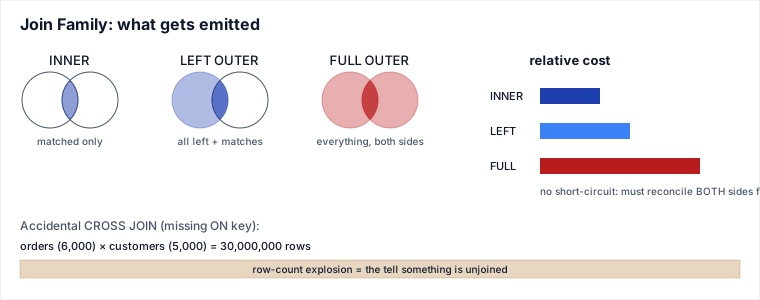
Mechanism. Every join starts from the same idea — the engine must decide, for each row on one side, whether a matching row exists on the other side. What differs is what happens to the unmatched rows:
- INNER JOIN — keep a row pair only if both sides match. Unmatched rows from either side are simply dropped.
- LEFT OUTER JOIN — keep every row from the left table. If no right-side match exists, the right columns are NULL-filled.
- RIGHT OUTER JOIN — the mirror image: keep every row from the right table, NULL-fill the left columns when unmatched. (Rarely used in practice — a RIGHT JOIN can always be rewritten as a LEFT JOIN by swapping table order, and most style guides ban RIGHT JOIN purely for readability.)
- FULL OUTER JOIN — keep every row from both sides; NULL-fill whichever side didn't match. It is the union of what LEFT and RIGHT would each produce.
Why FULL OUTER JOIN is inherently more expensive. An inner join (and to a lesser extent a left join) can be evaluated with a strategy that stops looking once a match is found and can even skip scanning a side entirely under the right index (see the Query Execution — Selectivity, Cost Model, Join Algorithms, Spills & Sargability page for how nested-loop, hash, and sort-merge joins actually walk rows). A full outer join cannot take that shortcut, because it must still account for every row on both sides, matched or not, before it can emit the unmatched leftovers. Concretely, under the standard algorithms:
- Hash join for FULL OUTER must build a hash table on one side (as usual), but then also probe every row from that build side to see which ones were never matched during the probe phase, so it can emit them with NULLs. That bookkeeping (a "match bit" per build-side row) and the extra final pass over the whole build side is pure overhead an inner join never pays.
- Sort-merge join for FULL OUTER must fully materialize (sort) both sides regardless of selectivity, because a merge join's early-exit optimizations (stop once one side is exhausted and you know no more matches are possible) don't apply — the remaining unmatched tail of whichever side still has rows must still be walked and emitted.
- Neither strategy can use a highly selective filter on one side to shrink the other side's scan, because every row on both sides is guaranteed to appear in the output one way or another.
Net: FULL OUTER JOIN forces the optimizer to fully materialize and reconcile both inputs; it trades the short-circuiting an inner/left join gets from selective predicates and indexes for completeness. This is why query plans for FULL OUTER JOIN routinely show hash joins with no filter pushdown even when one side has a highly selective WHERE clause — the filter can prune rows from the output, but the engine still has to visit the full row to know whether it should be NULL-padded.
2. CROSS JOIN and the accidental cartesian product
Mechanism. CROSS JOIN pairs every row of A with every row of B — no
predicate, no matching. Result size is exactly |A| × |B|. Used deliberately it's rare
(generating date ranges, combinatorial test data). Used accidentally it's one of the most
common silent production incidents in SQL.
The accidental cross join. It happens two ways:
- A comma-join or JOIN clause is written with a missing or wrong
ON/WHEREpredicate:SELECT * FROM orders o, customers c WHERE o.status = 'active'— there is no predicate tyingotoc, so every active order is paired with every customer. - The join key is duplicated on one side (e.g. a "lookup" table has more than one row per key because of bad data or a forgotten dedupe), so a join that looks like a clean 1:1 or many:1 silently fans out into many:many.
Traced example. Suppose orders has 10,000 rows and customers
has 5,000 rows, and an engineer writes:
SELECT o.order_id, c.name
FROM orders o
JOIN customers c ON o.status = 'active';   -- BUG: should be o.customer_id = c.customer_id
| Step | What happens | Row count |
|---|---|---|
| 1 | Predicate o.status = 'active' references only orders, not
customers — it is not a join key, so it doesn't restrict pairing between the two tables. |
— |
| 2 | Every row of orders where status='active' (say 6,000 rows) is paired with
every row of customers (5,000 rows). | — |
| 3 | Result set materializes | 6,000 × 5,000 = 30,000,000 rows |
What looked like a filtered join returns 30 million rows from 15,000 rows of input — a runaway result that can blow out memory, saturate the network, or silently corrupt a downstream aggregate (e.g. a SUM that's now inflated 5,000×).
How to spot it before it ships:
- Row-count sanity check: if the output row count is anywhere near
|A| × |B|rather than close to|A|or|B|, suspect a missing join key. - Read every
JOIN ... ONclause and confirm the predicate actually references a column from both sides of that specific join — a predicate that only touches one table's columns is a filter, not a join condition, and doesn't prevent fan-out. - Check the plan: a cost-based optimizer will show a nested-loop or hash join with no join condition (or a Cartesian Product node in engines that label it explicitly) and an estimated row count equal to the product of the two input cardinalities.
- Before trusting a join, verify the "assumed" side is actually unique on the key you're joining
on (
SELECT key, COUNT(*) FROM b GROUP BY key HAVING COUNT(*) > 1) — a duplicated key produces the same fan-out even with a syntactically correct ON clause.
3. Set-operation NULL semantics: IN/NOT IN vs INTERSECT/EXCEPT
Mechanism. IN / NOT IN against a subquery are commonly treated
as "the same thing" as INTERSECT / EXCEPT. They are not, and the divergence
is entirely about how each operator treats NULL.
x NOT IN (SELECT y FROM t) expands, conceptually, to
NOT (x = y1 OR x = y2 OR ... OR x = yN). SQL's three-valued logic means
x = NULL evaluates to UNKNOWN, not FALSE. If any row in the
subquery has y IS NULL, the OR-chain contains an UNKNOWN, and
NOT (... OR UNKNOWN ...) can never evaluate to TRUE for any row of x
— the whole NOT IN predicate becomes UNKNOWN or FALSE for every
row, so the query returns zero rows, even for values of x that obviously
don't appear in the non-NULL part of the subquery.
EXCEPT (and INTERSECT) compare rows using the "records are equal" rule set
operations use, where NULL IS NOT DISTINCT FROM NULL — i.e. two NULLs are treated as
matching for the purpose of set membership. EXCEPT does not fall into the UNKNOWN trap
NOT IN does.
The divergence, traced. Table t has values {1, 2, NULL}.
We want "values of x not present in t":
| Query | x = 1 | x = 3 | Why |
|---|---|---|---|
x NOT IN (SELECT v FROM t) | excluded (correct: 1 is in t) | excluded (wrong!) | The NULL in t makes every comparison 3 = NULL → UNKNOWN, poisoning the whole
OR-chain to non-TRUE for every candidate, including 3. |
SELECT x EXCEPT SELECT v FROM t | excluded (correct) | included (correct) | EXCEPT uses row-equality semantics, not per-value = comparison; NULL doesn't
poison the whole set, it's just one more (non-matching, unless x is also NULL) member. |
The two forms are only equivalent when the subquery side is guaranteed NOT NULL
(e.g. it's a non-nullable foreign key column). The safe fix for the NOT IN form is to
filter the NULL out explicitly: x NOT IN (SELECT v FROM t WHERE v IS NOT NULL), or prefer
NOT EXISTS (SELECT 1 FROM t WHERE t.v = x.x), which never has this failure mode because
correlated = comparisons against NULL simply don't match — there's no OR-chain to poison.
4. UPDATE, taught fully — not a one-liner
Multi-row UPDATE with a correlated subquery. Real updates usually need to pull a value computed per-row from another table:
UPDATE orders o
SET discount_pct = (
  SELECT c.tier_discount
  FROM customers c
  WHERE c.customer_id = o.customer_id
)
WHERE o.status = 'pending';
The subquery is correlated — it re-runs (conceptually) once per row of orders
matched by the outer WHERE, referencing that row's customer_id each time. This must
return at most one row per correlation, or the engine raises an error (or, in permissive engines,
picks an arbitrary one) — a classic bug when the "lookup" table isn't actually unique on the key.
UPDATE ... FROM (a join baked into an update). Most engines (Postgres, SQL Server) let you express the same intent as an explicit join instead of a scalar subquery, which is usually faster because the optimizer can pick a real join algorithm instead of a per-row correlated lookup:
UPDATE orders o
SET discount_pct = c.tier_discount
FROM customers c
WHERE c.customer_id = o.customer_id
  AND o.status = 'pending';
(MySQL spells this as a multi-table UPDATE orders o JOIN customers c ON ... SET
o.discount_pct = c.tier_discount WHERE ... — same idea, different syntax.)
The read-then-write hazard. An UPDATE that computes its new value from a
read of the current state — SET balance = balance - 100, or the correlated-subquery
form above reading a value that another transaction might also be changing — is only safe under
the isolation guarantees the engine actually gives a single statement. Two concurrent
UPDATE accounts SET balance = balance - 100 WHERE id = 1 statements are safe (the engine
serializes writers on the same row), but a pattern like "read balance in one statement, decide in
application code, then UPDATE in a second statement" is a classic TOCTOU (time-of-check to
time-of-use) race: another transaction can commit a change between your SELECT and your UPDATE,
and your UPDATE overwrites it with a value computed from stale data. The fix is to fold the
check into the UPDATE itself (UPDATE accounts SET balance = balance - 100 WHERE id = 1 AND
balance >= 100, then check the affected-row count) or use SELECT ... FOR UPDATE to
lock the row across the read and the write.
TRUNCATE vs DELETE. TRUNCATE TABLE deallocates the table's storage
wholesale instead of removing rows one at a time, which is why it's fast and why MySQL and SQL
Server reset the auto-increment/identity counter by default — but that same wholesale nature is
why:
- PostgreSQL does not reset the sequence by default: plain
TRUNCATE TABLEleaves the identity/serial sequence wherever it was (its documented default isCONTINUE IDENTITY), and you must writeTRUNCATE TABLE ... RESTART IDENTITYexplicitly to reset it — relying on a bare TRUNCATE to restart the counter is a MySQL/SQL-Server assumption that silently doesn't hold on Postgres. - Most engines refuse a TRUNCATE on a table that is the target of a foreign key from
another table (it can't guarantee referential integrity row-by-row), unless you add
CASCADE(Postgres) to also truncate the dependent tables, or drop/disable the constraint first. - TRUNCATE is minimally logged / not always fully transactional in the same way DELETE is: DELETE
generates a row-level log/undo entry per row (so it can be rolled back and replicated
statement-by-statement), while TRUNCATE in several engines is logged as a single
page/deallocation operation. In MySQL/InnoDB specifically, TRUNCATE implicitly commits the
surrounding transaction, so it cannot be rolled back once issued — a very different safety profile
than
DELETE FROM t, which can be wrapped and rolled back like any other DML.
5. DDL locking: why ALTER TABLE can take the site down
Mechanism. Before a DDL statement can even begin, most engines take a metadata lock (MDL) on the table to freeze its schema definition while the change is planned and applied. Some ALTER operations (adding a column with a non-default, non-volatile value in older engine versions; changing a column type; adding certain indexes) require the engine to physically rewrite every row of the table into a new copy — and while that rewrite runs, the metadata lock (and, on many engines, the table itself) blocks both reads and writes from every other session, because their query plans depend on a schema definition that is mid-change. On a large table this rewrite can take minutes to hours, during which the table is effectively down.
Not all DDL is equally expensive, though — this is the key judgment call:
- Metadata-only changes are near-instant: adding a nullable column with no default (or, in modern Postgres, adding a column with a constant default at all — Postgres stores the default in the catalog and only materializes it lazily per-row on read/write, so it doesn't rewrite the table), dropping a column (engine-dependent), renaming a column.
- Table-rewriting changes take the long lock: changing a column's type, adding a NOT NULL constraint that requires a full validation scan, adding certain index types on some engines.
Online-DDL alternatives exist precisely to avoid blocking production traffic during
a rewrite-class change: pt-online-schema-change (Percona Toolkit) and gh-ost
(GitHub's tool) both work the same way — create a shadow copy of the table with the new schema,
copy existing rows across in batches, use triggers (pt-osc) or binlog-tailing (gh-ost, so it avoids
trigger overhead) to keep the shadow table in sync with ongoing writes, then perform a brief atomic
rename/cutover at the end. The long-running rewrite happens off to the side while the original
table stays fully available; only the final cutover takes a short lock. See the dedicated
DDL Locking & Online Schema Change page for the full walkthrough of pt-osc/gh-ost internals
and the cutover mechanics.
6. Recursive CTEs: cycle protection
Mechanism. A recursive CTE has an anchor (base case) and a recursive member that joins back to the CTE's own name, executed repeatedly until the recursive member returns no new rows. A classic use is walking a hierarchy (org chart, bill-of-materials, category tree):
WITH RECURSIVE org_chain AS (
  SELECT employee_id, manager_id, 1 AS depth
  FROM employees WHERE employee_id = 42          -- anchor
  UNION ALL
  SELECT e.employee_id, e.manager_id, oc.depth + 1
  FROM employees e
  JOIN org_chain oc ON e.manager_id = oc.employee_id  -- recursive step
)
SELECT * FROM org_chain;
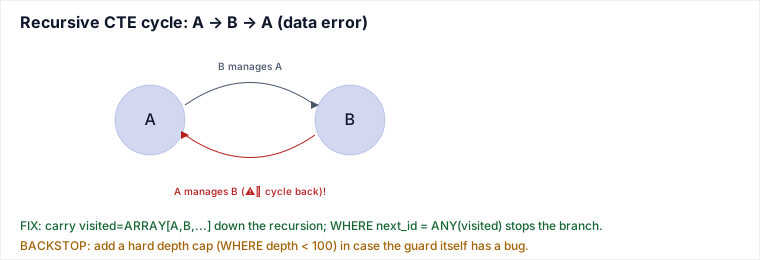
The cycle problem. This assumes the hierarchy is a DAG (no cycles) — but real data has data-entry errors. If employee A's manager is B, and (by mistake) B's manager is recorded as A, the recursive step keeps rediscovering both rows forever: A → B → A → B → ... The query never reaches a fixed point and the naive recursive CTE loops until it hits a resource limit or hangs the connection.
Traced example of the runaway:
| Iteration | Rows produced | Why it doesn't stop |
|---|---|---|
| 1 (anchor) | A (depth 1) | starting row |
| 2 | B (depth 2) | B is A's manager |
| 3 | A (depth 3) | A is (incorrectly) B's manager — A reappears |
| 4 | B (depth 4) | B reappears |
| ... | A, B, A, B, ... | no termination condition ever becomes true |
Three defenses, use at least one:
- Visited-path tracking — carry an array/string of visited IDs down the recursion
and stop extending a branch once the next row is already in that path:
This is the general, correct-by-construction fix and works even on graphs with multiple cycles.WITH RECURSIVE org_chain AS ( SELECT employee_id, manager_id, ARRAY[employee_id] AS visited, 1 AS depth FROM employees WHERE employee_id = 42 UNION ALL SELECT e.employee_id, e.manager_id, oc.visited || e.employee_id, oc.depth + 1 FROM employees e JOIN org_chain oc ON e.manager_id = oc.employee_id WHERE NOT (e.employee_id = ANY(oc.visited)) -- cycle guard ) SELECT * FROM org_chain; UNIONinstead ofUNION ALL—UNIONde-duplicates rows on each step, so once a row (with identical column values) has already been produced, it won't be re-added. This only works cleanly when a repeated row is byte-for-byte identical each time it's rediscovered (e.g. no depth column that keeps incrementing, which would make every "repeat" look like a new distinct row) — if you're tracking depth, UNION alone does not stop the cycle.- A hard depth cap — add
WHERE oc.depth < 100(or whatever the max plausible hierarchy depth is) to the recursive member as a circuit breaker. Cheap and simple, but it's a symptom fix: it stops the runaway query, it doesn't tell you the data has a cycle, and it silently truncates any legitimately deep (but valid) chain longer than the cap.
In practice: use the visited-path guard as the real fix, and keep a depth cap as a defensive backstop in case the visited-path logic itself has a bug.
7. Two dump gotchas
Inconsistent cross-table snapshot without --single-transaction. A plain
mysqldump against InnoDB tables, run without --single-transaction, dumps each
table with its own locking/read behavior as it gets to it — if writes are happening concurrently,
the dump can capture orders as of 10:00:00 and order_items as of 10:00:03,
producing a backup where the two tables disagree (an order references order_items that didn't
exist yet at the order's snapshot time, or vice versa). The fix:
mysqldump --single-transaction ... opens one consistent REPEATABLE READ transaction at
the start and dumps every InnoDB table from that same consistent snapshot, so the whole dump is
point-in-time consistent without blocking writers. (It does not help MyISAM tables, which have no
transactional snapshot to read from — those still need a table lock to be consistent.)
Logical dump INSERT order can violate constraints on reload. A logical dump emits
INSERT statements per table, typically in the order tables were dumped (often alphabetical
or dump-tool-determined) — not in dependency order. If order_items is dumped/inserted
before its parent table orders, and order_items.order_id has a foreign key to
orders.order_id, the reload fails partway through with a foreign-key violation, because
the parent rows the child rows point to don't exist yet. The same problem can hit unique
constraints if a dump captures rows in an order that transiently collides with an existing unique
value during a partial restore. Fixes:
- Disable constraint checking for the duration of the load (
SET FOREIGN_KEY_CHECKS=0;in MySQL, or dropping/deferring constraints in Postgres viaSET CONSTRAINTS ALL DEFERREDfor deferrable constraints) and re-enable/validate after all tables are loaded. - Or dump/restore in explicit dependency order (parents before children) so referenced rows always
exist before the rows that reference them — this is what tools like
pg_dump's dependency-aware ordering try to do automatically, but a hand-rolled or partial restore can still get it wrong.
Pitfalls
- Writing
LEFT JOINthen filtering the right-side column in theWHEREclause (WHERE right.col = 'x') silently turns it back into an INNER JOIN — NULL rows from unmatched left rows fail that WHERE predicate and get dropped. Put the condition in theONclause if you want to keep the outer-join semantics. - Assuming
NOT INandNOT EXISTSare interchangeable — they diverge exactly when the subquery side can contain NULL (see §3). - Running a rewrite-class
ALTER TABLEon a large hot table during peak traffic without checking whether it's metadata-only first — the outage is the migration, not a bug. - Shipping a recursive CTE against user-editable hierarchical data (org charts, category trees, "parent comment" threads) with no cycle guard, trusting that the data will "never" have a cycle.
- Restoring a dump without checking whether it was taken with
--single-transaction, then being surprised the restored data has orphaned rows.
Judgment layer
When FULL OUTER JOIN is actually worth its cost. Use it when you genuinely need to
see the union of unmatched rows from both sides in one result — e.g. reconciliation queries
("which orders exist with no matching payment, AND which payments exist with no matching order,
in one pass"). If you only need one direction of "unmatched," a LEFT JOIN (with a
WHERE right.key IS NULL anti-join pattern) is cheaper and expresses intent more clearly.
Don't reach for FULL OUTER JOIN out of habit when a LEFT JOIN says what you mean.
Choosing an online-DDL approach. For a small table or a metadata-only change
(nullable column add, most modern Postgres default-value adds), just run the plain
ALTER TABLE — the online-DDL machinery is unnecessary overhead. For a rewrite-class
change on a large, high-traffic table, reach for gh-ost when you want to avoid trigger
overhead on the source table (it tails the binlog instead), or pt-online-schema-change
when trigger-based sync is acceptable and you want the more mature/battle-tested tool. Both cost
you a longer overall migration wall-clock time and operational complexity (monitoring the shadow
copy, sizing for double storage during the copy) in exchange for avoiding a multi-minute-to-hour
production lock — worth it whenever the table is large enough that a direct ALTER's lock window
would be customer-visible.
Takeaways
- FULL OUTER JOIN costs more than INNER/LEFT because it can't short-circuit — it must fully reconcile both sides before it knows which rows are unmatched.
- An accidental cross join is a missing-or-duplicated join key, not a rare syntax error — catch
it by sanity-checking row counts against
|A| × |B|and verifying every ON clause references both tables. NOT INandEXCEPTare not interchangeable when NULLs are present:NOT INsilently returns zero rows if the subquery contains any NULL.- Rewrite-class DDL takes a metadata/table lock that can stall production; know which ALTERs are
metadata-only versus which need
gh-ost/pt-online-schema-change. - Recursive CTEs need an explicit cycle guard (visited-path array, ideally backed by a depth cap) whenever the underlying hierarchy is user-editable and can't be trusted to stay acyclic.
Related pages
- Query Execution — Selectivity, the Cost Model, Join Algorithms, Spills & Sargability (Deep Dive) — Databases — the cost-model detail behind why FULL OUTER JOIN can't short-circuit
- Join Algorithms — Nested Loop, Hash & Sort-Merge — Databases — the mechanics of how each join algorithm walks rows
- DDL Locking & Online Schema Change — System Design — full pt-osc/gh-ost cutover mechanics for the ALTER TABLE locking section
- SQL Fundamentals — The Semantic Gotchas: Precedence, NULL/Empty-Set, Timezone, Rounding & Collation (Deep Dive) — Databases — the prequel page on SQL expression semantics
- MVCC & Locking — Snapshots, Row Locks & Deadlocks — Databases — the row-lock/snapshot internals behind the UPDATE race hazard and mysqldump's --single-transaction
Cross-references: Query Execution — Selectivity, the Cost Model, Join Algorithms, Spills & Sargability (nested-loop/hash/merge join internals), Join Algorithms — Nested Loop, Hash & Sort-Merge, DDL Locking & Online Schema Change (full pt-osc/gh-ost cutover mechanics), and SQL Fundamentals — The Semantic Gotchas (precedence, NULL/empty-set, timezone, rounding, collation). Concepts synthesized from standard relational-database theory (join algebra, three-valued logic, MVCC/locking) and documented engine behavior (MySQL/InnoDB, PostgreSQL) plus Percona/GitHub's published pt-online-schema-change and gh-ost design docs. Re-authored/Deepened for this guide.
🤖 Don't fully get this? Learn it with Claude
Stuck on SQL Fundamentals II — Join Types & Cost, DDL Locking, Recursive CTEs & Dump Consistency (Deep Dive)? Open Claude, copy a block below, and it'll teach you this exact concept — visually and interactively.
Build the mental picture, not memorization.
I just read a lesson on **SQL Fundamentals II — Join Types & Cost, DDL Locking, Recursive CTEs & Dump Consistency (Deep Dive)** (Databases) and want to truly understand it. Explain SQL Fundamentals II — Join Types & Cost, DDL Locking, Recursive CTEs & Dump Consistency (Deep Dive) from first principles using ONE vivid real-world analogy and a visual mental model — draw it as ASCII art or a clear step-by-step diagram — with a concrete example using real numbers. Then ask me one question to check I got the mental picture, and wait for my reply. If you're unsure or a claim isn't standard, say so and reason from first principles instead of guessing.
Socratic — adapts to where you're stuck.
Teach me **SQL Fundamentals II — Join Types & Cost, DDL Locking, Recursive CTEs & Dump Consistency (Deep Dive)** interactively. Ask me ONE guiding question at a time, wait for my answer, and adapt to my confusion — build the idea with me step by step instead of explaining it all at once. If you're unsure or a claim isn't standard, say so and reason from first principles instead of guessing.
Active recall exposes what you missed.
Quiz me on **SQL Fundamentals II — Join Types & Cost, DDL Locking, Recursive CTEs & Dump Consistency (Deep Dive)** with 5 questions, easy to tricky, ONE at a time. Tell me if each answer is right; at the end, explain clearly what I got wrong and why. If you're unsure or a claim isn't standard, say so and reason from first principles instead of guessing.
Intuition + hook + flashcards for long-term memory.
Help me remember **SQL Fundamentals II — Join Types & Cost, DDL Locking, Recursive CTEs & Dump Consistency (Deep Dive)** for the long term: give the one-sentence intuition, a memorable hook/mnemonic, a tiny worked example, and 3 active-recall flashcards (Q -> A). If you're unsure or a claim isn't standard, say so and reason from first principles instead of guessing.