SQL Practice Patterns I — NULL Traps, COUNT Semantics, Sargability & the Missing-Group Pattern (Deep Dive)
Every SQL practice problem teaches you the answer to that problem. This page teaches the handful of mechanisms that keep reappearing underneath dozens of different problems, so that once you've internalized them you recognize the trap on sight instead of re-deriving it from scratch every time. Four mechanisms do almost all of the damage: SQL's three-valued logic silently drops rows it should keep, the wrong COUNT variant silently miscounts, a predicate shape the index can't use silently turns a scan into a full table scan, and a join shape that can't produce a group with zero matches silently erases that group from the report. None of these throw an error. That's exactly what makes them the most-asked correctness pitfalls in SQL interviews — the query runs, returns plausible-looking rows, and is wrong.
1. The NULL trap: WHERE col != 'X' silently excludes NULL rows
Mechanism: SQL predicates don't evaluate to just TRUE/FALSE — they evaluate to TRUE, FALSE, or UNKNOWN (three-valued logic, 3VL), and WHERE keeps a row only when the predicate evaluates to TRUE. Any comparison against NULL — =, !=, <, > — evaluates to UNKNOWN, because NULL means "no value to compare," not "some specific value." UNKNOWN is treated exactly like FALSE for filtering purposes: the row is dropped either way, but for a completely different reason a query author usually doesn't intend.
Traced example
Table customers(id, country): 3 rows. Intent: "everyone NOT in the US."
-- id=1, country='IN'
-- id=2, country='US'
-- id=3, country=NULL   (country unknown/unset)

SELECT * FROM customers WHERE country != 'US';| Row | country | country != 'US' | 3VL result | Kept? |
|---|---|---|---|---|
| 1 | 'IN' | 'IN' != 'US' | TRUE | yes |
| 2 | 'US' | 'US' != 'US' | FALSE | no (correct) |
| 3 | NULL | NULL != 'US' | UNKNOWN | no — silently dropped |
Row 3's country is genuinely unknown — it is neither provably "US" nor provably "not US" — so the comparison can never resolve to TRUE, so the row can never be kept, no matter what the customer's actual country turns out to be. The query returns 1 row (id 1) with no error and no warning; anyone reading only the result set has no signal that a row was silently excluded rather than genuinely evaluated and rejected.
Fix — state explicitly what should happen to NULLs:
SELECT * FROM customers WHERE country != 'US' OR country IS NULL;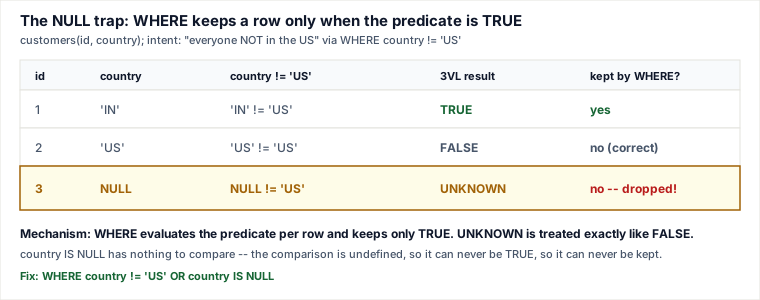
The same trap, worse: NOT IN against a subquery with a NULL
NOT IN (list) desugars to a chain of ANDed != comparisons: x NOT IN (5, 8, NULL) means x != 5 AND x != 8 AND x != NULL. The last term is UNKNOWN for every row, no matter what x is. An AND chain where one term is UNKNOWN and no other term is FALSE evaluates to UNKNOWN as a whole — so if even a single NULL sneaks into the subquery's result set, the entire NOT IN predicate becomes UNKNOWN for every row, and the query returns zero rows, even though the overwhelming majority of rows obviously aren't in the banned list.
-- banned_customers(customer_id) contains: 5, 8, NULL  (one bad/unassigned row)
SELECT * FROM customers c
WHERE c.id NOT IN (SELECT customer_id FROM banned_customers);
-- returns ZERO rows -- not "all customers except 5 and 8" as intended
Fix — use NOT EXISTS, which tests row existence rather than doing a NULL-sensitive list comparison:
SELECT * FROM customers c
WHERE NOT EXISTS (
  SELECT 1 FROM banned_customers b WHERE b.customer_id = c.id
);
-- unaffected by any NULL rows in banned_customers
A milder version: an OR chain where one branch touches a nullable column
OR only need one TRUE branch to keep a row — but if a branch's column is NULL, that branch contributes UNKNOWN, not FALSE, and doesn't help the row get kept unless another branch is TRUE:
-- intent: "orders that got a discount, or where the price was cut below list price"
SELECT * FROM orders WHERE discount > 0 OR final_price < list_price;
-- a row with discount = NULL (never set) and final_price = list_price
-- evaluates to UNKNOWN OR FALSE = UNKNOWN -> dropped, even though "discount unknown" is not the same claim as "no discount"
The fix is the same idea as above: decide explicitly what an unset/NULL discount should mean (probably 0, via COALESCE(discount, 0) > 0) rather than letting the comparison silently resolve to UNKNOWN.
2. COUNT semantics: COUNT(*) counts rows, COUNT(column) skips NULLs, COUNT(DISTINCT column) dedups
Mechanism: COUNT(*) tallies rows — it doesn't look at any column's value at all. COUNT(expr) evaluates expr per row and tallies only the rows where the result is non-NULL. COUNT(DISTINCT expr) does the same, then additionally collapses duplicate values before counting. These are not interchangeable, and the "list every X with its count, including X with zero matches" pattern is exactly where picking the wrong one produces a wrong number with no error.
Traced example: the zero-followers pattern
users(id): u1, u2, u3. follows(follower_id, followee_id): one row, (1, 2) — u1 follows u2. u3 has zero followers. Goal: "every user with their follower count, including users with zero followers" — which always starts from a LEFT JOIN:
SELECT u.id, COUNT(*) AS follower_count
FROM users u
LEFT JOIN follows f ON f.followee_id = u.id
GROUP BY u.id;
This looks reasonable and is wrong. A LEFT JOIN emits exactly one row per left-side (users) row even when nothing matches on the right — with every column from follows set to NULL. COUNT(*) faithfully counts that placeholder row:
| User | Rows after LEFT JOIN | COUNT(*) | Actually correct |
|---|---|---|---|
| u1 | 0 matches → 1 placeholder row (all NULL) | 1 | 0 |
| u2 | 1 match (follower_id=1) | 1 | 1 |
| u3 | 0 matches → 1 placeholder row (all NULL) | 1 | 0 |
Every user, matched or not, reports "at least 1" — because COUNT(*) can't distinguish "a real match" from "the placeholder row the outer join manufactured to keep this user in the result." The fix is to count a column that comes from the joined (right) side, so it is genuinely NULL exactly when there was no match:
SELECT u.id, COUNT(f.follower_id) AS follower_count
FROM users u
LEFT JOIN follows f ON f.followee_id = u.id
GROUP BY u.id;
-- u1 -> 0, u2 -> 1, u3 -> 0   (correct)
The companion pitfall, in the opposite direction
When there's no outer join involved and you simply want "how many rows matched," counting an optional, unrelated nullable column instead of COUNT(*) (or the table's primary key) undercounts real rows. E.g. COUNT(f.note) to answer "how many follow relationships exist" undercounts every follow row where the optional note field happens to be NULL, even though the relationship is completely real. Rule: count * (or a guaranteed-non-null key) when the question is "how many rows," and count a specific column only when the question is "how many rows have a value for this column" — and after an outer join, only a column from the joined side answers "how many rows actually matched."
COUNT(DISTINCT ...): dedup, then skip NULLs
SELECT COUNT(DISTINCT f.follower_id) AS distinct_followers
FROM follows f WHERE f.followee_id = 2;
This answers "how many distinct people follow user 2" — it collapses duplicate follow rows (e.g. a double-insert bug) down to one per follower before counting, and ignores NULL follower_id values automatically, same as any other COUNT(column).
3. Sargability across practice queries: what makes an index unusable
Mechanism: a B-tree index is sorted by the column's raw stored value. The instant a predicate wraps the column in a function, applies a leading wildcard, or hands it to a pattern-matching operator the engine can't pre-compute a seek range for, the index's sort order no longer lines up with what's being compared — so the engine must evaluate the predicate against every row, which is a full scan with extra function-call overhead on top, not an index seek. A predicate the engine can push straight into a seek is called sargable ("Search ARGument ABLE"). This guide's Indexing & Storage deep dive on fanout/statistics/sargability and the Query Execution deep dive on selectivity and the cost model cover the full crossover arithmetic between an index scan and a sequential scan — here's the pattern as it actually shows up across practice problems:
| Non-sargable (index unusable) | Sargable rewrite (index usable) | Why |
|---|---|---|
WHERE YEAR(order_date) = 2020 | WHERE order_date >= '2020-01-01' AND order_date < '2021-01-01' | YEAR(order_date) must be computed per row before comparing; the raw range on order_date is a direct B-tree seek to the start of 2020, scanning forward only through matching rows. |
WHERE LOWER(email) = 'a@b.com' | store/query a case-insensitive collation, or index the expression directly (a generated column + index on LOWER(email)) | wrapping the column in a function defeats the index exactly like YEAR() does — the fix is either to stop needing the transform, or to index the transformed value itself. |
WHERE description LIKE '%report%' | a full-text index (FULLTEXT / tsvector / trigram index) if keyword search is a real, recurring requirement | a leading wildcard has no fixed prefix to seek to, so the B-tree can't narrow the range at all — a trailing wildcard ('report%') is sargable, a leading one is not. |
WHERE description REGEXP '^A.*count$' | pre-filter with a sargable predicate first (e.g. WHERE description LIKE 'A%' AND description REGEXP '^A.*count$'), or maintain a separate indexed column for the pattern that actually matters | regex has essentially no native index support in mainstream engines regardless of anchoring — the engine must evaluate it row by row either way. |
At-scale mitigation for REGEXP: since a regex predicate can't use an index no matter how it's written, the standard fix is to shrink the candidate set before the regex runs — add a sargable prefix/range/equality predicate on an indexed column so REGEXP only evaluates against the pre-filtered slice, not the whole table. If the same substring/pattern search is a genuine recurring requirement rather than a one-off, that's the signal to invest in a full-text or trigram index instead of re-running an unindexed REGEXP at growing table size.
4. The missing-group / zero-result pattern
Mechanism: an INNER JOIN keeps a row only when both sides find a match. A group with zero matching rows on the joined side has nothing to keep — it is discarded during the join itself, before GROUP BY or any aggregate ever runs. No amount of clever aggregation downstream can resurrect a group the join already threw away. The fix is to make the side that must always appear the driving side of a LEFT JOIN, so every one of its rows survives regardless of whether a match exists, and then handle the resulting NULLs explicitly with COALESCE where an aggregate (like SUM/AVG) would otherwise return NULL over an empty group.
Traced example
users: u1, u2, u3. orders(user_id, amount): (u1, $200), (u1, $150), (u3, $90) — u2 placed zero orders. Goal: "every user's total spend, including users with zero orders."
-- BROKEN: INNER JOIN
SELECT u.id, COUNT(o.id) AS order_count, SUM(o.amount) AS total_spent
FROM users u
JOIN orders o ON o.user_id = u.id
GROUP BY u.id;
-- u1 -> 2, $350   u3 -> 1, $90   ... u2 never appears in the output at all
-- FIXED: LEFT JOIN from the driving side (users) + COALESCE
SELECT u.id, COUNT(o.id) AS order_count, COALESCE(SUM(o.amount), 0) AS total_spent
FROM users u
LEFT JOIN orders o ON o.user_id = u.id
GROUP BY u.id;
-- u1 -> 2, $350 u2 -> 0, $0 u3 -> 1, $90Note COUNT(o.id) already returns 0 for u2 without any COALESCE — COUNT never returns NULL, it just skips the NULL placeholder row (§2). SUM(o.amount) is different: summing over a group whose only row is the all-NULL LEFT JOIN placeholder gives NULL (this guide's SQL Fundamentals semantic-gotchas deep dive covers why SUM/AVG/MIN/MAX return NULL, not 0, over an empty/all-NULL set) — so COALESCE(SUM(o.amount), 0) is what actually turns that NULL into the "$0 spent" the report needs.
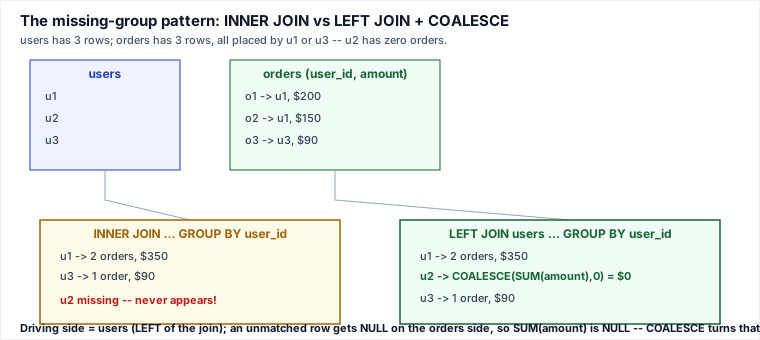
The general form: whenever the report's grouping key comes from a dimension table (users, dates, product categories, ...), drive the query from that dimension with a LEFT JOIN into the fact table, never the other way around. This generalizes past user/order examples: "sales per day, including days with zero sales" needs a LEFT JOIN from an authoritative calendar/dates table, because the fact table (orders) by definition has no rows at all for a day with zero activity — there's no row to GROUP BY into existence.
5. At-scale footguns
GROUP_CONCAT length truncation
MySQL's GROUP_CONCAT() output is capped by the session variable group_concat_max_len (a commonly-cited stock default is 1024 bytes, though this varies by version/configuration — always check SHOW VARIABLES LIKE 'group_concat_max_len' before trusting output length). When the concatenated string would exceed that length, MySQL silently truncates it — the server does issue a truncation warning, but a warning is easy to miss in application code that only checks for hard errors, so a "report" query can quietly ship an incomplete comma-separated list for years.
SET SESSION group_concat_max_len = 1000000;
SELECT customer_id, GROUP_CONCAT(product_name SEPARATOR ', ') AS products
FROM order_items GROUP BY customer_id;
For lists that can genuinely grow large and unbounded, the more robust fix is to stop relying on GROUP_CONCAT for anything beyond a quick debug/report query — fetch the rows and join the list in the application layer, where there's no silent server-side cap.
Range-join / self-join: which index actually helps
A self-join or range predicate — e.g. "orders placed within 7 days of the same customer's previous order," or an interval-overlap check — can't be answered by a single equality-based hash lookup the way a plain equi-join can (this guide's Query Execution deep dive covers why hash/sort-merge joins need an equality condition, forcing any theta/range join toward a nested loop). The index that actually helps this shape of query is a composite index on (customer_id, order_date): the equality on customer_id narrows the B-tree straight to that customer's rows first, and the range scan over order_date within that already-narrow slice becomes a short, ordered range scan — instead of comparing every row pair in the table against every other row pair.
Cross-engine note
MySQL's GROUP_CONCAT has no single standard-SQL equivalent; PostgreSQL's and SQL Server's STRING_AGG(expr, separator) do the same job but neither silently truncates by default. A query "working" around a MySQL GROUP_CONCAT truncation bug can behave completely differently — correctly, but differently — once ported to an engine whose aggregate doesn't cap output length at all.
Pitfalls a working engineer actually hits
- Reflexively writing
!=or<>for a "not X" filter without asking "can this column be NULL for a row I still want to keep?" - Using
NOT INagainst a subquery that isn't provably NULL-free — a single stray NULL zeroes out the entire result set with no error. - Defaulting to
COUNT(*)immediately after aLEFT JOINwhen the real intent is "count of matches" — verify against a column from the joined side. - Trusting
INNER JOIN+GROUP BYto enumerate "all X" — a missing group doesn't error, it just silently isn't in the output, so the bug surfaces only when someone notices an entity is missing from a report. - Wrapping an indexed column in a function/CAST, or leading a
LIKEpattern with%, and being surprised the same query goes from milliseconds to seconds purely because the table grew. - Relying on the default
GROUP_CONCAT/STRING_AGGlength cap for data that can legitimately grow past it.
Judgment layer: how a senior engineer decides
COUNT(*)vsCOUNT(column): useCOUNT(*)when the question is "how many rows in this group, period" and no outer join could have manufactured a placeholder row. UseCOUNT(column)— specifically a column from the joined side, ideally its primary key — whenever the row could be aLEFT JOINplaceholder, since only a column that is genuinely NULL exactly when there's no match will correctly report 0.COUNT(DISTINCT column)vs plainCOUNT(column): reach forDISTINCTwhenever the join topology could introduce duplicate rows per entity being counted (e.g. joining through a bridge/many-to-many table) and the question is about distinct entities, not distinct join-produced rows.- When a sargable rewrite is worth doing: if
EXPLAINshows a full scan on a large or growing table for a predicate whose column is otherwise indexed, rewriting to a raw range/prefix/equality (or adding an expression/generated-column index for a transform that truly can't be avoided) restores the index. Skip the rewrite effort on small or rarely-scaled tables where a full scan is already cheap — sargability is an investment that pays off proportional to table growth, not a rule to apply blindly everywhere. INNER JOINvsLEFT JOIN+COALESCE: useINNER JOINwhen a zero-match group is genuinely uninteresting or invalid for the report (e.g. "revenue by product, for products that have sold at least once"). Reach forLEFT JOINfrom an explicit driving/dimension table the moment the business question is "show me everyone, including the zeros" — which is most "list all X" and dashboard-style reports.NOT INvsNOT EXISTS: default toNOT EXISTSfor any "not in this subquery" filter unless the subquery's column is provably declaredNOT NULL. The downside ofNOT EXISTS(a correlated subquery) is negligible next to the downside ofNOT INsilently returning zero rows.
Takeaways
WHEREonly keeps rows where a predicate is TRUE — a comparison against NULL is UNKNOWN, which behaves like FALSE and silently vanishes;NOT INinherits this and can zero out an entire result set from a single NULL in the subquery.COUNT(*)counts rows,COUNT(column)skips NULLs,COUNT(DISTINCT column)dedups first — after aLEFT JOIN, onlyCOUNTof a column from the joined side correctly reports 0 for a non-match;COUNT(*)reports 1.- A B-tree index only helps a predicate written against the raw column — wrapping it in a function, a leading wildcard, or handing it to
REGEXPforces a full scan; rewrite to a range/prefix or pre-filter before the expensive check. - "Show all X, even the zero-Y ones" is always a
LEFT JOINfrom the dimension that must appear, plusCOALESCEfor any NULL-over-empty-group aggregate — never anINNER JOIN, which doesn't error on the missing group, it just erases it.
Related pages
- SQL Practice Patterns II — Window-Function Ties, WHERE-vs-ON Placement, Self-Join Fan-out & Portability (Deep Dive) — continues this series into window-function ties and self-join fan-out pitfalls.
- SQL Practice Patterns III — Gaps-and-Islands (the Canonical Technique), DENSE_RANK n-th & Zero-Day Semantics (Deep Dive) — the next installment's canonical gaps-and-islands technique.
- SQL Practice Patterns IV — Join Grain & Fan-out, GROUP_CONCAT Portability, NULL Ordering & Self-Join Cost (Deep Dive) — revisits GROUP_CONCAT portability and join-grain fan-out raised in §5 here.
- SQL Fundamentals II — Join Types & Cost, DDL Locking, Recursive CTEs & Dump Consistency (Deep Dive) — deeper treatment of join-type cost underlying the missing-group / driving-side pattern.
Re-authored/Deepened for this guide.
🤖 Don't fully get this? Learn it with Claude
Stuck on SQL Practice Patterns I — NULL Traps, COUNT Semantics, Sargability & the Missing-Group Pattern (Deep Dive)? Open Claude, copy a block below, and it'll teach you this exact concept — visually and interactively.
Build the mental picture, not memorization.
I just read a lesson on **SQL Practice Patterns I — NULL Traps, COUNT Semantics, Sargability & the Missing-Group Pattern (Deep Dive)** (Databases) and want to truly understand it. Explain SQL Practice Patterns I — NULL Traps, COUNT Semantics, Sargability & the Missing-Group Pattern (Deep Dive) from first principles using ONE vivid real-world analogy and a visual mental model — draw it as ASCII art or a clear step-by-step diagram — with a concrete example using real numbers. Then ask me one question to check I got the mental picture, and wait for my reply. If you're unsure or a claim isn't standard, say so and reason from first principles instead of guessing.
Socratic — adapts to where you're stuck.
Teach me **SQL Practice Patterns I — NULL Traps, COUNT Semantics, Sargability & the Missing-Group Pattern (Deep Dive)** interactively. Ask me ONE guiding question at a time, wait for my answer, and adapt to my confusion — build the idea with me step by step instead of explaining it all at once. If you're unsure or a claim isn't standard, say so and reason from first principles instead of guessing.
Active recall exposes what you missed.
Quiz me on **SQL Practice Patterns I — NULL Traps, COUNT Semantics, Sargability & the Missing-Group Pattern (Deep Dive)** with 5 questions, easy to tricky, ONE at a time. Tell me if each answer is right; at the end, explain clearly what I got wrong and why. If you're unsure or a claim isn't standard, say so and reason from first principles instead of guessing.
Intuition + hook + flashcards for long-term memory.
Help me remember **SQL Practice Patterns I — NULL Traps, COUNT Semantics, Sargability & the Missing-Group Pattern (Deep Dive)** for the long term: give the one-sentence intuition, a memorable hook/mnemonic, a tiny worked example, and 3 active-recall flashcards (Q -> A). If you're unsure or a claim isn't standard, say so and reason from first principles instead of guessing.