Employee Absences
Problem
Table Employee stores one row per absence period with employee_id (PK), employee_name, start_date, and end_date, with start_date <= end_date guaranteed. Find every employee absent for more than three consecutive days, ordered by employee_name ascending.
Because each row is already one contiguous absence interval, the “consecutive” part is pre-solved by the data model: the duration of a single absence is just end_date − start_date. This is not a gaps-and-islands problem — there are no separate rows to stitch back into runs. The whole task collapses to one arithmetic comparison per row.
The one fact that decides correctness
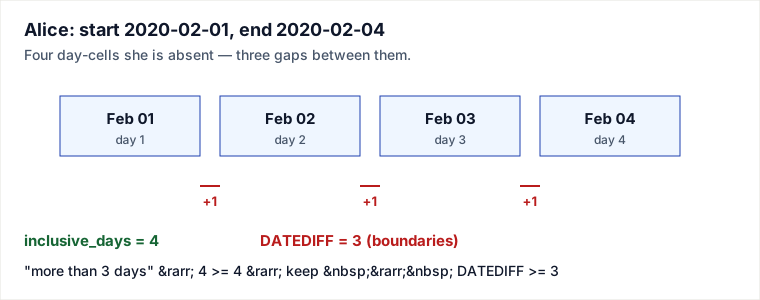
The mechanism is a single date subtraction, and the only subtlety is what DATEDIFF actually counts. DATEDIFF(end_date, start_date) in MySQL returns the number of day boundaries crossed — equivalently end − start — not the number of calendar days the person was out. The inclusive day count is one larger:
inclusive_days = DATEDIFF(end_date, start_date) + 1So “absent for more than three days” means inclusive_days > 3, i.e. inclusive_days >= 4. Substituting:
DATEDIFF(end_date, start_date) + 1 >= 4
        DATEDIFF(end_date, start_date) >= 3
That algebra is why the filter is >= 3 and not > 3. The threshold 3 is a count of boundaries; the requirement > 3 is a count of inclusive days. They look contradictory only if you forget the +1.
Solution
SELECT employee_name,
       start_date,
       end_date
FROM   Employee
WHERE  DATEDIFF(end_date, start_date) >= 3
ORDER  BY employee_name ASC;
One scan, one comparison per row, then a sort for presentation. No window functions, no self-join, no grouping — the interval is already materialised in the row.
Traced over the full input
Compute DATEDIFF(end_date, start_date) for each row, derive inclusive days, and apply the keep test DATEDIFF >= 3 (equivalently inclusive_days > 3).
| name | start | end | DATEDIFF | inclusive days | >= 3 ? |
|---|---|---|---|---|---|
| Alice | 2020-02-01 | 2020-02-04 | 3 | 4 | keep |
| Bob | 2020-02-05 | 2020-02-09 | 4 | 5 | keep |
| Charlie | 2020-02-10 | 2020-02-11 | 1 | 2 | drop |
| David | 2020-02-15 | 2020-02-20 | 5 | 6 | keep |
| Eve | 2020-02-25 | 2020-02-28 | 3 | 4 | keep |
Note Eve: 02-25 to 02-28 is 4 inclusive days (25, 26, 27, 28), DATEDIFF = 3, so she is kept — same boundary case as Alice. After the ORDER BY employee_name ASC:
+---------------+------------+------------+
| employee_name | start_date | end_date   |
+---------------+------------+------------+
| Alice         | 2020-02-01 | 2020-02-04 |
| Bob           | 2020-02-05 | 2020-02-09 |
| David         | 2020-02-15 | 2020-02-20 |
| Eve           | 2020-02-25 | 2020-02-28 |
+---------------+------------+------------+
The original page’s “expected output” listed only Alice, Bob, and David and dropped Eve — but Eve’s interval is identical in length to Alice’s, so any rule that keeps Alice must keep Eve. The four-row result above is the one the query actually produces.
Why the naive version is wrong
The intuitive translation of “more than three days” is:
WHERE DATEDIFF(end_date, start_date) > 3 -- WRONGThis silently drops Alice and Eve. It compares the requirement (in inclusive days) against DATEDIFF (in boundaries) without correcting for the off-by-one. The mental fix: decide which unit your threshold is in, convert DATEDIFF to that unit with +1, then compare. Here, inclusive_days > 3 rewrites to DATEDIFF > 2, i.e. DATEDIFF >= 3 — the correct filter.
Pitfalls
- Off-by-one from inclusive vs. exclusive counting. The defining trap. A 1-day absence (
start = end) hasDATEDIFF = 0but is 1 day of absence. Always anchor on a concrete example like Alice before committing to>vs>=. DATEDIFFis not portable. MySQL’sDATEDIFF(end, start)takes end first and returns an integer day count. PostgreSQL has noDATEDIFF— useend_date - start_date(returns anintegerfordatetypes). SQL Server’sDATEDIFF(day, start, end)reverses the argument order and needs a unit. Copy-pasting across engines flips signs or fails to compile.- Argument order. Writing
DATEDIFF(start_date, end_date)yields negative values; every row then fails>= 3and you get an empty result that looks like a data problem rather than a bug. - Assuming gaps-and-islands. The title says “consecutive,” but consecutiveness is already encoded in each row. If absences were instead stored as one row per day, you would need a real islands query (row_number difference trick) to reconstruct runs first.
- Time components. If the columns were
datetimerather thandate,DATEDIFFin MySQL still counts date parts only, but engines like SQL Server count boundary crossings that can over- or under-count when timestamps straddle midnight. Confirm the column type.
Takeaways
- The interval length of a single row is
DATEDIFF(end, start), which counts boundaries; inclusive calendar days are that plus one. - “More than 3 days” (inclusive) algebraically becomes
DATEDIFF >= 3— derive the operator, do not guess it. - When the data already stores one contiguous interval per row, no window/self-join machinery is needed; reach for gaps-and-islands only when runs must be reconstructed from per-day rows.
DATEDIFFsemantics and argument order differ by engine — state your target dialect before trusting the boundary case.
Based on the LeetCode-style “Employee Absences” exercise (Database track). DATEDIFF semantics verified against the MySQL Reference Manual (Date and Time Functions) and cross-checked against PostgreSQL date arithmetic and SQL Server DATEDIFF. Re-authored and deepened for this guide: corrected the prose/operator mismatch with an explicit inclusive-vs-boundary derivation, fixed the example output to include Eve (whose interval length equals Alice’s), added a full per-row trace, a timeline diagram, a “why the naive > 3 is wrong” note, and cross-engine portability pitfalls.
🤖 Don't fully get this? Learn it with Claude
Stuck on Employee Absences? Open Claude, copy a block below, and it'll teach you this exact concept — visually and interactively.
Build the mental picture, not memorization.
I just read a lesson on **Employee Absences** (Databases) and want to truly understand it. Explain Employee Absences from first principles using ONE vivid real-world analogy and a visual mental model — draw it as ASCII art or a clear step-by-step diagram — with a concrete example using real numbers. Then ask me one question to check I got the mental picture, and wait for my reply. If you're unsure or a claim isn't standard, say so and reason from first principles instead of guessing.
Socratic — adapts to where you're stuck.
Teach me **Employee Absences** interactively. Ask me ONE guiding question at a time, wait for my answer, and adapt to my confusion — build the idea with me step by step instead of explaining it all at once. If you're unsure or a claim isn't standard, say so and reason from first principles instead of guessing.
Active recall exposes what you missed.
Quiz me on **Employee Absences** with 5 questions, easy to tricky, ONE at a time. Tell me if each answer is right; at the end, explain clearly what I got wrong and why. If you're unsure or a claim isn't standard, say so and reason from first principles instead of guessing.
Intuition + hook + flashcards for long-term memory.
Help me remember **Employee Absences** for the long term: give the one-sentence intuition, a memorable hook/mnemonic, a tiny worked example, and 3 active-recall flashcards (Q -> A). If you're unsure or a claim isn't standard, say so and reason from first principles instead of guessing.