Employee Email Verification
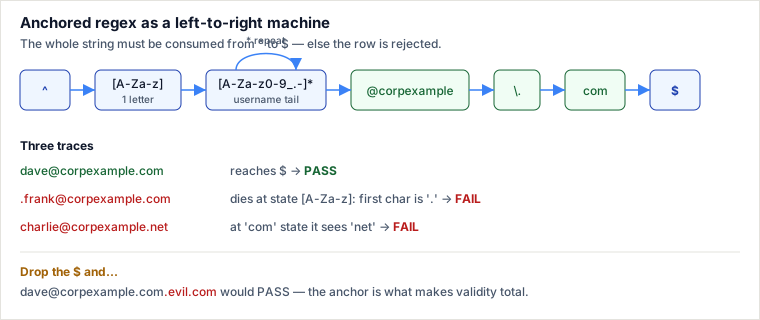
The engine walks each email string left-to-right against an anchored regular expression: ^ pins the match to the first character and $ to the last, so the pattern must consume the entire string or the whole row is rejected — there is no "contains a valid-looking part" loophole. Validity is therefore a single boolean: does the full string fit the grammar letter, then any run of allowed username characters, then the literal domain?
Problem
Table Employees(employee_id PK, name, email). Return the rows whose email is valid, in any order. A valid email is a username followed by a fixed domain:
- Username — starts with a letter, then any mix of letters, digits, underscore
_, period., hyphen-. - Domain — the literal
@corpexample.com.
Spec note (corrected here). The original prose said "the domain is
@corpexample" but every example and the regex require the full@corpexample.com— Charlie'scharlie@corpexample.netis rejected precisely because its domain is not.com. The two statements contradicted each other. The real contract is@corpexample.com; the bare@corpexamplewording was a carry-over error and is wrong.
The query (correct version)
SELECT *
FROM   Employees
WHERE  email REGEXP '^[A-Za-z][A-Za-z0-9_.-]*@corpexample\.com$';
Per-token breakdown — read it as one left-to-right machine:
| Token | Matches | Why it is there |
|---|---|---|
^ | start of string | Anchor. Without it, a valid email buried inside garbage would pass. |
[A-Za-z] | exactly one letter | The mandatory first character. Rejects .frank@… and 9bob@…. |
[A-Za-z0-9_.-] | one allowed username char | The character class: letters, digits, _, ., -. |
* | the class, zero or more times | Greedy repeat for the rest of the username. Zero is allowed, so a 1-letter username like a@corpexample.com is valid. |
@corpexample | that literal text | The @ and letters are ordinary characters here. |
\. | one literal dot | Escaped. An unescaped . means "any character," which would also accept @corpexampleXcom. |
com | that literal text | The TLD. |
$ | end of string | Anchor. Rejects dave@corpexample.com.evil.com and trailing whitespace. |
Note . and - need no backslash inside the class: . is already literal there, and - is literal when it sits last. Only the dot in \.com — outside the class — must be escaped.
Worked trace on the sample rows
The engine evaluates each string against the anchored pattern. Below, the cursor either consumes the whole string (PASS) or hits a character the pattern cannot accept (FAIL).
| What happens | Verdict | |
|---|---|---|
alice@corpexample.com | a→first letter; lice→class*; @corpexample.com→literal; $ at end. | PASS |
bob123@corpexample.com | b→letter; ob123→class* (digits allowed); domain literal matches. | PASS |
charlie@corpexample.net | Username + @corpexample. match, but the pattern now demands com; it sees net. | FAIL — wrong TLD |
dave@corpexample.com | Clean match, cursor reaches $. | PASS |
eve#corp@corpexample.com | e→letter; ve→class*; then # is not in the class and is not @corpexample…, so the run stops early and $ is not reached. | FAIL — # illegal |
.frank@corpexample.com | First char must be [A-Za-z]; it is .. Match dies at position 1. | FAIL — leading dot |
Output: rows 101 (Alice), 102 (Bob), 104 (Dave) — exactly the three that fully consumed the pattern.
Why the naive version is wrong
A common first attempt skips one or both anchors and uses an unescaped dot:
-- WRONG: no anchors, literal-looking but unescaped dot
WHERE email REGEXP '[A-Za-z][A-Za-z0-9_.-]*@corpexample.com'
Two silent bugs:
- No
^…$.REGEXPtests for a match anywhere in the string, so!!!alice@corpexample.com???passes — the engine just finds the good substring in the middle. Injection-style junk sails through. - Unescaped
.beforecommeans "any character," sox@corpexampleZcommatches. You wanted a literal dot; you got a wildcard.
The fix is the anchored, escaped form shown above. The lesson generalizes: a validator must be anchored, or it is a substring search wearing a validator's coat.
Portability — the operator is not the same across engines
The pattern is standard POSIX-ish regex, but the syntax to invoke it differs, and this trips people moving a query between databases:
| Engine | How to apply the regex | Note |
|---|---|---|
| MySQL / MariaDB | email REGEXP '^[A-Za-z]…\.com$' | REGEXP is case-insensitive by default on many collations; here the class already covers both cases so it does not matter. |
| PostgreSQL | email ~ '^[A-Za-z]…\.com$' | ~ = case-sensitive, ~* = case-insensitive. No REGEXP keyword. |
| SQLite | email REGEXP '…' only if a REGEXP function is loaded | Vanilla SQLite has no regex. Either load an extension, or fall back to GLOB/LIKE, which cannot express "one or more of a class" cleanly. |
| SQL Server | no native regex | Use LIKE with limited wildcards, or CLR / SQL Server 2025+ regex functions. |
The grader's earlier inline ASCII tables hid this entirely; on a real migration it is the first thing to break.
Pitfalls
- Forgetting the anchors. The single most common bug: an unanchored
REGEXPis a containment test, not a validator. Always wrap with^…$. - Over-escaping inside the class. Writing
[A-Za-z0-9_\.\-]works in MySQL but is needless noise — inside[]the dot is already literal and a trailing hyphen needs no backslash. In Postgres'~the extra backslashes can even change meaning depending on standard-conforming-strings settings. - Backslash doubling. The original page wrote
\\.com(double backslash) inside a single-quoted SQL literal. Whether that is one literal dot or a literal backslash-then-any-char depends on how the client processes escapes; the unambiguous, portable form is a single\.. Test the actual reject rows, do not eyeball the regex. - Hyphen placement. A hyphen in the middle of a class (
[a-.-]) becomes a range and silently changes what matches. Keep-first or last. - Case and collation surprises. Relying on MySQL's default case-insensitivity to accept uppercase letters is fragile across collations; encode both cases explicitly as
[A-Za-z]. - Trusting regex for full RFC email validation. This pattern validates this company's narrow rule, not real-world email. Real RFC 5321/5322 addresses (quoted locals, IP-literal domains) are far larger than any interview regex; don't reuse this as a general email validator.
Takeaways
- A validator is an anchored, full-string match:
^…$turns "contains" into "is." - Escape the dot you mean literally (
\.); inside a character class the dot is already literal and the hyphen only needs care about position. - The regex pattern is portable; the operator is not — MySQL
REGEXP, Postgres~, SQLite needs an extension, SQL Server has none. - The true spec here is
@corpexample.com; the.netrow failing is the tell that distinguishes the real rule from the buggy "@corpexample" prose.
Based on the LeetCode-style "Find the Valid Emails" / employee-email-verification problem and the MySQL REGEXP, PostgreSQL ~, and SQLite regex documentation. Anchoring and character-class behaviour follow the POSIX ERE / PCRE references (Friedl, Mastering Regular Expressions). Re-authored and deepened for this guide: resolved the @corpexample vs @corpexample.com spec contradiction in favour of the example data, added a per-token breakdown, a state-machine diagram, a "why the naive version is wrong" note, and the cross-engine portability table.
🤖 Don't fully get this? Learn it with Claude
Stuck on Employee Email Verification? Open Claude, copy a block below, and it'll teach you this exact concept — visually and interactively.
Build the mental picture, not memorization.
I just read a lesson on **Employee Email Verification** (Databases) and want to truly understand it. Explain Employee Email Verification from first principles using ONE vivid real-world analogy and a visual mental model — draw it as ASCII art or a clear step-by-step diagram — with a concrete example using real numbers. Then ask me one question to check I got the mental picture, and wait for my reply. If you're unsure or a claim isn't standard, say so and reason from first principles instead of guessing.
Socratic — adapts to where you're stuck.
Teach me **Employee Email Verification** interactively. Ask me ONE guiding question at a time, wait for my answer, and adapt to my confusion — build the idea with me step by step instead of explaining it all at once. If you're unsure or a claim isn't standard, say so and reason from first principles instead of guessing.
Active recall exposes what you missed.
Quiz me on **Employee Email Verification** with 5 questions, easy to tricky, ONE at a time. Tell me if each answer is right; at the end, explain clearly what I got wrong and why. If you're unsure or a claim isn't standard, say so and reason from first principles instead of guessing.
Intuition + hook + flashcards for long-term memory.
Help me remember **Employee Email Verification** for the long term: give the one-sentence intuition, a memorable hook/mnemonic, a tiny worked example, and 3 active-recall flashcards (Q -> A). If you're unsure or a claim isn't standard, say so and reason from first principles instead of guessing.