Status of Flight Tickets
Problem
Each flight has a fixed capacity; passengers book seats over time. A booking is Confirmed if it falls within the first capacity bookings for that flight ordered by booking_time; otherwise it is Waitlist. Return every passenger_id with its status, ordered ascending.
Flights(flight_id PK, capacity)
Passengers(passenger_id PK, flight_id, booking_time)   -- booking_time is distinct
Mechanism
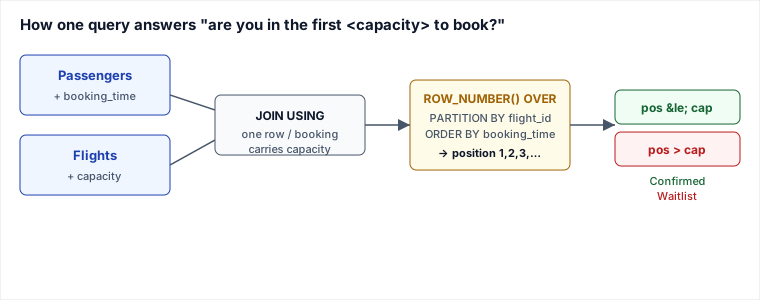
Per flight, sort bookings by time and number them 1,2,3,…; a booking is Confirmed exactly when its position number is ≤ that flight's capacity — so the question reduces to "is this passenger one of the first capacity to book?", which a window function answers per-row without a self-join or subquery.
Solution
SELECT passenger_id,
       IF(ROW_NUMBER() OVER (PARTITION BY flight_id
                             ORDER BY booking_time) <= capacity,
          'Confirmed', 'Waitlist') AS status
FROM   Passengers
       JOIN Flights USING (flight_id)
ORDER  BY passenger_id;
Read it inside-out:
JOIN Flights USING (flight_id)— attaches each booking's flightcapacityonto its row. (An innerJOINis correct here: everyflight_idinPassengersreferences a real flight.LEFT JOINwould behave identically given that FK guarantee, but inner states the intent.)PARTITION BY flight_id— restarts the counter for each flight, so flight 2's ranking never bleeds into flight 1's.ORDER BY booking_time— within a flight, earliest booking gets position 1. This is the priority rule.ROW_NUMBER() … <= capacity— positions 1..capacity are Confirmed, the rest Waitlist. The comparison runs per row;capacitycame along on the joined row.ORDER BY passenger_id— final presentation order, unrelated to the ranking order above.
Worked trace
Three flights. Flight 1 has capacity 2, flight 2 capacity 2, flight 3 capacity 1. After the join, every booking row carries its flight's capacity. Then per flight we sort by booking_time and number the rows — note the input is not pre-sorted, the window function does the sorting:
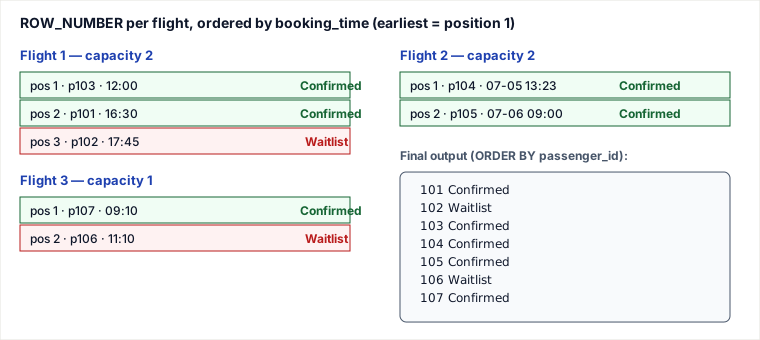
Notice how presentation order (101→107) is completely decoupled from priority order: p102 booked last on its flight so it waitlists, while p103 booked first and confirms, even though they sort adjacent in the output. The window function did the priority math; the outer ORDER BY only arranged the rows for display.
Why RANK() is a trap here — use ROW_NUMBER()
A common version of this answer writes RANK() OVER (PARTITION BY flight_id ORDER BY booking_time) <= capacity. With this dataset it gives the same result, because the problem promises booking_time is distinct. Remove that guarantee — two passengers booking in the same millisecond, a coarse timestamp, a backfill that stamps many rows with one time — and RANK() silently over-confirms seats.
The reason is how each function treats ties. RANK() gives tied rows the same number and then skips: 1, 1, 3. ROW_NUMBER() always emits distinct, gap-free positions: 1, 2, 3 (the order among the tied rows is then arbitrary, but the count is exact). For a capacity counter you want a true count of seats taken, which is exactly what ROW_NUMBER() gives and RANK() does not.
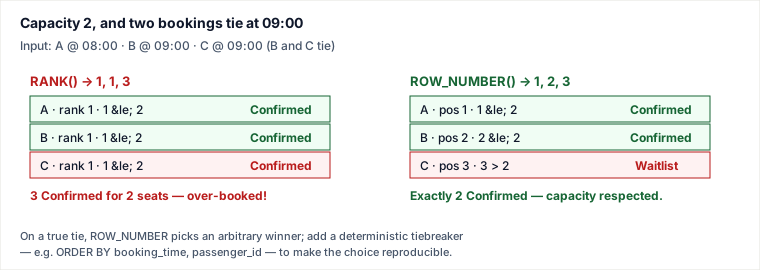
So the honest fix is twofold: use ROW_NUMBER() so the count of confirmed rows can never exceed capacity, and if real ties are possible, make the order deterministic by adding a stable tiebreaker:
ROW_NUMBER() OVER (PARTITION BY flight_id
                   ORDER BY booking_time, passenger_id)
Why the RANK() version is wrong: it is correct only under the problem's distinctness promise. As a real seat-allocator it has no notion of "seats already taken" — it answers "how many booked strictly earlier, plus one", which collapses on ties and lets more passengers confirm than there are seats. DENSE_RANK() is worse still: it never skips, so a 3-way tie at the front numbers 1,1,1 and the whole flight could confirm.
Pitfalls
- RANK() over-confirms on ties — the headline trap above. Reach for
ROW_NUMBER()for any "first N" / capacity / top-per-group cutoff; reserveRANK()/DENSE_RANK()for leaderboards where genuinely tied rows should share a place. - Filtering on the window function in WHERE. You cannot write
WHERE ROW_NUMBER() OVER (...) <= capacity— window functions are evaluated afterWHERE. TheIF(...)projection used here sidesteps it; if you instead need to drop waitlisted rows you must wrap the query in a subquery/CTE and filter on the aliased column outside. - Coarse or non-unique timestamps. If
booking_timeis stored as a DATE or rounded to seconds, expect ties even when bookings were logically ordered. Capture sub-second precision, or carry an insertion sequence / auto-increment id as the tiebreaker. - capacity ≤ 0 or NULL. A flight with
capacity = 0waitlists everyone (position 1 > 0), which is correct. But aNULLcapacity makesposition <= NULLevaluate to NULL → theIFtakes its else branch and silently waitlists the whole flight; guard withCOALESCE(capacity, 0)if capacity can be missing. - LEFT vs INNER JOIN. With an enforced FK they tie. Without one, a booking referencing a missing flight survives a
LEFT JOINwith NULL capacity (see above) but is dropped by anINNER JOIN— pick the one whose failure mode you want.
Cost & indexing
The work is one join plus one windowed sort. The window function must sort each partition by booking_time, so the dominant cost is O(n log n) on the Passengers row count n (sorting within partitions), plus the join lookup of capacity per row. A composite index (flight_id, booking_time) on Passengers lets the engine read rows already grouped and ordered, letting the planner skip the explicit sort and stream the ROW_NUMBER assignment — the single highest-leverage index for this query. Flights(flight_id) is already the primary key, so the capacity lookup is a point probe. There is no GROUP BY and no correlated subquery, so this scales far better than the classic "count earlier bookings with a correlated COUNT(*)" formulation, which is O(n²) per flight.
Takeaways
- "Is this row among the first N per group?" is a
ROW_NUMBER() OVER (PARTITION BY g ORDER BY k) <= Nshape — recognize it and you skip self-joins entirely. - For a capacity / count cutoff use ROW_NUMBER(), never RANK() or DENSE_RANK(): only ROW_NUMBER guarantees the confirmed count cannot exceed capacity, because its positions are distinct and gap-free.
- Window functions run after WHERE — do the cutoff in a projected
CASE/IF, or filter the aliased column in an outer query. - Index the partition+order columns
(flight_id, booking_time)to turn the windowed sort into a streamed read; add a tiebreaker column when timestamps can collide.
Sources: problem adapted from a LeetCode-style "flight ticket status" exercise. Window-function semantics (ROW_NUMBER vs RANK vs DENSE_RANK, ordering of WHERE vs window evaluation) per the ISO SQL standard and the PostgreSQL and MySQL 8 reference manuals on window functions. Re-authored and deepened for this guide: fixed the "We ca efficiently accomplishes" prose, switched the solution to ROW_NUMBER() with a tie analysis showing why RANK() over-confirms seats, replaced raster example I/O with hand-authored SVG traces, and added complexity and indexing notes.
🤖 Don't fully get this? Learn it with Claude
Stuck on Status of Flight Tickets? Open Claude, copy a block below, and it'll teach you this exact concept — visually and interactively.
Build the mental picture, not memorization.
I just read a lesson on **Status of Flight Tickets** (Databases) and want to truly understand it. Explain Status of Flight Tickets from first principles using ONE vivid real-world analogy and a visual mental model — draw it as ASCII art or a clear step-by-step diagram — with a concrete example using real numbers. Then ask me one question to check I got the mental picture, and wait for my reply. If you're unsure or a claim isn't standard, say so and reason from first principles instead of guessing.
Socratic — adapts to where you're stuck.
Teach me **Status of Flight Tickets** interactively. Ask me ONE guiding question at a time, wait for my answer, and adapt to my confusion — build the idea with me step by step instead of explaining it all at once. If you're unsure or a claim isn't standard, say so and reason from first principles instead of guessing.
Active recall exposes what you missed.
Quiz me on **Status of Flight Tickets** with 5 questions, easy to tricky, ONE at a time. Tell me if each answer is right; at the end, explain clearly what I got wrong and why. If you're unsure or a claim isn't standard, say so and reason from first principles instead of guessing.
Intuition + hook + flashcards for long-term memory.
Help me remember **Status of Flight Tickets** for the long term: give the one-sentence intuition, a memorable hook/mnemonic, a tiny worked example, and 3 active-recall flashcards (Q -> A). If you're unsure or a claim isn't standard, say so and reason from first principles instead of guessing.