SQL Practice Patterns III — Gaps-and-Islands (the Canonical Technique), DENSE_RANK n-th & Zero-Day Semantics (Deep Dive)
Five different practice problems — active users, consecutive login streaks, attendance runs, session windows, activity-day counts — all reduce to the same underlying shape: find maximal runs of consecutive rows in an ordered sequence. Each one is usually taught with its own bespoke trick, which means a learner who has solved four of them still freezes on the fifth because it doesn't look like the others. This page teaches the one canonical mechanism underneath all five — the ROW_NUMBER()-difference trick — so that "gaps and islands" becomes a single recognized pattern instead of five memorized recipes. It then covers the two mechanisms that most often ride alongside it in the same problem set: the DENSE_RANK() n-th-value generalization (with its tie-for-fastest and determinism subtleties), and the zero-denominator / zero-result behavior that silently turns a rate calculation into NULL instead of 0. It continues the SQL Practice Patterns I (NULL three-valued logic, COUNT variants, sargability, missing-group joins) and SQL Practice Patterns II (window-function ties, WHERE-vs-ON placement, self-join fan-out, portability) companions one level further — Patterns II already introduced DENSE_RANK vs RANK vs ROW_NUMBER for ties, and touched a calendar-day version of gaps-and-islands for High School Attendance; this page makes gaps-and-islands the headline topic and generalizes it past that one problem.
1. Gaps-and-islands: the ROW_NUMBER-difference trick
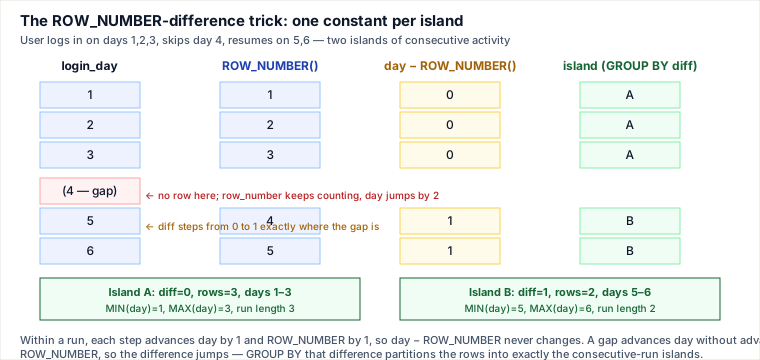
Mechanism first: take any sequence ordered by a value that is supposed to increase by a fixed step per row (a date incrementing by one day, an integer ID incrementing by one). Within one unbroken run of that sequence, both the value and its ROW_NUMBER() (ordered the same way) advance by exactly one per row — so value − ROW_NUMBER() stays constant for every row in that run. The instant a row is missing (a gap), the value jumps ahead by more than one step while ROW_NUMBER() only ever advances by one — so the difference jumps too, and never returns to its old value again. GROUP BY that difference therefore partitions the rows into exactly the maximal consecutive runs ("islands"), with no explicit loop, recursive CTE, or self-join required.
Traced worked example — consecutive login days
A user logs in on days 1, 2, 3, then skips day 4, then resumes on days 5 and 6 — two islands of consecutive activity, separated by one missing day:
| login_day | ROW_NUMBER() OVER (ORDER BY login_day) | login_day − ROW_NUMBER() | island |
|---|---|---|---|
| 1 | 1 | 0 | A |
| 2 | 2 | 0 | A |
| 3 | 3 | 0 | A |
| 5 | 4 | 1 | B |
| 6 | 5 | 1 | B |
Day 4 has no row, so ROW_NUMBER() for day 5 is 4, not 5 — it only counted the rows that actually exist. 5 − 4 = 1, a new value distinct from island A's 0. GROUP BY the difference column recovers both islands directly: GROUP BY (login_day − rn) with MIN(login_day) and MAX(login_day) per group gives island A as days 1–3 and island B as days 5–6, with the run length available for free as COUNT(*) per group.
-- Canonical gaps-and-islands template
WITH numbered AS (
    SELECT login_day,
           ROW_NUMBER() OVER (ORDER BY login_day) AS rn
    FROM logins
)
SELECT MIN(login_day) AS island_start,
       MAX(login_day) AS island_end,
       COUNT(*)        AS run_length
FROM numbered
GROUP BY (login_day - rn)
ORDER BY island_start;
The same template answers every member of this family: "3+ consecutive absent days" (filter to status='Absent' before numbering, then HAVING COUNT(*) >= 3), "longest login streak" (ORDER BY run_length DESC LIMIT 1), "total number of active-day streaks" (COUNT(*) over the grouped result), "team's current win streak" (partition the numbering by team first). One mechanism, five surface problems.
The robustness caveat — this only works on a dense, gap-free sequence
The trick's correctness depends on a hidden assumption: that consecutive rows in the intended sense are exactly one unit apart in the ordering value. It works cleanly for integer IDs and for calendar dates where every possible day could plausibly have a row. It breaks silently when the domain isn't a dense calendar — e.g. attendance recorded only on school days (no rows for weekends), where a Friday-Monday-Tuesday absence run is 3 consecutive school days but the raw dates jump by 3, not 1, across the weekend. Subtracting ROW_NUMBER() from the raw date then produces a different value on each side of the weekend even though the run is genuinely unbroken, and the run silently splits into two islands. Two fixes, by data shape:
- True calendar gaps that should count as breaks (e.g. "consecutive calendar days," where a weekend really does break the streak): use the raw date, or explicitly verify the gap with
DATEDIFF(date, LAG(date) OVER (...)) = 1as a boundary marker instead of trusting the subtraction blindly. - A non-daily but still-regular domain that should NOT count as broken (e.g. school days, business days, a calendar dimension table with only valid trading days): rank over the distinct valid-day calendar first (
DENSE_RANK() OVER (ORDER BY calendar_date)against a deduplicated day list), then subtract that dense rank from a per-entityROW_NUMBER()— both counters advance by exactly one per valid day, so the weekend gap no longer perturbs the difference. This is exactly the fix the Patterns II companion applies to High School Attendance.
The interviewer probe that tests whether a candidate actually understands the mechanism, rather than having memorized the query: "what if a day is missing from the underlying data?" The correct answer names which of the two fixes applies, and why — not just "add a WHERE clause."
2. DENSE_RANK for the n-th value, generalized: tie-for-fastest and determinism
Mechanism first: "the Nth-highest value" and "the top-N values" are the same question once ties are accounted for — both ask "how many distinct values have I seen so far, ordered a certain way?" DENSE_RANK() answers exactly that: it assigns the same rank to every row that ties, and does not skip ranks afterward, so filtering WHERE rnk <= N or WHERE rnk = N returns every row belonging to the Nth distinct value — not just one arbitrarily chosen representative. (The Patterns II companion traces why ROW_NUMBER() and RANK() both give the wrong answer to this same question — ROW_NUMBER by picking one arbitrary tied row, RANK by skipping ahead so no row may match rnk = N at all.)
Traced example — tie-for-fastest
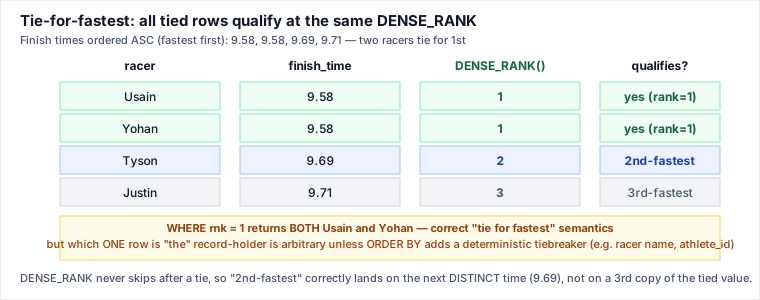
Four racers, finish times ascending (fastest first): 9.58, 9.58, 9.69, 9.71 — two racers tie for the fastest time.
SELECT racer, finish_time,
       DENSE_RANK() OVER (ORDER BY finish_time ASC) AS rnk
FROM race_results;
WHERE rnk = 1 correctly returns both tied racers — the "who is fastest" question has two right answers when there is a genuine tie, and DENSE_RANK is the only ranking function whose filter semantics reflect that. Crucially, DENSE_RANK also gets the next question right without any special-casing: WHERE rnk = 2 ("2nd-fastest") lands on 9.69, the next genuinely distinct time — not a duplicate copy of 9.58. This is the top-N / Nth-highest-with-ties generalization: the same DENSE_RANK mechanism that resolves "2nd highest salary" for two values also resolves "top-3 distinct price tiers" or "the top 5 highest-scoring, possibly-tied students" — swap the filter from an equality (= N) to a range (<= N) and both tied groups and single groups are handled uniformly.
The determinism trap: "which row" is arbitrary without a tiebreaker
Getting the rank right for tied rows does not mean the row-level output is deterministic. If a query asks for "the fastest racer" as a single row (ORDER BY finish_time LIMIT 1, or DENSE_RANK() ... WHERE rnk = 1 LIMIT 1) and two racers tie, the engine is free to return either one — and, without an explicit tiebreaker, may return a different one on a re-run, a different server replica, or after an unrelated index change. The fix is not a different ranking function; it's adding a deterministic column to ORDER BY:
SELECT racer, finish_time
FROM race_results
ORDER BY finish_time ASC, racer ASC   -- deterministic tiebreaker
LIMIT 1;
Named alternative — correlated subquery with COUNT(DISTINCT ...): the Nth-highest-distinct-value question can also be answered without any window function:
-- Nth-highest DISTINCT salary via a correlated subquery
SELECT DISTINCT e1.salary
FROM Employee e1
WHERE (
    SELECT COUNT(DISTINCT e2.salary)
    FROM Employee e2
    WHERE e2.salary > e1.salary
) = N - 1;
This counts how many distinct salaries exceed each candidate; a salary is the Nth-highest exactly when N−1 distinct salaries beat it. It is portable to engines with no window-function support, but it re-scans the table once per outer row (O(n²) without a supporting index) versus one sorted pass for the window-function version — a real cost trade-off on a large table, not just a stylistic choice. Note that DISTINCT cannot be combined with a window function's OVER clause on any mainstream engine (PostgreSQL, SQL Server, Oracle, and MySQL all reject COUNT(DISTINCT ...) OVER (...) as a syntax/semantic error) — there is no additional frame-based form that adds DISTINCT inside OVER. DENSE_RANK() OVER (ORDER BY salary DESC) itself already is the windowed running-distinct-count, which is exactly why it's the standard window-function answer to this question rather than a variant of the correlated subquery above.
3. Zero-trip-day / zero-result semantics: NULL is not 0
Mechanism first: a rate or ratio computed with AVG(), or a manual division like SUM(x) / SUM(y), is only well-defined when the group being aggregated actually has rows. Aggregate functions in SQL run per group after grouping; when a group has zero rows to aggregate, AVG and SUM over that empty set return NULL — not 0 — because "the average of nothing" is undefined, not zero. This is the single most common source of a wrong "0" or a wrong blank row in ratio-style interview problems: the query author assumes an empty group prints 0, but SQL prints NULL unless the query explicitly coalesces it.
NULL counterexample — "Trips and Users" / average ride-request rate
Consider a daily "average completed-trip rate" report: for each date, completed / (completed + cancelled). Suppose date 2020-01-02 has zero total requests logged at all (a true zero-trip day — no rows exist for that date in the requests table in the first place):
-- WRONG on a day with no rows at all: this date is simply MISSING from the result,
-- not present with a 0 -- an aggregate query can only report on groups that have rows
SELECT request_date,
       AVG(CASE WHEN status = 'cancelled' THEN 1.0 ELSE 0 END) AS cancel_rate
FROM trips
GROUP BY request_date;
A day with zero rows in trips never appears in this result at all — GROUP BY can only group rows that exist, so a zero-activity day is silently absent from the report rather than present with a 0 or NULL rate. If the requirement is "report every day in a date range, including days with no activity," the fix is a driving calendar table or date-generation series LEFT JOINed to the activity table (the same missing-group pattern the Patterns I companion covers for INNER-vs-LEFT+COALESCE), so every date row exists before aggregation even runs. Separately, even on a day that does have rows but zero rows in one branch of a ratio — e.g. zero cancellations that day — SUM(cancelled)/SUM(total) correctly evaluates to a real 0 because SUM over an existing, non-empty group of all-zero values is 0, not NULL; the NULL danger is specifically about the denominator itself being computed over zero rows or being a literal zero, not about the numerator happening to be zero.
Division semantics: integer truncation, ROUND, and NULLIF
Three separate failure modes stack on top of the empty-group issue:
- Integer division truncates.
5 / 2in an integer context is2, not2.5, on engines that infer integer division from two integer operands (MySQL's/actually promotes to decimal, but many engines, and any explicitINTEGERcast, truncate). The fix is forcing floating-point or decimal arithmetic before dividing:SUM(x) * 1.0 / SUM(y)orCAST(SUM(x) AS DECIMAL) / SUM(y). - Rounding must match the stated precision exactly. Interview graders check exact decimal places —
ROUND(value, 2)for "rounded to 2 decimal places" is not optional cosmetic polish; a correct ratio at the wrong precision is graded wrong. - Guard the divide-by-zero case explicitly with NULLIF. When a denominator can legitimately be zero for a given group (e.g. total requests for a date that exists in the calendar but had zero denominator-relevant rows after a filter),
x / NULLIF(y, 0)converts a would-be division-by-zero error (on strict engines) into a cleanNULLresult for that row — explicit, intentional, and distinguishable from a computed0, rather than an engine-specific error or an incorrect silent0.
-- Full pattern: calendar-anchored, NULL-safe, correctly rounded, explicit divide-by-zero guard
SELECT d.request_date,
       ROUND(
         COALESCE(SUM(CASE WHEN t.status = 'cancelled' THEN 1.0 ELSE 0 END), 0)
         / NULLIF(COUNT(t.trip_id), 0), 2) AS cancel_rate
FROM date_series d
LEFT JOIN trips t ON t.request_date = d.request_date
GROUP BY d.request_date
ORDER BY d.request_date;
Here COUNT(t.trip_id) (not COUNT(*)) is 0 for a calendar day joined against no trip rows — NULLIF(0, 0) converts that 0 denominator to NULL, and any division by NULL is NULL, cleanly representing "no rate is defined for this day" instead of a spurious 0 or a divide-by-zero error — while the date_series/LEFT JOIN keeps the zero-activity day present in the output in the first place.
4. Query-plan note: window functions need a sort
Mechanism first: every window function used above — ROW_NUMBER(), DENSE_RANK() — must process rows in the order given by its PARTITION BY/ORDER BY clause, and the engine typically satisfies that by sorting the input first (or by consuming an index that is already ordered that way). On an unindexed table this is an explicit sort step in the query plan, costing O(n log n) and, for a set larger than available working memory, a disk spill. A composite index on (partition_columns, order_columns) — e.g. (student_id, attendance_date) for a per-student gaps-and-islands query, or (finish_time) for the racer ranking — lets the engine walk the index in already-sorted order and skip the sort step entirely. This is the same cost mechanics covered in depth in the Query Execution — Selectivity, Cost Model, Join Algorithms, Spills & Sargability deep dive; the practical takeaway here is narrower: when a gaps-and-islands or ranking query is slow on a large table, check EXPLAIN for an explicit Sort/Using filesort node before assuming the window function itself is the bottleneck — it usually isn't; the missing supporting index is.
Pitfalls
- Subtracting ROW_NUMBER from a non-dense sequence. The gaps-and-islands trick silently over-splits real runs when the ordering column has legitimate, expected gaps (school days, business days, a trading calendar) — rank over the valid-day calendar first, don't trust the raw value.
- ROW_NUMBER or RANK where the question says "distinct." Only
DENSE_RANK's numbering matches "how many distinct values have I seen so far" — see Patterns II for the full three-way trace. - Treating "which tied row" as deterministic. Getting the rank right for a tie is not the same as getting a stable single-row answer; add an explicit tiebreaker column to
ORDER BYwhenever exactly one row must be returned. - Assuming AVG/SUM over an empty group returns 0. It returns
NULL; a zero-activity day is often simply missing from aGROUP BYresult rather than present with a real zero, unless a calendar-drivenLEFT JOINis used. - Integer division truncation.
SUM(x)/SUM(y)silently truncates to an integer on some engines/casts — force decimal arithmetic before dividing, thenROUNDto the stated precision. - Dividing without a NULLIF guard. An unguarded zero denominator either errors (strict engines) or, worse, is masked by a query shape that never surfaces the zero-denominator group at all.
Judgment layer: how a senior engineer decides
- Gaps-and-islands vs a self-join / recursive approach: the
ROW_NUMBER-difference trick wins whenever the ordering column advances by a fixed, known step per row (dates, sequential IDs) — it's a single sorted pass,O(n log n), no recursion. A self-join or recursive CTE ("does the next row's date equal this row's date + 1?") is the fallback when the step size isn't fixed or uniform across the whole set, but it costs more (a self-join fans out; recursion iterates) for a problem the difference trick would solve in one pass — reach for it only when the fixed-step assumption genuinely doesn't hold. - Which ranking function for "the Nth value" or "top-N": question is phrased around distinct values, with ties expected to co-qualify (top-N leaderboard, Nth-highest salary, tie-for-fastest) →
DENSE_RANK(). Question additionally requires exactly one deterministic row even through a tie → add an explicit tiebreaker toORDER BY, don't rely on the ranking function alone. No window-function support on the target engine, or the table is small enough that anO(n²)correlated subquery is acceptable → theCOUNT(DISTINCT ...)subquery form. - Whether a zero/empty case needs guarding: if the denominator or the group can legitimately be zero-count for real input (a genuinely inactive day, a category with no matching rows), guard it explicitly with
NULLIFand decide up front whether the correct output for that case isNULL("undefined, no data") or a coalesced0("defined, and the count truly is zero") — these are different claims and the interviewer is listening for which one is being made.
Takeaways
- Gaps-and-islands has one canonical mechanism —
value − ROW_NUMBER()is constant within a run and jumps at every gap — that replaces five memorized ad-hoc solutions; the only judgment call is whether the sequence is dense enough for the raw value, or needs ranking over a valid-day calendar first. DENSE_RANK()is the only ranking function whose "Nth" and "top-N" filters correctly co-qualify every tied row; getting the rank right is still separate from getting a deterministic single-row answer, which needs an explicit tiebreaker.AVG/SUMover zero rows isNULL, not0, and a zero-activity group is often simply absent from aGROUP BYresult — a calendar-anchoredLEFT JOIN,NULLIFfor the denominator, explicit decimal casting, and a statedROUNDprecision together close every edge of a rate calculation.- Window functions require sorted input; a composite index on the partition/order columns removes the sort step from the query plan — check
EXPLAINfor aSortnode before assuming the window function itself is slow.
Related pages
- SQL Practice Patterns I — NULL Traps, COUNT Semantics, Sargability & the Missing-Group Pattern (Deep Dive) — Databases — the NULL/COUNT/missing-group companion this page continues
- SQL Practice Patterns II — Window-Function Ties, WHERE-vs-ON Placement, Self-Join Fan-out & Portability (Deep Dive) — Databases — introduces the ranking-function ties this page generalizes
- SQL Practice Patterns IV — Join Grain & Fan-out, GROUP_CONCAT Portability, NULL Ordering & Self-Join Cost (Deep Dive) — Databases — the next companion in this practice-patterns series
- Query Execution — Selectivity, the Cost Model, Join Algorithms, Spills & Sargability (Deep Dive) — Databases — the sort/index cost mechanics behind window-function performance
- High School Attendance — Databases — the worked problem behind the non-dense gaps-and-islands fix
Re-authored/Deepened for this guide.
🤖 Don't fully get this? Learn it with Claude
Stuck on SQL Practice Patterns III — Gaps-and-Islands (the Canonical Technique), DENSE_RANK n-th & Zero-Day Semantics (Deep Dive)? Open Claude, copy a block below, and it'll teach you this exact concept — visually and interactively.
Build the mental picture, not memorization.
I just read a lesson on **SQL Practice Patterns III — Gaps-and-Islands (the Canonical Technique), DENSE_RANK n-th & Zero-Day Semantics (Deep Dive)** (Databases) and want to truly understand it. Explain SQL Practice Patterns III — Gaps-and-Islands (the Canonical Technique), DENSE_RANK n-th & Zero-Day Semantics (Deep Dive) from first principles using ONE vivid real-world analogy and a visual mental model — draw it as ASCII art or a clear step-by-step diagram — with a concrete example using real numbers. Then ask me one question to check I got the mental picture, and wait for my reply. If you're unsure or a claim isn't standard, say so and reason from first principles instead of guessing.
Socratic — adapts to where you're stuck.
Teach me **SQL Practice Patterns III — Gaps-and-Islands (the Canonical Technique), DENSE_RANK n-th & Zero-Day Semantics (Deep Dive)** interactively. Ask me ONE guiding question at a time, wait for my answer, and adapt to my confusion — build the idea with me step by step instead of explaining it all at once. If you're unsure or a claim isn't standard, say so and reason from first principles instead of guessing.
Active recall exposes what you missed.
Quiz me on **SQL Practice Patterns III — Gaps-and-Islands (the Canonical Technique), DENSE_RANK n-th & Zero-Day Semantics (Deep Dive)** with 5 questions, easy to tricky, ONE at a time. Tell me if each answer is right; at the end, explain clearly what I got wrong and why. If you're unsure or a claim isn't standard, say so and reason from first principles instead of guessing.
Intuition + hook + flashcards for long-term memory.
Help me remember **SQL Practice Patterns III — Gaps-and-Islands (the Canonical Technique), DENSE_RANK n-th & Zero-Day Semantics (Deep Dive)** for the long term: give the one-sentence intuition, a memorable hook/mnemonic, a tiny worked example, and 3 active-recall flashcards (Q -> A). If you're unsure or a claim isn't standard, say so and reason from first principles instead of guessing.