Game Play Analysis V
Day-one retention in one pass
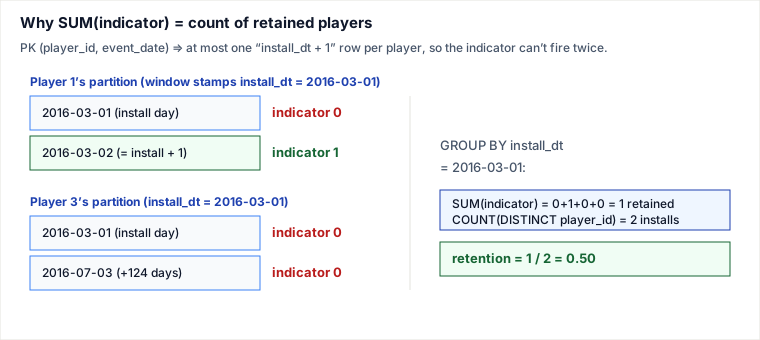
Day-one retention asks, for every install date x: of the players whose first-ever login was x, what fraction logged in again on x + 1 day. The mechanism that makes this a single-pass query is two facts working together. First, a window function MIN(event_date) OVER (PARTITION BY player_id) stamps every row of a player with that player's install date without collapsing the rows — so each login still carries both its own date and the player's install date side by side. Second, the table's primary key (player_id, event_date) guarantees each player has at most one row whose event_date equals install_dt + 1. That uniqueness is the load-bearing insight: it means a per-row indicator (1 if this login is the day-after-install, else 0) can never fire twice for the same player, so SUM(indicator) is exactly the count of distinct retained players — no DISTINCT needed on the numerator.
That is why the retention numerator is a plain SUM(CASE …) while the denominator is COUNT(DISTINCT player_id). They look asymmetric, and the asymmetry is correct on purpose, explained below.
The query
SELECT
    install_dt,
    COUNT(DISTINCT player_id) AS installs,
    ROUND(
        SUM(CASE WHEN event_date = install_dt + INTERVAL 1 DAY THEN 1 ELSE 0 END)
        / COUNT(DISTINCT player_id),
    2) AS Day1_retention
FROM (
    SELECT
        player_id,
        event_date,
        MIN(event_date) OVER (PARTITION BY player_id) AS install_dt
    FROM Activity
) t
GROUP BY install_dt;
The inner query annotates; it does not aggregate. Every original login row survives and gains a fourth value, install_dt, copied from that player's earliest login. The outer query then groups by install_dt and counts. INTERVAL 1 DAY is MySQL syntax; the same logic in PostgreSQL is install_dt + 1 (date + integer), and in standard SQL install_dt + INTERVAL '1' DAY.
Traced example
LeetCode's sample Activity table, where (player_id, event_date) is the primary key:
| player_id | device_id | event_date | games_played |
|---|---|---|---|
| 1 | 2 | 2016-03-01 | 5 |
| 1 | 2 | 2016-03-02 | 6 |
| 2 | 3 | 2017-06-25 | 1 |
| 3 | 1 | 2016-03-01 | 0 |
| 3 | 4 | 2016-07-03 | 5 |
Inner query — stamp each row with its player's install_dt. The window scans each player's partition and copies the minimum event_date onto every row of that player:
| player_id | event_date | install_dt = MIN over player | event_date = install_dt + 1 ? |
|---|---|---|---|
| 1 | 2016-03-01 | 2016-03-01 | no (this is install day itself) |
| 1 | 2016-03-02 | 2016-03-01 | yes → 1 |
| 2 | 2017-06-25 | 2017-06-25 | no |
| 3 | 2016-03-01 | 2016-03-01 | no |
| 3 | 2016-07-03 | 2016-03-01 | no (124 days later, not +1) |
Outer query — group by install_dt.
- install_dt = 2016-03-01: distinct players in this group are 1 and 3, so
installs = 2. The day-after indicator fires once (player 1's 2016-03-02 row). So numeratorSUM = 1, retention =1 / 2 = 0.50. - install_dt = 2017-06-25: distinct player is 2 only, so
installs = 1. Player 2 has a single login and never returned, soSUM = 0, retention =0 / 1 = 0.00.
Final result:
| install_dt | installs | Day1_retention |
|---|---|---|
| 2016-03-01 | 2 | 0.50 |
| 2017-06-25 | 1 | 0.00 |
The two-key subtlety: why numerator and denominator differ
The denominator must use COUNT(DISTINCT player_id) because a player can have many login rows in their install group, and you want to count each player once. The numerator can use a plain SUM precisely because the primary key forbids a second row at the same (player_id, event_date) — and the only date the indicator accepts is the single value install_dt + 1. So per player the indicator is structurally limited to 0 or 1; summing them already counts distinct retained players. If the table allowed duplicate (player_id, event_date) rows, this equivalence would break and you would need COUNT(DISTINCT CASE WHEN … THEN player_id END) instead. Knowing which constraint is doing the work is the difference between copying a recipe and being able to adapt it when the schema changes.
Pitfalls
- Integer division truncates to 0. In MySQL the
/operator yields a decimal, so1 / 2 = 0.5is fine. But in PostgreSQL or SQLite,SUM(...)andCOUNT(...)are both integers, so1 / 2 = 0and every retention prints0.00. Cast the numerator:SUM(...)::numeric / COUNT(...)(Postgres) or1.0 * SUM(...) / COUNT(...). - Filtering install+1 in a WHERE clause loses the install rows. A tempting wrong move is to self-join or filter the inner result down to only day-after-install rows. Do that and the install group's denominator vanishes — you can no longer count how many players installed that day. The
CASEindicator keeps every row present and lets numerator and denominator be computed from the same group in one pass. - Treating
install_dt + 1as “the next login” rather than the literal calendar next day. Day-one retention is about the specific dateinstall_dt + 1, not the player's second login. Player 3 logged in again on 2016-07-03 — a real return — but it does not count, because retention measures whether they came back the very next day. - Equality on
DATEvsDATETIME. Ifevent_datecarries a time component,event_date = install_dt + INTERVAL 1 DAYcan miss matches (10:05 ≠ 00:00). Compare on the date part:DATE(event_date) = DATE(install_dt) + INTERVAL 1 DAY. - Window function inside GROUP BY in one level. You cannot put
MIN(...) OVER (...)and aGROUP BYin the same SELECT — window functions are evaluated after grouping, not before. The subquery exists to compute the per-rowinstall_dtfirst, so the outer query can group on it.
Takeaways
- Window functions annotate without collapsing.
MIN(event_date) OVER (PARTITION BY player_id)attaches each player's install date to every one of their rows, so install-relative tests become a per-row comparison instead of a join. - The primary key is the proof of correctness. Uniqueness of
(player_id, event_date)is what lets a cheapSUM(CASE …)stand in for aCOUNT(DISTINCT retained-players). State that assumption explicitly; it is the part that breaks first when a schema changes. - Keep numerator and denominator in the same group. Using an indicator instead of a filter lets one pass produce both the install count and the retained count, avoiding an extra self-join.
- Always cast for ratios in engines with integer division. Portability across MySQL/Postgres/SQLite hinges on forcing the division to floating point.
Problem from LeetCode 1097, “Game Play Analysis V.” Window-function semantics and the date arithmetic per the MySQL 8.0 and PostgreSQL 16 documentation; integer-division behavior verified against each engine's reference. Re-authored and deepened for this guide to surface the primary-key invariant that makes SUM(indicator) equal the count of retained players, add a traced example, a mechanism diagram, and engine portability pitfalls.
🤖 Don't fully get this? Learn it with Claude
Stuck on Game Play Analysis V? Open Claude, copy a block below, and it'll teach you this exact concept — visually and interactively.
Build the mental picture, not memorization.
I just read a lesson on **Game Play Analysis V** (Databases) and want to truly understand it. Explain Game Play Analysis V from first principles using ONE vivid real-world analogy and a visual mental model — draw it as ASCII art or a clear step-by-step diagram — with a concrete example using real numbers. Then ask me one question to check I got the mental picture, and wait for my reply. If you're unsure or a claim isn't standard, say so and reason from first principles instead of guessing.
Socratic — adapts to where you're stuck.
Teach me **Game Play Analysis V** interactively. Ask me ONE guiding question at a time, wait for my answer, and adapt to my confusion — build the idea with me step by step instead of explaining it all at once. If you're unsure or a claim isn't standard, say so and reason from first principles instead of guessing.
Active recall exposes what you missed.
Quiz me on **Game Play Analysis V** with 5 questions, easy to tricky, ONE at a time. Tell me if each answer is right; at the end, explain clearly what I got wrong and why. If you're unsure or a claim isn't standard, say so and reason from first principles instead of guessing.
Intuition + hook + flashcards for long-term memory.
Help me remember **Game Play Analysis V** for the long term: give the one-sentence intuition, a memorable hook/mnemonic, a tiny worked example, and 3 active-recall flashcards (Q -> A). If you're unsure or a claim isn't standard, say so and reason from first principles instead of guessing.