Daily User Engagement Levels
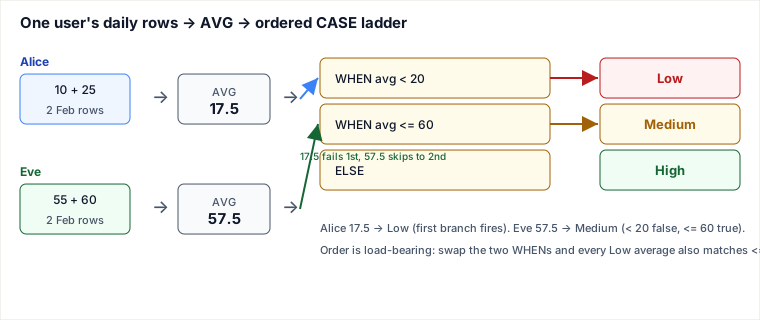
This query collapses each user's many daily engagement rows into a single average with GROUP BY user_name + AVG(), then routes that one number through an ordered CASE ladder where each WHEN only fires for values the earlier WHENs already excluded — so the <= 60 branch silently means "between 20 and 60" because everything under 20 was caught first.
Problem
Two tables: Users(user_id, user_name) and Engagement(user_id, engagement, date), one engagement row per user per day. For February 2020, compute each user's average engagement and label it:
- Low — average
< 20 - Medium — average between
20and60inclusive - High — average
> 60
The three boundaries (20, 60) carve the number line into exactly three regions, and the spec's "inclusive" on both ends is what makes a translation into CASE tricky if you write the wrong comparison operator.
The solution
SELECT
    u.user_name,
    CASE
        WHEN AVG(e.engagement) < 20  THEN 'Low'
        WHEN AVG(e.engagement) <= 60 THEN 'Medium'
        ELSE                              'High'
    END AS engagement_level
FROM Users u
JOIN Engagement e ON u.user_id = e.user_id
WHERE YEAR(e.date) = 2020 AND MONTH(e.date) = 2
GROUP BY u.user_id, u.user_name;
Three moving parts. The JOIN attaches each engagement row to its user; the WHERE keeps only February-2020 rows; GROUP BY + AVG reduces each user's surviving rows to one mean; and the CASE turns that mean into a label. Group by user_id (the key) as well as the name so two distinct users who happen to share a name never collapse into one bucket.
Why ordered thresholds, not three independent ranges
You do not need to write WHEN AVG(...) >= 20 AND AVG(...) <= 60 for Medium. CASE evaluates branches top to bottom and stops at the first true one. By the time control reaches the second WHEN, every average < 20 has already returned 'Low' — so <= 60 alone is exactly the half-open lower bound [20, 60] the spec wants. Spelling out the lower bound again is harmless but redundant; getting the operator wrong is not.
Worked trace, two users end to end
After the join and February filter, Alice has rows 10 and 25; Eve has 55 and 60. Watch each average enter the ladder:
| User | Feb rows | AVG | < 20? | <= 60? | Result |
|---|---|---|---|---|---|
| Alice | 10, 25 | 17.5 | true → stop | (not reached) | Low |
| Bob | 30, 40 | 35.0 | false | true → stop | Medium |
| Charlie | 65, 70 | 67.5 | false | false | High (ELSE) |
| David | 23, 24 | 23.5 | false | true → stop | Medium |
| Eve | 55, 60 | 57.5 | false | true → stop | Medium |
Alice at 17.5 trips the first branch and never sees <= 60. Eve at 57.5 falls through the first branch, then the second branch fires — Medium, not High, because 57.5 <= 60. The boundary users matter most: a hypothetical average of exactly 60.0 is Medium (<= 60 is true), and exactly 20.0 is Medium too (20 < 20 is false, so it survives to <= 60). Both inclusive ends fall out of the operator choice for free.
Pitfalls
- Date filter in the ON clause instead of WHERE. A common variant writes
JOIN Engagement e ON u.user_id = e.user_id AND YEAR(e.date)=2020 AND MONTH(e.date)=2. For this query it returns the same answer — but only because it is an INNER JOIN. With an inner join, ON-clause predicates and WHERE-clause predicates both discard non-matching rows, so they are interchangeable. The moment you switch to aLEFT JOINthey diverge: a date predicate inONstill produces a NULL-padded row for users with no February activity (the date check just fails to find a match), whereas the same predicate inWHEREfilters that NULL row away and quietly turns the LEFT JOIN back into an inner join. See Unused Accounts (025), where the date filter must live in the ON clause precisely to keep the never-active accounts. Rule of thumb: a filter on the right table of an outer join belongs inONif you want to preserve unmatched left rows, and inWHEREif you want to drop them. - Using
<where the spec says inclusive. Writing the Medium branch asWHEN AVG(engagement) < 60would mislabel an average of exactly60as High. The spec's "between 20 and 60 inclusive" maps to<= 60, not< 60. One character changes the answer for boundary users. - Reordering the CASE branches. If Medium's
<= 60comes first, every Low average (e.g. 17.5) also satisfies<= 60and gets mislabeled Medium. OrderedCASErelies on the cheapest/most-restrictive cutoff coming first; the second branch's lower bound is implicit. - Integer-division surprise in some engines. Here
engagementisINT, andAVGof integers returns a decimal in standard SQL / MySQL / Postgres, so 17.5 is correct. But if you ever compute the mean manually asSUM(engagement)/COUNT(*)with integer operands, some databases truncate (35/2 = 17).AVGavoids that; hand-rolled means do not. - Users with zero February rows vanish. The inner join drops any user who had no engagement in February. If the requirement were "every user, even inactive ones," you would need a
LEFT JOINwith the date predicate inON— which loops straight back to the first pitfall.
Takeaways
- Bucketing pattern: reduce many rows to one number with
GROUP BY + AVG, then route that number through an orderedCASE. EachWHENonly needs its upper bound; earlier branches own the lower bound. - ON vs WHERE is identical for inner joins and only for inner joins. Put a right-table filter in
WHEREby default; move it toONdeliberately when an outer join must preserve unmatched rows. - Inclusive boundaries are an operator decision:
<= 60includes 60,< 20in the first branch makes 20 fall through to Medium. Trace the exact boundary values, not just the typical ones. - Group by the key, not just the display name, so same-named users do not merge.
Based on the LeetCode-style "Daily User Engagement Levels" problem and its February-2020 sample data. ON-vs-WHERE semantics for inner versus outer joins follow the SQL standard's treatment of join predicates (see also Markus Winand, SQL Performance Explained, and the contrasting Unused Accounts problem in this guide). Re-authored and deepened for this guide: added the explicit mechanism statement, a five-user boundary-aware trace, the AVG→CASE pipeline diagram, and the ON-clause-vs-WHERE pitfall the original page omitted.
🤖 Don't fully get this? Learn it with Claude
Stuck on Daily User Engagement Levels? Open Claude, copy a block below, and it'll teach you this exact concept — visually and interactively.
Build the mental picture, not memorization.
I just read a lesson on **Daily User Engagement Levels** (Databases) and want to truly understand it. Explain Daily User Engagement Levels from first principles using ONE vivid real-world analogy and a visual mental model — draw it as ASCII art or a clear step-by-step diagram — with a concrete example using real numbers. Then ask me one question to check I got the mental picture, and wait for my reply. If you're unsure or a claim isn't standard, say so and reason from first principles instead of guessing.
Socratic — adapts to where you're stuck.
Teach me **Daily User Engagement Levels** interactively. Ask me ONE guiding question at a time, wait for my answer, and adapt to my confusion — build the idea with me step by step instead of explaining it all at once. If you're unsure or a claim isn't standard, say so and reason from first principles instead of guessing.
Active recall exposes what you missed.
Quiz me on **Daily User Engagement Levels** with 5 questions, easy to tricky, ONE at a time. Tell me if each answer is right; at the end, explain clearly what I got wrong and why. If you're unsure or a claim isn't standard, say so and reason from first principles instead of guessing.
Intuition + hook + flashcards for long-term memory.
Help me remember **Daily User Engagement Levels** for the long term: give the one-sentence intuition, a memorable hook/mnemonic, a tiny worked example, and 3 active-recall flashcards (Q -> A). If you're unsure or a claim isn't standard, say so and reason from first principles instead of guessing.