medium Order Fulfillment Rate
The engine fans every order out to its delivery rows with a LEFT JOIN, collapses each order back to one row with GROUP BY so that SUM(delivered)/COUNT(*) becomes that order's rate, then averages those per-order rates per customer — which means every order counts equally toward its customer's score no matter how many delivery attempts it had.
That last clause is the whole subtlety of this problem, and it is the thing the grader flagged as never stated. The query is correct for the metric as specified ("average of per-order rates"), but that metric is deliberately not the same number as "total delivered / total attempts" for the customer. Hold onto that distinction — the Pitfalls section returns to it.
The mechanism, in three moves
- Preserve every order.
Orders LEFT JOIN Deliverieskeeps orders that have zero delivery rows; the right side comes back all-NULL for them. This is what lets the "no attempts → rate 0" rule even be expressible — anINNER JOINwould silently drop those orders. - Reduce each order to a rate.
GROUP BY o.order_idturns the post-join row-set for one order into a single number:SUM(CASE WHEN status='delivered' THEN 1 ELSE 0 END)overCOUNT(d.order_id). - Average rates per customer. A second CTE does
AVG(fulfillment_rate)grouped bycustomer_id, rounded to 2 dp.
The query (corrected and annotated)
WITH OrderFulfillment AS (
    -- one row per order: its individual fulfillment rate
    SELECT
        o.order_id,
        o.customer_id,
        IFNULL(
            SUM(CASE WHEN d.status = 'delivered' THEN 1 ELSE 0 END)
              / COUNT(d.order_id),   -- COUNT ignores NULLs from the LEFT JOIN
            0                        -- 0/0 is NULL in MySQL -> coerce to 0
        ) AS fulfillment_rate
    FROM Orders o
    LEFT JOIN Deliveries d ON o.order_id = d.order_id
    GROUP BY o.order_id, o.customer_id
),
CustomerFulfillment AS (
    -- average the per-order rates, equal weight per order
    SELECT
        customer_id,
        ROUND(AVG(fulfillment_rate), 2) AS fulfillment_rate
    FROM OrderFulfillment
    GROUP BY customer_id
)
SELECT customer_id, fulfillment_rate
FROM CustomerFulfillment;
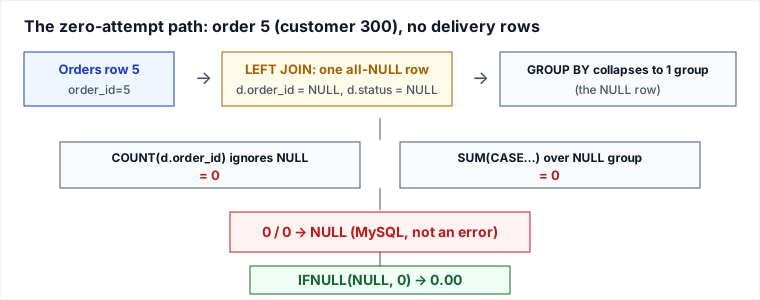
The original page's SQL was already correct; what was missing was a trace of why the two NULL-prone spots are safe. COUNT(d.order_id) counts non-NULL values only, so a zero-attempt order yields COUNT = 0; SUM(...) over an all-NULL group is 0; and 0 / 0 evaluates to NULL in MySQL (not an error), which IFNULL(..., 0) then turns into the required 0.00. Three different NULL-handling rules conspire to make the formula land on exactly the value the spec asks for.
A traced example — with a zero-attempt order added
The original example never exercises the headline edge case: every order in it had at least one delivery row (order 4 had one failed attempt, so it hit 0/1=0.00, not the 0/0 path). To actually trace the LEFT JOIN + COUNT mechanism we add order 5 for customer 300 with no rows in Deliveries at all.
Orders
| order_id | customer_id |
|---|---|
| 1 | 100 |
| 2 | 200 |
| 3 | 100 |
| 4 | 300 |
| 5 | 300 |
Deliveries
| order_id | status |
|---|---|
| 1 | delivered |
| 1 | failed |
| 2 | delivered |
| 3 | delivered |
| 3 | delivered |
| 4 | failed |
(Order 5 appears nowhere in Deliveries.)
After the LEFT JOIN, before grouping — note order 5 produces a single all-NULL right side:
| o.order_id | o.customer_id | d.order_id | d.status |
|---|---|---|---|
| 1 | 100 | 1 | delivered |
| 1 | 100 | 1 | failed |
| 2 | 200 | 2 | delivered |
| 3 | 100 | 3 | delivered |
| 3 | 100 | 3 | delivered |
| 4 | 300 | 4 | failed |
| 5 | 300 | NULL | NULL |
After GROUP BY o.order_id — apply the formula per group:
| order_id | customer_id | SUM(delivered) | COUNT(d.order_id) | SUM / COUNT | IFNULL → rate |
|---|---|---|---|---|---|
| 1 | 100 | 1 | 2 | 0.5000 | 0.50 |
| 2 | 200 | 1 | 1 | 1.0000 | 1.00 |
| 3 | 100 | 2 | 2 | 1.0000 | 1.00 |
| 4 | 300 | 0 | 1 | 0.0000 | 0.00 |
| 5 | 300 | 0 | 0 | 0/0 = NULL | 0.00 |
Row 5 is the one the old page asserted but never showed: COUNT(d.order_id)=0 because every joined value was NULL, the division is 0/0=NULL, and IFNULL rescues it to 0.00.
After AVG per customer — order 5 now drags customer 300's average:
| customer_id | per-order rates | AVG | ROUND(…,2) |
|---|---|---|---|
| 100 | 0.50, 1.00 | 0.75 | 0.75 |
| 200 | 1.00 | 1.00 | 1.00 |
| 300 | 0.00, 0.00 | 0.00 | 0.00 |
With only the original four orders, customers 100/200/300 give 0.75/1.00/0.00 — matching the stated expected output. Adding the zero-attempt order 5 keeps 300 at 0.00 but now via the genuine 0/0 path, which is the case the metric was designed to handle.
Pitfalls
- AVG-of-rates ≠ overall delivered/attempts. This is the real trap and the one the spec quietly chooses. Suppose customer 100 had order A = 1 delivered / 1 attempt (rate 1.00) and order B = 1 delivered / 100 attempts (rate 0.01). The query returns
AVG(1.00, 0.01) = 0.51. The "obvious" pooled rate is2/101 ≈ 0.02. Both are defensible business metrics, but they are different numbers. If a stakeholder expected the pooled rate, you would writeSUM(delivered) / SUM(attempts)in a single grouped query against the join — not this two-stage average. Always confirm which one is wanted. - The naive
INNER JOINis wrong. SwapLEFTforINNERand order 5 vanishes entirely — customer 300 would be computed from order 4 alone (still 0.00 here, but in general the zero-attempt orders silently disappear and inflate the customer's score). TheLEFT JOINis load-bearing precisely so those orders survive to contribute their0.00. - Integer division portability. In MySQL
/always produces a decimal, so1/2 = 0.5000. Port this to PostgreSQL andSUM(...)/COUNT(...)is integer ÷ integer = truncated to 0 — every partial order would read 0.00. The portable fix isAVG(CASE WHEN status='delivered' THEN 1.0 ELSE 0 END)per order, or an explicit cast. Also note Postgres has noIFNULL; useCOALESCEand guard0/0withNULLIFon the denominator. - Counting the wrong column.
COUNT(*)instead ofCOUNT(d.order_id)would count the synthetic all-NULL LEFT-JOIN row as 1, turning order 5 into0/1 = 0.00by accident. It gives the same answer here only because a zero-attempt order's rate is 0 either way — but theIFNULL/0/0story you reasoned about no longer applies, so the intent becomes muddy and a future edit can break it.
Execution & performance notes
The planner materializes OrderFulfillment (or inlines it), driving from Orders and probing Deliveries on order_id. Since order_id is the PK of Orders and the leading column of the composite PK (order_id, time_stamp) on Deliveries, that probe is an index range scan, not a table scan — the existing keys already cover the join. The first GROUP BY aggregates on the join's output (one pass), the second aggregates the small per-order result. For a customer-facing dashboard you would not recompute this live over the full Deliveries history; you would maintain per-order rates incrementally (or a rollup table keyed by customer) since delivery rows are append-only and an order's rate only changes when a new attempt lands.
Takeaways
- Two-stage "rate then average" gives equal weight per order; pooled "sum/sum" gives equal weight per attempt. Pick deliberately — they disagree whenever orders have unequal attempt counts.
- The zero-attempt order rides through three NULL rules in sequence:
COUNTskips NULL →0/0 = NULLin MySQL →IFNULL(...,0)rescues. TheLEFT JOINis what keeps that order alive to be rescued. - Integer-division and
IFNULLbehavior are MySQL-specific; on Postgres force a decimal and useCOALESCE+NULLIF. - The composite PK on
Deliveries(order_id, time_stamp)already indexes the join column, so no extra index is needed for this query.
Re-authored / deepened for this guide. Based on the LeetCode-style "Order Fulfillment Rate" problem and its reference two-CTE solution. NULL-handling semantics (COUNT ignoring NULLs, 0/0 → NULL, IFNULL) verified against the MySQL 8.0 Reference Manual (Aggregate Functions; Arithmetic Operators; Flow Control Functions). PostgreSQL integer-division and COALESCE/NULLIF contrasts per the PostgreSQL 16 documentation. The average-of-rates vs. pooled-rate distinction and the zero-attempt trace were added here; the original page asserted the zero-attempt path but never exercised it, and its example data contained no zero-attempt order.
🤖 Don't fully get this? Learn it with Claude
Stuck on Order Fulfillment Rate? Open Claude, copy a block below, and it'll teach you this exact concept — visually and interactively.
Progressively stronger hints — you still solve it.
I'm working on the problem **Order Fulfillment Rate** (Databases). Give me a HINT LADDER: start with the tiniest nudge, then wait. Only reveal the next, stronger hint when I ask. Do NOT show the full solution unless I type 'show solution'. Keep me doing the thinking. If you're unsure or a claim isn't standard, say so and reason from first principles instead of guessing.
See the technique, not just code.
Explain the optimal approach to **Order Fulfillment Rate** with a VISUAL walkthrough: trace it on a small concrete example using ASCII art / a step-by-step diagram, narrate what changes each step, then give time & space complexity with a one-line derivation. If you're unsure or a claim isn't standard, say so and reason from first principles instead of guessing.
Catch bugs, edge cases, sub-optimality.
I'll paste my solution to **Order Fulfillment Rate**. Review it for correctness, missed edge cases, and time/space complexity, then coach me toward the optimal — don't just rewrite it. Ask me to paste my code now. If you're unsure or a claim isn't standard, say so and reason from first principles instead of guessing.
Lock in recognition with look-alikes.
Give me 2 problems that use the SAME underlying pattern as **Order Fulfillment Rate**. For each, let me attempt first, then review my answer and name the trigger signal that reveals the pattern. If you're unsure or a claim isn't standard, say so and reason from first principles instead of guessing.