OAuth 2.0 & OIDC — Traced: “Login with Google”
Watch it happen, with real values
You sign up for Spotify and click “Continue with Google.” Here is the exact sequence — note your Google password is never given to Spotify.
 STEP 1 — Spotify redirects your browser to Google’s authorization endpoint:
   https://accounts.google.com/o/oauth2/v2/auth
        ?client_id=spotify-1234.apps.googleusercontent.com
        &redirect_uri=https://spotify.com/callback
        &response_type=code
        &scope=openid email profile
        &state=xyz789
        &nonce=abc123
        &access_type=offline      (Google-specific: ask for a refresh_token too)

 STEP 2 — Google authenticates you (if not already) and shows a CONSENT screen:
   "Spotify wants access to: your email, basic profile."   →  you click [Allow]

 STEP 3 — Google redirects your browser back to Spotify with a one-time CODE:
   https://spotify.com/callback?code=4/0AeanS0a9x...&state=xyz789   (short-lived, single-use)

 STEP 4 — Spotify’s SERVER (back-channel, not your browser) exchanges the code:
   POST https://oauth2.googleapis.com/token
        code=4/0AeanS0a9x... &client_id=spotify-1234... &client_secret=GOCSPX-secret
        &redirect_uri=https://spotify.com/callback &grant_type=authorization_code
   ← Google responds:
     { "access_token": "ya29.a0Af...", "id_token": "eyJhbGciOi...", "refresh_token": "1//x...", "expires_in": 3599 }

 STEP 5 — Spotify calls the API with the token:
   GET https://openidconnect.googleapis.com/v1/userinfo
       Authorization: Bearer ya29.a0Af...
   ← { "sub": "110248495...", "email": "you@gmail.com", "name": "You" }
   Spotify creates your account / logs you in. Done.
Why this is safe: your password stayed with Google; Spotify got a code in the browser (useless
alone) and exchanged it for a token server-to-server using its secret. The token is scoped (email/profile only)
and expires in an hour. One provider-specific knob is worth naming: access_type=offline in step 1 is
what makes Google return the refresh_token in step 4 — omit it and you get only the access and id
tokens. (Google issues the refresh_token on the first consent; on later logins add prompt=consent to
force a re-issue. Per Google’s “OAuth 2.0 for Web Server Applications” docs — provider-specific,
not part of the OAuth spec itself.)
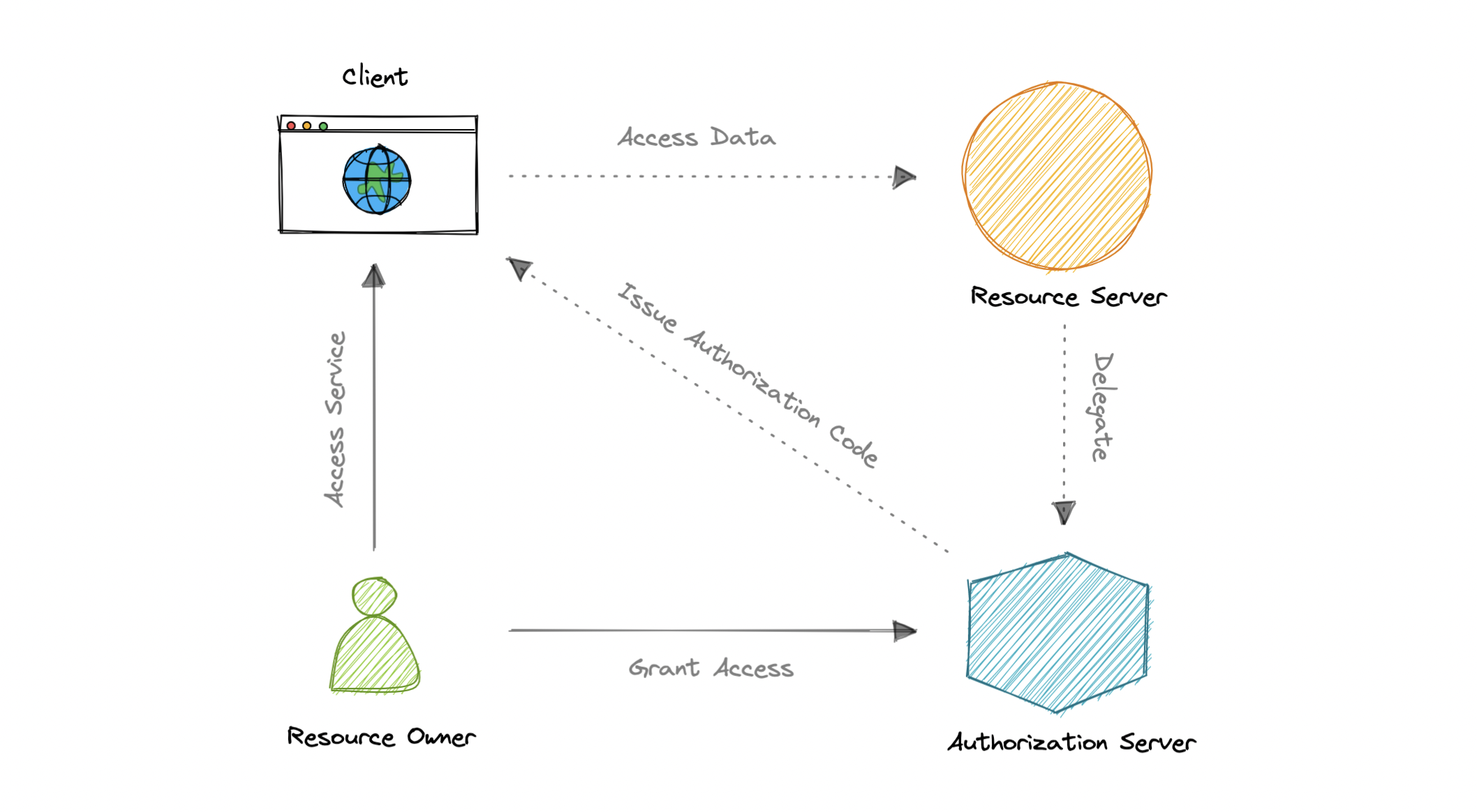
Why the redirect-and-exchange dance?
The browser receives a one-time authorization code because the client cannot keep a secret in user-accessible code. In the SPA/mobile case you add PKCE: the client creates a random code_verifier, hashes it into a code_challenge sent with the redirect, and sends the original verifier to the token endpoint; the authorization server verifies the challenge before issuing tokens. This stops an attacker who intercepts the code from redeeming it.
The state parameter prevents login CSRF by binding the outgoing redirect to the incoming callback. A nonce in the OIDC request binds the id_token to the original login attempt and stops replay.
Server-to-server exchange keeps the client_secret out of the browser and the user’s password out of the app.
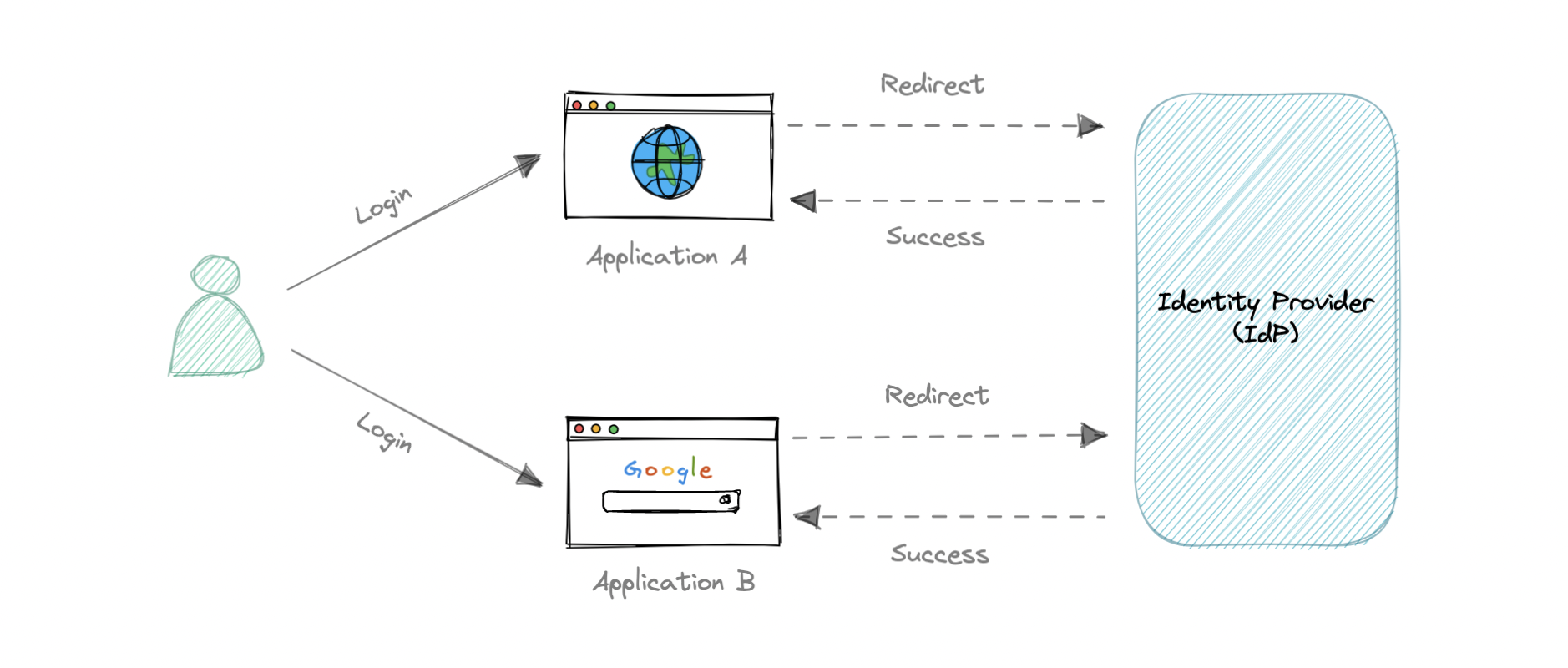
The two roles, made concrete
- access_token (
ya29...) = authorization — “the bearer may read this email/profile.” That’s plain OAuth 2.0. - id_token (
eyJ...) = authentication — a signed JWT proving who you are. This is the OpenID Connect (OIDC) addition. Decode its payload and you get:{ "iss":"https://accounts.google.com", "sub":"110248495...", "email":"you@gmail.com", "aud":"spotify-1234...", "exp":1719..., "nonce":"abc123" }Spotify verifies the signature against Google’s public keys, checksaudmatches its client ID, and trusts “this is user 110248495….”
So: OAuth answers “what can this app access?”; OIDC adds “who is this user?” “Log in with Google” is OIDC.
SSO, traced
Because you already have a live Google session from step 2, when you later click “Login with Google” on a different app, Google skips the password prompt (you’re already authenticated) and goes straight to the redirect-with-code. One login, many apps — that’s Single Sign-On.
Which OAuth flow when?
- Authorization code + PKCE for SPAs and mobile apps (public clients). See the PKCE/security deep dive.
- Authorization code for confidential server-side web apps that can protect a client secret.
- Client credentials for service-to-service or daemon apps with no human user.
- Implicit and resource-owner password flows are deprecated for new code; avoid them.
Token hygiene
- Validate the id_token. Fetch the IdP’s JWKS, verify the signature, then check
iss,audequals yourclient_id,exp, and thenonceif you sent one. - Store tokens safely. Prefer
HttpOnly; Secure; SameSite=Laxcookies; keep access tokens short-lived. AvoidlocalStoragefor long-lived tokens because XSS can exfiltrate them. - Logout is revocation. Delete the local session and revoke the refresh token at the IdP. The access token remains valid until its short expiry, which is why access-token lifetimes are usually 5–15 minutes.
Takeaways
- Browser carries a one-time code; the app’s server swaps it for a token using its secret — the password never reaches the app.
- access_token = authorization; id_token (JWT) = authentication (OIDC).
statestops login CSRF,noncestops replay, and PKCE protects public clients.- An existing IdP session is what makes SSO skip re-login across apps.
- Compare with the Session vs Token mechanisms for the simpler first-party case.
Re-authored as a from-scratch walkthrough for this guide.
id_token validation checklist
The id_token is a signed JWT, but a signature alone is not enough. Verify these five claims before you trust it.
| Check | How | What failure looks like |
|---|---|---|
| 1. Signature | Fetch the IdP’s JWKS, pick the key matching kid, verify the JWT signature with that public key; pin the expected alg | Attacker forges a token with alg: none or RS256→HS256 confusion |
2. Issuer (iss) | iss must exactly equal the IdP’s issuer URL, e.g. https://accounts.google.com | Token from a look-alike identity provider is accepted |
3. Audience (aud) | aud must equal your registered client_id | Token minted for another app is replayed against yours |
4. Expiry (exp) | Reject if exp is in the past, allowing a small clock-skew buffer (usually ≤ 60 s) | Expired or never-valid token is honored |
| 5. Nonce | If you sent nonce=abc123 in the auth request, nonce in the id_token must match exactly | Replay of an id_token from a different login attempt succeeds |
def verify_id_token(token, client_id, expected_iss, expected_nonce, jwks):
    header = json.loads(base64url_decode(token.split('.')[0]))
    key = jwks.get_key(header['kid'])
    claims = jwt.decode(token, key, algorithms=['RS256'], issuer=expected_iss, audience=client_id)
    if claims.get('nonce') != expected_nonce:
        raise SecurityError('nonce mismatch')
    return claims
Grant-type decision map
Pick the OAuth 2.0 grant by the client’s ability to keep a secret and whether a human is present.
| Client type | Recommended grant | Why |
|---|---|---|
| SPA / mobile app | Authorization code + PKCE | No client secret in user-accessible code; PKCE binds the code to the app instance |
| Server-side web app | Authorization code | Client secret stays on the server during token exchange |
| Daemon / service-to-service | Client credentials | No human user; machine identity authenticated with a secret or certificate |
| Smart TV / CLI device | Device authorization grant | Device has no browser; user authorizes on a phone/laptop |
| Any new system | Avoid implicit and resource-owner password | Both are deprecated in OAuth 2.0 Security Best Current Practice |
🪜 Drill ladder: OAuth 2.0 & OIDC
These are the follow-ups an interviewer uses to separate a candidate who has traced the flow from one who understands the threat model.
- L1 — Why PKCE? The authorization code is delivered through the browser, so a malicious app or network observer could steal it. PKCE binds the code to the original app instance: the app proves possession of the
code_verifierthat produced thecode_challenge. Without it, public clients are open to code-interception attacks. - L2 — What is the difference between
stateandnonce?statebinds the outgoing redirect to the incoming callback, stopping login CSRF (an attacker tricking you into logging into their account).noncebinds the id_token to the original authentication request, stopping replay of an id_token from a different login. - L3 — Where should tokens live? Prefer
HttpOnly; Secure; SameSite=Laxcookies for session continuity. AvoidlocalStoragefor long-lived tokens because an XSS payload can exfiltrate them in one line. For SPAs that need the access token in JavaScript, keep it short-lived (minutes) and pair it with a refresh token stored in a hardened cookie. - L4 — Why not put the client secret in a SPA? A SPA’s source is fully visible. An attacker who extracts the secret can exchange stolen authorization codes for tokens themselves. That is why public clients use PKCE and no client secret.
🤖 Don't fully get this? Learn it with Claude
Stuck on OAuth 2.0 & OIDC — Traced: “Login with Google”? Open Claude, copy a block below, and it'll teach you this exact concept — visually and interactively.
Build the mental picture, not memorization.
I just read a lesson on **OAuth 2.0 & OIDC — Traced: “Login with Google”** (System Design) and want to truly understand it. Explain OAuth 2.0 & OIDC — Traced: “Login with Google” from first principles using ONE vivid real-world analogy and a visual mental model — draw it as ASCII art or a clear step-by-step diagram — with a concrete example using real numbers. Then ask me one question to check I got the mental picture, and wait for my reply. If you're unsure or a claim isn't standard, say so and reason from first principles instead of guessing.
Socratic — adapts to where you're stuck.
Teach me **OAuth 2.0 & OIDC — Traced: “Login with Google”** interactively. Ask me ONE guiding question at a time, wait for my answer, and adapt to my confusion — build the idea with me step by step instead of explaining it all at once. If you're unsure or a claim isn't standard, say so and reason from first principles instead of guessing.
Active recall exposes what you missed.
Quiz me on **OAuth 2.0 & OIDC — Traced: “Login with Google”** with 5 questions, easy to tricky, ONE at a time. Tell me if each answer is right; at the end, explain clearly what I got wrong and why. If you're unsure or a claim isn't standard, say so and reason from first principles instead of guessing.
Intuition + hook + flashcards for long-term memory.
Help me remember **OAuth 2.0 & OIDC — Traced: “Login with Google”** for the long term: give the one-sentence intuition, a memorable hook/mnemonic, a tiny worked example, and 3 active-recall flashcards (Q -> A). If you're unsure or a claim isn't standard, say so and reason from first principles instead of guessing.