hard MFA: TOTP, WebAuthn & Step-Up Auth
MFA: TOTP, WebAuthn & Step-Up Auth
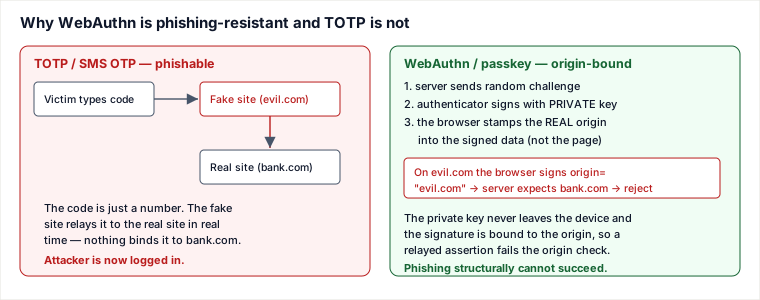
Multi-factor auth works because an attacker who steals a password still lacks a second, independent proof — but the kind of second factor decides whether that proof can be stolen too. The sharpest distinction is mechanical: TOTP produces a value the user retypes (so it can be relayed to a phishing site), while WebAuthn produces a signature bound to the real origin (so it cannot). That one difference is the whole phishing-resistance story.
TOTP: shared secret + time window → HMAC → 6 digits
TOTP (RFC 6238) builds on HOTP. At enrollment the server generates a random secret S and shows it
as a QR code; the authenticator app stores S. Thereafter both sides independently compute
the same code from S and the current time, with no network between them:
T = floor(unix_time / 30)— a counter that ticks once per ~30s window.hmac = HMAC-SHA1(S, T).- Dynamic-truncate
hmacto a 31-bit number, thenmod 10^6→ a 6-digit code.
Because clocks drift and the user takes a few seconds to type, the server checks the current window
T and the adjacent ones (T±1) — the clock-skew
tolerance. Wider tolerance = friendlier but a larger guessing surface.
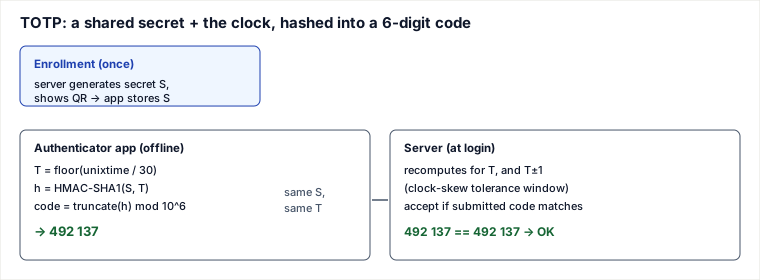
Traced TOTP verification
- Unix time 1,700,000,015 →
T = floor(1700000015 / 30) = 56,666,667. - App computes
HMAC-SHA1(S, 56666667), truncates, mod 10^6 → shows492137. - User submits
492137. Server recomputes forTand finds a match → accept. Had the user been one window late, the match would come fromT-1. - Server marks that window used so the same code can't be replayed within its lifetime.
WebAuthn / passkeys: origin-bound challenge–response
WebAuthn replaces the shared secret with a key pair generated per site, the private key held in
a hardware authenticator or the platform TPM/secure enclave and never exported. Login is a challenge–response:
the server sends a random challenge, the authenticator signs it with the private key, and the server verifies with
the stored public key. The phishing-resistance comes from what gets signed: the browser includes the
real origin it is actually talking to (the origin recorded in clientDataJSON, with the RP ID
hash checked separately in authenticatorData) in the
signed data, and the authenticator will only use the credential registered for that origin. A phishing site at a
different origin therefore gets a signature over the wrong origin (or no credential at all), which the
server rejects. Nothing the user could type across to an attacker exists.
Step-up authentication: re-prove for sensitive actions
An active session is a coarse trust decision made once at login. Step-up (re-authentication) narrows that trust for high-blast-radius actions by demanding a fresh, stronger proof even inside a valid session: changing a password or email, adding a payee/withdrawal address, a high-value transfer, or entering an admin area. The mechanism is to record when and how strongly the user last authenticated (an auth-time and an ACR/AMR level) and, when a sensitive action arrives, require a recent strong factor — otherwise prompt for it before proceeding. This limits the damage of a hijacked session or an unlocked-laptop: the stolen session alone can't move money or change the recovery email.
A concrete risk ladder makes this operational: browsing rides the existing session cookie with no extra prompt; changing the email or password requires a fresh strong factor (WebAuthn, or a TOTP re-entered within a short recency window such as the last 5 minutes); a money transfer demands WebAuthn with user-verification. Don't forget the escape hatch either: issue about ten single-use recovery codes at enrollment, store only their hashes (exactly like passwords), rate-limit their use, and alert on every burn — they are the account's floor when the strong factor is lost, so a recovery-code login should itself be treated as a high-risk, step-up-worthy event.
Pitfalls
- SMS OTP is the weak factor — vulnerable to SIM-swap, SS7 interception, and (like TOTP) phishing/relay. Use it only as a last-resort factor, never the strong one.
- TOTP secret at rest. The server stores
Sfor every user; a breach of that table lets an attacker generate everyone's codes. Encrypt it. - Real-time MITM phishing (e.g. Evilginx) defeats passwords and TOTP by relaying both live; only origin-bound WebAuthn stops it.
- MFA-bypass paths. Account recovery and "remember this device" often skip MFA — the attacker just uses the side door. Harden those to the same bar (see the recovery page).
- MFA fatigue. Push-approval spam until the user taps "approve"; require number-matching.
When to use which — the judgment layer
- WebAuthn / passkeys when you can: phishing-resistant by construction, no shared secret to breach, and better UX (biometric tap) once enrolled. Cost: rollout friction — device support, account-recovery for lost authenticators, and a fallback factor while adoption grows.
- TOTP as the pragmatic default second factor: easy, free, works offline, no phone-number dependency. Why not / cost: phishable (relayable), and the server holds a shared secret that a breach exposes.
- SMS OTP only when nothing else is possible (widest reach, no app needed) — it is the weakest option (SIM-swap), so treat it as better-than-nothing, not as real MFA.
- Step-up is orthogonal: layer it on top of whatever factors you have, for the few actions whose blast radius justifies re-proving identity.
Takeaways
- TOTP = shared secret + time window → HMAC → 6 digits, checked with a ±1-window skew tolerance; it is phishable because it is a value the user retypes.
- WebAuthn is phishing-resistant because the signature is bound to the real origin and the private key never leaves the device — a relayed assertion fails the origin check.
- Force step-up for sensitive actions even in an active session; trust granted at login is not trust for moving money.
- Ranking by resistance: WebAuthn > TOTP > SMS OTP. Don't let recovery flows silently downgrade it.
WebAuthn API calls and server-side assertion checks
The browser exposes WebAuthn through two JavaScript entry points. Enrollment calls navigator.credentials.create({ publicKey }), which asks the authenticator to create a new credential key pair for the relying party. Login calls navigator.credentials.get({ publicKey }), which asks the authenticator to sign a fresh server challenge using the existing credential.
On registration, the server stores the credential ID, public key, relying-party ID, and initial signature counter. On login, server validation is mechanical: parse clientDataJSON, verify the type is webauthn.get, verify the challenge equals the one issued for this session, and verify the origin is the expected site. Then parse authenticatorData, check the RP ID hash, require the User Presence (UP) flag and, for high-risk flows, User Verification (UV), and verify the signature over authenticatorData || SHA256(clientDataJSON) with the stored public key.
Finally, check signCount, the signature counter. For authenticators that support a monotonic counter, the new signCount must be greater than the stored value; if it goes backward or repeats, treat it as a cloned-authenticator signal and step up or revoke the credential. Some synced passkey ecosystems use different counter behavior, so handle zero/non-incrementing counters per vendor guidance, but do not ignore the field blindly.
Sources: RFC 6238 (TOTP), RFC 4226 (HOTP), W3C WebAuthn & FIDO2 specs, NIST SP 800-63B, and OWASP MFA guidance. Re-authored/Deepened for this guide.
🤖 Don't fully get this? Learn it with Claude
Stuck on MFA: TOTP, WebAuthn & Step-Up Auth? Open Claude, copy a block below, and it'll teach you this exact concept — visually and interactively.
Build the mental picture, not memorization.
I just read a lesson on **MFA: TOTP, WebAuthn & Step-Up Auth** (System Design) and want to truly understand it. Explain MFA: TOTP, WebAuthn & Step-Up Auth from first principles using ONE vivid real-world analogy and a visual mental model — draw it as ASCII art or a clear step-by-step diagram — with a concrete example using real numbers. Then ask me one question to check I got the mental picture, and wait for my reply. If you're unsure or a claim isn't standard, say so and reason from first principles instead of guessing.
Socratic — adapts to where you're stuck.
Teach me **MFA: TOTP, WebAuthn & Step-Up Auth** interactively. Ask me ONE guiding question at a time, wait for my answer, and adapt to my confusion — build the idea with me step by step instead of explaining it all at once. If you're unsure or a claim isn't standard, say so and reason from first principles instead of guessing.
Active recall exposes what you missed.
Quiz me on **MFA: TOTP, WebAuthn & Step-Up Auth** with 5 questions, easy to tricky, ONE at a time. Tell me if each answer is right; at the end, explain clearly what I got wrong and why. If you're unsure or a claim isn't standard, say so and reason from first principles instead of guessing.
Intuition + hook + flashcards for long-term memory.
Help me remember **MFA: TOTP, WebAuthn & Step-Up Auth** for the long term: give the one-sentence intuition, a memorable hook/mnemonic, a tiny worked example, and 3 active-recall flashcards (Q -> A). If you're unsure or a claim isn't standard, say so and reason from first principles instead of guessing.