hard Account Recovery & Login Hardening
Account Recovery & Login Hardening
An authentication system is only as strong as its weakest way in, and for most systems that is not the login form — it is account recovery. A reset flow that emails a guessable or long-lived link, or that reveals which emails are registered, quietly becomes the front door. The two disciplines below close the two gaps attackers actually use: a leaky recovery flow, and an unthrottled login endpoint.
Part A — a safe password-reset / account-recovery flow
The mechanism is a time-limited, single-use, signed (or high-entropy random) token delivered out-of-band to the email on file, of which the server stores only a hash. Each property defends a specific attack:
- High entropy (128+ bits random) → not guessable/brute-forceable.
- Short expiry (e.g. 15 min) → a leaked link (proxy logs, forwarded email) dies fast.
- Single-use (mark
usedon redemption) → no replay. - Store only
HASH(token)→ a DB leak yields no usable links, exactly like password hashing. - Uniform response ("if that account exists, we've emailed a link") → defeats account enumeration: the attacker can't tell registered from unregistered addresses.
- Invalidate all sessions on reset → if the reset was the legitimate user recovering from compromise, the attacker's live sessions die.
- Rate-limit the reset endpoint → stops mail-bombing a victim and mass-enumeration.
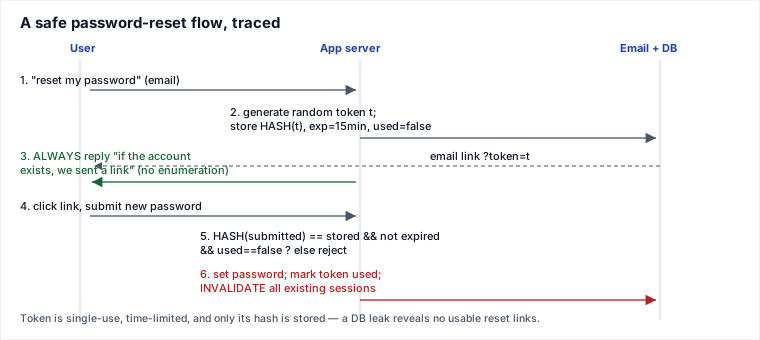
Why "don't reveal whether an account exists" matters
If the reset (or signup, or login) endpoint says "no such user" for one address and "we sent a link" for another, an attacker scripts it into a membership oracle — harvesting which emails have accounts to target with phishing or credential-stuffing. The fix is the same uniform response and the same timing on both branches (do the hashing work even when the user doesn't exist, so response time doesn't leak the answer).
Recovering a lost second factor — the highest-risk recovery path
Resetting a password is routine; resetting MFA for a user who lost their phone is where takeovers happen, because it is the one flow that deliberately removes a strong factor. Never make it email-only for a high-value account. The senior pattern is out-of-band identity proof (a second channel or a support step) plus a cooling-off delay, then invalidate the old factors and force re-enrolment. And pair every sensitive change with notification and a hold: email the old address whenever the recovery email or password changes (so the real owner can react and reverse it), and apply a short freeze — e.g. no payouts for 24h after a recovery-email change — so an attacker who does get in cannot immediately cash out.
Part B — login hardening
The second gap is the login endpoint itself under automated attack. Three defenses:
- Throttle failed attempts with a token bucket or exponential backoff: each consecutive failure increases the delay before the next attempt is allowed (0s, 1s, 2s, 4s, 8s…), collapsing an attacker's guess rate while barely inconveniencing a human who mistypes once.
- Credential-stuffing defense: attackers replay username/password pairs leaked from other breaches, so a single account sees attempts from thousands of IPs and each IP hits thousands of accounts. Counter with both per-account and per-IP limits (neither alone catches the spread pattern), plus a breached-password check (reject known-leaked passwords at set/login time, e.g. via k-anonymity range queries).
- Session fixation defense: rotate the session id on login and on any privilege change (see below).
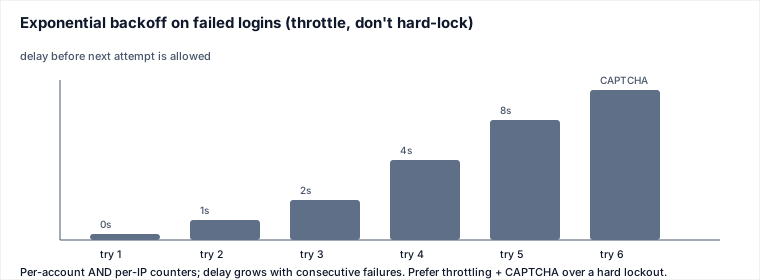
The lockout trade-off: throttle + CAPTCHA over hard lockout
A hard account lockout after N failures seems safe but hands attackers a denial-of-service on the victim: anyone who knows your email can lock you out by failing logins on purpose. The senior default is progressive throttling + CAPTCHA (and step-up/notify on anomalies) rather than a hard lock, because it degrades the attacker's throughput without letting them weaponize the lock against a legitimate user. Reserve true lockout for extreme signals, with a fast self-service unlock.
Session fixation — why you rotate the session id
In a session-fixation attack, the attacker plants a known session id in the victim's browser (via a crafted link, an accepted URL parameter, or an unrotated pre-login cookie). The victim then logs in on that same id; if the server keeps it, the attacker — who already knows the id — is now inside an authenticated session. The defense is mechanical and cheap: issue a brand-new session id at the moment of login (and again on any privilege elevation), discarding the pre-auth one. The id the attacker planted is now worthless because it is not the authenticated id.
Traced: a hardened login
- Request arrives; check per-IP and per-account failure counters → if over threshold, delay / require CAPTCHA.
- Verify password against the stored hash (constant-time compare); if the password is on the breached list, force a reset.
- On success, reset both failure counters, rotate the session id, and bind the new session to its context.
- On failure, increment counters and grow the backoff; never reveal whether the username or the password was wrong.
Pitfalls
- Reset token in the URL leaks via Referer headers, proxy/server logs, and browser history. Keep expiry short and don't log the query string.
- Host-header / reset-link poisoning: building the reset URL from an attacker-controlled
Hostheader emails the victim a link pointing at the attacker's domain. Build links from a trusted, configured base URL, never from the request Host. - Enumeration via side channels: even with a uniform message, a different response time or a distinct signup/login error still leaks account existence — equalize the work and the message on both branches.
- Forgetting to invalidate sessions on reset leaves an attacker's existing session alive after the legitimate user "recovers."
- Hard lockout as the default hands attackers a victim-DoS lever (covered above).
When to use which — the judgment layer
- Throttling / backoff (token bucket) is the default rate control: cheap, stateless-ish, attacker-throughput-killing. Why not hard lockout: lockout converts a guessing nuisance into a victim-DoS; use it only with a self-service unlock and strong signals.
- CAPTCHA when automated volume is the problem — it targets bots specifically. Cost: UX friction and accessibility concerns, so gate it behind a suspicion threshold, not on every login.
- Breached-password checks to blunt credential-stuffing at the source. Alternative / complement: device fingerprinting and risk-based (adaptive) auth — step up only anomalous logins, so normal users see no friction. That trades some complexity and privacy for far less user friction than blanket controls.
Takeaways
- Recovery is usually the weakest link: time-limited, single-use, hash-stored tokens; uniform "if it exists" responses; invalidate sessions on reset; rate-limit the endpoint.
- Never reveal account existence on reset/signup/login — equal responses and equal timing.
- Defend login with per-account and per-IP throttling + breached-password checks; prefer throttle + CAPTCHA over hard lockout to avoid victim-DoS.
- Always rotate the session id on login and on privilege change — the one-line fix for session fixation.
Dummy password verification to close the timing side channel
A login endpoint often leaks account existence through timing even when the response text is uniform. A missing-user branch may do only a database lookup (~2 ms) and return, while an existing-user branch runs bcrypt/Argon2 verification (~100 ms). Attackers can average response times and recover the membership oracle.
The fix is to execute a dummy password verify when the account is not found, using a precomputed hash generated with the same password-hashing parameters as real accounts:
dummy_hash = "$2b$12$precomputedDummyHashWithSameCost..."

user = users.find_by_email(email)
hash_to_check = user.password_hash if user else dummy_hash
password_ok = bcrypt.verify(submitted_password, hash_to_check)

if not user or not password_ok:
    return generic_login_failure()

return issue_session(user)
Now both branches pay the expensive hash-verification cost. The dummy verify equalizes execution time, so a nonexistent account and a wrong password for an existing account both look like "DB lookup + bcrypt verify + generic failure" instead of 2 ms vs 100 ms. Keep rate limits anyway: timing equalization removes enumeration, not brute-force economics.
Sources: OWASP Forgot Password, Authentication, Credential Stuffing & Session Management Cheat Sheets; NIST SP 800-63B; Have I Been Pwned range-query (k-anonymity) model. Re-authored/Deepened for this guide.
🤖 Don't fully get this? Learn it with Claude
Stuck on Account Recovery & Login Hardening? Open Claude, copy a block below, and it'll teach you this exact concept — visually and interactively.
Build the mental picture, not memorization.
I just read a lesson on **Account Recovery & Login Hardening** (System Design) and want to truly understand it. Explain Account Recovery & Login Hardening from first principles using ONE vivid real-world analogy and a visual mental model — draw it as ASCII art or a clear step-by-step diagram — with a concrete example using real numbers. Then ask me one question to check I got the mental picture, and wait for my reply. If you're unsure or a claim isn't standard, say so and reason from first principles instead of guessing.
Socratic — adapts to where you're stuck.
Teach me **Account Recovery & Login Hardening** interactively. Ask me ONE guiding question at a time, wait for my answer, and adapt to my confusion — build the idea with me step by step instead of explaining it all at once. If you're unsure or a claim isn't standard, say so and reason from first principles instead of guessing.
Active recall exposes what you missed.
Quiz me on **Account Recovery & Login Hardening** with 5 questions, easy to tricky, ONE at a time. Tell me if each answer is right; at the end, explain clearly what I got wrong and why. If you're unsure or a claim isn't standard, say so and reason from first principles instead of guessing.
Intuition + hook + flashcards for long-term memory.
Help me remember **Account Recovery & Login Hardening** for the long term: give the one-sentence intuition, a memorable hook/mnemonic, a tiny worked example, and 3 active-recall flashcards (Q -> A). If you're unsure or a claim isn't standard, say so and reason from first principles instead of guessing.