Introduction to Serialize and Deserialize Pattern
Mechanism
Serialize/deserialize converts an in-memory structure into a linear string by choosing a traversal order that encodes enough structural information (node values plus explicit markers for absence) to invert the traversal exactly — the string is a lossless, re-playable recipe for rebuilding the structure, not just a dump of its values.
Recognize the pattern
- Problem says "design an algorithm to serialize and deserialize a <tree/graph/list>" — round-trip fidelity is the explicit requirement.
- The structure has shape (parent-child links, cycles, nesting) that a flat array cannot represent without extra markers.
- You need to persist an object to disk/network and later reconstruct an object identical in structure, not just in element set.
- Hints mention "null markers", "delimiters", or "any format you like as long as it round-trips".
Brute force vs optimal — Serialize a Binary Tree
Brute force (BFS with fixed-width levels): serialize every level including implicit null children up to the tree's height, like a complete binary tree array. This wastes space exponentially for skewed trees — a right-skewed tree of n nodes needs O(2^n) slots because each level doubles.
Optimal (pre-order DFS with null markers): write each node's value in pre-order; whenever a child pointer is null, write a sentinel token (e.g. #) instead of recursing. Deserialization replays the exact same pre-order decision sequence, consuming tokens one at a time — a null token stops recursion, a value token creates a node and recurses left then right. This costs O(n) tokens total, exactly one token per real node plus one null token per missing child slot (at most n+1 null tokens for n real nodes), so it is linear in nodes, not levels.
Complexity, derived
Serialize: DFS visits each of the n real nodes exactly once (O(n) work) and additionally visits each null child exactly once to emit a sentinel. Every internal/leaf node has exactly 2 child slots, and there are n-1 real child links, so the number of null slots is (2n) - (n-1) = n+1. Total tokens emitted = n + (n+1) = 2n+1 → O(n) time. String building appends tokens once each → O(n) extra space for the output string (plus O(h) recursion stack, h = height, worst case O(n) for a skewed tree).
Deserialize: a single pointer/index walks the token list left to right exactly once, consuming 2n+1 tokens and performing O(1) work per token (create node or return null) → O(n) time, O(n) space for the rebuilt tree plus O(h) recursion stack.
Traced example
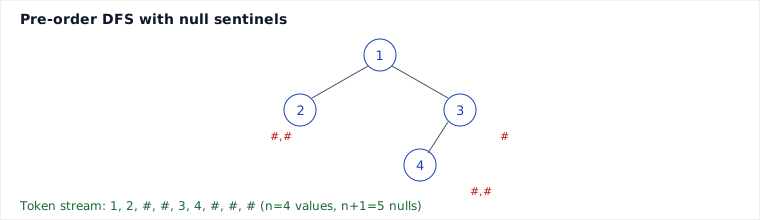
Tree: 1 is root, left child 2 (a leaf), right child 3 with left child 4 and right child null.
| Step | Visit | Action | Tokens so far |
|---|---|---|---|
| 1 | 1 | emit value | 1 |
| 2 | 1→left=2 | emit value | 1,2 |
| 3 | 2→left=null | emit # | 1,2,# |
| 4 | 2→right=null | emit # | 1,2,#,# |
| 5 | 1→right=3 | emit value | 1,2,#,#,3 |
| 6 | 3→left=4 | emit value | 1,2,#,#,3,4 |
| 7 | 4→left/right=null | emit #,# | 1,2,#,#,3,4,#,# |
| 8 | 3→right=null | emit # | 1,2,#,#,3,4,#,#,# |
Serialized: "1,2,#,#,3,4,#,#,#" — 4 real nodes, 5 null markers (n+1 = 5 checks out). Deserialization reads token 1 → node(1); recurses left, reads 2 → node(2); recurses left, reads # → null; recurses right, reads # → null; back up, recurses right of 1, reads 3 → node(3); reads 4 → node(4); reads #,# → both null; reads final # → node(3)'s right is null. Tree rebuilt exactly.
Java implementation
class TreeNode {
    int val; TreeNode left, right;
    TreeNode(int v) { val = v; }
}

public class Codec {
    public String serialize(TreeNode root) {
        StringBuilder sb = new StringBuilder();
        buildString(root, sb);
        return sb.toString();
    }
    private void buildString(TreeNode node, StringBuilder sb) {
        if (node == null) { sb.append("#,"); return; }
        sb.append(node.val).append(",");
        buildString(node.left, sb);
        buildString(node.right, sb);
    }
    public TreeNode deserialize(String data) {
        java.util.Deque tokens = new java.util.ArrayDeque<>(java.util.Arrays.asList(data.split(",")));
        return buildTree(tokens);
    }
    private TreeNode buildTree(java.util.Deque tokens) {
        String t = tokens.poll();
        if (t.equals("#")) return null;
        TreeNode node = new TreeNode(Integer.parseInt(t));
        node.left = buildTree(tokens);
        node.right = buildTree(tokens);
        return node;
    }
}
Pitfalls
- Omitting null markers (as the naive flat-array approach does) makes the encoding ambiguous or forces wasteful complete-tree padding — pre-order alone (without nulls) cannot be uniquely inverted for arbitrary trees.
- Using a delimiter character that can also appear inside data (e.g. comma inside a string value) corrupts the split — escape or length-prefix instead.
- Forgetting that BFS-order serialization needs per-level null placeholders too, or mixing traversal orders between serialize and deserialize.
- Using recursion on very deep/skewed trees risks stack overflow — an iterative version with an explicit stack is safer for adversarial inputs.
When to use / when not, and trade-offs
Use pre-order DFS with sentinels when you need a compact, simple, purely value-based round trip and recursion depth is bounded. It is O(n) time/space with minimal code. Alternative: level-order (BFS) with explicit null slots (e.g. LeetCode's own tree serializer) — easier to reason about level-by-level and matches array-style tree representations, but generally produces a longer string (more null tokens near the leaves) and needs a queue instead of a stack; still O(n). Alternative: binary/typed formats (protobuf, custom byte encoding) — far more compact and faster to parse for production systems, but adds tooling complexity and is overkill for interview-style round-trip problems where a human-readable string is preferred for debugging.
Takeaways
- A serialization scheme is really "a traversal order + a rule for encoding absence"; get both consistent and the inverse traversal reconstructs the structure exactly.
- Total token count is n real values plus n+1 null markers for a binary tree — this is where the O(n) bound comes from, derived, not assumed.
- Pick DFS for compactness and simple recursive code; pick BFS when the problem already frames things level-by-level.
Recall: Why does pre-order traversal without any null markers fail to uniquely serialize/deserialize an arbitrary binary tree, even though the same traversal works fine for a binary search tree?
Synthesized from the source page's array serialize/deserialize walkthrough, extended with the canonical binary-tree serialize/deserialize interview pattern (LeetCode 297) and traversal/complexity analysis.
🤖 Don't fully get this? Learn it with Claude
Stuck on Introduction to Serialize and Deserialize Pattern? Open Claude, copy a block below, and it'll teach you this exact concept — visually and interactively.
Build the mental picture, not memorization.
I just read a lesson on **Introduction to Serialize and Deserialize Pattern** (DSA) and want to truly understand it. Explain Introduction to Serialize and Deserialize Pattern from first principles using ONE vivid real-world analogy and a visual mental model — draw it as ASCII art or a clear step-by-step diagram — with a concrete example using real numbers. Then ask me one question to check I got the mental picture, and wait for my reply. If you're unsure or a claim isn't standard, say so and reason from first principles instead of guessing.
Socratic — adapts to where you're stuck.
Teach me **Introduction to Serialize and Deserialize Pattern** interactively. Ask me ONE guiding question at a time, wait for my answer, and adapt to my confusion — build the idea with me step by step instead of explaining it all at once. If you're unsure or a claim isn't standard, say so and reason from first principles instead of guessing.
Active recall exposes what you missed.
Quiz me on **Introduction to Serialize and Deserialize Pattern** with 5 questions, easy to tricky, ONE at a time. Tell me if each answer is right; at the end, explain clearly what I got wrong and why. If you're unsure or a claim isn't standard, say so and reason from first principles instead of guessing.
Intuition + hook + flashcards for long-term memory.
Help me remember **Introduction to Serialize and Deserialize Pattern** for the long term: give the one-sentence intuition, a memorable hook/mnemonic, a tiny worked example, and 3 active-recall flashcards (Q -> A). If you're unsure or a claim isn't standard, say so and reason from first principles instead of guessing.