Scalability
Scalability for an API gateway is not the same problem as scaling a generic stateless service. Every request in the system passes through the gateway tier, so three things are unique to it: the gateway's own node count directly multiplies backend connection load, its rate-limiting state either lives per-node or has to be kept in sync across nodes, and its capacity math has to account for headroom that never touches live traffic (spares held back for rolling deploys). Getting these gateway-specific mechanics wrong is a common source of outages that look like backend problems but are actually caused by how the gateway tier scaled.
Horizontal vs. vertical scaling of the gateway tier
Horizontal scaling (scaling out) adds more gateway nodes behind the load balancer. This is the default for gateways because they are usually stateless with respect to application data — any node can handle any request — so adding nodes linearly increases request throughput without a single point of failure. Vertical scaling (scaling up) gives each gateway node more CPU/memory, which helps with per-request costs (TLS termination, request transformation, header parsing) but hits a hardware ceiling and still leaves a single node as a failure domain. In practice, gateway fleets scale horizontally as the primary lever and vertically only to raise the per-node capacity number that horizontal scaling then multiplies.
Statelessness is what makes horizontal scaling possible
A gateway can only run as N interchangeable nodes behind a load balancer if no request depends on which node handled the previous one. That means keeping the node itself stateless and pushing anything request-spanning out to a shared store: rate-limit counters, session/auth tokens, and cached responses all go to something like Redis, so any instance can serve any request. Connection pools to backends are the one piece of state that necessarily lives per node. When state is externalized this way, adding a node is free — the LB just starts routing to it — and losing a node loses no data.
Gateway-specific scaling mechanics
- Rate-limit state. A token bucket or sliding-window counter can live locally on each node (cheap, scales trivially, but only approximates a global limit — 20 nodes each independently enforcing "1,000 req/min" yields a real ceiling of up to 20,000 req/min) or in a shared store such as Redis (accurate global enforcement, but every request now pays a network round trip to the store, and the store itself becomes a new capacity bottleneck and failure domain as the fleet grows). Choose local when limits are per-node soft guards; choose shared when the limit is a hard contractual ceiling (e.g. a paid third-party API quota). A shared store also forces a policy decision the local option never faces: when the store is unreachable, does the limiter fail-open (allow the request — availability preserved, enforcement dropped) or fail-closed (reject — the ceiling holds, but a store outage becomes a gateway outage)? Decide it per limit rather than inheriting whatever the client library does on timeout: fail-closed for abuse- or quota-protection limits, fail-open with loud alerting for availability-critical paths.
- Connection pooling. Each gateway node keeps its own outbound connection pool per backend service — pools are not shared across nodes. That means backend connection count scales with gateway node count, not with request rate. This is the single most common way gateway scale-outs silently overwhelm a database or internal service's connection ceiling (worked example below).
Worked example: sizing the gateway fleet
Suppose the gateway must sustain a steady peak of 60,000 requests/sec, and load testing shows one gateway node sustainably handles 3,000 requests/sec before p99 latency degrades.
| Quantity | Value |
|---|---|
| Steady peak traffic | 60,000 requests/sec |
| Sustainable throughput per gateway node | 3,000 requests/sec |
| Nodes needed to cover steady peak (60,000 ÷ 3,000) | 20 nodes |
| Spares reserved for rolling deploys (never removed from rotation as a block) | +2 nodes |
| Total fleet size provisioned | 22 nodes |
Which number the rest of this page uses, and why: 22 is what you provision and pay for. 20 is what is actually carrying live traffic at steady peak — the 2 spares exist purely so a rolling deploy can pull one batch of nodes out of rotation without ever dropping below 20 serving nodes; in normal operation they sit idle or mid-rollout, not serving production traffic. Every load-driven calculation below — backend connection counts, concurrency estimates — is therefore computed against the 20 serving nodes, not the 22 provisioned nodes. The one place the 22-node total matters is the brief window mid-rollout when both the outgoing and incoming batches are live at once; that ceiling is called out explicitly where it applies, rather than mixed silently into the steady-state numbers.
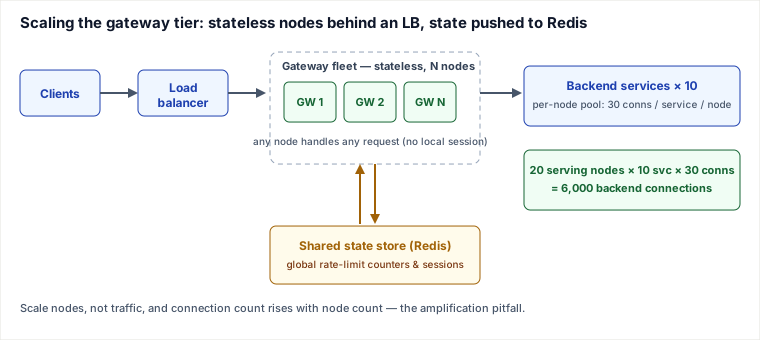
Backend connection fan-out
Because pools are per-node, steady-peak backend connections are driven by the 20 serving nodes, not the 22 provisioned: 20 serving nodes × 10 backend services × 30 pooled connections per service = 6,000 backend connections at steady peak.
Estimating in-flight concurrency with Little's Law
Little's Law states L = λ × W, where λ is the arrival rate and W is the mean (average) sojourn time a request spends in the system. Applied with the true average backend latency, it gives the actual expected number of concurrent in-flight requests.
A common shortcut is to plug in the p99 latency instead, because it is the number already on the latency dashboard: 60,000 requests/sec × 40 ms p99 backend latency = 2,400 estimated concurrent in-flight requests. This is not a literal Little's Law result — the law's W term is an average, not a percentile, and p99 latency is always greater than or equal to mean latency, so substituting it produces a deliberately conservative, inflated concurrency estimate rather than the true average. That conservatism is a defensible capacity-planning heuristic for sizing worker pools or connection limits with safety margin, but it should be labeled as an approximation, not presented as the formula's exact output. For contrast, if the mean backend latency is 12 ms, the literal Little's Law figure is 60,000 × 0.012 = 720 concurrent — about a third of the p99-based estimate. Pick the number that matches your intent and name it correctly: "720, the average concurrency by Little's Law" versus "2,400, a p99-based conservative sizing estimate."
Pitfalls
- Connection amplification. Because each gateway node opens its own pool per backend service, it is node count — not traffic — that multiplies backend connections. Scale the gateway fleet's serving nodes from 20 to 200 (a 10× increase, e.g. over-provisioned to absorb a CPU-bound TLS-termination spike) without re-tuning per-node pool size, and backend connections jump from 6,000 to 60,000 — also a 10× increase — even though the request rate never changed. A database or internal service budgeted for a fixed connection ceiling can be pushed over that ceiling purely by a gateway scale-out event that has nothing to do with backend load. Mitigate by sizing per-node pool limits as a function of fleet size (target pool size ≈ desired total connections ÷ node count) or by moving to a connection-multiplexing layer (a local sidecar, or an HTTP/2 multiplexed upstream) so pool count does not scale linearly with gateway node count.
- Sticky sessions / in-memory state block horizontal scaling. The moment a gateway keeps something per-request-chain in local memory — a session object, a cached auth decision, an in-process rate-limit counter — the LB must pin each client to one node (sticky sessions). That undoes the main benefit of scaling out: load no longer spreads evenly (a hot client overloads its pinned node), a node crash drops every session it held, and you cannot drain a node for deploy without disrupting live users. Keep the node stateless and externalize the state instead.
- The gateway becomes the bottleneck / SPOF. Because every request traverses the gateway, it is the first thing to saturate and a single point of failure if under-provisioned or run as too few nodes. Run at least two nodes across failure domains (availability zones), autoscale on the per-node saturation signal (CPU for TLS-heavy fleets, connections/event-loop lag for I/O-bound ones), and health-check aggressively so the LB ejects a sick node fast.
- Downstream doesn't scale with the gateway. Scaling the gateway only moves the bottleneck: 20→200 nodes lets more requests through, but if the databases, caches, and backend services behind it were sized for the old load, the gateway now just delivers the overload faster. Scale the gateway together with its downstream, and protect the downstream with the gateway's own load-shedding, timeouts, and circuit breakers so a backend that can't keep up fails fast instead of collapsing.
Selection and trade-offs
- Horizontal vs. vertical. Prefer horizontal scaling for the gateway: it removes the single-node failure domain and scales past any one machine's ceiling, at the cost of an LB, more nodes to operate, and the connection-amplification math above. Reach for vertical scaling only to raise the per-node throughput number (bigger box for TLS/crypto work) — it is simpler and needs no LB coordination, but caps out at the largest instance and leaves you with one failure domain. Real fleets do both: vertically tune the node, then horizontally multiply it.
- Stateless + external store vs. sticky sessions. Stateless nodes with state in Redis give even load distribution, painless deploys/drains, and no data loss on node death — you pay a network round trip per request that touches shared state, and the store becomes a capacity and failure concern you must itself scale and replicate. Sticky sessions keep state local (zero extra latency, trivial to build) but reintroduce uneven load, session loss on crash, and disruptive deploys. Choose stateless + external store for anything that must scale elastically; sticky sessions are acceptable only for small, fixed fleets where the operational simplicity outweighs the loss of elasticity.
Takeaways
- Statelessness is the enabler: push rate-limit, session, and cache state to a shared store so any of N nodes can serve any request — that is what makes horizontal scaling of the gateway work.
- Size the fleet from measured per-node throughput, and keep provisioned (22) vs. serving (20) nodes distinct so load-driven math isn't inflated by idle rolling-deploy spares.
- Backend connections scale with node count, not traffic — a scale-out can breach a database connection ceiling with zero change in request rate; size pools as total ÷ nodes or multiplex.
- Scaling the gateway just moves the bottleneck downstream and makes the gateway itself the SPOF to guard — scale it with its backends and protect them with load-shedding and circuit breakers.
Sources: Little, J. D. C. (1961), "A Proof for the Queuing Formula: L = λW," Operations Research 9(3), for Little's Law and the mean-sojourn-time requirement on W; standard distributed-systems capacity-planning practice (per-node connection pooling, local-vs-shared rate-limit state, stateless-service scaling) as in the Google SRE Book and Designing Data-Intensive Applications (Kleppmann). Re-authored/Deepened for this guide.
🤖 Don't fully get this? Learn it with Claude
Stuck on Scalability? Open Claude, copy a block below, and it'll teach you this exact concept — visually and interactively.
Build the mental picture, not memorization.
I just read a lesson on **Scalability** (System Design) and want to truly understand it. Explain Scalability from first principles using ONE vivid real-world analogy and a visual mental model — draw it as ASCII art or a clear step-by-step diagram — with a concrete example using real numbers. Then ask me one question to check I got the mental picture, and wait for my reply. If you're unsure or a claim isn't standard, say so and reason from first principles instead of guessing.
Socratic — adapts to where you're stuck.
Teach me **Scalability** interactively. Ask me ONE guiding question at a time, wait for my answer, and adapt to my confusion — build the idea with me step by step instead of explaining it all at once. If you're unsure or a claim isn't standard, say so and reason from first principles instead of guessing.
Active recall exposes what you missed.
Quiz me on **Scalability** with 5 questions, easy to tricky, ONE at a time. Tell me if each answer is right; at the end, explain clearly what I got wrong and why. If you're unsure or a claim isn't standard, say so and reason from first principles instead of guessing.
Intuition + hook + flashcards for long-term memory.
Help me remember **Scalability** for the long term: give the one-sentence intuition, a memorable hook/mnemonic, a tiny worked example, and 3 active-recall flashcards (Q -> A). If you're unsure or a claim isn't standard, say so and reason from first principles instead of guessing.