HTTP 10 vs 11 vs 20 vs 30
Why HTTP keeps getting rewritten
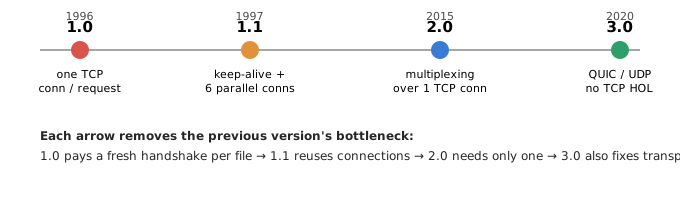
The HyperText Transfer Protocol (HTTP) is the request/response language browsers and servers speak. Its four production versions — 1.0 (1996), 1.1 (1997), 2.0 (2015), and 3.0 (deployed from ~2020, standardized 2022 as RFC 9114) — are not arbitrary upgrades. Each one attacks the dominant latency bottleneck of its era while keeping the same request/response semantics (methods, headers, status codes) intact. The verbs and status codes you know have barely changed; what changed underneath is how bytes get on and off the wire.
If you understand that single through-line — every version is a fight against round trips and blocked connections — the differences stop being trivia and become a design tool. This lesson builds that mental model from scratch, then proves it with one consistent, worked latency budget.
The mental model: it is all about round trips
Loading a page is rarely limited by bandwidth. It is limited by latency — the time light-in-glass and routers take to shuttle a packet to the server and back. That there-and-back time is one round trip time (RTT). On a decent connection an RTT is roughly 50 ms; on mobile it can be 100–300 ms.
Before a single byte of HTML moves, a secure connection has to be built, and each step below costs whole round trips:
- TCP handshake (SYN, SYN-ACK, ACK): 1 RTT before you can send anything.
- TLS handshake (the encryption that makes it HTTPS): 2 RTT for TLS 1.2, 1 RTT for TLS 1.3, and 0 RTT on a resumed session.
- Each request/response you cannot overlap with another: 1 RTT apiece.
So the game every HTTP version plays is: pay the handshake as few times as possible, and stop requests from waiting in line behind each other. Two enemies recur throughout this lesson — connection setup cost and head-of-line (HOL) blocking (one slow item stalling everything behind it).
HTTP/1.0 — one connection per request
How it works
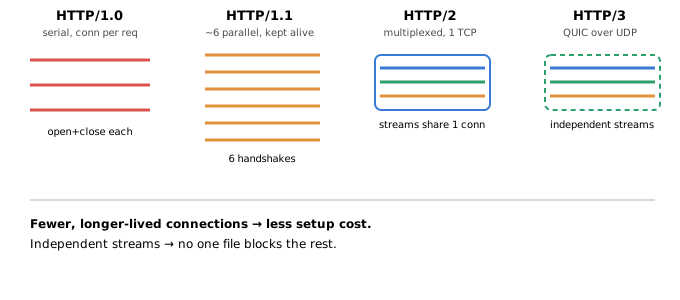
HTTP/1.0 is the simplest possible design: open a TCP connection, send one request, read one response, close the connection. Need another file? Open another connection and pay the whole setup cost again. It is stateless and supports basic headers for content type, caching, and status.
The bottleneck it created
A real page is not one file — it is HTML plus stylesheets, scripts, and images. Under HTTP/1.0 each of those pays a fresh TCP handshake (and, once HTTPS arrives, a fresh TLS handshake too). Setup cost is paid per resource, so latency scales linearly with the number of files. This is the cost the next three versions spend twenty years chipping away at.
Where it was fine
Early static sites and single-file documents. When a page is essentially one resource, connection-per-request is not a problem — there is nothing to pipeline.
HTTP/1.1 — keep the connection open
What changed
- Persistent connections (keep-alive): the default. One TCP connection is reused for many request/response pairs, so you stop re-paying TCP + TLS for every file.
- Chunked transfer encoding: the server can start streaming a response before it knows the total size.
- Host header: many domains can share one IP (virtual hosting) — the reason shared hosting and, later, the modern web scaled at all.
- Richer caching (
Cache-Control,ETag, conditional requests).
The bottleneck that remained
HTTP/1.1 sends one request at a time per connection. It defined pipelining to send several requests without waiting, but responses still had to come back in order: a slow first response blocks every response queued behind it. This is application-layer head-of-line blocking, and it made pipelining so unreliable that browsers disabled it.
Browsers worked around the single-request-at-a-time limit by opening up to ~6 parallel connections per origin. That buys concurrency but multiplies the handshakes — a cost the worked example below makes concrete. (Sites pushed further with domain sharding — spreading assets across many hostnames to unlock even more connections — an optimization that HTTP/2 later turned into an anti-pattern.)
HTTP/2 — many streams, one connection
What changed
- Binary framing: requests and responses become framed binary messages instead of plain text — cheaper to parse and less ambiguous.
- Multiplexing: many independent streams share one TCP connection. Requests and responses interleave freely, so you no longer need 6 connections or domain sharding — one handshake serves the whole page. This kills application-layer HOL blocking.
- Header compression (HPACK): repetitive headers (cookies, user-agent) are compressed and referenced by index, saving bandwidth on every request.
- Server push: the server could pre-emptively send resources it knew you would need. In practice this was hard to use well and has largely been deprecated in favor of preload hints.
The bottleneck that remained
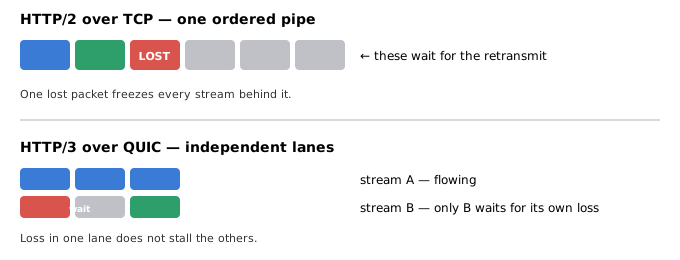
All those streams still ride a single TCP connection, and TCP guarantees in-order byte delivery. If one packet is lost, TCP holds back every stream until it is retransmitted — even streams that arrived fine. HTTP/2 removed HOL blocking at the application layer but left it at the transport layer. That is exactly the problem HTTP/3 exists to solve.
HTTP/3 — drop TCP, use QUIC
What changed
- Built on QUIC over UDP: QUIC is a new transport that implements its own reliability, ordering, and congestion control on top of UDP — so it can be upgraded without waiting for operating-system TCP stacks.
- Per-stream reliability: QUIC tracks loss per stream. A lost packet only stalls its own stream; the others keep flowing. This finally removes transport-layer head-of-line blocking.
- Faster handshake: QUIC folds the transport and TLS 1.3 handshakes together into 1 RTT, and a returning client can use 0-RTT to send its first request with zero waiting.
- Connection migration: a connection is identified by a connection ID, not the IP/port 4-tuple. Switch from Wi-Fi to cellular and the connection survives — no reconnect.
- Encryption is mandatory: TLS 1.3 is integral to QUIC; there is no unencrypted HTTP/3.
The trade-offs
QUIC lives in user space, so it can be more CPU-intensive than kernel TCP. Some corporate and mobile networks throttle or block UDP, so clients keep TCP-based HTTP/2 as a fallback. And 0-RTT data is replayable by an attacker — so it must only carry idempotent requests (safe to repeat), never something like a payment.
Worked example: a latency budget you can trust
Let us price the same page on all four versions under one consistent set of assumptions — the point is to compare apples to apples, so TLS is on for every version.
Assumptions (held constant)
- RTT = 50 ms.
- Page = 7 resources (1 HTML document + 6 sub-resources: CSS, JS, images).
- HTTPS everywhere. TCP-based versions use TLS 1.2 = 2 RTT; QUIC folds TLS 1.3 into its 1-RTT handshake.
- TCP handshake = 1 RTT; each request/response = 1 RTT.
- Cold start, first visit (no 0-RTT resumption) unless noted.
- HTTP/1.x browsers open up to 6 parallel connections.
Per-version cost
| Version | Handshake cost | Request waves | Total RTT | Wall-clock |
|---|---|---|---|---|
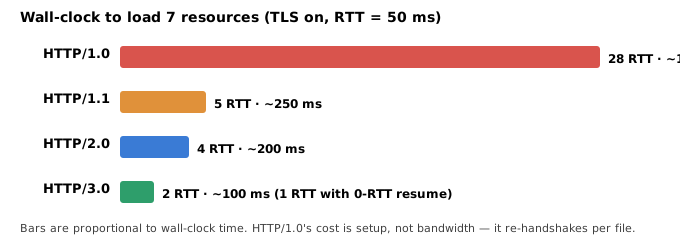
| HTTP/1.0 | 7 serial connections × (TCP 1 + TLS 2) = 21 RTT | 7 serial requests = 7 RTT | 28 RTT | ~1400 ms |
| HTTP/1.1 | 6 connections handshake in parallel: TCP 1 + TLS 2 = 3 RTT wall-clock (18 RTT of work overlapped) | 7 files over 6 conns = 2 waves = 2 RTT | 5 RTT | ~250 ms |
| HTTP/2.0 | 1 connection: TCP 1 + TLS 2 = 3 RTT | all 7 multiplexed = 1 wave = 1 RTT | 4 RTT | ~200 ms |
| HTTP/3.0 | 1 QUIC connection: transport + TLS 1.3 = 1 RTT | all 7 multiplexed = 1 wave = 1 RTT | 2 RTT | ~100 ms |
Reading the numbers honestly
- HTTP/1.0's 28 RTT includes TLS, applied consistently: each of the 7 connections pays TCP (1) + TLS (2) + request (1) = 4 RTT, so 7 × 4 = 28 RTT. (If you turned TLS off, 1.0 would drop to 14 RTT — but then you would not be comparing it fairly against the secure newer versions.) Setup cost, not transfer, dominates.
- HTTP/1.1's 5 RTT is real but its work is not free. Its 6 connections each run their own TCP + TLS handshake; they only look cheap because they overlap into 3 RTT of wall-clock time. That is 18 round trips of aggregate handshake work — burning server sockets and CPU — plus 2 request waves because 7 files do not fit on 6 connections at once.
- HTTP/2 wins with one handshake and one wave (4 RTT): a single connection, all 7 requests multiplexed together.
- HTTP/3 halves HTTP/2's handshake to a single round trip (2 RTT total). On a repeat visit, 0-RTT resumption lets the client send its first request immediately, collapsing the whole page to roughly 1 RTT (~50 ms).
Feature comparison
| Feature | HTTP/1.0 | HTTP/1.1 | HTTP/2.0 | HTTP/3.0 |
|---|---|---|---|---|
| Released | 1996 | 1997 | 2015 | 2022 (RFC 9114; deployed from ~2020) |
| Transport | TCP | TCP | TCP | QUIC (UDP) |
| Connection model | New conn per request | Persistent; ~6 parallel | Multiplexed over 1 conn | Multiplexed over 1 QUIC conn |
| Message format | Text | Text | Binary framing | Binary framing |
| Header compression | None | None | HPACK | QPACK |
| Head-of-line blocking | N/A (serial) | Application layer | Transport layer (TCP) | Eliminated (per-stream) |
| Handshake (cold) | TCP + TLS per file | TCP + TLS per conn | TCP + TLS once | 1-RTT; 0-RTT on resume |
| Encryption | Optional | Optional | Optional (TLS in practice) | Mandatory (TLS 1.3) |
| Connection migration | No | No | No | Yes (connection ID) |
| Typical use | Legacy / static | Ubiquitous baseline | Most of the modern web | Real-time, mobile, lossy links |
When to use which (the judgment layer)
You rarely pick an HTTP version per request — client and server negotiate the highest they both support (via ALPN during TLS, and via the Alt-Svc header to discover HTTP/3). But you make real decisions about what to enable:
- Enable HTTP/2 as your baseline. For any page with more than a handful of resources it strictly beats HTTP/1.1: one handshake, one wave, header compression. There is almost no reason to serve modern HTTPS traffic over HTTP/1.1 by choice.
- Add HTTP/3 when your clients are on lossy or mobile networks. Its win over HTTP/2 is largest exactly where TCP hurts most: high packet loss (no transport HOL blocking) and changing networks (connection migration). On a clean, low-loss wired link the HTTP/2-vs-HTTP/3 gap is small.
- Keep HTTP/2 (over TCP) as the fallback. Some networks block or throttle UDP; HTTP/3-capable stacks fall back automatically, so you deploy both, not one instead of the other.
- Stop sharding domains and stop bundling to dodge connection limits. Those were HTTP/1.1 workarounds; under HTTP/2 and HTTP/3 they hurt by fragmenting the single multiplexed connection and its compression context.
- Use TLS 1.3 and 0-RTT for latency-sensitive repeat traffic — but only for idempotent requests, because 0-RTT payloads can be replayed by an attacker. Never put a state-changing action (a purchase, a transfer) in 0-RTT data.
When the version barely matters: a single small API call over an already-warm connection is dominated by server processing, not by the protocol. The HTTP-version wins are about many resources and connection setup — optimize the version when those dominate, and profile the server otherwise.
Gotchas and real-world notes
- "HTTP/2 is faster" is not universal. Because everything shares one TCP connection, a single lost packet can stall the whole page (transport HOL blocking). On very lossy links, six independent HTTP/1.1 connections can occasionally feel more resilient — which is precisely why HTTP/3 exists.
- Server push is effectively dead. It was hard to avoid pushing resources the client already cached; browsers have removed support. Use
103 Early Hints/preloadinstead. - QUIC costs CPU. It runs in user space and encrypts everything, so high-throughput servers may see more CPU per byte than kernel TCP + TLS offload. Measure before assuming HTTP/3 is a free win at scale.
- Version negotiation is layered. HTTP/2 is chosen during the TLS handshake via ALPN; HTTP/3 is usually discovered after a first HTTP/2 response advertises it with
Alt-Svc, then used on subsequent visits.
Sources & further reading
- Adapted and corrected from the Knowledge Guide lesson “HTTP 1.0 vs 1.1 vs 2.0 vs 3.0” (System Design › API Gateway).
- RFC 9110 — HTTP Semantics; RFC 9112 — HTTP/1.1.
- RFC 9113 — HTTP/2 (obsoletes RFC 7540); RFC 7541 — HPACK.
- RFC 9114 — HTTP/3; RFC 9000 — QUIC Transport; RFC 9001 — Using TLS to Secure QUIC; RFC 9204 — QPACK.
- Ilya Grigorik, High Performance Browser Networking (O’Reilly) — round-trip and handshake cost model.
- MDN Web Docs — Evolution of HTTP and Connection management in HTTP/1.x.
Latency figures are illustrative, using RTT = 50 ms and a 7-resource page with TLS enabled on all versions; real-world results vary with network conditions, TLS version, resource sizes, and 0-RTT resumption.
🤖 Don't fully get this? Learn it with Claude
Stuck on HTTP 10 vs 11 vs 20 vs 30? Open Claude, copy a block below, and it'll teach you this exact concept — visually and interactively.
Build the mental picture, not memorization.
I just read a lesson on **HTTP 10 vs 11 vs 20 vs 30** (System Design) and want to truly understand it. Explain HTTP 10 vs 11 vs 20 vs 30 from first principles using ONE vivid real-world analogy and a visual mental model — draw it as ASCII art or a clear step-by-step diagram — with a concrete example using real numbers. Then ask me one question to check I got the mental picture, and wait for my reply. If you're unsure or a claim isn't standard, say so and reason from first principles instead of guessing.
Socratic — adapts to where you're stuck.
Teach me **HTTP 10 vs 11 vs 20 vs 30** interactively. Ask me ONE guiding question at a time, wait for my answer, and adapt to my confusion — build the idea with me step by step instead of explaining it all at once. If you're unsure or a claim isn't standard, say so and reason from first principles instead of guessing.
Active recall exposes what you missed.
Quiz me on **HTTP 10 vs 11 vs 20 vs 30** with 5 questions, easy to tricky, ONE at a time. Tell me if each answer is right; at the end, explain clearly what I got wrong and why. If you're unsure or a claim isn't standard, say so and reason from first principles instead of guessing.
Intuition + hook + flashcards for long-term memory.
Help me remember **HTTP 10 vs 11 vs 20 vs 30** for the long term: give the one-sentence intuition, a memorable hook/mnemonic, a tiny worked example, and 3 active-recall flashcards (Q -> A). If you're unsure or a claim isn't standard, say so and reason from first principles instead of guessing.