HTTP vs HTTPS
HTTPS is just HTTP running inside a TLS tunnel: before any request bytes are sent, client and server run a handshake that (1) verifies the server's identity with a certificate signed by a trusted Certificate Authority, and (2) uses asymmetric crypto to agree on a fresh symmetric session key that encrypts everything afterward — so an attacker on the wire sees only ciphertext and cannot impersonate the server without the CA's private signing key. Plain HTTP skips all of this: every byte, including cookies and passwords, travels as readable text on TCP port 80.
The mechanism: what actually happens on the wire
HTTP is text over a bare TCP socket. Type GET /login HTTP/1.1 and the server receives exactly those bytes; anyone sniffing the network — a rogue café Wi-Fi access point, a compromised router, your ISP — reads the request and any response verbatim, and can silently rewrite them. There is no notion of "who am I talking to."
HTTPS inserts the TLS layer (formerly SSL — the term "SSL" survives only in library names) between TCP and HTTP. TLS solves three distinct problems that beginners often blur together:
- Confidentiality — a symmetric cipher (AES-GCM, ChaCha20) encrypts the byte stream so interceptors see noise.
- Authentication — the server proves it owns the domain by presenting an X.509 certificate signed by a CA your browser already trusts. This is what actually stops a man-in-the-middle: encryption to the wrong party is worthless.
- Integrity — an authentication tag (AEAD) on every record means a flipped bit is detected and the connection is torn down, not silently accepted.
The clever part is the key exchange. Symmetric encryption is fast but needs both sides to share a secret key — yet they've never met. TLS 1.3 solves this with ephemeral Diffie-Hellman: each side sends a public key share, and they independently compute the same shared secret that never travels on the wire. The certificate's job is only to sign the server's share so you know the share came from the real domain and not an attacker who spliced in their own.
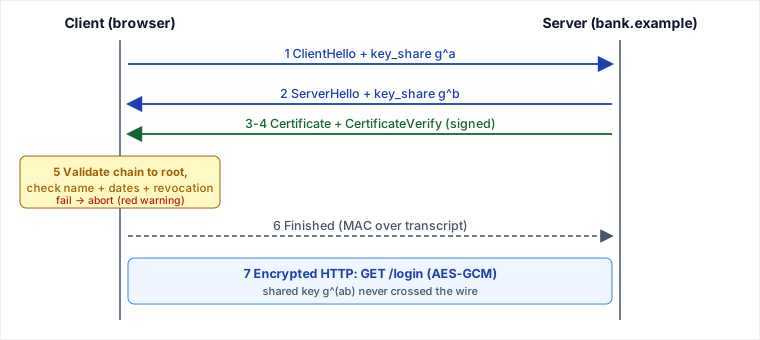
A traced TLS 1.3 handshake — connecting to https://bank.example
Real message flow after the TCP connection is open. TLS 1.3 completes the handshake in one round trip (1-RTT), then application data flows encrypted.
| Step | Direction | Message & real content | Why it matters |
|---|---|---|---|
| 1 | Client → Server | ClientHello: TLS 1.3, cipher list [TLS_AES_128_GCM_SHA256, …], SNI=bank.example, and a key_share = the client's ephemeral X25519 public key g^a | Proposes crypto and hands over half the DH exchange up front — that's how 1-RTT is possible |
| 2 | Server → Client | ServerHello: chosen cipher TLS_AES_128_GCM_SHA256, server key_share g^b | Both sides now compute shared secret g^(ab). Everything after this point is encrypted. |
| 3 | Server → Client | Certificate: bank.example's cert, chaining Leaf → an intermediate CA → ISRG Root X1 (intermediate names rotate every few years — check the live chain with openssl s_client) | Carries the server's public key and the CA signature chain the client will verify |
| 4 | Server → Client | CertificateVerify: a signature over the whole handshake transcript, made with the cert's private key | Proves the server actually holds the private key for that cert — not just a copy of a public cert |
| 5 | Client (local) | Validate chain to a trusted root; check bank.example matches a Subject Alternative Name; check notBefore/notAfter dates; check OCSP/CRL revocation | This is the anti-MITM gate. Fail any check → browser aborts with a red warning. |
| 6 | Both → | Finished: MAC over the transcript using the derived key | Confirms neither side's messages were tampered with mid-handshake (downgrade protection) |
| 7 | Client → Server | Encrypted: GET /login HTTP/1.1\r\nHost: bank.example\r\nCookie: session=… | The actual HTTP request — now AES-GCM ciphertext, unreadable to any sniffer |
Key insight for step 4: possessing the certificate file is public knowledge (the browser downloads it in step 3). Security comes from CertificateVerify, where the server signs with the matching private key. An attacker can copy bank.example's cert but cannot produce that signature, so the handshake dies at step 5/6.
Why the naive mental model is wrong
A common beginner claim: "HTTPS encrypts data with the server's public key from the certificate." That describes old RSA key transport, which TLS 1.3 removed because it lacks forward secrecy — if the server's long-term private key later leaks, an attacker who recorded past traffic could decrypt all of it. Modern TLS uses ephemeral Diffie-Hellman instead: the session key is derived from throwaway key pairs discarded after the handshake, so recorded ciphertext stays safe even if the cert's private key is stolen tomorrow. The certificate is used to sign and authenticate the exchange, not to encrypt the session.
Pitfalls a working engineer hits
- "Encrypted" is not "safe" — check the identity. An attacker's phishing site can have a perfectly valid Let's Encrypt cert for
bank-secure-login.com. The padlock only proves the connection is private to whoever holds that cert, not that it's your bank. The domain name is the security boundary. - Expired or misconfigured certs take you down, hard — in two different ways. Ericsson 2018: an expired certificate in mobile-network node software cut service for millions — the client-refusal failure, where a lapsed cert fails validation at step 5 and every client refuses the connection. Equifax: an expired cert on their traffic-inspection device silently blinded breach-detection monitoring for months — the other way expiry hurts: your security tooling goes dark while everything appears to work. [VERIFY both incident mechanisms against the public post-mortems — Ericsson's 2018 outage statement and the US House Oversight report on Equifax.] Automate renewal (ACME/certbot) and alert well before
notAfter. - Missing intermediate certificates. The server must send the full chain (leaf + intermediates). It works in your browser (which caches intermediates) but fails in
curl, mobile apps, and other clients — the classic "works on my machine" TLS bug. Test withopenssl s_client -connect host:443. - Mixed content. An HTTPS page that pulls a script over
http://reopens the exact MITM hole HTTPS closed; browsers block it, breaking the page. - SNI leaks the hostname. Even in HTTPS, the
ClientHellosends the domain in cleartext (step 1), so a network observer still learns which site you visit, just not the content. Encrypted Client Hello (ECH) is the emerging fix. - TLS terminates at the load balancer. Traffic is often plaintext on the internal hop from LB to app server. Fine inside a trusted VPC; a real exposure in zero-trust environments where mTLS between services is expected.
- SSL stripping on the first visit. If a user types
bank.example(no scheme), the browser trieshttp://first; a man-in-the-middle can intercept that plaintext request and keep the user on HTTP, never letting the redirect-to-HTTPS reach them. The fix is HSTS — aStrict-Transport-Security: max-age=31536000header tells the browser to use HTTPS for this domain for a year, so after the first successful visit the plaintext hop is never attempted again (preload lists close even the first-visit gap). - 0-RTT early data is replayable. TLS 1.3's 0-RTT resumption lets the client send request bytes in the first flight, but those bytes carry no proof of freshness, so a network attacker can capture and replay them. Only send 0-RTT data for idempotent requests (a GET), never a non-idempotent POST that moves money.
When to use HTTP vs HTTPS — and the decision a senior makes
In 2026 this is barely a choice for anything internet-facing: default to HTTPS everywhere. Certs are free (Let's Encrypt), browsers only speak HTTP/2 over TLS (the spec's cleartext h2c variant exists but is unused on the public web) and HTTP/3 requires TLS 1.3 outright, browsers mark plain HTTP "Not Secure," and Google uses HTTPS as a ranking signal. The residual decision is about where you terminate TLS, not whether to use it.
Choose plain HTTP only when: it's a localhost dev loop, a health-check endpoint on a private network, or the internal hop behind a TLS-terminating gateway inside a trusted network — signals: no untrusted network segment, no credentials or PII on the wire, latency-critical east-west traffic.
Prefer HTTPS (the default) when: any byte crosses a network you don't fully control, or carries cookies, tokens, PII, or payment data — i.e. essentially all client-facing traffic.
Trade-offs vs the alternatives
- HTTPS vs HTTP: you gain confidentiality, authenticated identity, and integrity. It costs one extra round trip on connect (1-RTT in TLS 1.3, or 0-RTT with session resumption — down from 2-RTT in TLS 1.2), a small CPU cost for the handshake's asymmetric crypto (bulk AES is hardware-accelerated and effectively free), and the operational burden of cert lifecycle management. On modern hardware the throughput overhead is a rounding error — the old "HTTPS is slow" objection is obsolete.
- Edge/gateway TLS termination vs end-to-end TLS: terminating at the API gateway or load balancer centralizes cert management and lets the gateway inspect/route/cache — the standard pattern. It costs you plaintext on internal hops. Choose end-to-end (or re-encrypt / mTLS to the backend) when compliance (PCI-DSS, HIPAA) or a zero-trust posture forbids any plaintext, accepting the extra handshakes and cert sprawl.
- HTTPS vs a VPN/mTLS: HTTPS authenticates the server to the client. When you also need to authenticate the client (service-to-service, high-security APIs), reach for mutual TLS or a network-layer VPN instead of relying on app-level tokens alone.
Choose HTTPS whenever traffic touches an untrusted network or carries anything sensitive (the default for all public traffic); drop to plain HTTP only on trusted internal hops behind a terminating gateway where the latency saving is worth losing on-wire protection.
Takeaways
- HTTPS = HTTP inside a TLS tunnel; the handshake is what makes it secure, and it does three jobs — encryption, server authentication, and integrity — not just "encryption."
- Authentication (the CA-signed cert +
CertificateVerifysignature) is what actually blocks MITM; encryption to an unauthenticated party is useless, which is why a padlock on a lookalike domain is still a phishing site. - TLS 1.3 uses ephemeral Diffie-Hellman for forward secrecy and completes in one round trip — the certificate signs the key exchange, it does not encrypt the session.
- Default to HTTPS everywhere; the real engineering decision is where TLS terminates and whether internal hops need re-encryption or mTLS.
Re-authored/Deepened for this guide. Sources: RFC 8446 (TLS 1.3) and RFC 2818 (HTTP over TLS); Mozilla MDN Web Docs on HTTPS and TLS; the OpenSSL s_client documentation; Cloudflare Learning Center articles on TLS handshakes and forward secrecy; and Google's HTTPS-as-ranking-signal announcement.
🤖 Don't fully get this? Learn it with Claude
Stuck on HTTP vs HTTPS? Open Claude, copy a block below, and it'll teach you this exact concept — visually and interactively.
Build the mental picture, not memorization.
I just read a lesson on **HTTP vs HTTPS** (System Design) and want to truly understand it. Explain HTTP vs HTTPS from first principles using ONE vivid real-world analogy and a visual mental model — draw it as ASCII art or a clear step-by-step diagram — with a concrete example using real numbers. Then ask me one question to check I got the mental picture, and wait for my reply. If you're unsure or a claim isn't standard, say so and reason from first principles instead of guessing.
Socratic — adapts to where you're stuck.
Teach me **HTTP vs HTTPS** interactively. Ask me ONE guiding question at a time, wait for my answer, and adapt to my confusion — build the idea with me step by step instead of explaining it all at once. If you're unsure or a claim isn't standard, say so and reason from first principles instead of guessing.
Active recall exposes what you missed.
Quiz me on **HTTP vs HTTPS** with 5 questions, easy to tricky, ONE at a time. Tell me if each answer is right; at the end, explain clearly what I got wrong and why. If you're unsure or a claim isn't standard, say so and reason from first principles instead of guessing.
Intuition + hook + flashcards for long-term memory.
Help me remember **HTTP vs HTTPS** for the long term: give the one-sentence intuition, a memorable hook/mnemonic, a tiny worked example, and 3 active-recall flashcards (Q -> A). If you're unsure or a claim isn't standard, say so and reason from first principles instead of guessing.