Latency and Performance
Latency Is a Budget, Not a Vibe
Every hop a request makes — DNS resolution, the TLS handshake, the gateway, the backend, the database — eats into a fixed amount of time before a user notices something is slow or a downstream contract is breached. Saying "reduce latency" about an API gateway in the abstract is close to useless. What matters is deciding, in milliseconds, how much of the total time budget each layer is allowed to spend, then measuring whether it stays inside that allowance at the tail — p99 or p999, not the average — because averages hide exactly the slow requests that make users leave.
The gateway sits directly in the critical path of every single call, so anything it does — routing, authentication, rate-limiting, request or response transformation, TLS termination — is latency the client pays on top of whatever the backend needs. The gateway's job is to add as little of the budget as possible, and to fail fast through timeouts and circuit breakers rather than silently blow the whole budget when a backend gets slow.
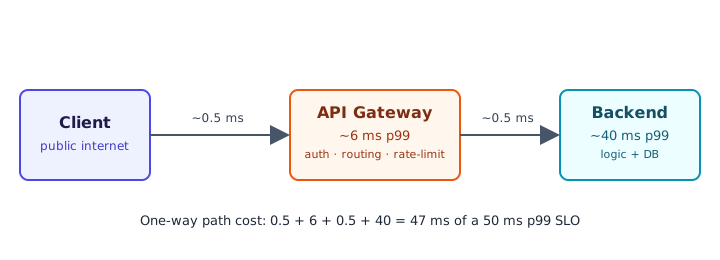
Worked Example: Splitting a 50 ms p99 Budget
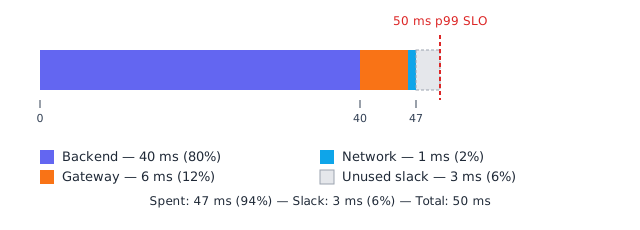
Suppose a product SLO promises a 50 ms p99 end-to-end response time for a read endpoint served through the gateway. The backend team profiles their service, including its own database round-trip, and reports it needs about 40 ms p99 to do the actual work reliably. That leaves the gateway and the internal network a combined 10 ms of p99 headroom (50 − 40 = 10) for everything that isn't "the business logic."
Measured in isolation, the gateway typically costs about 6 ms p99 — TLS session reuse, route matching, auth-token validation, a rate-limit check, header rewriting — and the internal hop to the backend over the data-center network adds roughly 1 ms p99 round-trip. That is 7 ms actually spent out of the 10 ms of headroom, for a total path cost of 40 + 6 + 1 = 47 ms against the 50 ms budget.
| Component | p99 latency | Cumulative | % of 50 ms budget |
|---|---|---|---|
| Backend (business logic + DB) | 40 ms | 40 ms | 80% |
| Gateway (auth, routing, rate limit, rewrite) | 6 ms | 46 ms | 92% |
| Internal network hop (gateway to backend) | 1 ms | 47 ms | 94% |
| Unused slack (jitter buffer) | 3 ms | 50 ms | 100% |
The remaining 3 ms (50 − 47) is not spare capacity to fill with another feature — it is slack that absorbs jitter: a GC pause, a slow DNS re-resolution, a TCP retransmit, a noisy-neighbor CPU steal on the node. Budget to exactly 100% of the SLO on paper and you will blow the SLO in production the first time anything hiccups. A reasonable rule of thumb is to design so real consumption sits at 90–95% of the stated budget at p99, treating the rest as a shock absorber rather than an invitation to add more work to the gateway's hot path.
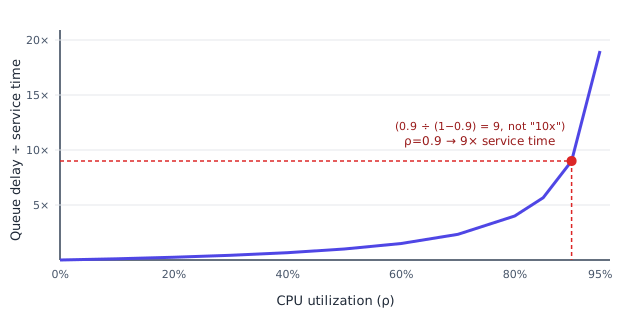
The Queueing-Theory Pitfall: Utilization Near 100% Is a Cliff, Not a Slope
A gateway (or any single-threaded-per-core request handler) behaves, to a first approximation, like an M/M/1 queue: requests arrive roughly at random, get serviced one at a time, and any request that arrives while the server is busy has to wait. The textbook result for that model is that the expected queueing delay scales as Wq ∝ ρ / (1 − ρ), where ρ is utilization (CPU busy fraction) and Wq is measured as a multiple of the mean service time.
That formula is deceptively brutal because it is not linear. Utilization climbing from 50% to 80% roughly quadruples the queueing multiplier, and the last 10 percentage points before saturation cost far more than the first 80 combined:
| CPU utilization (ρ) | Queue delay ÷ service time (ρ/(1−ρ)) |
|---|---|
| 50% | 1× |
| 70% | 2.3× |
| 80% | 4× |
| 90% | 9× |
| 95% | 19× |
So at 90% CPU utilization, queueing delay is about 9 times the mean service time (0.9 ÷ 0.1 = 9) — not the "roughly 10x" shorthand that sometimes gets quoted, which comes from rounding 1/(1−ρ) instead of the actual ρ/(1−ρ) relation. The gap only widens as ρ climbs further (at 95% it's 19×, not 20×). The practical takeaway is the same either way: keep gateway and backend CPU utilization comfortably under 70–80% at peak, because the curve gets vertical fast, and a small traffic spike near saturation turns into a large, visible latency spike rather than a proportionally small one.
Gateway Hop vs Direct-to-Service: What the Extra Hop Actually Costs
It's worth asking, honestly, whether the gateway's overhead is worth paying on every call, since it's a hop a direct client-to-service connection wouldn't need at all.
| Dimension | Direct client → service | Client → gateway → service |
|---|---|---|
| Added latency | None — one fewer hop | ~1–8 ms p99 typically (routing, auth, policy checks) |
| TLS termination | Every service terminates its own TLS, or exposes raw ports | Terminated once, centrally; internal hops can reuse plaintext or mTLS with connection pooling |
| Connection reuse | Each client opens its own connection per service, no shared pooling | Gateway keeps warm, pooled keep-alive connections to backends, amortizing handshake cost across many clients |
| Public surface area | Every service needs its own public endpoint, cert, and hardening | One stable public contract; services stay on a private network |
| Caching / short-circuiting | Not possible without duplicating logic in every service | Gateway can serve cached or rate-limited responses without reaching the backend at all |
| Consistency of auth/rate-limits | Reimplemented per service, prone to drift | Enforced once, uniformly, in one place |
| Failure isolation | A slow service directly stalls the client with no shared circuit breaker | Gateway can time out and trip a circuit breaker before the client notices a hang |
For most public-facing APIs, the 1–8 ms the gateway adds is a rounding error next to typical internet round-trip time (30–150 ms), so it's an easy trade: pay a few milliseconds for one place to enforce TLS, auth, rate limits, and caching instead of duplicating that logic — and letting it drift — across every service. The calculus flips for latency-critical service-to-service calls inside the same data center, where the backend's own budget might be single-digit milliseconds; there, gateway overhead competes directly with the budget, and a lighter-weight approach — a sidecar proxy, a service-mesh data plane, or direct routing — usually wins over sending internal traffic through the same edge gateway used for public clients.
Keeping the Gateway's Slice of the Budget Small
Once you know the gateway's ms allowance, a handful of concrete techniques keep it inside that allowance under real load:
- Connection pooling and keep-alive to backends. Re-establishing a TCP+TLS handshake per request can cost more than the rest of the request combined; a warm pool of persistent connections turns that into a one-time cost amortized over thousands of requests.
- HTTP/2 (or HTTP/3) multiplexing between gateway and backend avoids head-of-line blocking on a single connection and reduces the number of connections needed under high concurrency.
- Asynchronous, non-blocking I/O in the gateway's request-handling path, so one slow backend call doesn't tie up a worker thread that could be serving other requests — this is what keeps the gateway's own queueing utilization low even when a downstream dependency is having a bad day.
- Edge or response caching for idempotent, cacheable reads removes the backend hop entirely for a fraction of traffic, which is the only way to beat the network — not by making a network call faster, but by not making it.
- Per-route timeout budgets that are shorter than the overall SLO, so a hung backend fails fast instead of eating the entire budget while the client waits for nothing.
- Circuit breakers that stop calling a backend once it's clearly unhealthy, so p99 latency is bounded by "fail fast" rather than by however long the backend takes to time out.
- Request coalescing for identical in-flight requests (e.g. cache stampede protection) so ten concurrent requests for the same uncached key produce one backend call, not ten.
- Bound CPU-heavy inline work. Regex-based WAF rules, schema validation, and large-payload transforms all run on the request-handling thread. A crafted input against a poorly-written rule can trigger catastrophic regex backtracking that adds tens to hundreds of milliseconds to that request's tail — turning the gateway's own security filter into the latency bottleneck under an attack. Cap per-rule evaluation time and prefer linear-time (RE2-style) matchers so no single payload can blow the budget.
Key Takeaways
- Set an explicit p99 latency budget for the whole request path, then split it between backend, gateway, and network — don't leave "how fast should this be" implicit.
- Design to spend 90–95% of the budget, not 100%; the unspent slack absorbs real-world jitter instead of turning every hiccup into an SLO breach.
- Queueing delay is nonlinear in utilization (Wq ∝ ρ/(1−ρ)); keep peak CPU utilization comfortably below 80% or the tail-latency curve goes vertical.
- The gateway's overhead is usually worth it for public traffic (a few ms against 30–150 ms of internet RTT) but competes directly with tight internal service-to-service budgets, where a lighter-weight proxy may be the better trade-off.
Sources
- Kleinrock, L., Queueing Systems, Volume 1: Theory — derivation of the M/M/1 mean waiting-time relation Wq ∝ ρ/(1−ρ).
- Google, Site Reliability Engineering, ch. 21 "Addressing Cascading Failures" — latency budgets, timeout propagation, and load shedding under saturation.
- AWS Builders' Library, "Timeouts, retries, and backoff with jitter" — practical timeout-budget and circuit-breaker guidance for gateway-to-backend calls.
- Kleppmann, M., Designing Data-Intensive Applications, ch. 1 — why tail percentiles (p99), not averages, are the right way to reason about user-facing latency.
🤖 Don't fully get this? Learn it with Claude
Stuck on Latency and Performance? Open Claude, copy a block below, and it'll teach you this exact concept — visually and interactively.
Build the mental picture, not memorization.
I just read a lesson on **Latency and Performance** (System Design) and want to truly understand it. Explain Latency and Performance from first principles using ONE vivid real-world analogy and a visual mental model — draw it as ASCII art or a clear step-by-step diagram — with a concrete example using real numbers. Then ask me one question to check I got the mental picture, and wait for my reply. If you're unsure or a claim isn't standard, say so and reason from first principles instead of guessing.
Socratic — adapts to where you're stuck.
Teach me **Latency and Performance** interactively. Ask me ONE guiding question at a time, wait for my answer, and adapt to my confusion — build the idea with me step by step instead of explaining it all at once. If you're unsure or a claim isn't standard, say so and reason from first principles instead of guessing.
Active recall exposes what you missed.
Quiz me on **Latency and Performance** with 5 questions, easy to tricky, ONE at a time. Tell me if each answer is right; at the end, explain clearly what I got wrong and why. If you're unsure or a claim isn't standard, say so and reason from first principles instead of guessing.
Intuition + hook + flashcards for long-term memory.
Help me remember **Latency and Performance** for the long term: give the one-sentence intuition, a memorable hook/mnemonic, a tiny worked example, and 3 active-recall flashcards (Q -> A). If you're unsure or a claim isn't standard, say so and reason from first principles instead of guessing.