Monitoring and Observability
From "is it up" to "why is it slow, for whom, right now"
Monitoring answers a narrow question: is the system inside its known-good thresholds? Observability answers a broader one: given only the external outputs of a system whose failure modes you didn't fully anticipate, can you reconstruct what's happening inside it? An API gateway is the best possible vantage point for both, because every request in the fleet passes through it exactly once on the way in — it's the one place you can attach a single timestamp and a single identifier to a request before it fans out into however many downstream calls it triggers.
Three pillars do the actual work, and they are not interchangeable — each is a different data shape with a different cost model, and picking the wrong one for the question you're asking either bankrupts your observability budget or leaves you staring at a dashboard that can't answer "why":
- Metrics — pre-aggregated numeric time series: counters, gauges, histograms. Cheap to store and query at high resolution over long windows, but they only know about the labels you decided to attach ahead of time.
- Traces — the causal chain of spans a single request creates as it crosses service boundaries, all sharing one trace ID. Expensive per request, but the only pillar that shows you the shape of a request's journey.
- Logs — discrete, timestamped events with arbitrary detail. The richest pillar and the most expensive per unit of information, because nothing about them is pre-aggregated.
The rest of this lesson works through each pillar with real numbers — a histogram you can re-derive percentiles from by hand, a trace you can follow end-to-end, an alert rule and why one clause in it exists — and ends with the selection question every gateway team eventually has to answer explicitly: which pillar do you reach for first, and what does reaching for it cost you?
A. Metrics: cheap, aggregated, blind to any one request
The workhorse pattern for a gateway is the RED method — Rate, Errors, Duration — one counter, one counter, one histogram, per route:
http_requests_total{route, method, status}— a counter, only ever goes up.http_request_duration_seconds_bucket{route, method, le}— a histogram: several counters, one per latency bucket boundary (le= "less than or equal to"), each counting every request whose duration fell at or below that boundary.
Suppose 10,000 requests hit one route in a 5-minute window. The bucket counters (cumulative, as Prometheus stores them) and the plain request counter for the same window look like this:
| le (seconds) | Cumulative count | Requests newly in this bucket |
|---|---|---|
| 0.05 | 6,000 | 6,000 |
| 0.1 | 8,500 | 2,500 |
| 0.25 | 9,500 | 1,000 |
| 0.5 | 9,850 | 350 |
| 1 | 9,970 | 120 |
| 2.5 | 9,996 | 26 |
| +Inf | 10,000 | 4 |
The +Inf bucket is just the total counter under a different name — it has to equal whatever http_requests_total reports for the same 5-minute window, here 10,000. If the two ever disagree, one of your exporters is dropping or double-counting observations, and every percentile computed from that histogram is suspect until you find out which.
You never read bucket counts directly — you derive percentiles with histogram_quantile:
histogram_quantile(0.95, sum(rate(http_request_duration_seconds_bucket[5m])) by (le))rate() turns the cumulative bucket counters into a per-second increase, so a process restart (which resets counters to zero) doesn't produce a fake latency spike; sum by (le) merges the buckets across every gateway instance behind the load balancer; histogram_quantile then assumes observations are spread evenly within a bucket and interpolates.
Walking it by hand for p95: rank = 0.95 × 10,000 = the 9,500th observation. The cumulative count hits exactly 9,500 at le=0.25, so p95 ≈ 0.25s (250ms) — no interpolation needed, that rank lands precisely on the bucket boundary.
For p99: rank = 9,900th observation. That falls between le=0.5 (9,850 cumulative) and le=1 (9,970 cumulative) — a bucket holding 120 observations spread, by assumption, evenly across the 0.5–1.0s range. The 9,900th observation is 50 requests into that 120-request bucket: fraction = 50 / 120 ≈ 0.417. Estimate = 0.5 + 0.417 × (1 − 0.5) = 0.5 + 0.208 ≈ 0.708s (~708ms). That's the number histogram_quantile hands back — an estimate bounded by bucket width, not the true 9,900th value, which is why bucket boundaries should be chosen tighter around the latencies you actually alert on.
Pitfall: cardinality explosion
Every distinct combination of label values on a metric is a separate time series that Prometheus has to store and scan on every query. route, method, and a 3–5 value status class are bounded and cheap — a few hundred series even across a large fleet. Add a label like user_id or a raw, un-templated URL path (/orders/48213 instead of /orders/:id) and cardinality multiplies by however many distinct values exist — 500,000 users becomes 500,000+ time series for that one metric alone, and Prometheus's memory usage and query latency scale with that number directly, not with request volume. This is the single most common way teams accidentally take down their own metrics backend. The fix is a hard rule: identifiers that can grow without bound never become metric labels — they belong in traces and logs, which are built to carry per-request identity; metric labels stay in a small, enumerable set.
Histograms vs. Summaries: the aggregability trap
Prometheus gives you two ways to expose request latency, and only one of them survives aggregation across a fleet. A histogram stores cumulative per-bucket counters; you sum(rate(..._bucket[5m])) by (le) across every instance, then call histogram_quantile once on the merged buckets. A summary computes quantiles inside the client library with a sliding time window and exposes pre-computed percentiles such as http_request_duration_seconds{quantile="0.99"}. Summaries are convenient for a single process, but you cannot average or sum those pre-computed quantiles to get a fleet-wide p99 — percentiles are not linear, and averaging them silently understates the tail.
Use a histogram when you need fleet-wide percentiles, SLO dashboards, or burn-rate alerts. Use a summary only when the metric is scoped to one unsharded process and you want a cheap client-side quantile without storing buckets. The interview trap is exposing a summary from every pod and then averaging the pod-level p99s in Grafana; the correct fleet-wide p99 must come from histogram buckets.
# Histogram: aggregable across instances
histogram_quantile(0.99, sum(rate(http_request_duration_seconds_bucket[5m])) by (le))

# Summary: do NOT average these across pods
avg(http_request_duration_seconds{quantile="0.99"}) # wrong
B. Alerting on metrics: the clause that keeps you from paging on noise
A metric only becomes useful operationally once something is watching it and knows when to escalate. Alertmanager rules pair a PromQL expression with a duration:
groups:
  - name: gateway-latency
    rules:
      - alert: GatewayP99LatencyHigh
        expr: histogram_quantile(0.99, sum(rate(http_request_duration_seconds_bucket[5m])) by (le)) > 1
        for: 5m
        labels:
          severity: page
        annotations:
          summary: "Gateway p99 latency has exceeded 1s for 5 minutes"
The for: 5m clause is doing real work: Prometheus must see the condition evaluate true at every rule evaluation (the rule group's evaluation interval, typically 15–60 s — a separate clock from the scrape interval) for the entire 5 minutes before the alert actually fires — with a 1 m evaluation interval, for: 5m means 5–6 consecutive true evaluations — and it clears the moment a single evaluation comes back false. Without it, a single garbage-collection pause or a 30-second burst of retries pages someone at 3 a.m. for a condition that already resolved itself before they opened their laptop. The trade-off is symmetric: a real incident also takes up to 5 minutes to page, because the rule can't distinguish "briefly bad" from "the start of a genuinely bad 5 minutes" until the window has elapsed. Set the window to the shortest delay the severity can tolerate, not to a value copied from someone else's runbook — a page-worthy SLO breach and a ticket-worthy slow degradation don't need the same for: value.
C. Distributed tracing: following one request across every hop it makes
A trace is a tree of spans, each span representing one unit of work (a handler, an RPC call, a DB query) with a start time and a duration, and every span in the tree sharing one trace ID. The propagation mechanism is a single HTTP header, standardized by the W3C Trace Context recommendation and implemented by OpenTelemetry, Jaeger, and Zipkin alike:
traceparent: 00-4bf92f3577b34da6a3ce929d0e0e4736-00f067aa0ba902b7-01| Field | Length | Value here | Meaning |
|---|---|---|---|
| version | 2 hex chars (1 byte) | 00 | Header format version — 00 is the only one defined so far |
| trace-id | 32 hex chars (16 bytes) | 4bf92f3577b34da6a3ce929d0e0e4736 | Identifies the whole end-to-end request; every span in the trace carries this same value |
| parent-id | 16 hex chars (8 bytes) | 00f067aa0ba902b7 | The span ID of whichever caller is invoking you next; you record it as your new span's parent |
| trace-flags | 2 hex chars (1 byte) | 01 | Bit 0 is the sampled flag — 01 means "record and export this trace", 00 means don't bother |
When a service receives this header, it does not reuse parent-id as its own identity — it mints a fresh 16-hex-char span ID for the work it's about to do, keeps the 32-hex-char trace-id unchanged, and sets parent-id on whatever header it sends downstream to its own new span ID. That single rule — new span ID, same trace ID, parent points one hop back — is the entire mechanism that lets a trace fan out across an arbitrary number of services with no central coordinator involved.
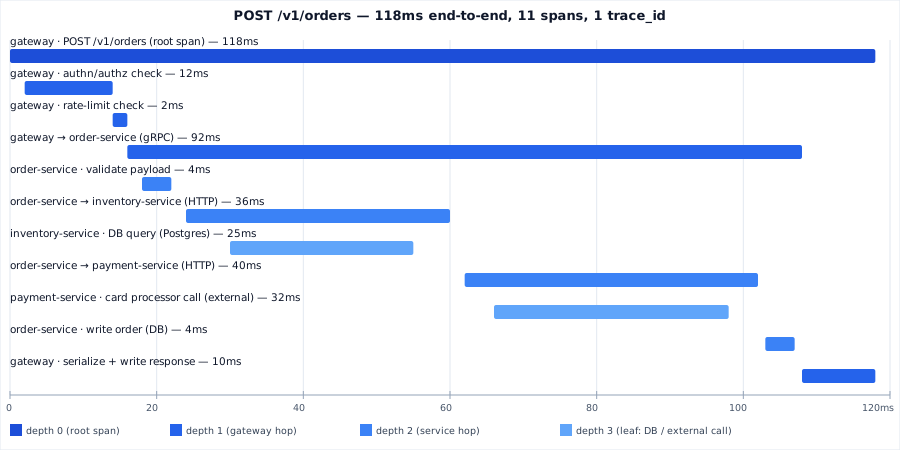
Reading the waterfall
The trace above is one real POST /v1/orders request, 118ms end-to-end, decomposed into 11 spans that all share the trace ID from the header above. Two things fall out of laying it out this way that no single metric can show you:
- The critical path isn't the deepest span, it's the longest uninterrupted chain: gateway → order-service → payment-service → the external card processor accounts for 40 of the 92ms that
order-servicespends handling the request — the single largest contributor to the total, bigger than the DB query on the inventory path (25ms) even though both are "a call to something else." - The gaps between spans (order-service's own request parsing before it calls inventory-service, the second between the payment call finishing and the DB write starting) are where each layer's own code — not its dependencies — is spending time. A flat metric like p99 latency tells you the tail is fat; only the trace tells you it's fat because of the external card processor specifically, not your own database.
Pitfall: sampling decides what you're able to see, before you know what you'll need
Recording and exporting every span for every request at real production volume is rarely affordable, so almost every tracing setup samples. The two strategies make very different trade-offs:
- Head-based sampling decides at the root span, before any downstream work has happened — e.g. "sample 1% of all traces, flip a coin at the gateway." It's cheap: unsampled requests never generate spans anywhere downstream. Its failure mode is exactly the incidents you care about most: if the 1% you happened to keep is error-free, you have zero traces for the outage everyone's asking about.
- Tail-based sampling buffers every span for a trace at a collector until the trace is complete, then decides — e.g. "keep 100% of traces with an error status or over 1s total; keep 1% of everything else." This guarantees a trace exists for every interesting outcome, at the cost of buffering memory in the collector tier and the added latency of waiting for a trace to fully close before the keep/drop decision can be made.
Most gateway teams end up running tail-based sampling specifically because the traces that justify the expense of tracing at all — the slow ones, the failed ones — are exactly the ones head-based sampling is most likely to throw away.
D. Logging: the pillar that can tell you the actual "why"
Metrics tell you something is wrong; traces tell you where in the call graph it went wrong. Neither tells you the literal error message, the payload that failed validation, or the stack trace — that's what structured logs are for. A useful gateway log line is JSON, not free text, and it carries the trace ID so it can be joined back to the trace it happened inside:
{"ts":"2026-07-02T09:14:22.118Z","level":"error","service":"payment-service",
 "trace_id":"4bf92f3577b34da6a3ce929d0e0e4736","span_id":"…","route":"/v1/orders",
 "msg":"card processor declined: insufficient_funds","http_status":402}
With trace_id stamped into every line, an aggregation backend (the ELK stack, Loki, Graylog) can answer "show me every log line from every service for this one request" as a single query — the join key is the trace ID, not a timestamp range and a guess. The connection runs the other way too: Prometheus histogram exemplars attach a sample trace ID to individual bucket observations, so a spike on a Grafana latency graph can link directly to one concrete trace that landed in the slow bucket, instead of leaving you to go searching for one by hand.
Two disciplines govern gateway logs. The first is security: the gateway sees every request's credentials, so it is exactly the place a careless log line leaks them. Never write Authorization headers, bearer tokens, API keys, cookies, or card numbers into a log store that far more people can read than can reach production — redact them at the source or strip them in the collector (the pipeline below deletes user_email for this reason). The second is cost: which fields get indexed and how long raw lines are retained — indexing an unbounded field (a raw URL with query string, a full request body) reproduces the metrics cardinality problem in a different, usually more expensive, system.
When to use which pillar (and what it costs)
Every one of the three pillars can technically be pushed to answer any observability question — you can grep logs for a latency distribution, or scan every trace to compute a request rate — but each is shaped for a different question, and using the wrong one is either slow, expensive, or both.
| Pillar | What drives its cost | Question it answers best | Reach for it when… | Don't reach for it when… |
|---|---|---|---|---|
| Metrics | Number of unique label-value combinations (cardinality), not traffic volume — a route with 5 status classes across 10 instances is 50 time series regardless of how many requests it serves. | "How many, how fast, how often — right now, in aggregate, across the whole fleet?" | You need a dashboard, an SLO, or an always-on alert trigger; you're watching a trend across thousands of instances over weeks, cheaply, at high resolution. | You need to explain one specific customer's one specific slow request — an aggregate p99 tells you a tail exists, not which request was in it or why. |
| Traces | Spans per request × hops per request × sampling rate × retention. A 10-hop request at 100% sampling costs 10× a 1-hop one; tail-based sampling controls this by deciding per-trace, after the fact, which ones earn their storage. | "Why was THIS request slow or broken, and which of the N services it touched is responsible?" | The request crosses more than one or two service boundaries and you need the causal call graph, not just a duration; you're chasing a specific latency outlier or error a metric already told you exists. | You're trying to answer a fleet-wide trend — scanning millions of spans to reconstruct a p99 you could read off a histogram in one query wastes both time and storage budget. |
| Logs | Ingestion, indexing, and retention of raw, mostly unstructured text — one entry per event, nothing pre-aggregated. The most expensive pillar per unit of information unless indexed fields are deliberately kept bounded. | "What exactly happened inside this one component, at this one moment, in its own words?" | Metrics told you something's wrong and a trace told you where — now you need the literal error message, stack trace, or payload to know why. | You're trying to answer cross-service or fleet-wide questions — correlating lines across services only works once every service stamps the same trace ID into its logs, and that's still slower to aggregate at scale than a metric built for exactly that. |
In practice the three aren't a menu you pick one from — they're a funnel you fall through in order. A metric's alert tells you something's wrong and roughly where (which route, which percentile moved, since when). Its exemplar or a quick trace query pointed at that route and time window shows you the call graph and pinpoints which hop is the actual contributor. That trace's trace_id, dropped into your log search, pulls up the exact log lines — from just the implicated service, in just that time window — that explain why. Each pillar narrows the search space for the next one; skipping straight to logs without a trace ID to filter by is the expensive way to find the same answer.
E. A distributed-systems debugging trace: metric → trace → log → metric
The most productive observability workflow is a narrowing loop, not a single pillar. Each step answers a smaller question and hands the next step a concrete pointer. Here is a realistic end-to-end trace.
Symptom. The dashboard shows POST /v1/orders p99 jumping from 120 ms to 950 ms at 09:14 UTC. Route traffic is flat, so this is not a load effect.
Step 1 — Metric narrows the shape. The histogram buckets for the route show the 0.1 s bucket unchanged, but the 0.5 s, 1 s and 2.5 s buckets all climbed together. That pattern means a tail event, not a uniform slowdown, and it is localized to this route. The metric alone cannot tell you which request, but it tells you whether to keep looking and where.
sum(rate(http_request_duration_seconds_bucket{route="/v1/orders"}[5m])) by (le)Step 2 — Exemplar → trace finds the critical path. The histogram has an exemplar attached to a slow bucket: one real trace ID that landed in that bucket. Pulling that trace shows the waterfall: gateway 12 ms → auth 15 ms → order-service 840 ms → payment-service 818 ms → card-processor span 780 ms. The critical path is the external card-processor call; everything upstream is just waiting.
Step 3 — Trace → log finds the literal "why." Filtering logs in payment-service by that trace ID and the span timestamp returns:
{"ts":"2026-07-02T09:14:22.118Z","level":"warn","service":"payment-service",
 "trace_id":"4bf92f3577b34da6a3ce929d0e0e4736","span_id":"a1b2c3",
 "msg":"card_processor_timeout_retry","attempt":2,"latency_ms":780}
The root cause is now explicit: the card processor is timing out, the payment service retries once, and the retry succeeds but costs ~780 ms.
Step 4 — Log → metric prevents recurrence. A one-off trace and log pair solve the incident; a new metric prevents the next one. Create payment_timeouts_total{processor="card-processor"} from the log line and alert on it directly, so the team pages on the first timeout rather than on the retried p99 spike it produces.
| Step | Pillar | Question it answers | Hand-off to next step |
|---|---|---|---|
| 1 | Metric (histogram) | "Is there a real problem, and what is its shape?" | Exemplar trace ID from a slow bucket |
| 2 | Trace | "Which hop is responsible?" | Service + span timestamp |
| 3 | Log | "What exactly failed?" | A concrete event to metric-ize |
| 4 | Metric | "How do we watch for this proactively?" | A new alert or SLO guard |
F. OpenTelemetry collector pipeline
Production services rarely send telemetry directly to one backend. The OpenTelemetry Collector sits in the middle: it receives telemetry in several wire formats, processes it, and exports it to one or more backends. Treating the collector as a pipeline makes its failure modes and tuning knobs explicit.
| Stage | What it does | Typical knobs / failure modes |
|---|---|---|
| Receivers | Accept OTLP/gRPC/HTTP, Prometheus scrape, Zipkin, Jaeger | Port exhaustion; message-size limits; protocol version mismatch. Tune max_recv_msg_size_mib and connection limits. |
| Processors | Batch, filter, add/drop attributes, mask PII, tail-sample | Tail-sampling buffer grows with trace duration during latency incidents; PII leaks if redaction is missing. Tune batch.timeout, tail_sampling.wait. |
| Exporters | Send to Prometheus, Tempo/Loki, Jaeger, Datadog, cloud vendors | Backend back-pressure fills the sending queue and forces drops. Tune sending_queue.queue_size, retry_on_failure, and load-balancing. |
A minimal but realistic trace pipeline looks like this:
receivers:
  otlp:
    protocols:
      grpc:
        endpoint: 0.0.0.0:4317
processors:
  batch:
    timeout: 1s
    send_batch_size: 1024
  tail_sampling:
    policies:
      - name: errors
        type: status_code
        status_code: {status_codes: [ERROR]}
      - name: slow
        type: latency
        latency: {threshold_ms: 500}
  attributes/mask:
    actions:
      - key: user_email
        action: delete
exporters:
  otlp/tempo:
    endpoint: tempo:4317
    sending_queue:
      queue_size: 10000
service:
  pipelines:
    traces:
      receivers: [otlp]
      processors: [tail_sampling, attributes/mask, batch]
      exporters: [otlp/tempo]
The key design decision is ordering: tail-sample and mask before batch, so you only batch what you actually keep and never ship PII you intended to redact.
Sources
- W3C Trace Context Recommendation — traceparent header format
- Prometheus documentation — histogram_quantile()
- Prometheus documentation — alerting rule best practices (the for: clause)
- OpenTelemetry documentation — head-based vs. tail-based sampling
- OpenTelemetry documentation — Collector configuration
- Weaveworks — The RED Method
🤖 Don't fully get this? Learn it with Claude
Stuck on Monitoring and Observability? Open Claude, copy a block below, and it'll teach you this exact concept — visually and interactively.
Build the mental picture, not memorization.
I just read a lesson on **Monitoring and Observability** (System Design) and want to truly understand it. Explain Monitoring and Observability from first principles using ONE vivid real-world analogy and a visual mental model — draw it as ASCII art or a clear step-by-step diagram — with a concrete example using real numbers. Then ask me one question to check I got the mental picture, and wait for my reply. If you're unsure or a claim isn't standard, say so and reason from first principles instead of guessing.
Socratic — adapts to where you're stuck.
Teach me **Monitoring and Observability** interactively. Ask me ONE guiding question at a time, wait for my answer, and adapt to my confusion — build the idea with me step by step instead of explaining it all at once. If you're unsure or a claim isn't standard, say so and reason from first principles instead of guessing.
Active recall exposes what you missed.
Quiz me on **Monitoring and Observability** with 5 questions, easy to tricky, ONE at a time. Tell me if each answer is right; at the end, explain clearly what I got wrong and why. If you're unsure or a claim isn't standard, say so and reason from first principles instead of guessing.
Intuition + hook + flashcards for long-term memory.
Help me remember **Monitoring and Observability** for the long term: give the one-sentence intuition, a memorable hook/mnemonic, a tiny worked example, and 3 active-recall flashcards (Q -> A). If you're unsure or a claim isn't standard, say so and reason from first principles instead of guessing.