System Design Basics
System Design Basics
System design is the craft of arranging a small set of reusable building blocks — clients, DNS, load balancers, application servers, caches, databases, queues, and object storage — so that a service stays fast, available, and affordable as it grows from 100 users to 100 million. In an interview it is a conversation, not a coding puzzle: you are being tested on whether you can reason about scale, failure, and trade-offs out loud.
1. Intuition — why this concept exists
A single machine running one process with a local database works beautifully — until it doesn't. One box has a ceiling: finite CPU, RAM, disk, and network. Worse, it is a single point of failure — when it reboots, the whole product is down. System design exists to answer one question: how do we serve more traffic and survive failures without a single component becoming the bottleneck or the thing that takes everyone down?
The core moves are just two. Vertical scaling (scale up) means buying a bigger machine — simple, but you hit a hard physical and price ceiling, and you still have one box to lose. Horizontal scaling (scale out) means adding more modest machines behind a load balancer — nearly unlimited, and losing one box is survivable. Almost every large system is horizontally scaled at the stateless layers, and the whole art is managing the state (data) that horizontal scaling makes awkward.
2. How it works, precisely
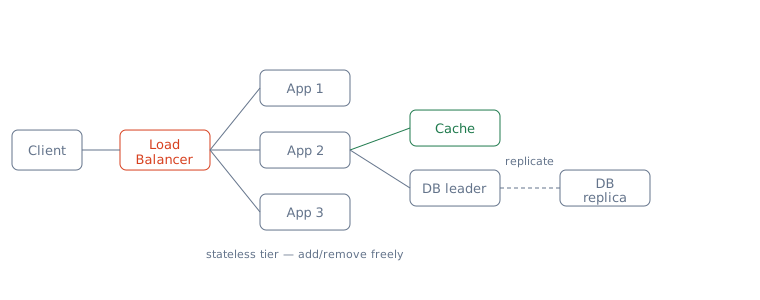
Requests flow through named tiers, each solving one problem:
- DNS turns
api.example.cominto an IP address and can hand back different IPs for geographic or load-based routing. - Load balancer (L4 by IP/port, or L7 by URL/header) spreads requests across a pool of identical app servers using round-robin, least-connections, or consistent hashing, and does health checks so it stops sending traffic to dead nodes.
- Stateless app servers hold no per-user data between requests, so any server can handle any request — that is exactly what lets you add or remove them freely. Session state lives in a shared store (e.g. Redis), not in process memory.
- Cache (in-memory, like Redis/Memcached) sits in front of the database to serve hot reads in microseconds instead of milliseconds, absorbing the bulk of read traffic.
- Database is the source of truth. You scale reads with replicas (leader takes writes, followers serve reads) and scale writes/storage with sharding (partitioning data across nodes by a key).
- Message queue (Kafka, SQS, RabbitMQ) decouples producers from consumers so slow or bursty work (emails, video encoding) happens asynchronously without blocking the request.
- Object storage / CDN holds large blobs (images, video) and pushes them to edge locations near users.
3. Worked scenario — a URL shortener at 10M writes/day
Say we build a Bit.ly clone. Estimate first: 10M new links/day ÷ 86,400 s ≈ 116 writes/sec average, so budget ~3× for peak → ~350 write QPS. The 3× is not arbitrary: consumer traffic is diurnal — it concentrates into the waking hours of your dominant time zones, so the busiest hour typically runs 2–4× the 24-hour average; 3× is the standard planning midpoint (a global product with flatter traffic might use 2×, a single-country one 4×). Reads dominate at a 100:1 ratio, so ~35,000 read QPS. The 100:1 models a create-once, consume-many product — one person shortens a link, thousands click it — the same shape as tweets, product pages, and news articles. The ratio drives the whole design: at 10:1 (e.g. a chat or logging system) peak reads would be only ~3,500 QPS, which a leader plus replicas serves directly — the cache would no longer pay for its staleness and invalidation complexity. Each row (short code + long URL + metadata) is ~500 bytes, so 10M/day × 500 B × 365 × 5 years ≈ 9 TB — too big and too hot for one box.
The design falls out of the numbers. 35k read QPS at 500 B is trivial to cache, so a Redis cache with the hot links absorbs, say, 90% of reads — the database sees only ~3,500 read QPS, comfortably served by a leader plus 2–3 read replicas. The 9 TB is sharded by short code (consistent hashing) across, say, 4 shards of ~2.25 TB each. A p99 latency budget of 50 ms is easy: cache hit ~1 ms, cache miss + DB read ~5–10 ms. Reads route through the cache; the rare cache miss falls back to a replica; writes go to the leader and asynchronously populate the cache. Because cache population is asynchronous, a reader may see the old value until invalidation or update completes — an AP-leaning choice; if strong consistency is required, invalidate the cache synchronously on write. That single worked example touches every core building block.
Now break it with its own numbers. The database tier was sized for ~3,500 read QPS because the cache absorbs 90%. That sizing is a bet on the cache being warm. If the cache goes fully cold — a Redis restart, a flush, a mass TTL expiry — the full 35,000 QPS lands on a tier built for 3,500: a 10× overload, and the database drowns. Even a partial failure hurts: lose one of three Redis nodes and that third of the keyspace misses until re-fetched, so the database sees ~35,000×⅓ ≈ 11,700 forced misses plus the usual ~2,300 ≈ 14,000 QPS — 4× design load. This is the concrete version of the thundering herd: it isn't an exotic edge case, it is the direct consequence of sizing the origin for the cache-hit steady state. The mitigations, with numbers: request coalescing (singleflight) — if 5,000 concurrent requests miss on the same hot key, exactly one goes to the database and 4,999 wait for its result, collapsing the stampede to roughly one origin fetch per distinct key; cache warming — replay the hot-key log into a new node before it takes traffic, so it never serves cold; and replica fan-out — enough read replicas that the residual miss traffic after coalescing still fits, buying headroom of 2–3× rather than exactly 1×.
4. Trade-offs — when to use, when not
Vertical vs. horizontal scaling. Reach for vertical scaling first when traffic is modest and simplicity matters — one big Postgres box handles enormous load and keeps transactions and joins easy. Go horizontal only when you approach the ceiling of the biggest reasonable machine or need fault tolerance; the cost is distributed-systems complexity you now own forever.
Cache vs. more replicas. A cache is the cheapest way to kill read load and cut latency, but it introduces staleness and invalidation problems. Add read replicas instead when you need strong-ish consistency and query flexibility (ad-hoc SQL) rather than raw key lookups.
SQL vs. NoSQL. Choose relational when you need transactions, joins, and strong consistency (payments, orders). Choose a NoSQL store (Cassandra, DynamoDB) when the access pattern is simple key lookups at massive write scale and you can accept eventual consistency and denormalization.
Sync call vs. queue. Call a downstream service synchronously when the caller needs the result now and the work is fast. Use a queue when the work is slow, bursty, or can fail-and-retry (video encoding, notifications) — you trade immediate results and simplicity for throughput and resilience, at the cost of eventual consistency and harder debugging.
5. Pitfalls an interviewer probes
- Skipping the estimate. Jumping to boxes-and-arrows without computing QPS and storage is the number-one red flag. Always do back-of-envelope math first.
- Stateful app servers. If you store sessions in local process memory, you can't load-balance freely and lose them on restart. Push state to a shared store.
- The single point of failure. A lone load balancer, leader database, or cache is itself a SPOF. Expect the follow-up: "what happens when that dies?" — answer with replicas, failover, and multi-AZ, and be ready for the second follow-up: how the failover actually works. For the load balancer: run an active–standby pair sharing a floating (virtual) IP via VRRP — the standby hears heartbeats from the active; when they stop, it claims the virtual IP and announces it (gratuitous ARP) within a second or two, so clients keep connecting to the same address. For the database leader: a monitor promotes a replica to leader (typically 10–30 s of write unavailability), and with asynchronous replication any writes the old leader acknowledged but had not yet shipped are lost — the un-replicated-write window; synchronous replication closes that window at the cost of write latency.
- Ignoring the CAP trade-off. When you add replicas or shards you are now a distributed system; under a network partition you must choose availability or consistency. Name which one and why.
- Cache invalidation & thundering herd. On a cold cache or expiry, thousands of requests can stampede the database at once. Mention TTLs, request coalescing, and write-through/read-through strategy.
- Hot shards. A bad shard key (e.g. by date) sends all new traffic to one node. Pick a key with even distribution.
Key takeaways
- Estimate, then draw. Turn requirements into QPS, storage, and latency numbers first; the architecture falls out of the math.
- Keep the compute tier stateless and push state into caches, databases, and shared stores — that is what makes horizontal scaling and failover possible.
- Every choice is a trade-off: vertical vs. horizontal, cache vs. replica, SQL vs. NoSQL, sync vs. queue — name the alternative and justify the pick out loud.
- Design for failure: hunt down single points of failure and answer the CAP, invalidation, and hot-shard follow-ups before the interviewer asks.
🤖 Don't fully get this? Learn it with Claude
Stuck on System Design Basics? Open Claude, copy a block below, and it'll teach you this exact concept — visually and interactively.
Build the mental picture, not memorization.
I just read a lesson on **System Design Basics** (System Design) and want to truly understand it. Explain System Design Basics from first principles using ONE vivid real-world analogy and a visual mental model — draw it as ASCII art or a clear step-by-step diagram — with a concrete example using real numbers. Then ask me one question to check I got the mental picture, and wait for my reply. If you're unsure or a claim isn't standard, say so and reason from first principles instead of guessing.
Socratic — adapts to where you're stuck.
Teach me **System Design Basics** interactively. Ask me ONE guiding question at a time, wait for my answer, and adapt to my confusion — build the idea with me step by step instead of explaining it all at once. If you're unsure or a claim isn't standard, say so and reason from first principles instead of guessing.
Active recall exposes what you missed.
Quiz me on **System Design Basics** with 5 questions, easy to tricky, ONE at a time. Tell me if each answer is right; at the end, explain clearly what I got wrong and why. If you're unsure or a claim isn't standard, say so and reason from first principles instead of guessing.
Intuition + hook + flashcards for long-term memory.
Help me remember **System Design Basics** for the long term: give the one-sentence intuition, a memorable hook/mnemonic, a tiny worked example, and 3 active-recall flashcards (Q -> A). If you're unsure or a claim isn't standard, say so and reason from first principles instead of guessing.