Proxy vs Reverse Proxy
Two intermediaries, opposite directions
A forward proxy and a reverse proxy both sit in the middle of a request, but they face opposite ways. A forward proxy is configured on the client and acts on the client's behalf toward the wider internet; a reverse proxy is deployed in front of servers and acts on their behalf toward incoming clients, which believe they are talking to the origin itself.
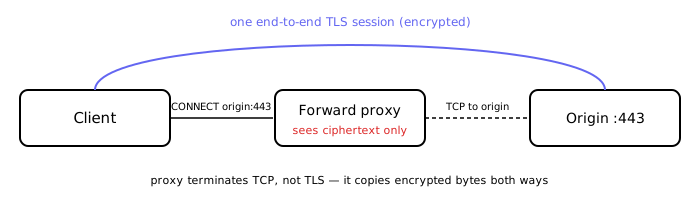
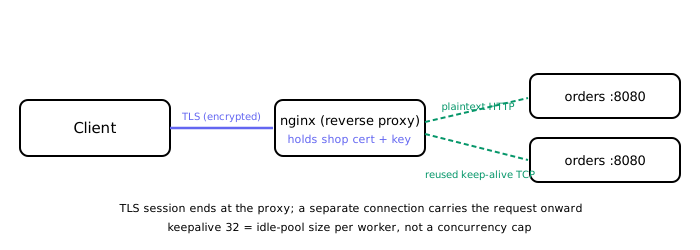
The sharper distinction lives at the connection layer. A reverse proxy almost always terminates the client's TCP connection and opens a second, independent connection to a backend — two separate TCP sessions that it bridges, and (when it does TLS termination) two separate TLS sessions as well. A forward proxy does not necessarily do this. In its most common mode — an HTTPS CONNECT tunnel — it terminates only the TCP connection to itself and then relays the encrypted bytes untouched, so a single end-to-end TLS session runs straight through it. In other words, a forward proxy in tunnel mode terminates TCP but not TLS (Trace 1), whereas a TLS-terminating reverse proxy terminates both (Trace 2).
Forward proxy: acting for the client
You reach for a forward proxy when the thing you control is the client side. Typical jobs:
- Egress control: a corporate proxy decides which external hosts employees may reach, and logs the attempts.
- Privacy / anonymity: the origin server sees the proxy's IP, not the client's.
- Shared caching of cacheable resources across many clients.
Because the client is explicitly configured (or forced) to send traffic through it, the forward proxy is the first hop for outbound requests. Its power and its limits both follow from that position, as the next trace shows.
Trace 1 — a forward proxy tunnelling HTTPS (blind byte pump)
- The browser is configured to use
proxy.corp:3128. To reachhttps://bank.example, it opens a TCP connection to the proxy and sendsCONNECT bank.example:443 HTTP/1.1. - The proxy opens its own TCP connection to
bank.example:443and replies200 Connection Established. - From here the proxy stops parsing. The browser and
bank.examplerun the TLS handshake directly through the tunnel; the certificate is validated againstbank.example, not against the proxy. The proxy simply copies encrypted bytes in both directions. - All application data — the actual HTTP request and response — lives inside that end-to-end TLS session. The proxy sees only ciphertext, plus the destination host it was handed in the
CONNECTline (and the TLS SNI / target IP). It cannot read or modify the HTTP.
This is exactly why a forward proxy can enforce which hosts you may reach but cannot, without an explicit man-in-the-middle setup that installs its own trusted certificate, inspect or cache HTTPS bodies. In tunnel mode it is a blind byte pump.
Reverse proxy: acting for the server
A reverse proxy is deployed in front of one or more backends. To the outside world it is the service: it owns the public address and, typically, the domain's TLS certificate and private key. Its jobs:
- Load balancing across a pool of backends.
- TLS termination: decrypt once at the edge so backends can speak plain HTTP inside a trusted network.
- Caching, compression, and request buffering (shielding backends from slow clients).
- Hiding topology: clients never learn backend addresses.
The defining move is that it accepts and terminates the client connection, then originates a fresh connection to a backend. The two legs are independent, which is what makes the next trace work.
Trace 2 — a TLS-terminating reverse proxy (nginx)
- The client opens TCP to
shop.example.com:443and performs a TLS handshake with nginx. nginx presentsshop.example.com's certificate and holds its private key — the client's TLS session ends right here, at the proxy. - nginx decrypts and now holds plaintext HTTP. It matches
location /orders/and routes the request to theordersupstream. - nginx forwards the request over a separate connection to a backend. In this config that upstream leg is plaintext HTTP (
proxy_pass http://orders), so there is no second TLS handshake to the backend at all.keepalive 32tells each nginx worker to keep up to 32 idle upstream connections cached for reuse — it is not a ceiling on concurrent upstream connections. Under load nginx opens as many upstream sockets as it has in-flight requests; when a request finishes, its connection is returned to the idle pool (up to 32 per worker) rather than closed. Reusing a warm pooled connection lets the next request skip the TCP three-way handshake to the backend, saving roughly one round trip.proxy_http_version 1.1plusproxy_set_header Connection ""is what makes this work: it forces HTTP/1.1 upstream and strips the defaultConnection: close, which would otherwise defeat keep-alive. - The backend replies in plaintext; nginx re-encrypts the response on the client's TLS session and streams it back.
upstream orders {
    server 10.0.1.11:8080;
    server 10.0.1.12:8080;
    keepalive 32;          # up to 32 IDLE pooled conns per worker (reuse), not a max
}

server {
    listen 443 ssl;
    server_name shop.example.com;
    ssl_certificate     /etc/nginx/tls/shop.crt;
    ssl_certificate_key /etc/nginx/tls/shop.key;

    location /orders/ {
        proxy_pass http://orders;          # plaintext HTTP to backend (no TLS here)
        proxy_http_version 1.1;            # required for upstream keep-alive
        proxy_set_header Connection "";     # drop the default "close" header
    }
}
Common myth, corrected: keepalive N does not collapse tens of thousands of client connections onto N backend sockets. N bounds only the idle cache. If you genuinely need a hard cap on concurrent upstream connections, that is a different mechanism — max_conns on an upstream server — not keepalive.
How nginx and Envoy implement reverse-proxying
Both products solve the same core problem — accept a client connection, decide where the request goes, balance it across backends, and stream the response back — but their internal shapes differ.
nginx models it as an event-driven request pipeline. A master process spawns worker processes, and each worker runs a single non-blocking event loop (epoll on Linux, kqueue on BSD/macOS) that multiplexes thousands of connections. A request advances through an ordered set of phases — post-read, rewrite, access, content, log — where directives like location matching and proxy_pass hang off the content phase. The upstream module owns the backend connection pool (the keepalive cache from Trace 2). Configuration is static: it lives in files, and changes take effect on reload (a SIGHUP gracefully spins up new workers with the new config).
Envoy runs a filter chain. A TLS transport socket terminates the connection, then a network filter — the HTTP connection manager — parses the request and passes it through an ordered chain of HTTP filters (for example ext_authz for authorization, ratelimit, fault for fault injection), ending in the router filter. The router selects a cluster and load-balances across its endpoints, with retries, circuit breaking, outlier detection, and per-endpoint connection pools built in. The decisive difference from nginx is configuration: Envoy is driven dynamically over xDS (LDS for listeners, RDS for routes, CDS for clusters, EDS for endpoints), streamed from a control plane, so routes and backends change with no reload. That dynamic model is exactly why Envoy became the data plane of service meshes. Put simply: nginx optimizes for a static, file-configured edge, while Envoy optimizes for dynamic, programmatically-controlled service-to-service traffic.
Choosing between them
They are not competing options — they solve different problems, decided by which side you control.
- Reach for a forward proxy when you own the clients and need egress control, outbound anonymity, or shared client-side caching. Do not use it to inspect or cache HTTPS response bodies unless you deliberately deploy a trusted MITM certificate — in tunnel mode it only sees ciphertext. A security-specific reason to force all outbound traffic through an egress-allowlist proxy is SSRF containment: if application hosts can reach the internet only via the proxy's allowlist, a server-side-request-forgery bug is bounded by that policy instead of being free to hit arbitrary internal or external addresses.
- Reach for a reverse proxy when you own the servers and need load balancing, TLS termination, caching, or a stable public front for a changing backend fleet. Do not insert one purely to pick a backend by hostname when DNS-based routing already suffices; the extra hop adds latency and an operational component. (A CDN edge is a specialized, geographically distributed reverse-proxy fleet: clients hit the nearest edge, which terminates TLS, may serve from cache, and otherwise fetches from your origin.)
- nginx vs Envoy: prefer nginx for a static edge / web-serving front door; prefer Envoy when routing must change dynamically at runtime, especially inside a mesh.
Decision table: forward vs reverse proxy
| Concern | Forward proxy | Reverse proxy |
|---|---|---|
| Who controls it | Client / client organization | Server / server organization |
| Typical use | Egress filtering, anonymity, shared client cache | Load balancing, TLS termination, origin hiding |
| Connection model | Often CONNECT tunnel; TCP terminated, TLS end-to-end | Terminates client TCP and TLS, opens new backend connection |
| HTTPS inspection | Cannot inspect HTTPS bodies without trusted MITM cert | Can inspect because it holds the origin certificate |
| Client configuration | Explicit proxy setting required | Transparent to clients — they think they talk to origin |
Failure-mode notes
- Forward proxy MITM: inspecting HTTPS requires installing the proxy's CA on clients; otherwise it is a blind tunnel. Corporate proxies do this; public proxies cannot.
- Reverse proxy SPOF: if it fails, every backend behind it is unreachable even if healthy. Run multiple instances behind a load balancer.
- Keepalive confusion: see the "Common myth, corrected" paragraph in the nginx/Envoy section above — mistaking
keepalivefor a concurrency cap causes capacity surprises. - Lost client IP: after reverse proxying, backend logs show the proxy's IP. Use
X-Forwarded-Foror PROXY protocol. - Backend slow-down: reverse proxy can buffer slow clients, but if backends are slow it can run out of worker connections. Add timeouts and circuit breakers.
Drill ladder — surviving the follow-ups
L0 · A forward proxy acts for clients; a reverse proxy acts for servers.
L1 · "Can a forward proxy cache HTTPS responses?"
Bar: Not in normal CONNECT tunnel mode, because it sees only ciphertext. Caching HTTPS requires a trusted MITM certificate installed on the client.
L2 · "Why does a reverse proxy terminate TLS?"
Bar: So it can read the plaintext HTTP request for routing, auth, logging, and caching, and so backends can run plain HTTP inside a trusted network.
L3 · "What is the difference between keepalive and max_conns in nginx?"
Bar: keepalive limits idle reusable connections; max_conns limits concurrent connections. Confusing them causes overload.
L4 · "A backend sees all requests coming from the proxy's IP. How do you fix rate limiting?"
Bar: Forward the original client IP via X-Forwarded-For (L7) or PROXY protocol (L4), and rate-limit on that value.
L5 · "When would you prefer Envoy over nginx as a reverse proxy?"
Bar: Envoy when routing/backends change dynamically (xDS, service mesh) and you need built-in retries, circuit breaking, and outlier detection. Nginx for static, file-configured edge serving.
Sources
- nginx documentation — ngx_http_upstream_module (
keepalive,max_conns) and ngx_http_proxy_module (proxy_pass,proxy_http_version), nginx.org. - Envoy Proxy documentation — Life of a Request, HTTP connection manager and HTTP filters, and the xDS configuration APIs, envoyproxy.io.
- RFC 9110, HTTP Semantics — the
CONNECTmethod and tunnelling; RFC 8446, The Transport Layer Security (TLS) Protocol Version 1.3.
🤖 Don't fully get this? Learn it with Claude
Stuck on Proxy vs Reverse Proxy? Open Claude, copy a block below, and it'll teach you this exact concept — visually and interactively.
Build the mental picture, not memorization.
I just read a lesson on **Proxy vs Reverse Proxy** (System Design) and want to truly understand it. Explain Proxy vs Reverse Proxy from first principles using ONE vivid real-world analogy and a visual mental model — draw it as ASCII art or a clear step-by-step diagram — with a concrete example using real numbers. Then ask me one question to check I got the mental picture, and wait for my reply. If you're unsure or a claim isn't standard, say so and reason from first principles instead of guessing.
Socratic — adapts to where you're stuck.
Teach me **Proxy vs Reverse Proxy** interactively. Ask me ONE guiding question at a time, wait for my answer, and adapt to my confusion — build the idea with me step by step instead of explaining it all at once. If you're unsure or a claim isn't standard, say so and reason from first principles instead of guessing.
Active recall exposes what you missed.
Quiz me on **Proxy vs Reverse Proxy** with 5 questions, easy to tricky, ONE at a time. Tell me if each answer is right; at the end, explain clearly what I got wrong and why. If you're unsure or a claim isn't standard, say so and reason from first principles instead of guessing.
Intuition + hook + flashcards for long-term memory.
Help me remember **Proxy vs Reverse Proxy** for the long term: give the one-sentence intuition, a memorable hook/mnemonic, a tiny worked example, and 3 active-recall flashcards (Q -> A). If you're unsure or a claim isn't standard, say so and reason from first principles instead of guessing.