Polling vs LongPolling vs WebSockets vs Webhooks
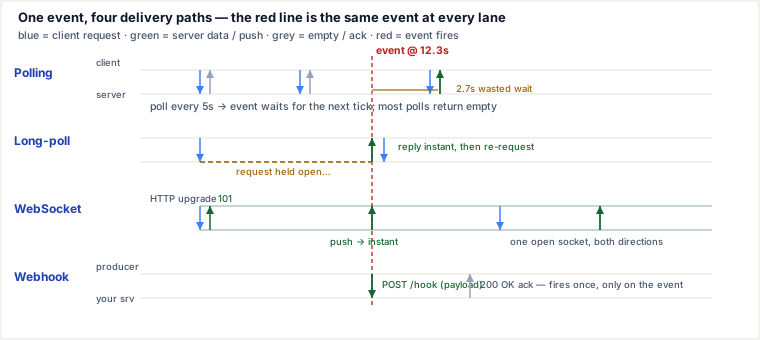
All four solve the same problem — getting a server-side event onto a screen — and they differ only in who opens the TCP connection and how long it lives. Polling reopens a short request on a fixed clock; long-polling parks one request open until the event fires, then re-requests; WebSockets upgrade a single connection into a permanent two-way pipe; and webhooks invert the direction entirely, so the producing server POSTs to a URL you registered. Everything else — latency, wasted requests, server memory, scaling model — falls out of that one choice.
Polling
Mechanism: the client runs a timer (e.g. setInterval every 5 s) and fires an ordinary HTTP GET /updates each tick; the server answers immediately with new data or an empty result, and the connection closes. The tension is entirely in the interval: shorten it and latency drops but wasted empty requests explode; lengthen it and load drops but a change that lands just after a poll waits almost a full cycle. It is pull-based and one-directional.
Where it wins: trivial to build on any HTTP stack, no persistent state, sails through every proxy and firewall, and the client fully controls cadence — fine for a dashboard that refreshes once a minute.
Long-Polling
Mechanism: the client sends the same request, but when there is no data the server does not reply — it holds the request open (parking it on an event/condition) until either data arrives or a timeout (~25–30 s) elapses. On an event the server responds instantly; the client then immediately re-issues a fresh request to keep listening. This collapses the interval-vs-latency tradeoff: you get near-instant delivery over plain HTTP without a flood of empty responses.
The catch: it is still one response per request — each delivered event costs a new round trip, and a held request occupies a server worker unless the server uses async I/O. Under bursty traffic it degenerates back toward ordinary polling.
WebSockets
Mechanism: the client sends an HTTP request carrying Upgrade: websocket and a Sec-WebSocket-Key; the server replies 101 Switching Protocols, and from that point the same TCP socket is a full-duplex message channel (ws:// / wss://). No more request/response — either side pushes framed messages the instant it has them, with only a few bytes of framing overhead per message. This is the only option here that is genuinely bidirectional and event-driven on both ends.
The cost: the connection is stateful and long-lived, so you must handle reconnects, heartbeats, and — because a socket is pinned to one server node — a pub/sub layer (e.g. Redis) to fan an event out to sockets living on other nodes.
Webhooks
Mechanism: a webhook is an HTTP callback that inverts the request flow. The consumer registers a URL with the producer once; thereafter, when an event happens on the producer (payment succeeded, code pushed), the producer makes an HTTP POST to that URL with a JSON payload. The receiver never asks — it just runs an endpoint and waits. This is a server-to-server push, so it typically feeds a backend, not a browser: your server receives the webhook, then relays it to users over WebSockets or SSE. It replaces "poll their API every minute to see if anything changed" with "they call you exactly once, when it changes."
Comparison at a glance
| Method | Connection & direction | Delivery latency | Idle overhead | Fits |
|---|---|---|---|---|
| Polling | Repeated short requests, client → server, pull | Up to one interval late | High — most requests empty | Infrequent, non-urgent updates; prototypes |
| Long-poll | Held request, client → server, pull-that-waits | ~1 RTT after event | Medium — one round trip per event/timeout | Near-real-time over plain HTTP; WebSocket fallback |
| WebSocket | Persistent socket, client ↔ server, full-duplex | ~1 RTT, both ways | Low per message; one held FD per client | Chat, games, live cursors, trading feeds |
| Webhook | One POST, producer → consumer, push | ~1 RTT after event | Very low — fires only on events | Server-to-server integration (Stripe, GitHub) |
Worked trace — a price alert, 200 clients
Scenario: a crypto ticker. Price crosses a threshold at t = 12.3 s (the event). Polling interval = 5 s (polls at 0, 5, 10, 15…); long-poll timeout = 30 s; price changes on average once per minute; 200 clients are connected.
- Polling. The poll at t = 10.0 s returned empty. The event lands at 12.3 s but the client only learns it at the next poll, t = 15.0 s → 2.7 s stale. In that idle minute each client fires 12 requests (11 empty); across 200 clients that is 2,400 req/min, ~2,200 of them useless.
- Long-poll. The client's held request is parked; the server responds the instant the event fires → delivered at ~12.33 s (one ~30 ms RTT). With a 30 s timeout an idle minute is ~2 timeout refreshes + 1 event ≈ 3 req/client = ~600 req/min.
- WebSocket. The socket is already open, so the server pushes one frame at 12.3 s → delivered at ~12.33 s with 0 polling requests — the cost is 200 sockets (file descriptors) held open on the server.
- Webhook. This is the server-to-server leg: the exchange POSTs your backend at 12.3 s; your backend then fans the update out over the 200 WebSockets above. The webhook itself is 1 request, not 200.
| Method | Client sees event at | Latency | Requests / idle min (200 clients) |
|---|---|---|---|
| Polling (5 s) | 15.0 s | 2.7 s | ~2,400 |
| Long-poll | 12.33 s | ~30 ms | ~600 |
| WebSocket | 12.33 s | ~30 ms | 0 (200 sockets held) |
| Webhook (to your server) | 12.3 s | ~30 ms | 1 POST |
The lesson isn't "WebSockets win." It's that polling trades 2,200 wasted requests for 2.7 s of staleness, and both numbers are knobs you set with the interval.
Broadcast scale: 10,000 WebSocket clients
When a single event must reach every connected client, the cost model flips from "requests per minute" to "fan-out messages plus pub/sub hops." Suppose a chat server has 10,000 open sockets spread across 10 nodes (1,000 sockets each) and one user sends a message.
- Naive in-process emit: the receiving node emits only to its own 1,000 sockets; the other 9,000 clients never see it. This is the most common "it works on one box" failure.
- Pub/sub fan-out: the receiving node publishes one message to Redis/Kafka; every node consumes it once and emits to its local 1,000 sockets. Total socket writes = 10,000; total pub/sub messages = 10 (one per node). If the message is 500 bytes, that is roughly 5 MB of egress plus 10 broker messages.
- Backpressure: if clients are on slow links, the outbound TCP buffers on each node back up. Without flow control, memory grows unbounded or messages are dropped. Apply per-client send buffers and drop/skip policies when a client cannot keep up.
The lesson: WebSockets solve the "held connection" problem but introduce a "fan-out + backpressure" problem that polling never had. The choice between WebSocket and polling is not only latency; it is whether you are willing to own a stateful, broadcast-capable infrastructure.
Source grounding: Fan-out architecture and backpressure are covered in Kleppmann, Designing Data-Intensive Applications (ch. 11, stream processing), and in the stream-processing scale literature.
When to use which — and what it costs
Choose polling when updates are infrequent or non-urgent, the client controls cadence, and you want zero new infrastructure. Gain: dead-simple, stateless, universal. Cost: wasted requests scale with client count × frequency, and latency is bounded below by the interval; on battery-powered clients a tight interval also drains power through constant radio wake-ups. Prefer long-polling the moment users notice the staleness but you're still confined to HTTP.
Choose long-polling when you need near-real-time delivery but can't run WebSockets (restrictive proxy, HTTP/1.1-only middlebox, or as a graceful fallback — Socket.IO does exactly this). Cost: one round trip per event, and held requests tie up a worker unless the server is async. Prefer WebSockets once update frequency is high enough that per-event round trips dominate.
Choose WebSockets when you need frequent, low-latency, bidirectional traffic — chat, multiplayer, collaborative editing, live cursors. Cost: stateful connections (reconnect logic, heartbeats), a load balancer that supports Upgrade and long idle timeouts, and a pub/sub bus to fan events across nodes. Prefer Server-Sent Events (SSE) if the traffic is server → client only: SSE rides plain HTTP, auto-reconnects with Last-Event-ID, and is far simpler — reach for WebSockets specifically when the client also needs to push often.
Choose webhooks for cross-service, event-driven notifications where you control a receiving endpoint (Stripe payments, GitHub pushes). Gain: near-zero idle traffic; the producer calls you once, on the event. Cost: you must run an always-on, secured, idempotent endpoint, and it only reaches your server — the last mile to the browser still needs WebSockets/SSE/polling. Prefer polling their API only when no webhook is offered. In real systems you mix: webhook in from a partner → WebSocket out to your users → polling as the fallback.
Pitfalls
- Polling — the synchronized herd. Clients that start on the hour all poll at the same second, hammering the server in spikes. Add random jitter to each interval, and cap aggressive polling behind rate limits.
- Long-poll — the proxy timeout race. A load balancer with a 60 s idle timeout will kill a held request before your event arrives, surfacing as random disconnects. Set the server timeout comfortably below the proxy's (25–30 s). And on a thread-per-request server, thousands of held requests exhaust the pool (the C10k problem) — use async / event-loop I/O.
- WebSocket — silent half-open sockets. A dropped network gives no FIN, so the server thinks the client is still there. Without ping/pong heartbeats and client reconnect, you leak dead connections and lose messages. Because a socket is pinned to one node, broadcasting also breaks unless events flow through Redis/Kafka pub-sub — a naive in-process emit reaches only the clients on that one server.
- Webhook — at-least-once, out of order. Providers retry on non-2xx, so you will get duplicate deliveries — make handlers idempotent (dedupe on an event ID). If your endpoint is down, the provider retries with backoff for a bounded window — Stripe retries failed deliveries for days, while other providers give up after a few attempts (retry windows change; verify your provider's current docs). Deliveries that exhaust the window are gone from the push path, so treat webhooks as a latency optimization, not the source of truth: run a periodic reconciliation poll against the provider's event-listing API to catch anything the push missed, and (optionally) land inbound webhooks in your own queue with a dead-letter so a bug in your handler cannot lose them either. Always verify the HMAC signature: an unauthenticated public POST endpoint is a forgery and SSRF risk. Ordering is not guaranteed — never assume webhook #2 arrives after #1.
Takeaways
- The one decision behind all four is connection lifetime + who initiates; latency, wasted traffic, and the scaling model all follow from it.
- Polling's interval is an explicit staleness-vs-load knob — long-polling removes the wasted half, WebSockets remove both by keeping the pipe open.
- WebSockets are the only bidirectional option; if you only push server→client, SSE is simpler and auto-reconnects. Reach for WebSockets when the client pushes often too.
- Webhooks handle the server-to-server hop only; you still need polling/SSE/WebSockets for the last mile to the browser, and the endpoint must be idempotent, signature-verified, and retry-tolerant.
Re-authored and deepened for this guide. Sources: MDN Web Docs (WebSockets API, Server-Sent Events); RFC 6455 (The WebSocket Protocol); the HTML Living Standard (EventSource / SSE); Stripe and GitHub webhook delivery, retry, and signature-verification docs; and Kleppmann, “Designing Data-Intensive Applications,” on push vs pull and delivery guarantees.
🤖 Don't fully get this? Learn it with Claude
Stuck on Polling vs LongPolling vs WebSockets vs Webhooks? Open Claude, copy a block below, and it'll teach you this exact concept — visually and interactively.
Build the mental picture, not memorization.
I just read a lesson on **Polling vs LongPolling vs WebSockets vs Webhooks** (System Design) and want to truly understand it. Explain Polling vs LongPolling vs WebSockets vs Webhooks from first principles using ONE vivid real-world analogy and a visual mental model — draw it as ASCII art or a clear step-by-step diagram — with a concrete example using real numbers. Then ask me one question to check I got the mental picture, and wait for my reply. If you're unsure or a claim isn't standard, say so and reason from first principles instead of guessing.
Socratic — adapts to where you're stuck.
Teach me **Polling vs LongPolling vs WebSockets vs Webhooks** interactively. Ask me ONE guiding question at a time, wait for my answer, and adapt to my confusion — build the idea with me step by step instead of explaining it all at once. If you're unsure or a claim isn't standard, say so and reason from first principles instead of guessing.
Active recall exposes what you missed.
Quiz me on **Polling vs LongPolling vs WebSockets vs Webhooks** with 5 questions, easy to tricky, ONE at a time. Tell me if each answer is right; at the end, explain clearly what I got wrong and why. If you're unsure or a claim isn't standard, say so and reason from first principles instead of guessing.
Intuition + hook + flashcards for long-term memory.
Help me remember **Polling vs LongPolling vs WebSockets vs Webhooks** for the long term: give the one-sentence intuition, a memorable hook/mnemonic, a tiny worked example, and 3 active-recall flashcards (Q -> A). If you're unsure or a claim isn't standard, say so and reason from first principles instead of guessing.